
ELK学习笔记(三)单台服务器多节点部署
一般情况下单台服务器只会部署一个ElasticSearch node,但是在学习过程中,很多情况下会需要实现ElasticSearch的分布式效果,所以需要启动多个节点,但是学习开发环境(不想开多个虚拟机实现多个服务器的效果),所以就想着在一台服务器上部署多个结点(下文以2个结点作为例子),两个节点分别称为实例一、二。
1、首先将elasticsearch-5.4.0文件夹再复制一份
cp -R elasticsearch-5.4. elasticsearch-5.4.-node2
2、修改节点1的配置文件
# ======================== Elasticsearch Configuration =========================

#

# NOTE: Elasticsearch comes with reasonable defaults for most settings.

#       Before you set out to tweak and tune the configuration, make sure you

#       understand what are you trying to accomplish and the consequences.

#

# The primary way of configuring a node is via this file. This template lists

# the most important settings you may want to configure for a production cluster.

#

# Please consult the documentation for further information on configuration options:

# https://www.elastic.co/guide/en/elasticsearch/reference/index.html

#

# ---------------------------------- Cluster -----------------------------------

#

# Use a descriptive name for your cluster:

#

cluster.name: elk-cluster   #cluster.name 要保持一致

#

# ------------------------------------ Node ------------------------------------

#

# Use a descriptive name for the node:

#

node.name: node1

#

# Add custom attributes to the node:

#

#node.attr.rack: r1

#

node.master: true #该节点有机会成为master节点

transport.tcp.port: 9300 # 默认里没有自己添加

# ----------------------------------- Paths ------------------------------------

#

# Path to directory where to store the data (separate multiple locations by comma):

#

#path.data: /path/to/data

#

# Path to log files:

#

#path.logs: /path/to/logs

#

# ----------------------------------- Memory -----------------------------------

#

# Lock the memory on startup:

#

#bootstrap.memory_lock: true

#

# Make sure that the heap size is set to about half the memory available

# on the system and that the owner of the process is allowed to use this

# limit.

#

# Elasticsearch performs poorly when the system is swapping the memory.

#

# ---------------------------------- Network -----------------------------------

#

# Set the bind address to a specific IP (IPv4 or IPv6):

#

network.host: 192.168.25.129

#

# Set a custom port for HTTP:

#

#http.port: 9200

#

# For more information, consult the network module documentation.

#

# --------------------------------- Discovery ----------------------------------

#

# Pass an initial list of hosts to perform discovery when new node is started:

# The default list of hosts is ["127.0.0.1", "[::1]"]

#

#discovery.zen.ping.unicast.hosts: ["host1", "host2"]

#

# Prevent the "split brain" by configuring the majority of nodes (total number of master-eligible nodes / 2 + 1):

#

discovery.zen.minimum_master_nodes: 1  #设置这个参数来保证集群中的节点可以知道其它N个有成为master资格的节点

#

# For more information, consult the zen discovery module documentation.

#

# ---------------------------------- Gateway -----------------------------------

#

# Block initial recovery after a full cluster restart until N nodes are started:

#

#gateway.recover_after_nodes: 3

#

# For more information, consult the gateway module documentation.

#

# ---------------------------------- Various -----------------------------------

#

# Require explicit names when deleting indices:

#

#action.destructive_requires_name: true
2、修改节点2的配置文件
# ======================== Elasticsearch Configuration =========================

#

# NOTE: Elasticsearch comes with reasonable defaults for most settings.

#       Before you set out to tweak and tune the configuration, make sure you

#       understand what are you trying to accomplish and the consequences.

#

# The primary way of configuring a node is via this file. This template lists

# the most important settings you may want to configure for a production cluster.

#

# Please consult the documentation for further information on configuration options:

# https://www.elastic.co/guide/en/elasticsearch/reference/index.html

#

# ---------------------------------- Cluster -----------------------------------

#

# Use a descriptive name for your cluster:

#

cluster.name: elk-cluster

#

# ------------------------------------ Node ------------------------------------

#

# Use a descriptive name for the node:

#

node.name: node2

node.master: false

transport.tcp.port: 9301

#

# Add custom attributes to the node:

#

#node.attr.rack: r1

#

#

# Path to directory where to store the data (separate multiple locations by comma):

#

#path.data: /path/to/data

#

# Path to log files:

#

#path.logs: /path/to/logs

#

# ----------------------------------- Memory -----------------------------------

#

# Lock the memory on startup:

#

#bootstrap.memory_lock: true

#

# Make sure that the heap size is set to about half the memory available

# on the system and that the owner of the process is allowed to use this

# limit.

#

# Elasticsearch performs poorly when the system is swapping the memory.

#

# ---------------------------------- Network -----------------------------------

#

# Set the bind address to a specific IP (IPv4 or IPv6):

#

network.host: 192.168.25.129

#

# Set a custom port for HTTP:

#

http.port: 9201

#

# For more information, consult the network module documentation.

#

# --------------------------------- Discovery ----------------------------------

#

# Pass an initial list of hosts to perform discovery when new node is started:

# The default list of hosts is ["127.0.0.1", "[::1]"]

#

#discovery.zen.ping.unicast.hosts: ["host1", "host2"]

#

# Prevent the "split brain" by configuring the majority of nodes (total number of master-eligible nodes / 2 + 1):

#

discovery.zen.minimum_master_nodes: 1

discovery.zen.ping.unicast.hosts: ["192.168.25.129:9300"] #设置集群中的Master节点的初始列表,可以通过这些节点来自动发现其他新加入集群的节点

#

# For more information, consult the zen discovery module documentation.

#

# ---------------------------------- Gateway -----------------------------------

#

# Block initial recovery after a full cluster restart until N nodes are started:

#

#gateway.recover_after_nodes: 3

#

# For more information, consult the gateway module documentation.

#

# ---------------------------------- Various -----------------------------------

#

# Require explicit names when deleting indices:

#

#action.destructive_requires_name: true
4.启动两个节点,用Kibana查看
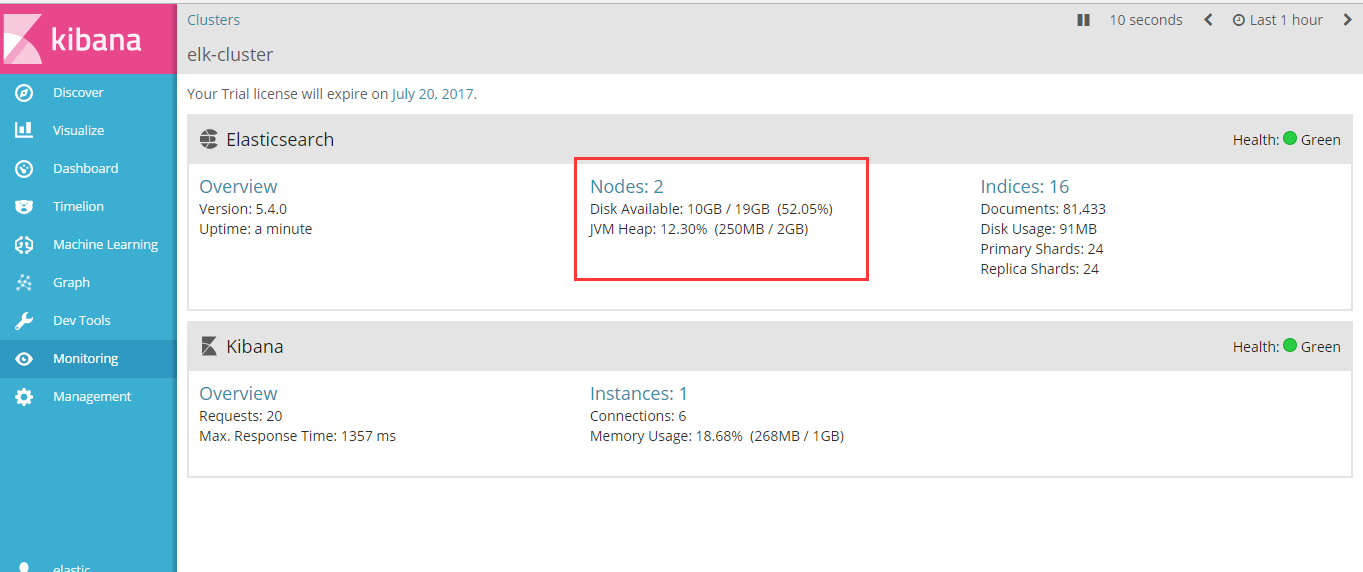

至此,多节点搭建成功。
踩过的坑
1.node2无法启动 是因为复制的elasticsearch文件夹下包含了data文件中node1的节点数据,需要把node1 data文件下的文件清空。
ELK学习笔记(三)单台服务器多节点部署的更多相关文章
- Apache Ignite 学习笔记(三): Ignite Server和Client节点介绍
在前两篇文章中,我们把Ignite集群当做一个黑盒子,用二进制包自带的脚本启动Ignite节点后,我们用不同的客户端连接上Ignite进行操作,展示了Ignite作为一个分布式内存缓存,内存数据库的基 ...
- AngularJS学习笔记(三) 单页面webApp和路由(ng-route)
就我现在的认识,路由($route)这个东西(也许可以加上$location)可以说是ng最重要的东西了.因为angular目前最重要的作用就是做单页面webApp,而路由这个东西是能做到页面跳转的关 ...
- JSP学习笔记(三):简单的Tomcat Web服务器
注意:每次对Tomcat配置文件进行修改后,必须重启Tomcat 在E盘的DATA文件夹中创建TomcatDemo文件夹,并将Tomcat安装路径下的webapps/ROOT中的WEB-INF文件夹复 ...
- ElasticSearch 5学习(3)——单台服务器部署多个节点
一般情况下单台服务器只会部署一个ElasticSearch node,但是在学习过程中,很多情况下会需要实现ElasticSearch的分布式效果,所以需要启动多个节点,但是学习开发环境(不想开多个虚 ...
- 学习笔记(三)--->《Java 8编程官方参考教程(第9版).pdf》:第十章到十二章学习笔记
回到顶部 注:本文声明事项. 本博文整理者:刘军 本博文出自于: <Java8 编程官方参考教程>一书 声明:1:转载请标注出处.本文不得作为商业活动.若有违本之,则本人不负法律责任.违法 ...
- VSTO学习笔记(三) 开发Office 2010 64位COM加载项
原文:VSTO学习笔记(三) 开发Office 2010 64位COM加载项 一.加载项简介 Office提供了多种用于扩展Office应用程序功能的模式,常见的有: 1.Office 自动化程序(A ...
- 高性能网络编程(一):单台服务器并发TCP连接数到底可以有多少
高性能网络编程(一):单台服务器并发TCP连接数到底可以有多少 阅读(81374) | 评论(9)收藏16 淘帖1 赞3 JackJiang Lv.9 1 年前 | 前言 曾几何时我 ...
- angular学习笔记(三十一)-$location(2)
之前已经介绍了$location服务的基本用法:angular学习笔记(三十一)-$location(1). 这篇是上一篇的进阶,介绍$location的配置,兼容各版本浏览器,等. *注意,这里介绍 ...
- angular学习笔记(三十)-指令(10)-require和controller
本篇介绍指令的最后两个属性,require和controller 当一个指令需要和父元素指令进行通信的时候,它们就会用到这两个属性,什么意思还是要看栗子: html: <outer‐direct ...
随机推荐
- burpsuite + sqlmap 日志导出批量扫描
http://lcx.cc/?i=4207 在burpsuite中options -->misc-->logging中选择要记录的日志来源: 一般是proxy request: 生成的 ...
- 深度拾遗(06) - 1X1卷积/global average pooling
什么是1X1卷积 11的卷积就是对上一层的多个feature channels线性叠加,channel加权平均. 只不过这个组合系数恰好可以看成是一个11的卷积.这种表示的好处是,完全可以回到模型中其 ...
- 微信开源的Android热补丁框架 Tinker
前不久,微信开源了其Android热补丁框架Tinker,它的特别之处在于放在github.com/Tencent下面,是该账号下第一个正式的开源项目,可以看到腾讯对它的重视和认可. 早在6月份微信客 ...
- eclipse中maven的run as打war包失败的问题
场景一: 由于某些原因,有的时候需要暂时在断网的情况下,或者更标准的说,是在连不上公司的maven公有仓库的情况下打包. 很长一段时间,我打包都是在eclipse中用run as在线打包,直到前不久一 ...
- Linux显示登录Shell信息
Linux显示登录Shell信息 youhaidong@youhaidong-ThinkPad-Edge-E545:~$ finger -p Login Name Tty Idle Login Tim ...
- Java之CyclicBarrier使用,任务等待
1.类说明: 一个同步辅助类,它允许一组线程互相等待,直到到达某个公共屏障点 (common barrier point).在涉及一组固定大小的线程的程序中,这些线程必须不时地互相等待,此时 Cycl ...
- C# 图解教程 第二章 C#编程概述
C#编程概述 一个简单的C#程序标识符关键字Main:程序的起始点从程序输出文本注释 C#编程概述 一个简单的C#程序 标识符 标识符是一种字符串,用来命名变量.方法.参数和许多后面将要阐述的其他程序 ...
- C#图解教程 第十八章 枚举器和迭代器
枚举器和迭代器 枚举器和可枚举类型 foreach语句 IEnumerator接口 使用IEnumerable和IEnumerator的示例 泛型枚举接口迭代器 迭代器块使用迭代器来创建枚举器使用迭代 ...
- 第二篇:数据可视化 - 基本API
前言 数据可视化是数据挖掘非常重要的一个环节,它不单在查阅了解数据环节使用到,在整个数据挖掘的流程中都会使用到. 因为数据可视化不单可以形象地展示数据,让你对数据有更好的总体上的了解,而且还可以让你清 ...
- 【POJ3207】Ikki's Story IV - Panda's Trick
POJ 3207 Ikki's Story IV - Panda's Trick liympanda, one of Ikki's friend, likes playing games with I ...