
.Net Core 爬坑日记
安装【DotNetCore.1.0.1-VS2015Tools.Preview2.0.3.exe】失败

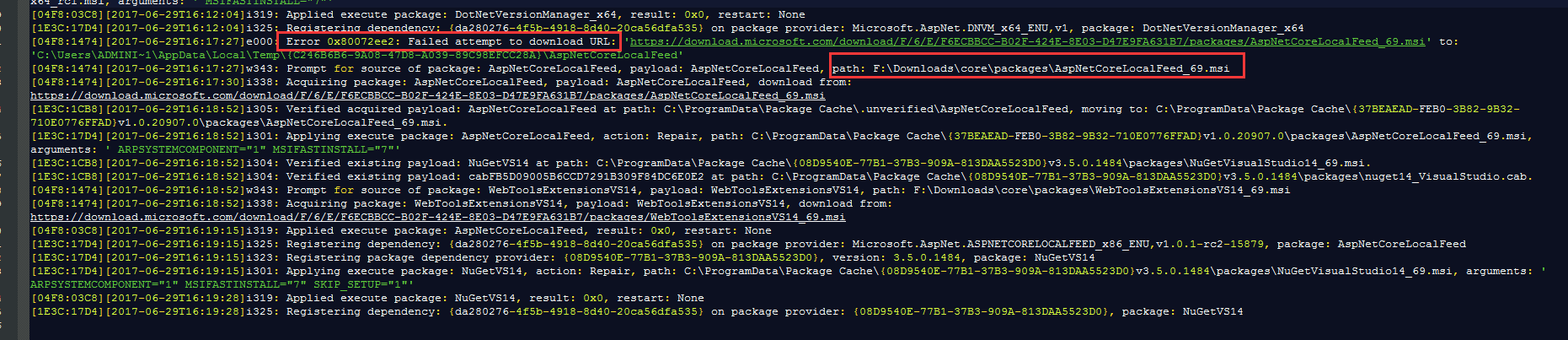
查看log发现,发现猫腻,然后copy下链接,用迅雷手动下载【AspNetCoreLocalFeed_69.msi】

并安装好,再次安装【DotNetCore.1.0.1-VS2015Tools.Preview2.0.3.exe】,
.Net Core 1.0升级2.0(xproj项目迁移到.csproj )
vs2015的创建的项目是以*.xproj的项目文件,迁移到vs2017需要如下准备:
1、安装好vs2017;
2、下载最新的SDK
3、在目标项目中,建立一个global.json文件,内容如下:
{

  "projects":["src","test"],

  "sdk": {

    "version": "1.1.0"

  }

}
4、用vs2017打开,自动迁移,完毕!!
参考资料:https://blog.jetbrains.com/dotnet/2017/04/04/rider-eap-update-csproj-based-net-core-support-migrate/
补充:
.Net Core SDK 2.0装完成之后,在VS2017的目标框架仍然没发现2.0的时候,参考这篇(http://www.cnblogs.com/lishuyi/p/7081269.html),设置一下系统环境变量,
变量名:MSBuildSdksPath

变量值:C:\Program Files\dotnet\sdk\2.0.\Sdks   (这个是本人的)
.Net core 项目加载提示“项目文件不完整。缺少预期导入”

在项目下新建一个global.json
内容为空

然后关闭vs重新启动项目,从.csproj启动,启动之后,删除原解决方案文件.sln
创建多平台共用的组件 .NET Standard
创建好.NET Standard项目,前提是安装好对应的版本,然后修改.csproj
<Project Sdk="Microsoft.NET.Sdk">

  <PropertyGroup>

    <PackageId>Banana.Uow</PackageId>

    <PackageTags>orm;sql;micro-orm;Dapper;Uow;Repository</PackageTags>

    <Title>Dapper</Title>

    <Description>Uow and Repository</Description>

    <Authors>EminemJK</Authors>

    <TargetFrameworks>net452;netstandard2.</TargetFrameworks>

  </PropertyGroup>

  <ItemGroup Condition="'$(TargetFramework)' == 'net452'">

    <Reference Include="System" />

    <Reference Include="System.Data" />

    <Reference Include="System.Xml" />

    <Reference Include="System.Xml.Linq" />

    <Reference Include="Microsoft.CSharp" />

  </ItemGroup>

  <ItemGroup Condition=" '$(TargetFramework)' == 'netstandard2.0'">

    <PackageReference Include="System.Data.SqlClient" Version="4.4.0" />

    <PackageReference Include="System.Reflection.Emit.Lightweight" Version="4.3.0" />

    <PackageReference Include="System.Reflection.TypeExtensions" Version="4.4.0" />

    <PackageReference Include="System.Collections.Concurrent" Version="4.3.0" />

    <PackageReference Include="System.Collections.NonGeneric" Version="4.3.0" />

    <PackageReference Include="System.Dynamic.Runtime" Version="4.3.0" />

    <PackageReference Include="System.Reflection.Emit" Version="4.3.0" />

    <PackageReference Include="System.Runtime.InteropServices" Version="4.3.0" />

    <PackageReference Include="System.Xml.XmlDocument" Version="4.3.0" />

  </ItemGroup>

  <ItemGroup>

    <PackageReference Include="MySql.Data"  Version="8.0.13" />

    <PackageReference Include="Dapper.Contrib" Version="1.50.5" />

    <PackageReference Include="System.Data.SQLite" Version="1.0.109.2" />

  </ItemGroup>

</Project>
未经处理的异常:System.IO. FileNotFoundException:未能加载文件或程序集“System.Runtime,Version=
Could not load file or assembly 'System.Runtime, Version=
未经处理的异常:System.IO.FileNotFoundException:未能加载文件或程序集“System.Runtime,Version=4.2.1.0,Cu"lture=neutra"l, PublicKeyToken=b03f5f7f11d50a3a”或它 的某一个依赖项。系统找不到指定的文件。

System.ModuleHandle.ResolveTypeCRuntimeModule module, Int32 typeToken, Int Ptr* typelnstArgs, Int32 typelnstCount, IntPtr* methodlnstArgs, Int32 methodlnst Count, ObjectHandleOnStack type)

System.ModuleHandle.ResolveTypeHandlelnternal(RuntimeModule module, Int32 typeToken, Runti meTypeHandle[] typelnstanti ati onContext, Runti meTypeHandle[] met hodlnstanti ati onContext)

System.Reflection.RuntimeModule.ResolveType(Int32 metadataToken, Type[] ge nericTypeArguments, Type[] generi cMethodArquments)

System.Reflecti on.CustomAttri bute.Fi TterCustomAttributeRecord(CustomAttri b uteRecord caRecord, Metadatalmport scope, Assembly& lastAptcaOkAssembly, Runtime Module decoratedModule, MetadataToken decoratedToken, RuntimeType attributeFilte rType, Boolean mustBelnheritable, Object[] attributes, IList derivedAttributes, RunfimeType& attributeType, IRuntimeMethodInfo& ctor, Boolean& ctorHasParameters ,Boolean& isVarArg)

System.Reflecti on.CustomAttri bute.GetCustomAttri butes(Runti meModule decora tedModule, Int32 decoratedMetadataToken, Int32 pcaCount, RuntimeType attributeFi lterType, Boolean mustBelnheritable, IList derivedAttributes, Boolean isDecorate dTargetSecurityTransparent)

System.Reflecti on.CustomAttri bute.GetCustomAttri butes(Runti meAssembly asse mbly, RuntimeType caType)

在 System.Attribute.GetCustomAttributes(Assembly element, Type attributeType, Boolean inherit)

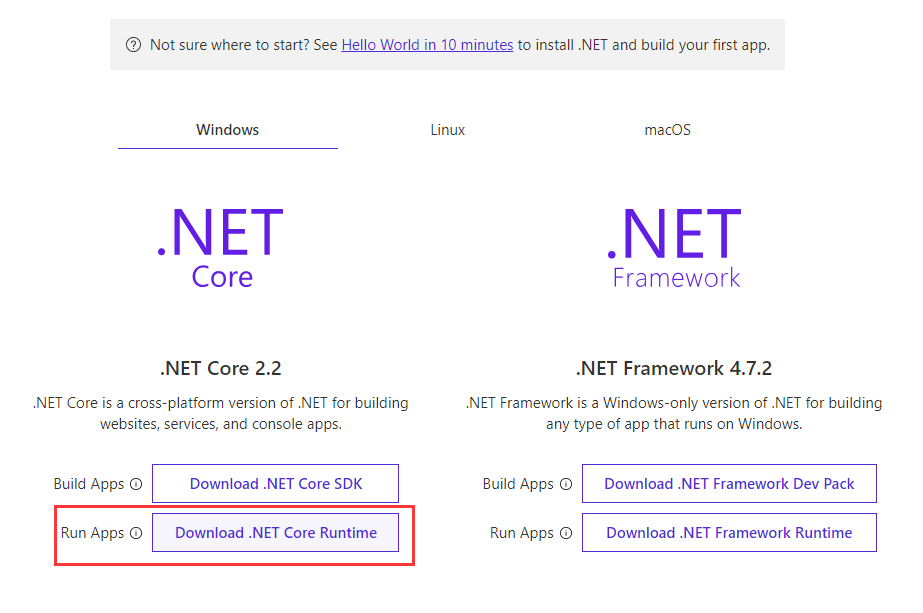
本地VS开发调试没问题,发布到IIS后出现以上问题,请安装与项目目标框架(我是.Net core 2.2)对应的RunTime,并重启电脑即可。
爬坑日记进行中……持续更新……
.Net Core 爬坑日记的更多相关文章
- 微信小程序爬坑日记
新公司上手小程序.30天,从入门到现在,还没放弃... 虽然小程序发布出来快一年了,爬坑的兄弟们大多把坑都踩平了.而我一直停留在"Hello World"的学习阶段.一来没项目,只 ...
- .NET Core爬坑记 1.0 项目文件
前言: 之所以要写这个系列是因为在移植项目到ASP.NET Core平台的过程中,遇到了一些“新变化”,这些变化有编译方面的.有API方面的,今天要讲的是编译方面的一些问题.我把它们整理后分享出来,以 ...
- .net Core 调用EF Core 爬坑
.net Core 中调用 EF Core项目 首先得建一个类库供.net Core 的主项目引用:其次,在.net Core 中做注入:最后,在页面中调用 1.类库项目中的操作 1.新建类库项目 2 ...
- openstack 爬坑日记
这个问题官方文档应该付全部责任. 关于 endpoint regionOne 问题 官方文档的所有endpoint 创建命令都是使用的regionOne,但是这个配置项必须和相关的组件ini 文件 ...
- [爬坑日记] 安卓模拟器1903蓝屏 没开hyper-v
先说解决方案: 我在升级完1903之后短短几个小时蓝屏了两次 还是不同原因,不由得开始怀疑这个版本的稳定性,随后发现只有启动安卓模拟器的时候必然蓝屏(还有一次蓝屏实在安装驱动的时候) 经过百度得知需要 ...
- Android爬坑之路
做了那么久前端,现在终于可以回到我的老本行, 今天我用了一天的时间配置里Android开发环境,mac和windows双平台,eclipse和IDEA双平台,别问为什么,我就喜欢,中间大坑不断,再加上 ...
- 多线程爬坑之路-Thread和Runable源码解析之基本方法的运用实例
前面的文章:多线程爬坑之路-学习多线程需要来了解哪些东西?(concurrent并发包的数据结构和线程池,Locks锁,Atomic原子类) 多线程爬坑之路-Thread和Runable源码解析 前面 ...
- 安卓易学,爬坑不易——腾讯老司机的RecyclerView局部刷新爬坑之路
针对手游的性能优化,腾讯WeTest平台的Cube工具提供了基本所有相关指标的检测,为手游进行最高效和准确的测试服务,不断改善玩家的体验.目前功能还在免费开放中. 点击地址:http://wetest ...
- kali linux安装virtualbox虚拟机之爬坑经历
很多kali爱好者想把kali linux作为系统使用,但是有些win下的程序有时候也需要用到,此时需要虚拟机. kali系统在安装虚拟机的时候也会遇到一大堆坑,接下来是我的爬坑过程. 一波三折. 环 ...
随机推荐
- Anaconda下载及安装教程
Anaconda官网 https://www.anaconda.com/download/#windows 选择Python 3.6版本 下一步,选择安装路径 下一步,两个方框打上对号,点击Insta ...
- posix,perl正则表达式区别
1.正则表达式(Regular Expression,缩写为regexp,regex或regxp),又称正规表达式.正规表示式或常规表达式或正规化表示法或正规表示法,是指一个用来描述或者匹配一系列符合 ...
- CentOS 6.2+Nginx+Nagios,手机短信和qq邮箱提醒
http://chenhao6.blog.51cto.com/6228054/1323192 标签:软件包 配置文件 nagios 服务端 监控 原创作品,允许转载,转载时请务必以超链接形式标明文章 ...
- HTML5 CSS3专题 纯CSS打造相册效果
转载请标明出处:http://blog.csdn.net/lmj623565791/article/details/30993277 今天偶然发现电脑里面还有这样的一个例子,感觉效果还不错,不记得啥时 ...
- 玩转web之ligerui(二)---前缀编码生成树(分级码)实现树型表格
请珍惜小编劳动成果,该文章为小编原创,转载请注明出处. 背景: 在ligerui中(其他uI可能也大同小异),实现树形表格可以通过父子节点,也可以通过前缀编码生成树去实现,而使 ...
- Python2 与 Python3 的编码对比
在 Python 中,不论是 Python2 还是 Python3 中,总体上说,字符都只有两大类: 通用的 Unicode 字符: (unicode 被编码后的)某种编码类型的字符,比如 UTF-8 ...
- java分割字符串用法
转自 http://www.cnblogs.com/dawnLynn/p/5477263.html 1."."和"|"都是转义字符,必须得加"\\&q ...
- file.go
// return int64(f.offset), errors.New("offset > file.size") //}else { // ...
- BZOJ_2152_聪聪可可_点分治
BZOJ_2152_聪聪可可_点分治 Description 聪聪和可可是兄弟俩,他们俩经常为了一些琐事打起来,例如家中只剩下最后一根冰棍而两人都想吃.两个人都想玩儿电脑(可是他们家只有一台电脑)…… ...
- CentOS7 配置SVN服务器
也可以参考这里:https://jingyan.baidu.com/article/148a1921d84be34d71c3b18f.html 1.安装svn yum install -y subve ...