
android发送短信样例
Android应用开发中我们经常须要发送手机短信。这对于android平台来说,是最简单只是的功能了,无需太多代码,也无需自己定义代码,仅仅须要调用android提供的消息管理类SmsManager就能够了。
【源代码下载】http://www.code4apk.com/android-code/202
核心就是使用SmsManager的sendTextMessage方法加上PendingIntent跳转。
核心代码例如以下:
SmsManager sms=SmsManager.getDefault();

PendingIntent  intent=PendingIntent.getBroadcast(MainActivtiy.this,0, new Intent(), 0);

sms.sendTextMessage(phone.getText().toString(), null, text.getText().toString(), intent, null);
以下一起来实现这个功能:
第1步:新建一个activity :MainActivtiy
import android.app.Activity;

import android.app.PendingIntent;

import android.content.Intent;

import android.os.Bundle;

import android.telephony.SmsManager;

import android.view.View;

import android.view.View.OnClickListener;

import android.widget.Button;

import android.widget.EditText;

import android.widget.Toast;

public class MainActivtiy extends Activity {

EditText text;

EditText phone;

Button send;

@Override

public void onCreate(Bundle savedInstanceState) {

super.onCreate(savedInstanceState);

setContentView(R.layout.main);

send=(Button)findViewById(R.id.send);

text=( EditText)findViewById(R.id.text);

phone=( EditText)findViewById(R.id.phone);

send.setOnClickListener(new OnClickListener() {

@Override

public void onClick(View v) {

SmsManager sms=SmsManager.getDefault();

PendingIntent  intent=PendingIntent.getBroadcast(MainActivtiy.this,0, new Intent(), 0);

sms.sendTextMessage(phone.getText().toString(), null, text.getText().toString(), intent, null);

Toast.makeText( MainActivtiy.this, "发送成功.....", Toast.LENGTH_LONG).show();

}

});

}

}
第2步:改动配置文件:main.xml
<?

xml version="1.0" encoding="utf-8"?>

<LinearLayout xmlns:android="http://schemas.android.com/apk/res/android"

android:layout_width="fill_parent"

android:layout_height="fill_parent"

android:orientation="vertical" >

<EditText

android:id="@+id/phone"

android:layout_width="fill_parent"

android:layout_height="wrap_content"

android:hint="请输入电话号码"

android:inputType="phone"

android:text="" >

</EditText>

<EditText

android:id="@+id/text"

android:inputType="text"

android:hint="请输入消息"

android:layout_width="fill_parent"

android:layout_height="wrap_content" >

</EditText>

<Button

android:id="@+id/send"

android:layout_width="fill_parent"

android:layout_height="wrap_content"

android:text="发送消息" >

</Button>

</LinearLayout>
第3步:在配置文件AndroidManifest.xml中加入发送短信支持
<uses-permission android:name="android.permission.SEND_SMS"/>
第4步调试执行:
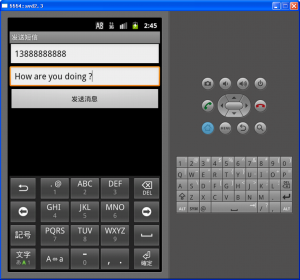
android发送短信样例的更多相关文章
- android 发送短信 怎样做到一条一条的发送,仅仅有在上一条发送成功之后才发送下一条短信
android发送短信截获上一条发送是否成功,然后再来发送下一条短信 1.问题:在项目中遇到例如以下要求:待发短信有N条,实现一条一条的发送并在上一条短信发送成功之后再来发送下一条. for(int ...
- android 发送短信的两种方式,以及接收报告和发送报告
android发送短信,以及接收报告和发送报告 android中发送短信其实有两种方式,这个和打电话类似,大家可以了解一下: 一.调起系统发短信功能 ...
- android发送短信验证码并自动获取验证码填充文本框
android注册发送短信验证码并自动获取短信,截取数字验证码填充文本框. 一.接入短信平台 首先需要选择短信平台接入,这里使用的是榛子云短信平台(http://smsow.zhenzikj.com) ...
- 【Android】Android 发送短信和打电话的方法
发送短信的方法 有两种方法可以实现发送短信,其一是使用intent-startActivity,URI数据格式为"smsto:num",调用的action为Intent.ACTIO ...
- Android 发送短信总结
SMS涉及的主要类SmsManager 实现SMS主要用到SmsManager类,该类继承自java.lang.Object类,下面我们介绍一下该类的主要成员. 公有方法: ArrayList< ...
- 关于Android发送短信获取送达报告的问题
最近公司开发一个项目,要求app能够发送短信并获取送达报告.这本不是一个什么难题,实现这一功能的代码一搜一大把,那么这么简单的一个问题,为什么我要在这里提出来呢?那是因为我在写代码的时候掉入了一个坑, ...
- Android发送短信核心代码
核心代码:(1)SmsManager manager = SmsManager.getDefault(); //获得默认的消息管理器(2)ArrayList<String> list = ...
- Android发送短信
// 发送短信 public void sendMsg(){ String content = edtSend.getText().toString(); SmsManager smsManager ...
- android发送短信代码(短信内容超长处理)
一条短信只可容纳70个中文,所以当短信长度超过70个中文字符时程序就要特殊处理了. 有两种方式: 1.通过sendTextMessage()方法依次发送拆分后的短信,该方式有个弊端就是用户会分条收到短 ...
随机推荐
- adb(Android Debug Bridge)(一)
上一篇介绍的am,pm命令都是基于adb shell下的命令.这节来详细介绍下adb命令. Android Debug Bridge(adb)是一个让你跟模拟器或者android设备通信的多功能命令. ...
- JavaScript简述一
一.什么时JavaScript JavaScript是一种具有面向对象能力的,解释型的设计语言,更具体一点,它是基于圣明和事件驱动并具有相对安全必的客户端脚本语言,因为它不需要在一个语言环境下运行,只 ...
- MISRA-C 2012 Amendment 1
- Jacoco的原理(各个覆盖率的解释)
覆盖率计数器 Jacoco使用一系列的不同的计数器来做覆盖率的度量计算.所有这些计数器都是从java的class文件中获取信息,这些class文件可以(可选)包含调试的信息在里面.即使在没有源码的情况 ...
- html字符转义
常用表: No. 文字表記 10進表記 16進表記 文字 Comment 001 " " " """ quotation mark ...
- gdb 读取elf
在make file中找到ld,然后将其换成 gdb, 如本例中LINKER = /usr/cygnus/xscale-020523/H-sparc-sun-solaris2.5/bin/xscale ...
- Codeforces554C:Kyoya and Colored Balls(组合数学+费马小定理)
Kyoya Ootori has a bag with n colored balls that are colored with k different colors. The colors are ...
- KNOCKOUTJS DOCUMENTATION-绑定(BINDINGS)-自定义绑定
除了ko内建的绑定,还可以自定义绑定,灵活地封装复杂的行为使之可重用. 自定义绑定 注册自定义绑定 向 ko.bindingHandles添加一个子属性来注册一个绑定. ko.bindingHandl ...
- 获取泛型类对应的class类型
自己写来备忘的,如有错误,请指正! public class Demo<T> { private Class<T> clazz; public Demo() { Paramet ...
- oracle默认连接数150
当oracle连接数超过最大的150登录不上 sqlplus / as sysdba ###报错,提示连接数未释放! ---释放网络连接数 ps -ef |grep ora |grep " ...