
Azure 上SQL Database(PaaS)Time Zone时区问题处理(进阶篇)
通常ISV在面对本地客户时对时间相关的处理,一般都时区信息都是不敏感的。但是现在云的世界里为了让大家把时间处理的方式统一起来,云上的服务都是以UTC时间为准的,现在如果作为一个ISV来说就算你面对的客户只是本地用户但是你打算利用云来为你进行的应用提供更多的功能和便捷性时,你就需要采用UTC时间来处理跟相关的代码了。
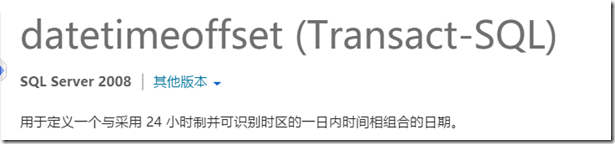
在SQL Server数据库处理时间相关的数据时,我们常常会使用DateTime类型或者DateTime2类型来处理数据,其实早在SQL Server 2008发布时,数据库就开始支持DatetimeOffset数据类型了,DatetimeOffset天生出来就是为了处理时区问题的
参考上一个Blog 《Azure 上SQL Database(PaaS)Time Zone时区问题处理》,我们同样要来解决时区的问题,我们创建appcount表时,我们采用下面语句
CREATE TABLE [dbo].[appcount2](

    [Id] [int] IDENTITY(1,1) NOT NULL,

    [createtime] [datetime] NULL,

    [CreatetimeWithOffset] [Datetimeoffset] NULL,

    PRIMARY KEY CLUSTERED (Id)

)
插入数据时使用
INSERT INTO appcount(createtime,createtimewithoffset) VALUES(GetDate(),sysdatetimeoffset() AT TIME ZONE 'China Standard Time')
插入完数据我们将数据在查询出来


我们会发现DateTimeOffset在处理时区问题时不管带不带时区的迁移语句的出来的时间都是正确的,但是DateTime字段的出来的时间明显就会有时间偏移错误。
我们用下面的C#从.NET程序里面将这些时间数据取出来会如何呢?
using (IDbConnection conn = new System.Data.SqlClient.SqlConnection(strConn))

            {

                conn.Open();

                var command = conn.CreateCommand();

                command.CommandText = "Select  id,createtime,CreatetimeWithOffset from appcount";

                var reader = command.ExecuteReader();

                while (reader.Read())

                {

                    var id = reader["id"];

                    var date = reader["createtime"];

                    var date2 = reader["createtimeWithOffset"];

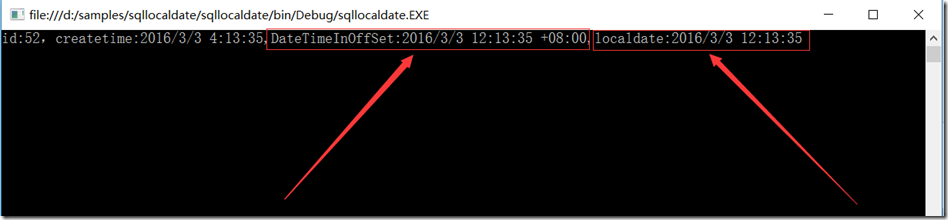
                    var localDate = ((DateTimeOffset)date2).LocalDateTime;

                    Console.WriteLine("id:{0},createtime:{1},DateTimeInOffSet:{2},localdate:{3}", id, date,date2, localDate);

                }

                reader.Close();

                conn.Close();

            }
这里是代码执行结果:
小结:
采用DatetimeOffset来存储时间,通过DatetimeOffset来处理时间可以让你的代码更加稳健,更加国际范
相关文章:《Azure 上SQL Database(PaaS)Time Zone时区问题处理》
Azure 上SQL Database(PaaS)Time Zone时区问题处理(进阶篇)的更多相关文章
- Azure 上SQL Database(PaaS)Time Zone时区问题处理
在Azure上面的PaaS时间都是以UTC时间为准(云的世界里基本上都是以UTC时间为标准的),所以以前在本地SQL Server上面常用的GetDate()方法会碰到问题,在中国获取的时间会被当前时 ...
- [Windows Azure] Managing SQL Database using SQL Server Management Studio
Managing Windows Azure SQL Database using SQL Server Management Studio You can use Windows Azure SQL ...
- [Windows Azure] Windows Azure Storage & SQL Database
http://channel9.msdn.com/Series/Windows-Azure-Storage-SQL-Database-Tutorials Windows Azure offers mu ...
- [Windows Azure] Monitoring SQL Database Using Dynamic Management Views
Monitoring Windows Azure SQL Database Using Dynamic Management Views 5 out of 7 rated this helpful - ...
- 在Windows Azure上配置VM主备切换(1)——Linux篇
对任何一个上线系统来说,高可用设计是不可或缺的一个环节,这样才可以确保应用可以持续.稳定的运行,而不是频繁的掉线.停机.高可用设计的核心思路很简单,就是消除一切单点故障,将单点链路或者节点升级为多点. ...
- Java连接Azure SQL Database
Azure SQL Database是Azure上的数据库PAAS服务,让用户可以快速的创建和使用SQL数据库而不用担心底层的备份,安全,运维,恢复等繁琐的工作,本文简单介绍如何使用Java程序连接到 ...
- [Windows Azure] Guidelines for Connecting to Windows Azure SQL Database
Guidelines for Connecting to Windows Azure SQL Database 6 out of 12 rated this helpful - Rate this t ...
- [Windows Azure] Learn SQL Reporting on Windows Azure (9-Step Tutorial)
Learn SQL Reporting on Windows Azure (9-Step Tutorial) 4 out of 4 rated this helpful - Rate this top ...
- Azure SQL Database (21) 将整张表都迁移到Azure Stretch Database里
<Windows Azure Platform 系列文章目录> Azure SQL Database (19) Stretch Database 概览 Azure SQL Da ...
随机推荐
- sprint2(第九天)
今天是sprint2的最后一天,已经完成功能有可以实现点餐功能.菜品的添加和删减.菜品数量的增减.添加备注.查看订单详情.订单状态.提交订单.后厨可以查看订单信息,对菜品的状态进行操作,是否完成烹饪, ...
- "重力锁屏"Beta版使用说明
一.产品介绍 重力锁屏是基于android系统的一款锁屏软件.它利用重力感应器来判断用户的动作从而自动锁屏亮屏,是锁屏软件的一大创新.相比传统的锁屏软件,“重力锁屏”从可操作性.方便性.功能全面性都有 ...
- HDU 4281 Judges' response 状压dp+多旅行商问题
题目链接: http://acm.hdu.edu.cn/showproblem.php?pid=4281 Judges' response Time Limit: 2000/1000 MS (Java ...
- iOS成长之路-使用系统默认声音、震动
导入框架 代码片段 apple系统默认声音名称说明: 1.声音格式是MP3或m4r的需要转成caf格式(可先转成aif , aiff,然后修改后缀) 2.路径在/System/Library/Audi ...
- JSPatch 原理
原理 JSPatch用iOS内置的JavaScriptCore.framework作为JS引擎,但没有用它JSExport的特性进行JS-OC函 数互调,而是通过Objective-C Runtime ...
- 关于Keil C关键字xdata和data的问题
1.xdata表示这是一个外部RAM地址内的数据,数据最终将被保存至外部RAM的某个地址单元中:但是,外部RAM只能通过寄存器间接寻址来访问,也就是说,其地址需要保存在内部RAM中(其实或许是SFR中 ...
- CentOS 7.2修改网卡名称
#!/bin/bash #Centos7.2修改网卡名称ens33为eth0 #2017/05/19 if [ -f /etc/sysconfig/grub ];then cd cp /etc/sys ...
- intel 的架构图
第一代: 第二代 第三代 以及对比
- Nginx和Apache区别
Nginx VS Apache 相同点: 1.都是HTTP服务器软件 2.功能上都采用模块化结构设计 3.都支持通用的语言接口,如PHP.Perl.Python等 4.支持正向.反向代理.虚拟主机. ...
- ucontext-人人都可以实现的简单协程库
ucontext的介绍 http://blog.csdn.net/qq910894904/article/details/41911175 协程的介绍 https://en.wikipedia.org ...