
vs配置SP++3.0
最近在研究信号处理的C语言算法,突然发现一个西安交大的师兄之前已经写出来了一个完整的库,同样是研究生三年,差别怎么这样大呢。
先从用轮子开始吧。
一、SP++3.0安装及测试
官网下载地址:
https://code.google.com/archive/p/tspl/downloads
将 SP++3.0 压缩包解压到某一路径下,如 D:\Program Files\SP++3.0
建立VS2010 项目,在Project->Propertiesr的VC++Directories->Include Directories
中加入D:\Program Files\SP++3.0\include
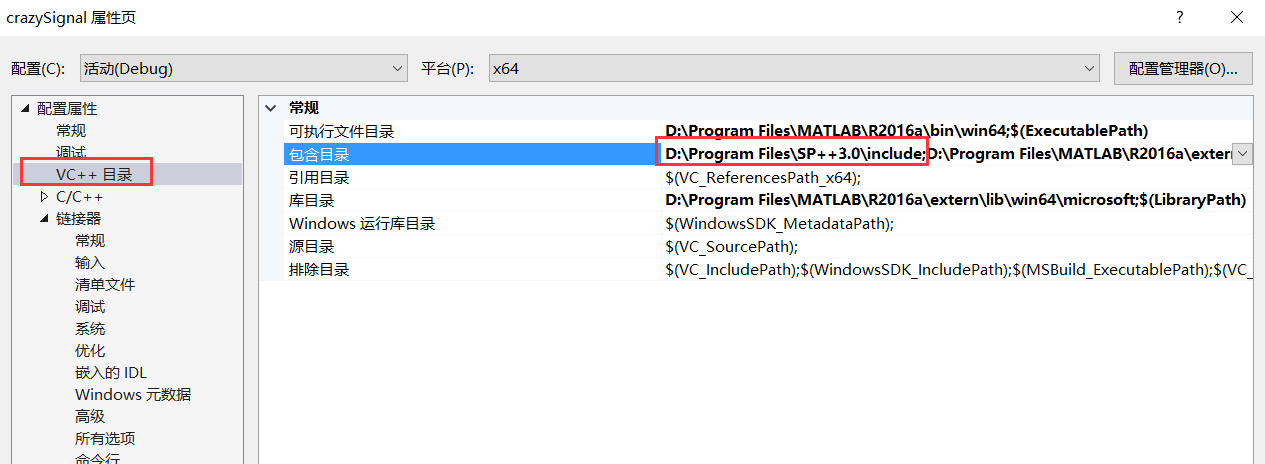
然后添加一个fft_test.cpp,进行测试
/*****************************************************************************

 *                               fft_test.cpp

 *

 * FFT test.

 *

 * Zhang Ming, 2010-09, Xi'an Jiaotong University.

 *****************************************************************************/

#include <iostream>

#include <cstdlib>

#include <vectormath.h>

#include <fft.h>

using namespace std;

using namespace splab;

typedef double  Type;

const   int     MINLEN = 1;

const   int     MAXLEN = 1000;

const   int     STEP   = 10;

int main()

{

	Vector< complex<Type> >  sn, Rk, Sk, xn;

	Vector<Type> rn, tn;

    cout << "forward transform: complex to complex." << endl;

	cout << "inverse transform: complex to complex." << endl << endl;

	cout << "signal length" << "\t" << "mean(abs((sn-xn))" << endl;

	for( int len=MINLEN; len<MAXLEN; len+=STEP )

	{

	    sn.resize(len);

	    for( int i=0; i<len; ++i )

            sn[i] = complex<Type>( rand()%10, rand()%10 );

        Sk = fftc2c( sn );

        xn = ifftc2c( Sk );

//        Sk = fft( sn );

//        xn = ifft( Sk );

        cout << "    " << len << "\t\t" << "  " << sum(abs(sn-xn))/len << endl;

	}

    cout << endl << endl;

    cout << "forward transform: real to complex ." << endl;

	cout << "inverse transform: complex to real." << endl << endl;

	cout << "signal length" << "\t" << "mean(abs((rn-tn))" << endl;

    for( int len=MINLEN; len<MAXLEN; len+=STEP )

	{

	    rn.resize(len);

	    for( int i=0; i<len; ++i )

            rn[i] = rand()%10;

        Rk = fftr2c( rn );

        tn = ifftc2r( Rk );

//        Rk = fft( rn );

//        tn = real( ifft(Rk) );

        cout << "    " << len << "\t\t" << "  " << sum(abs(rn-tn))/len << endl;

	}

	cout << endl;

	return 0;

}
编译会产生错误:min,max出现在未命名空间,直接注释即可(也可在主文件添加#inlucde<algorthm>)。
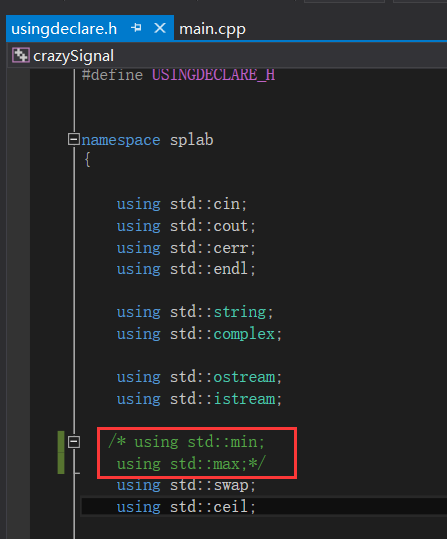
之后编译成功。
二、SP++3.0测试含matlab plot代码
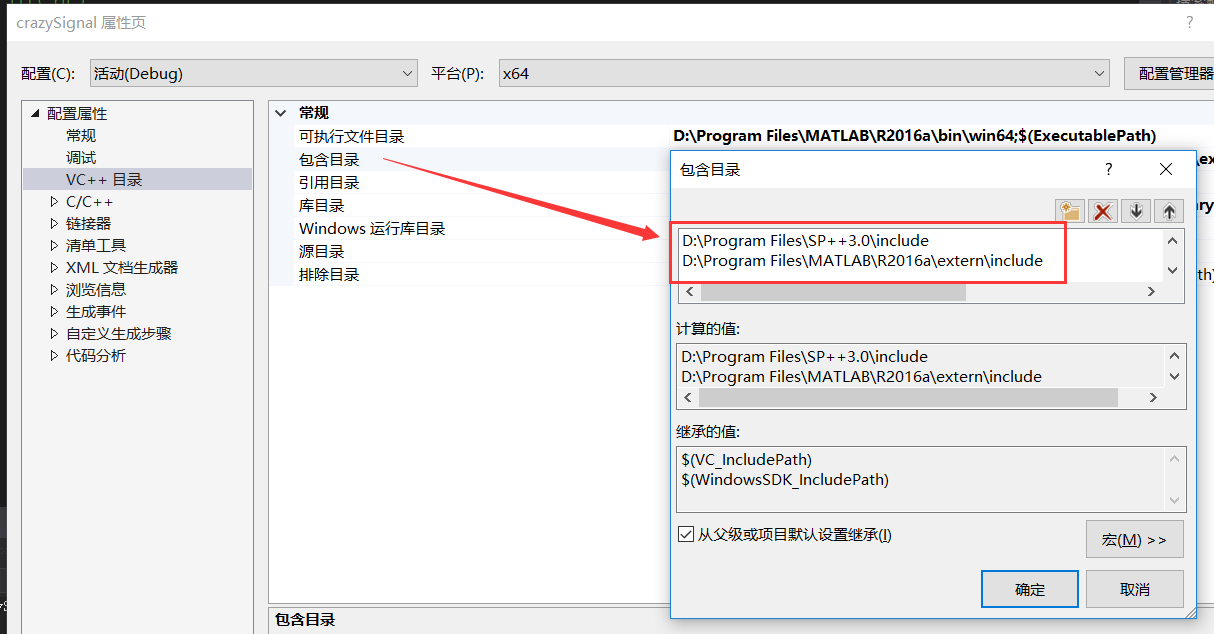
注意:
此处必须先加载SP++3.0\include,然后再加载Matalb\extern\inlcude,因为SP++3.0 与Matlab中都有matrix.h头文件,如果加载顺序相反,则无法通过编译;
此处配置Matlab环境,参考文章:https://www.cnblogs.com/shuqingstudy/p/10134254.html
配置完成后,测试cppmatlab_test.cpp
/*****************************************************************************

 *                             CppMatlab_test.cpp

 *

 * C++ and Matlab mixed programming testing.

 *

 * Zhang Ming, 2010-10, Xi'an Jiaotong University.

 *****************************************************************************/

#define BOUNDS_CHECK

#include <iostream>

#include <cstring>

#include <vectormath.h>

#include <matrixmath.h>

#include <wft.h>

#include "engine.h"

using namespace std;

using namespace splab;

typedef double  Type;

const   int     Lg = 128;

const   int     Ls = 1000;

const   Type    Fs = 1000;

int main()

{

    /******************************* [ signal ] ******************************/

	Vector<Type> t = linspace( Type(0), Type(Ls-1), Ls ) / Type(Fs);

	Vector<Type> s = sin( Type(400*PI) * pow(t,Type(2.0)) );

	/******************************** [ widow ] ******************************/

	t = linspace(Type(0),Type(Lg-1),Lg);

	Vector<Type> g = gauss( t, (Lg-1)/Type(2), Lg/Type(8) );

	/********************************* [ WFT ] *******************************/

	cout << "Taking windowed Fourier transform." << endl;

    Matrix< complex<Type> > coefs = wft( s, g );

	/******************************** [ IWFT ] *******************************/

	cout << "Taking inverse windowed Fourier transform." << endl;

	Vector<Type> x = iwft( coefs, g );

	cout << "The relative error is : " << "norm(s-x) / norm(s) = "

		 << norm(s-x)/norm(s) << endl << endl;

    /******************************** [ PLOT ] *******************************/

	Engine *ep  = engOpen( NULL );

	if( !ep )

	{

		cerr << "Cannot open Matlab Engine!" << endl;

		exit(1);

	}

    Matrix<Type> C = trT( abs(coefs) );

    int M = C.rows(), N = C.cols();

    // define mxArray as 1-by-1 Real Scalar

	mxArray *mFs = mxCreateDoubleMatrix( 1, 1, mxREAL );

    // define mxArray as N-by-1 Real Vector

	mxArray *ms = mxCreateDoubleMatrix( Ls, 1, mxREAL );

    mxArray *mx = mxCreateDoubleMatrix( Ls, 1, mxREAL );

	// define mxArray as N-by-M Real Matrix, BECAUSE matalb is ROW MAJOR

	// and C/C++ is COLUMN MAJOR, the row of SP++ matrix is copied as the

	// column of Matlab matrix

	mxArray *mC = mxCreateDoubleMatrix( N, M, mxREAL );

    // array copy from Scalar to mxArray.

	memcpy( mxGetPr(mFs), &Fs, sizeof(Type) );

    // array copy from Vectors to mxArray.

	memcpy( mxGetPr(ms), s, Ls*sizeof(Type) );

	memcpy( mxGetPr(mx), x, Ls*sizeof(Type) );

	// array copy from Matrix to mxArray.

	memcpy( mxGetPr(mC), C, C.size()*sizeof(Type) );

    // send command to Matlab engine

    engPutVariable( ep, "fs", mFs );

	engPutVariable( ep, "s", ms );

	engPutVariable( ep, "x", mx );

	engPutVariable( ep, "C", mC );

    // Matlab commands

	const char *mCmd =  " \

        figure('name','C++ and Matlab Mixed Programming Testing'); \

        hFN = floor(size(C,1)/2);   tN = size(C,2); \

        subplot(2,2,1); plot((0:tN-1), s); \

        axis([0,tN,min(s),max(s)]); \

        xlabel('Time (ms)', 'fontsize',12); ylabel('Amplitude', 'fontsize',12); \

        title('(a)'); \

        subplot(2,2,2); pcolor((0:tN-1),(0:hFN)'/hFN, C(1:hFN+1,:)); \

        shading interp; \

        axis([0,tN, 0,1]); \

        yt = 0 : 0.2 : 1; set(gca, 'YTick',yt); set(gca, 'YTickLabel',fs*yt/2); \

        xlabel('Time (ms)','fontsize',12); ylabel('Frequency (Hz)','fontsize',12); \

        title('(b)'); \

        subplot(2,2,3); plot((0:tN-1),x); \

        axis([0,tN,min(x),max(x)]); \

        xlabel('Time (ms)','fontsize',12); \

        ylabel('Amplitude', 'fontsize',12); \

        title('(c)'); \

        subplot(2,2,4); e=s-x; plot((0:tN-1),e); \

        axis([0,tN,min(e),max(e)]); \

        xlabel('Time (ms)','fontsize',12); \

        ylabel('Amplitude', 'fontsize',12); \

        title('(d)'); \

        ";

    // send command to Matlab engine

    engEvalString( ep, mCmd );

	// delete mxArray

	mxDestroyArray( mFs );

	mxDestroyArray( ms );

	mxDestroyArray( mx );

	mxDestroyArray( mC );

    system( "pause" );

	engClose(ep);

	return 0;

}
输出:
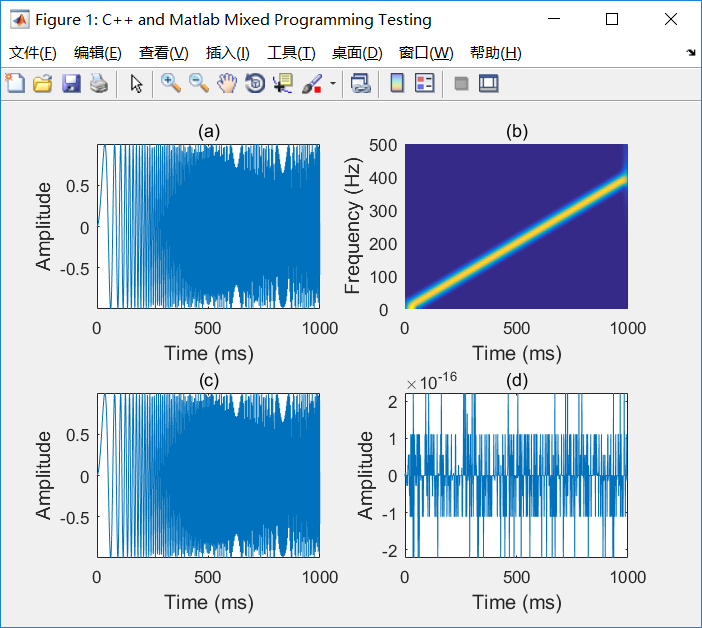
项目代码缺陷:
目前VS2015环境仅仅配置了SP++库环境和Matlab环境,SP++内部使用fftw并没有配置,因此后面如果需要再进行配置。
vs配置SP++3.0的更多相关文章
- win10下vs2015配置Opencv3.1.0过程详解
下载安装Opencv3.1.0 下载Opencv3.1.0,进入官网,点击opencv for windows即可下载. 点击运行下载好的文件.实际上,opencv的安装程序就是解压缩文件,个人因为 ...
- 在Windows 2008/2008 R2 上配置IIS 7.0/7.5 故障转移集群
本文主要是从:http://support.microsoft.com/kb/970759/zh-cn,直接转载,稍作修改裁剪而来,其中红色粗体部分,是我特别要说明的 若要配置 IIS 7.0 和 7 ...
- MyEclipse 8.5配置Tomcat 7.0
MyEclipse 8.5配置Tomcat 7.0 在窗口(Windows)->首选项(Prefrences)->MyEclipse->Servers->Tomcat 6.x下 ...
- Ubuntu14.04 安装配置Hadoop2.6.0
目前关于Hadoop的安装配置教程书上.官方教程.博客都有很多,但由于对Linux环境的不熟悉以及各种教程或多或少有这样那样的坑,很容易导致折腾许久都安装不成功(本人就是受害人之一).经过几天不断尝试 ...
- windows下配置lamp环境(0)---软件获取
工作快一年了,还没有怎么配置过服务器环境,经常使用集成套件wampserver,为了复习配置wamp服务器 特意在虚拟机中测试安装步骤如下. 安装前步骤:下载软件.软件下载地址如下: 1.apache ...
- opencv-python:win7下,搭建python2.7.5环境,配置opencv3.1.0准备开工-OpenCV步步精深
我的个人博客:点这里 搭建python2.7.5环境 下载python2.7.5 64位:https://www.python.org/ftp/python/2.7.5/python-2.7.5.am ...
- win10下vs2015配置Opencv3.1.0过程详解(转)
下载安装Opencv3.1.0 下载Opencv3.1.0,进入官网,点击opencv for windows即可下载. 点击运行下载好的文件.实际上,opencv的安装程序就是解压缩文件,个人因为 ...
- vs2013配置opencv3.2.0
工具/原料 l VS2013 l OpenCV3.20http://jaist.dl.sourceforge.net/project/opencvlibrary/opencv-win/3.2.0/op ...
- iis6下配置支持.net4.0&发布网站[转]
iis6配置支持.net4.0 在win2003操作系统上发布两个网站,首先配置iis: 1.下载 .net framework 4.0 差不多48MB 2.安装 3.打开iis: 开始=> ...
随机推荐
- java实验三 敏捷开发与XP实践
一.实验内容 (一)敏捷开发与XP 软件开发流程的目的是为了提高软件开发.运营.维护的效率,并提高软件的质量.用户满意度.可靠性和软件的可维护性. 光有各种流程的思想是不够的,我们还要有一系列的工具来 ...
- Ubuntu下ssh连接在服务端显示图形界面
Ubuntu下ssh连接在服务端显示图形界面 step1 安装ssh服务 服务端安装运行ssh,在终端运行命令如下: sudo apt-get install openssh-server 在客户端安 ...
- 【Leetcode】82. Remove Duplicates from Sorted List II
Question: Given a sorted linked list, delete all nodes that have duplicate numbers, leaving only dis ...
- 【转】python win32api win32gui win32con 简单操作教程(窗口句柄 发送消息 常用方法 键盘输入)
作者:https://blog.csdn.net/qq_16234613/article/details/79155632 附:https://www.programcreek.com/python/ ...
- Android bp语法介绍
参考网址: http://note.qidong.name/demo/soong_build/ 谷歌官网文档: https://android.googlesource.com/platform/bu ...
- mysql 简单sql语句
1.修改数据库的编码 alter database test character set utf8 2.创建新表 : create table text4(id int( ...
- hdu4285-circuits
题意 一个 \(n\times m\) 的方格纸,有一些格子不能走.给出一个 \(k\) ,求有多少种方案,用 \(k\) 个不相交,不嵌套 的环覆盖所有可以走的格子.\(n,m\le 12\) . ...
- 关于nginx的一点记录
(1) 安装nginx官网下载:http://nginx.org下载适合Windows的安装包,是一个压缩包,直接解压就可以了. (2) 启动nginx有三种方式启动:a. 双击nginx.exe图标 ...
- 一些常用的基础Linux操作指令
复习的时候顺便分享我学的知识,虽不是什么牛的技术分享,只是一些基础,基础打好了技术慢慢就提高了!一起加油一起共勉! 具体的vi和vim命令集太多了,以后的随笔我也会分享出来,没必要全记住,记住常用的就 ...
- C++ STL 常用算术和生成算法
C++ STL 常用算术和生成算法 accumulate() accumulate: 对指定范围内的元素求和,然后结果再加上一个由val指定的初始值. #include<numeric> ...