
戴尔PowerEdge R430 机架式服务器 安装ubuntu server 14.04.1 LTS 64 位
硬件配置:
服务编号:5Z04X72
软件配置
1、Ubuntu 系统下载地址:
https://certification.ubuntu.com/certification/hardware/201412-16241/
2、uiso9_cn_9.6.6.3300.exe 下载

3、ubuntu server12.04系统U盘安装详细教程
https://wenku.baidu.com/view/64e4c33c2b160b4e777fcf28.html
4、Ubuntu 14.04 Server开发者安装指南
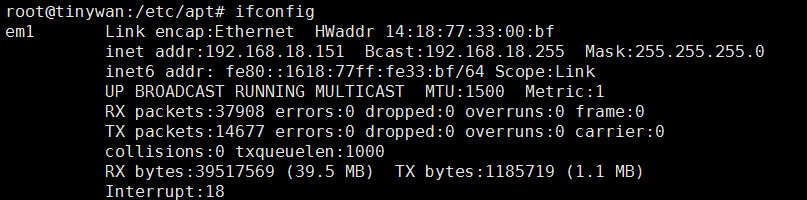
5、网卡信息看查看(cat /proc/version Ubuntu 系统查看)
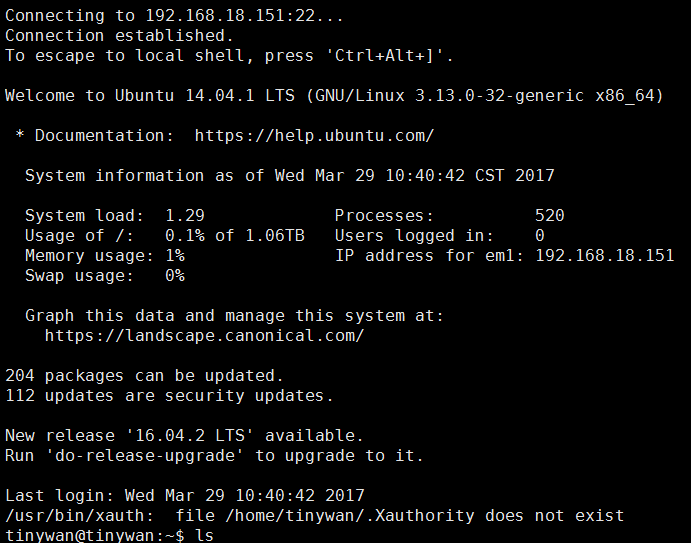
6、SSh 远程登录

登录失败
在服务器本机,安装ssh
ps -e |grep ssh
安装: apt-get install ssh ( 安装后会自动开启给服务)
再次链接了,链接成功
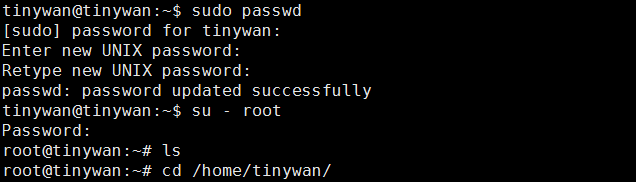
7、修改root 密码
sudo passwd
8、更新阿里云源(切换到root账户)

注意:我在这里直接是备份原有的一份,然后直接把给文件删除,重新新建一个文件即可
sources.list 添加以下内容
deb http://mirrors.aliyun.com/ubuntu/ trusty main restricted universe multiverse

deb http://mirrors.aliyun.com/ubuntu/ trusty-security main restricted universe multiverse

deb http://mirrors.aliyun.com/ubuntu/ trusty-updates main restricted universe multiverse

deb http://mirrors.aliyun.com/ubuntu/ trusty-proposed main restricted universe multiverse

deb http://mirrors.aliyun.com/ubuntu/ trusty-backports main restricted universe multiverse

deb-src http://mirrors.aliyun.com/ubuntu/ trusty main restricted universe multiverse

deb-src http://mirrors.aliyun.com/ubuntu/ trusty-security main restricted universe multiverse

deb-src http://mirrors.aliyun.com/ubuntu/ trusty-updates main restricted universe multiverse

deb-src http://mirrors.aliyun.com/ubuntu/ trusty-proposed main restricted universe multiverse

deb-src http://mirrors.aliyun.com/ubuntu/ trusty-backports main restricted universe multiverse
安装nginx
错误1
root@tinywan:/home/tinywan/nginx-1.10.3# ./configure

checking for OS

 + Linux 3.13.0-32-generic x86_64

checking for C compiler ... not found

./configure: error: C compiler cc is not found
解决办法:apt-get install build-essential
错误2
./configure: error: the HTTP rewrite module requires the PCRE library.

You can either disable the module by using --without-http_rewrite_module

option, or install the PCRE library into the system, or build the PCRE library

statically from the source with nginx by using --with-pcre=<path> option.
方法:
apt-get install libreadline-dev libncurses5-dev libpcre3-dev \

libssl-dev perl make build-essential curl
编译、安装、浏览器访问
http://192.168.18.151/
结束安装
戴尔PowerEdge R430 机架式服务器 安装ubuntu server 14.04.1 LTS 64 位的更多相关文章
- PowerEdge R430 机架式服务器安装( Ubuntu server 14.04.1 、PHP5.5.9、PHP-redis2.8、Phalcon3.1)
未解决问题:换成静态路由的话,怎么就 apt-get udpate 出现错误信息! 解决办法:么有设置网关 一.Ubuntu 系统下载地址: https://certification.ubuntu. ...
- Ubuntu Server 16.04.1 LTS 64位 搭建LNMP环境
安装配置 Nginx 为了确保获得最新的 Nginx,先使用sudo apt-get update命令更新源列表.安装 Nginx,输入命令:sudo apt-get install nginx. 启 ...
- U盘安装ubuntu server 14.04
U盘安装ubuntu server 14.04 U盘安装ubuntu server 14.04 1.制作启动u盘 2.开始安装 1 将u盘插入主机,重启后从u盘启动 2 选择语言(随便挑,随便选),我 ...
- u盘安装ubuntu server 14.04 以及No CD-ROM drive was detected 错误
u盘安装ubuntu server 14.04 1:下载ubuntu server14的 iso镜像文件 2:下载 UltraISO U盘镜像制作工具 : 3:使用Ultra iOS 将下载好的 is ...
- vmware 10虚拟机安装ubuntu server 14.04
-開始安装ubuntu server- 1.首先是安装系统时的语言,推荐选择English 然后安装系统 这里选择语言非常重要,我開始选择了中文,安装完毕后会乱码,所以推荐选择英文 由于在中国.所以选 ...
- [原创]安装Ubuntu Server 14.04后
安装后许多软件都没有,需要进行安装. 官方指南:https://help.ubuntu.com/lts/serverguide/index.html 1.修改网络配置文件 用ifconfig查看本地网 ...
- ubuntu server 14.04 LTS下搭建LAMP环境之最详细笔记之一U盘安装双系统
前言: 一直在WIN上使用PHP,不喜欢用WAMP,每次都是手动在windows配置环境,偶尔有一次装了小红帽玩了两天,感觉不是很习惯就换了回来,过了没几天见讨论LAMP环境,于是安装了ubuntu的 ...
- U盘安装ubuntu server 12.04的问题检测不到CDROM的解决
U盘安装ubuntu server 12.04的问题检测不到CDROM的解决 ========================== 我是u盘安装ubuntu 14 64Bit 也是出现同样的问题 用u ...
- 在虚拟机中安装Ubuntu Server 15.04
学Linux,上红联! 红联Linux门户|Linux通用技术|Linux发行版技术|Linux企业应用|Linux实验室|红联Linux论坛 Linux系统教程 Linux入门 Linux管理 Li ...
随机推荐
- FD.io 社区中国行暨未来网络技术沙龙 南京站 参会小结
FD.io 社区中国行暨未来网络技术沙龙 南京站,2018 年 3 月 17 日. 开场致辞 Ray 介绍了一些有的没的 ⁃ (Future Event)DPDK summit, FD.io summ ...
- vim python和golang开发环境配置
首先在-下新建目录.vim和配置文件.vimrc,.vimrc内容如下: syntax on set nocompatible filetype off set rtp+=~/.vim/bundle/ ...
- 解决登录不上网页得tomcat(授权manager-gui角色的操作如下)
1:编辑/usr/local/tomcat/conf/tomcat-users.xml文件,在没有注释的内容中添加: <role rolename="manager-gui" ...
- Linux基础五(系统管理)
Linux 系统管理 1. 进程管理 1.1 进程管理简介 进程的简介: 一个程序在运行的时候会占用系统的资源,即系统分配资源给某个程序使用,进程就是正在运行中的某个程序或者命令.进程又可以细分为线程 ...
- 关于css伪类
p:nth-child(2){} !选择所有p元素的第二个子元素: p:nth-of-type(2) !选择所有p元素第二个为p的子元素(是选择第二个类型为p的元素 而不是第二个子集为p的元素)
- windows 下查看进程开始运行的时间
1. 打开运行 输入 msinfo32 然后在软件环境- 正在运行任务- 就能够看到运行开始的时间了.
- SQLSERVER 的资源限制
https://docs.microsoft.com/en-us/sql/sql-server/maximum-capacity-specifications-for-sql-server?view= ...
- laravel多环境配置(local,testing,production)
根据不同的环境有不同的配置,laravel中,可以把配置写到.env文件中 在系统中,可以使用env(key, "默认值")来获取env中的配置信息 在laravel中运行时,会运 ...
- [转]正确设置nginx/php-fpm/apache权限
核心总结:php-fpm/apache 进程所使用的用户,不能是网站文件所有者. 凡是违背这个原则,则不符合最小权限原则. 根据生产环境不断反馈,发现不断有 php网站被挂木马,绝大部分原因是因为权限 ...
- MVC框架理解及优缺点
MVC:模型(Model).视图(View).控制器(Control) 流程如下: 首先是视图向控制器发送请求,控制器再将业务请求发送给模型, 然后模型处理请求业务并把结果返回给控制器,控制器根据结果 ...