
An application icon
The application icon is a small image which is usually displayed in the top left corner of the titlebar. In the following example we will show how we do it in PyQt4. We will also introduce some new methods.
#!/usr/bin/python

# -*- coding: utf-8 -*-

"""

ZetCode PyQt4 tutorial

This example shows an icon

in the titlebar of the window.

author: Jan Bodnar

website: zetcode.com

last edited: October 2011

"""

import sys

from PyQt4 import QtGui

class Example(QtGui.QWidget):

    def __init__(self):

        super(Example, self).__init__()

        self.initUI()

    def initUI(self):

        self.setGeometry(300, 300, 250, 150)

        self.setWindowTitle('Icon')

        self.setWindowIcon(QtGui.QIcon('web.png'))

        self.show()

def main():

    app = QtGui.QApplication(sys.argv)

    ex = Example()

    sys.exit(app.exec_())

if __name__ == '__main__':

    main()
The previous example was coded in a procedural style. Python programming language supports both procedural and object oriented programming styles. Programming in PyQt4 means programming in OOP.
class Example(QtGui.QWidget):

    def __init__(self):

        super(Example, self).__init__()

        ...
The three most important things in object oriented programming are classes, data, and methods. Here we create a new class called Example. The Example class inherits from QtGui.QWidget class. This means that we call two constructors: the first one for the Example class and the second one for the inherited class. The super() method returns the parent object of the Example class and we call its constructor. The __init__() method is a constructor method in Python.
self.initUI()
The creation of the GUI is delegated to the initUI() method.
self.setGeometry(300, 300, 250, 150)

self.setWindowTitle('Icon')

self.setWindowIcon(QtGui.QIcon('web.png'))
All three methods have been inherited from the QtGui.QWidget class. The setGeometry() does two things. It locates the window on the screen and sets its size. The first two parameters are the x and y positions of the window. The third is the width and the fourth is the height of the window. In fact, it combines the resize() and move() methods in one method. The last method sets the application icon. To do this, we have created a QtGui.QIcon object. The QtGui.QIcon receives the path to our icon to be displayed.
def main():

    app = QtGui.QApplication(sys.argv)

    ex = Example()

    sys.exit(app.exec_())

if __name__ == '__main__':

    main()
The startup code has been placed in the main() method. This is a Python idiom.
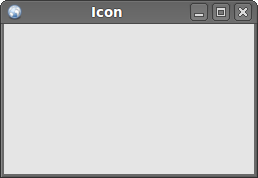 Figure: Icon
An application icon的更多相关文章
- Manifest merger failed : Attribute application@icon value=(@mipmap/ic_launcher) from AndroidManifest
情况是这样子的,导入一个比较老的项目(两年前),它依赖于一个 Libraray,已经先导入了 library,现在导入项目的时候出了错 (1) Android Studio 目前提供将 SDK包成 . ...
- Qt Setting Application Icon
Qt4 设置应用程序图标 将一个ico图标放在资源文件夹下; 然后建立txt,输入 IDI_ICON1 DISCARABLE "myico.ico"; 保存文件,将其后缀改为.rc ...
- iOS 点击Application icon加载推送通知Data
今天做APNS远程推送通知遇到了一个问题,就是手机接收到通知的时候,如果马上点击通知的 alert view时候,系统马上唤醒你的Application,通知或调用你的didReceiveLocalN ...
- 【iOS开发-71】解决方式:Attempting to badge the application icon but haven't received permission from the...
(1)原因 一切都是iOS8捣的鬼.您假设把模拟器换成iOS7.1或者更早的,就不会有这个问题.而如今在iOS8中要实现badge.alert和sound等都需要用户允许才干,由于这些都算做Notif ...
- Attempting to badge the application icon but haven't received permission from the user to badge the application错误解决办法
今天刚刚学习UIApplication对象,当我希望利用这个对象在我们的应用图标上显示个数字的时候,xcode报了这个错误: 解决办法 : - (IBAction)applicationClicke ...
- iOS Icon尺寸、iPhone Ratina 分辨率
高清晰度的iPhone和iPod touch(单位:像素) 启动影像 :640 x 960 APP图标:114 x 114 App Store商店:1024 x 1024 Spotlight搜索小图标 ...
- os项目icon和default 等相关图标命名规则和大小设置
最新的参考apple官网地址:https://developer.apple.com/library/ios/qa/qa1686/_index.html,网页下面有详细的使用方法(ios7以后的) 转 ...
- Starting the application on Mac does not work(拷贝platforms到不同的位置,才能解决问题),还可设置DYLD_PRINT_LIBRARIES=1 观察动态库
In some rare cases it can happen that the application does not launch and there is no reaction after ...
- Error: No resource found that matches the given name (at 'icon' with value '@mipmap/Icon')
问题: error: Error: No resource found that matches the given name (at 'icon' with value '@mipmap/Icon' ...
随机推荐
- [JAVA] JAVA JDK 安装配置
JDK 安装 下载安装 下载JDK 从oracle官方网站下载并安装JDK. 下载使用文档 从oracle官方网站下载使用帮助文档. 安装库源文件 源文件位于安装目录的 /Library/Java/J ...
- MP1593 RT8272 ACT4070 制作的DC-DC稳压电源
http://www.ideyi.org/article/11-05/2575971305526398.html?sort=2068_2073_2092_0 MP1593制作的DC-DC稳压电源,这款 ...
- jquery easyui combobox设置默认选中第一项
combobox的内容是从后台获取的json, js截取: var data = $('#id').combobox('getData'); $("#id ").combobox( ...
- C++空类产生哪些成员函数 || C++类可以自动生成的6个成员函数
class Empty { public: Empty(); // 缺省构造函数 Empty( const Empty& ); // 拷贝构造函数 ~Empty ...
- xarmain使用Forms编译android工程出现support_r19.0.1.zip支持包错误
第一次使用xarain下载Forms程序,提示一下错误. C:\Program Files (x86)\MSBuild\Xamarin\Android\Xamarin.Android.Common.t ...
- 【springMVC 后台跳转前台】1.使用ajax访问的后台,后台正常执行,返回数据,但是不能进入前台的ajax回调函数中 ----2.前后台都没有报错,不能进入ajax回调函数
问题1: 使用ajax访问的后台,后台正常执行,并且正常返回数据,但是不能进入前台的ajax回调函数中 问题展示: 问题解决: 最后发现是因为后台的方法并未加注解:@ResponseBody,导致方 ...
- Selenium2+python自动化41-绕过验证码(add_cookie)
前言 验证码这种问题是比较头疼的,对于验证码的处理,不要去想破解方法,这个验证码本来就是为了防止别人自动化登录的.如果你能破解,说明你们公司的验证码吗安全级别不高,那就需要提高级别了. 对于验证码,要 ...
- 基于tomcat7 web开发中的一点小东西
控制台: org.apache.jasper.compiler.TldLocationsCache tldScanJar 信息: At least one JAR was scanned for TL ...
- java实时监控mysql数据库变化
对于二次开发来说,很大一部分就找找文件和找数据库的变化情况 对于数据库变化.还没有发现比较好用的监控数据库变化监控软件. 今天,我就给大家介绍一个如何使用mysql自带的功能监控数据库变化 1.打开数 ...
- android 利用 aapt 解析 apk 得到应用名称 包名 版本号 权限等信息
在上传各大市场时发现 apk 上传后能自动解析出应用名称.包名.版本号.使用权限等信息,所以就研究了一下 1 直接解压 apk 解析 AndroidManifest.xml 是不行的,因为 apk ...