
MVC扩展ModelBinder,通过继承DefaultModelBinder把表单数据封装成类作为action参数
把视图省、市、街道表单数据,封装成一个类,作为action参数。如下:
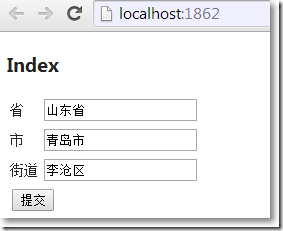
action方法参数类型:
namespace MvcApplication1.Models
{
public class Customer
{
public string Address { get; set; }
}
}
在自定义ModelBinder中,接收视图表单数据,封装成Customer类。
using System.Web;

using System.Web.Mvc;

using MvcApplication1.Models;

namespace MvcApplication1.Extension

{

    public class CustomerBinder : DefaultModelBinder

    {

        public override object BindModel(ControllerContext controllerContext, ModelBindingContext bindingContext)

        {

            if (bindingContext.ModelType == typeof (Customer))

            {

                HttpRequestBase request = controllerContext.HttpContext.Request;

                string province = request.Form.Get("Province");

                string city = request.Form.Get("City");

                string street = request.Form.Get("street");

                return new Customer() {Address = province+city+street};

            }

            else

            {

                return base.BindModel(controllerContext, bindingContext);

            }

        }

    }

}
全局注册:
ModelBinders.Binders.Add(typeof(Customer), new CustomerBinder());
HomeController:
using System.Web.Mvc;

using MvcApplication1.Extension;

using MvcApplication1.Models;

namespace MvcApplication1.Controllers

{

    public class HomeController : Controller

    {

        public ActionResult Index()

        {

            return View();

        }

        [HttpPost]

        public ActionResult Index([ModelBinder(typeof(CustomerBinder))]Customer customer)

        {

            if (ModelState.IsValid)

            {

                return Content(customer.Address);

            }

            return View();

        }

    }

}
Home/Index.cshtml:
@{

    ViewBag.Title = "Index";

    Layout = "~/Views/Shared/_Layout.cshtml";

}

<h2>Index</h2>

@using (Html.BeginForm())

{

    <table>

        <tr>

            <td>省</td>

            <td><input type="text" id="Province" name="Province"/></td>

        </tr>

        <tr>

            <td>市</td>

            <td><input type="text" id="City" name="City"/></td>

        </tr>

        <tr>

            <td>街道</td>

            <td><input type="text" id="Street" name="Street"/></td>

        </tr>

        <tr>

            <td colspan="2"><input type="submit" value="提交"/></td>

        </tr>

    </table>

}
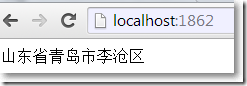
提交后结果:
MVC扩展ModelBinder,通过继承DefaultModelBinder把表单数据封装成类作为action参数的更多相关文章
- form表单数据封装成json格式并提交给服务器
1.jsp代码,form表单: <form action="#" id="costForm"> <input type="hidde ...
- MVC扩展ModelBinder使类型为DateTime的Action参数可以接收日期格式的字符串
原文:MVC扩展ModelBinder使类型为DateTime的Action参数可以接收日期格式的字符串 如何让视图通过某种途径,把符合日期格式的字符串放到路由中,再传递给类型为DateTime的控制 ...
- MVC遇上bootstrap后的ajax表单模型验证
MVC遇上bootstrap后的ajax表单验证 使用bootstrap后他由他自带的样式has-error,想要使用它就会比较麻烦,往常使用jqueyr.validate的话只有使用他自己的样式了, ...
- JavaWeb -- Struts1 使用示例: 表单校验 防表单重复提交 表单数据封装到实体
1. struts 工作流程图 超链接 2. 入门案例 struts入门案例: 1.写一个注册页面,把请求交给 struts处理 <form action="${pageContext ...
- jquery自动将form表单封装成json的具体实现
前端页面:<span style="font-size:14px;"> <form action="" method="post&q ...
- ASP.NET From表单转实体类
原由 经常遇到 int Age=Convert.ToInt32(this.txtAge.Text); 这种蛋疼的代码,特写次方法. 之所以抛出异常是希望知道转换失败,格式错误的属性是什么,方便调试. ...
- 把表单转成json,并且name为key,value为值
http://jsfiddle.net/sxGtM/3/http://stackoverflow.com/questions/1184624/convert-form-data-to-js-objec ...
- <form> 标签 // HTML 表单 // from 表单转换成json 格式
<form> 标签 // HTML 表单 // from 表单转换成json 格式 form 表单,对开发人员来说是在熟悉不过的了,它是页面与web服务器交互时的重要信息来源 表 ...
- java后台表单验证工具类
/** * 描述 java后台表单验证工具类 * * @ClassName ValidationUtil * @Author wzf * @DATE 2018/10/27 15:21 * @VerSi ...
随机推荐
- javaweb作业一
作业:Http全称叫什么?有什么特点?端口号是多少?超文本传输协议:(1)遵循请求/响应模型(2)http协议是一种无状态协议,请求/响应完成后,连接会断开.这时,服务器无法知道当前访问的用户是否是老 ...
- 解决Url带中文参数乱码问题
这里我来介绍下如何配置Tomcat 来解决Url带中文参数乱码问题: 首先打开Tomcat安装目录,以Tomcat7为例,其他版本基本一样: 打开conf文件 打开server.xml 大概在70行左 ...
- 定制Eclipse
转载自http://chriszz.sinaapp.com 一般从Eclipse官网eclipse.org下载的,都是打包好的版本,比如标准版.jee版.java版.c++版.php版.测试版等.有时 ...
- deploy.sh
备份一下之前的一个脚本吧 #!bin/bash adb uninstall org.cocos2d.fishingjoy4 for apk in `find . -name '*.apk' | xar ...
- shell常用
-e filename 如果 filename存在,则为真-d filename 如果 filename为目录,则为真 -f filename 如果 filename为常规文件,则为真-L filen ...
- 【LOJ】#2558. 「LNOI2014」LCA
题解 当年LN还是有专门的省选题的,但是还不如没有 看到这道题,我就想到了一个清晰易懂,简单好写,代码优美的树链剖分线段树套主席树的\(O(q\log^{3}n)\)做法,且就5组数据出题人肯定是不会 ...
- Cobbler图文详解安装及遇到的问题说明
一.介绍 Cobbler是一个使用Python开发的开源项目,通过将部署系统所涉及的所有服务集中在一起,来提供一个全自动批量快速建立linux系统的网络环境, Cobbler提供了DHCP管理,YUM ...
- spring中的scope详解
spring容器中的bean默认是单例模式的,改成非单例模式需要在类上加上@Scope("prototype") 1. scope概论 spring中scope是一个非常关键的概念 ...
- python3.6 利用requests和正则表达式爬取猫眼电影TOP100
import requests from requests.exceptions import RequestException from multiprocessing import Pool im ...
- 转 Java高级程序员面试题
1.你认为项目中最重要的过程是那些? 分析.设计阶段 尽量找出进度的优先级 2.如果给你一个4-6人的team,怎么分配? 挑选一技术过硬的人作为我的替补.其它人平均分配任务,每周进行全面的任务分配 ...