
VM ESXI 服务器虚拟化资料积累
编者按:
公司业务需求,公有云平台不能满足部署mac系统环境的需求,故租赁或托管物理机自行虚拟化,使用的工具就是VM ESXI 。从部署到应用都没有遇到过什么问题,但是在今天发生VMware vSphere Client5.5远程连接服务端的失败的问题。所以决定写一篇博文做一下这方面的记录,已作为后期学习和工作使用。
一、VMware vSphere部署
http://herunmin.blog.51cto.com/5586997/1206554 ESXi 5.1 安装 Mac OSX Lion 10.7
二、故障排查:
1.vSphere Client无法连接vSphere server解决一例
参考:http://bbs.51cto.com/thread-1108272-1.html

首先从网络的角度来测试:
ping IP #正常ping通,说明网络链路正常
然后查看端口情况:vm exsi默认使用端口443 902
443端口主要负责别名讯息的传递,而902端口主要负责远端控制台画面的传递
telnet IP 902 #正常telnet 说明该端口正常
telnet IP 443 #telnet失败,说明该端口出现异常,查两方面:防火墙映射和服务器端口是监听
登录服务器端运行:nc -v -z 127.0.0.1 443 #nc: connect to 127.0.0.1 port 443 (tcp) failed: Connection refused
说明此时服务器端口443未被监听。那就想法让他监听上。
资料查明:https://communities.vmware.com/message/2160793#2160793
服务运行负责监听端口 /etc/init.d/rhttpproxy ,然后打开该文件发现命令/sbin/watchdog.sh -d -s $RHTTPPROXY_TAG rhttpproxy ++min=0,swapscope=system,group=hostd -r /etc/vmware/rhttpproxy/config.xml指向一个配置文件,那么接下来就需要修改这个配置文件。
/etc/vmware/rhttpproxy/config.xml文件信息,里面记录了https监听443.尝试重启服务/etc/init.d/rhttpproxy restart
<!--  RhttpProxy configuration file for ESX/ESXi -->

<config>

   <!-- the version of this config file -->

   <version>5.5.0.0</version>

   <!-- working directory  -->

   <workingDir>/var/log/vmware/</workingDir>

   <!-- location to examine for configuration files that are needed -->

   <defaultConfigPath> /etc/vmware/ </defaultConfigPath>

   <log>

      <!-- controls where rolling log files are stored -->

      <directory>/var/log/vmware/</directory>

      <!-- name of log file -->

      <name>rhttpproxy</name>

      <!-- controls whether logger sends its output to console also -->

      <outputToConsole>false</outputToConsole>

      <!-- If true, log to files on disk -->

      <outputToFiles>false</outputToFiles>

      <!-- default size(in bytes) of each log file before rolling over to next -->

      <maxFileSize>524288</maxFileSize>

      <!-- default number of log files to rotate amongst -->

      <maxFileNum>8</maxFileNum>

      <!-- default log level -->

      <level>verbose</level>

      <!-- If true, logs to syslog -->

      <outputToSyslog>true</outputToSyslog>

      <!-- syslog configuration.  Only used if outputToSyslog is true. -->

      <syslog>

         <!-- syslog identifier to use when logging -->

         <ident>Rhttpproxy</ident>

         <!-- syslog facility to use when logging -->

         <facility>local4</facility>

         <!-- The section header contents are placed in this file at startup.

              When vmsyslogd rotates the hostd log file, it logs the content of this

              file to syslog. This is being done so that we don't lose context on log

              rotations.

              IMPORTANT: Value needs to match that in onrotate entry in

              vmsyslog.d/hostd.conf

         -->

         <logHeaderFile>/var/run/vmware/rhttpproxyLogHeader.txt</logHeaderFile>

      </syslog>

   </log>

   <proxy>

      <!-- default location of the proxy config file -->

      <endpoints>/etc/vmware/rhttpproxy/endpoints.conf</endpoints>

      <!-- HTTP port to be used by the reverse proxy -->

      <httpPort>80</httpPort>

      <!-- HTTPS port to be used by the reverse proxy -->

      <httpsPort>443</httpsPort>

   </proxy>

   <!-- Remove the following node to disable SSL -->

   <ssl>

      <!-- The server private key file -->

      <privateKey>/etc/vmware/ssl/rui.key</privateKey>

      <!-- The server side certificate file -->

      <certificate>/etc/vmware/ssl/rui.crt</certificate>

   </ssl>

   <vmacore>

      <pluginBaseDir>/lib/</pluginBaseDir>

      <!-- default thread pool configuration for Posix impl -->

      <threadPool>

        <IoMin>2</IoMin>

        <IoMax>44</IoMax>

        <TaskMin>2</TaskMin>

        <TaskMax>18</TaskMax>

        <!-- Do not set MaxFdsPerThread if hostdMinFds is set above -->

        <!-- MaxFdsPerThread> 2048 </MaxFdsPerThread -->

        <NumKeepAlive>8</NumKeepAlive>

        <ThreadCheckTimeSecs>600</ThreadCheckTimeSecs>

        <ThreadStackSizeKb>256</ThreadStackSizeKb>

        <threadNamePrefix>rhttpproxy</threadNamePrefix>

      </threadPool>

      <rootPasswdExpiration>false</rootPasswdExpiration>

      <ssl>

          <doVersionCheck> false </doVersionCheck>

          <useCompression>true</useCompression>

          <libraryPath>/lib/</libraryPath>

      </ssl>

      <!-- enable plugin loading -->

      <loadPlugins> false </loadPlugins>

      <!-- enable/disable the dynamic loading of plugins -->

      <loadDynamicPlugins> false </loadDynamicPlugins>

      <!-- should the RefTracker be enabled? -->

      <!-- <useRefTracker>false</useRefTracker> -->

      <!-- Enable/disable the stack tracer -->

      <!-- <useStackTracer>false</useStackTracer> -->

      <xml>

         <doc>

            <!-- maximum size of each XML message. -->

            <maxChars>62914560</maxChars>

            <!-- maximum nodes in of each XML message. -->

            <maxNodes>524288</maxNodes>

            <!-- maximum node depth of each XML message. -->

            <maxDepth>1000</maxDepth>

         </doc>

      </xml>

      <http>

         <!-- Num of max proxy connections -->

         <!-- PR 604415: Temporary lower the connections limit to 128 -->

         <maxConnections> 128 </maxConnections>

      </http>

   </vmacore>

</config>
nc -v -z 127.0.0.1 443 #Connection to 127.0.0.1 443 port [tcp/https] succeeded!
测试客户端连接。正常。
总结:这次问题解决了一下午。需要总结的就是对于这个虚拟化平台的命令行参数不清楚。幸亏华为技术帮忙找到nc命令才定位到443端口没有起来。在此谢过了。
三、常用命令参考:
1. ESX与ESXi管理员必备25个命令 http://www.cnblogs.com/frostx/p/3705942.html
2.nc命令参数:
nc [-hlnruz][-g<网关...>][-G<指向器数目>][-i<延迟秒数>][-o<输出文件>][-p<通信端口>][-s<来源位址>][-v...][-w<超时秒数>][主机名称][通信端口...]
- -g<网关> 设置路由器跃程通信网关,最丢哦可设置8个。
- -G<指向器数目> 设置来源路由指向器,其数值为4的倍数。
- -h 在线帮助。
- -i<延迟秒数> 设置时间间隔,以便传送信息及扫描通信端口。
- -l 使用监听模式,管控传入的资料。
- -n 直接使用IP地址,而不通过域名服务器。
- -o<输出文件> 指定文件名称,把往来传输的数据以16进制字码倾倒成该文件保存。
- -p<通信端口> 设置本地主机使用的通信端口。
- -r 乱数指定本地与远端主机的通信端口。
- -s<来源位址> 设置本地主机送出数据包的IP地址。
- -u 使用UDP传输协议。
- -v 显示指令执行过程。
- -w<超时秒数> 设置等待连线的时间。
- -z 使用0输入/输出模式,只在扫描通信端口时使用。
示例:
TCP端口扫描 nc -u -z -w2 192.168.0.1 1-1000 //扫描192.168.0.3 的端口 范围是 1-1000
nc -nvv 192.168.0.1 80 //扫描 80端口
3.查看路由信息命令:
- esxcfg-route -l
VMkernel Routes:

Network Netmask Gateway Interface

10.124.177.0 255.255.255.0 Local Subnet vmk0

default 0.0.0.0 10.124.177.1 vmk0
esxcli network ip route ipv4 list
Network Netmask Gateway Interface Source

------------ ------------- ------------ --------- ------

default 0.0.0.0 10.124.177.1 vmk0 MANUAL

10.124.177.0 255.255.255.0 0.0.0.0 vmk0 MANUAL
4.查看hostd状态
/etc/init.d/hostd status
hostd is running.
/etc/init.d/hostd {start|stop|restart|status}
三、ESxi升级
参考链接:
https://www.jb51.net/softjc/612974_all.html
https://www.cisco.com/c/zh_cn/support/docs/servers-unified-computing/vmware-esxi-cisco-ucs/211521-How-to-Upgrade-VMware-ESXi-from-version.html
https://wenku.baidu.com/view/2a6307d759f5f61fb7360b4c2e3f5727a5e924c8.html
VMware vSphere Client各版本官方下载地址
版本升级对照表:
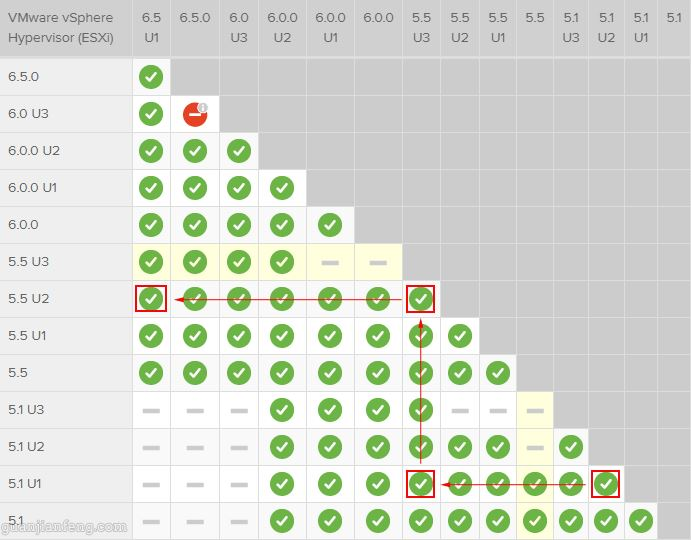
实验环境是:Esxi5.1 --->6.5
升级过程:Esxi5.1--->Esxi6.0---->Esxi6.5
升级命令:
5.1|5.5 --> 6.0

esxcli software sources profile list --depot=/vmfs/volumes/5384d7fc-83b4c32c-e5a5-c81f66bca93b/ESXi600-201706001.zip

esxcli software profile update -d /vmfs/volumes/5384d7fc-83b4c32c-e5a5-c81f66bca93b/ESXi600-201706001.zip -p ESXi-6.0.0-20170604001-standard

6.0 --> 6.5

esxcli software sources profile list --depot=/vmfs/volumes/5384d7fc-83b4c32c-e5a5-c81f66bca93b/update-from-esxi6.5-6.5_update02.zip

esxcli software profile update -d /vmfs/volumes/5384d7fc-83b4c32c-e5a5-c81f66bca93b/update-from-esxi6.5-6.5_update02.zip -p ESXi-6.5.0-20180502001-standard
升级过程遇到的问题:
1. 兼容性问题:
[root@localhost:/vmfs/volumes/5384d7fc-83b4c32c-e5a5-c81f66bca93b] esxcli software profile update -d /vmfs/volumes/5384d7fc-83b4c32c-e5a5-c81f66bca93b/ESXi650-201701001.zip -p ESXi-6.5.0-20170104001-standard

 [DependencyError]

 VIB QLogic_bootbank_scsi-qla4xxx_634.5.7.0-1OEM.500.0.0.472560 requires com.vmware.driverAPI-9.2.0.0, but the requirement cannot be satisfied within the ImageProfile.

 VIB QLogic_bootbank_scsi-qla4xxx_634.5.7.0-1OEM.500.0.0.472560 requires vmkapi_2_0_0_0, but the requirement cannot be satisfied within the ImageProfile.

 VIB Emulex_bootbank_scsi-be2iscsi_4.2.324.12-1OEM.500.0.0.472629 requires vmkapi_2_0_0_0, but the requirement cannot be satisfied within the ImageProfile.

 VIB QLogic_bootbank_net-qlcnic_5.0.750-1OEM.500.0.0.472560 requires com.vmware.driverAPI-9.2.0.0, but the requirement cannot be satisfied within the ImageProfile.

 VIB Brocade_bootbank_net-bna_3.2.0.0-1OEM.500.0.0.472560 requires vmkapi_2_0_0_0, but the requirement cannot be satisfied within the ImageProfile.

 VIB Emulex_bootbank_scsi-be2iscsi_4.2.324.12-1OEM.500.0.0.472629 requires com.vmware.iscsi_linux-9.2.0.0, but the requirement cannot be satisfied within the ImageProfile.

 VIB Emulex_bootbank_scsi-be2iscsi_4.2.324.12-1OEM.500.0.0.472629 requires com.vmware.driverAPI-9.2.0.0, but the requirement cannot be satisfied within the ImageProfile.

 VIB Brocade_bootbank_net-bna_3.2.0.0-1OEM.500.0.0.472560 requires com.vmware.driverAPI-9.2.0.0, but the requirement cannot be satisfied within the ImageProfile.

 VIB VMware_bootbank_net-qlge_2.0.0.54-1vmw.500.0.0.472560 requires vmkapi_2_0_0_0, but the requirement cannot be satisfied within the ImageProfile.

 VIB Intel_bootbank_net-ixgbe_3.11.32-1OEM.500.0.0.472560 requires com.vmware.driverAPI-9.2.0.0, but the requirement cannot be satisfied within the ImageProfile.

 VIB Intel_bootbank_net-ixgbe_3.11.32-1OEM.500.0.0.472560 requires vmkapi_2_0_0_0, but the requirement cannot be satisfied within the ImageProfile.

 VIB QLogic_bootbank_net-qlcnic_5.0.750-1OEM.500.0.0.472560 requires vmkapi_2_0_0_0, but the requirement cannot be satisfied within the ImageProfile.

 VIB VMware_bootbank_net-qlge_2.0.0.54-1vmw.500.0.0.472560 requires com.vmware.driverAPI-9.2.0.0, but the requirement cannot be satisfied within the ImageProfile.

 VIB Brocade_bootbank_scsi-bfa_3.2.0.0-1OEM.500.0.0.472560 requires com.vmware.driverAPI-9.2.0.0, but the requirement cannot be satisfied within the ImageProfile.

 VIB QLogic_bootbank_scsi-qla4xxx_634.5.7.0-1OEM.500.0.0.472560 requires com.vmware.iscsi_linux-9.2.0.0, but the requirement cannot be satisfied within the ImageProfile.

 VIB VMware_bootbank_ehci-ehci-hcd_1.0-4vmw.600.3.69.5572656 requires com.vmware.usb-9.2.3.0, but the requirement cannot be satisfied within the ImageProfile.

 VIB Brocade_bootbank_scsi-bfa_3.2.0.0-1OEM.500.0.0.472560 requires vmkapi_2_0_0_0, but the requirement cannot be satisfied within the ImageProfile.

 Please refer to the log file for more details.
解决方案从这里找到的:https://communities.vmware.com/message/2734060
#获取已经安装的软件包

esxcli software vib list

#根据报错可以看到下面几个软件包影响了升级,需要将其删除

net-bna                        3.2.0.0-1OEM.500.0.0.472560          Brocade  VMwareCertified   2014-05-27

scsi-bfa                       3.2.0.0-1OEM.500.0.0.472560          Brocade  VMwareCertified   2014-05-27

dell-configuration-vib         5.1-0A02                             Dell     PartnerSupported  2014-05-27

ima-be2iscsi                   4.2.324.12-1OEM.500.0.0.472629       Emulex   VMwareCertified   2014-05-27

scsi-be2iscsi                  4.2.324.12-1OEM.500.0.0.472629       Emulex   VMwareCertified   2014-05-27

net-ixgbe                      3.11.32-1OEM.500.0.0.472560          Intel    VMwareCertified   2014-05-27

ima-qla4xxx                    500.2.01.31-1vmw.0.0.060523          QLogic   VMwareCertified   2014-05-27

net-qlcnic                     5.0.750-1OEM.500.0.0.472560          QLogic   VMwareCertified   2014-05-27

scsi-qla4xxx                   634.5.7.0-1OEM.500.0.0.472560        QLogic   VMwareCertified   2014-05-27

net-qlge                       2.0.0.54-1vmw.500.0.0.472560         VMware   VMwareCertified   2014-05-27

#删除软件包命令

esxcli software vib remove -n <vibname>
再执行升级命令既可。每次更新修改都需要重启服务器生效。
VM ESXI 服务器虚拟化资料积累的更多相关文章
- 服务器虚拟化ESXi 5.5安装过程
研究服务器虚拟化实践小结: 实验服务器硬件: 主板 华硕P8B-C/2L CPU Intel Xeon E3-1230 V2 3.3GHz RAM 8G ECC 1600MHz 硬盘 2T 2块 软件 ...
- VMware vSphere服务器虚拟化实验六 vCenter Server 添加储存
VMware vSphere服务器虚拟化实验六 vCente ...
- VMware vSphere6.0 服务器虚拟化部署安装图解
一 VMware vSphere部署的前期规划要点 1 vSphere的优点 (略) 2 如何利用现在的设备架构虚拟化环境 在虚拟化过程中,用户大多会考虑目前现有的服务器.存储.交换机等基础设备是否可 ...
- VMware vSphere6.0 服务器虚拟化部署安装图解(最全,最详细)-搭建的所有步骤
VMware vSphere6.0 服务器虚拟化部署安装图解 一 .VMware vSphere部署的前期规划要点 1.vSphere的优点 (略) 2如何利用现在的设备架构虚拟化环境 在虚拟化过程中 ...
- XenServer(服务器虚拟化平台)
Citrix Xenserver,思杰基于Xen的虚拟化服务器.Citrix XenServer是一种全面而易于管理的服务器虚拟化平台,基于强大的 Xen Hypervisor 程序之上.Xen技术被 ...
- Citrix 服务器虚拟化之二十一 桌面虚拟化之部署Provisioning Services
Citrix 服务器虚拟化之二十一 桌面虚拟化之部署Provisioning Services Provisioning Services 是Citrix 出品的一系列虚拟化产品中最核心的一个组件, ...
- Citrix 服务器虚拟化之八 Xenserver虚拟机模版
Citrix 服务器虚拟化之八 Xenserver虚拟机模版 XenServer与VMware不同,Vmware只能将现有的VM转换成模版,而XenServer具有两种方法:一种是将现有 VM 转换为 ...
- Citrix 服务器虚拟化之五 Xenserver配置存储
Citrix 服务器虚拟化之五 Xenserver配置存储 XenServer中定义了一个容器称为存储库(SR)来描述一个特定的存储目标存储虚拟磁盘映像(VDI). VDI是一个的磁盘抽象,包含一个 ...
- Citrix 服务器虚拟化之十三 Xenserver虚拟机内存优化与性能监控
Citrix 服务器虚拟化之十三 Xenserver虚拟机内存优化与性能监控 XenServer的DMC通过自动调节运行的虚拟机的内存,每个VM分配给指定的最小和最大内存值之间,以保证性能并允许每 ...
随机推荐
- 题解 P1967 【货车运输】
树链剖分+线段树 思路 貌似题解里没有树链剖分和线段树的,贡献一发. 首先明确题目要求:一辆车走某条路从x城到y城的边权最小值 我们把要求分开来看: 从x城到y城:我们需要走的路径将两点联通 边权最小 ...
- HTTP协议(2)-------- 网络编程
1. HTTP请求格式 做过Socket编程的人都知道,当我们设计一个通信协议时,“消息头/消息体”的分割方式是很常用的,消息头告诉对方这个消息是干什么的,消息体告诉对方怎么干.HTTP协议传输的消息 ...
- 如何安装ioncube扩展对PHP代码加密
禅道专业版本的核心代码都是加密的(前端的html, css, js, 配置,语言项是开源的)的,使用的加密软件是 ioncube,因此要能运行禅道专业版本的软件,先要按照ioncube扩展. 一.下载 ...
- bzoj 2456: mode ——独特水法
Description 给你一个n个数的数列,其中某个数出现了超过n div 2次即众数,请你找出那个数. Input 第1行一个正整数n.第2行n个正整数用空格隔开. Output 一行一个正整数表 ...
- opencv的基本数据结构(一)(转)
从2001年以来,opencv的函数库一直是基于C接口构建的,因此在opencv1.0版本中,一般使用IplImage的C结构体在内存中存储图像,因此,我们在很多较经典的书籍或者开源项目中依然可见Ip ...
- 《区块链100问》第82集:应用类项目Golem
Golem是第一个基于以太坊区块链打造的计算资源交易平台.通过区块链,Golem能链接全球的算力资源,从而实现计算能力的全球共享.应用所有者和个体用户(算力“请求方”)可以点对点地从其他用户处租用算力 ...
- Ubuntu 12.04 更新源的方法及地址
本文章转自:http://www.maybe520.net/blog/424/ 安装好ubuntu 12.04之后,可以联网之后,马上要做的最重要的事情之一就是配置更新源列表,这样以后安装更新或者软件 ...
- Linux/Unix系统编程手册 第一章:历史和标准
Unix的开发不受控于某一个厂商或者组织,是由诸多商业和非商业团体共同贡献进行演化的.这导致两个结果:一是Unix集多种特性于一身,二是由于参与者众多,随着时间推移,Unix实现方式逐渐趋于分裂. 由 ...
- [转]坐在马桶上看算法:只有五行的Floyd最短路算法
此算法由Robert W. Floyd(罗伯特·弗洛伊德)于1962年发表在“Communications of the ACM”上.同年Stephen Warshall(史蒂芬·沃舍尔)也独立发表了 ...
- Visual Studio 2010 SP1 在线安装后,找到缓存在本地的临时文件以便下次离线安装
由于在下载Visual Studio 2010安装程序(大约3G左右)的时候速度飞快,大约几分钟下载完毕(多线程下载工具下载),所以笔者在继续安装Visual Studio 2010 SP1的时候也选 ...