
How to Kill All Processes That Have Open Connection in a SQL Server Database[关闭数据库链接 最佳方法] -摘自网络
SQL Server database administrators may frequently need in especially development and test environments instead of the production environments to kill all the open connections to a specific database in order to process SQL Server maintenance task over the SQL Server database.
In such situations when you need to kill or close all the active or open connections to the SQL Server database, you may manage this task by using the Microsoft SQL Server Management Studio or by running t-sql commands or codes. Actually, this task can be thought as a batch task to kill sql process running on a SQL Server.
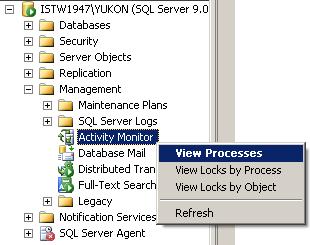
If you open the SQL Server Management Studio and connect to a SQL Server instance you will see the Activity Monitor object in the Object Explorer screen of the related database instance. You can double click the Activity Monitor object or right click to view the context menu and then select a desired item to display the activities to be monitored on the Activity Monitor screen.
As seen on below you can monitor and view process id's and process details on the list of prcesses running on the database instance. If you want you can filter processes based on specific values like user, database or status.
Note that default view when displayed the screen is first opened is filtered only for non-system processes which means system processes which own the first 50 reserved processid's are not listed in the view by default. You can view system processes by removing the filter on "Show System Processes" criteria in the filter settings screen.
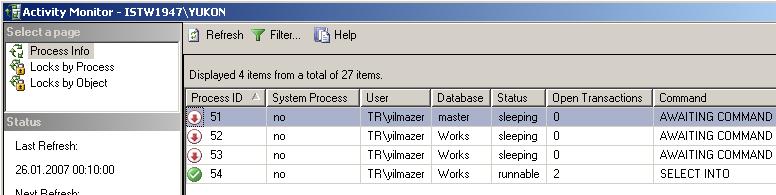
SQL Server 2005 SQL Server Management Studio Activity Monitor screen
You can kill a process by a right click on the process in the grid and selecting the Kill Process menu item. You will be asked for a confirmation to kill the related process and then will kill the open connection to the database over this process. This action is just like running to kill sql process t-sql command for a single process.
A second method which I do not recommend but can be used in some situations may be using the Detach Database screen to drop connections and detaching the database and then re-attaching the database. You can open the Detach Database screen from the context menu displayed by a right click on the related daabase for example for the below screen shot the name of the database is Works. On the menu, highlight menu item Tasks then select the Detach... menu item. This selection will open the detach database dialog screen. Note that if in the message column it is declared that active connections exists as for our case the number of active connections is 2, you will not be able to detach the database unless the Drop Connections checkbox is also selected.

The above configuration as the Drop Connections check box is cleared and active connections exist, the detach task will fail:
 Detach database failed for Server '{DatabaseInstanceName}'. (Microsoft.SqlServer.Smo)
 For help, click: http://go.microsoft.com/fwlink?ProdName=Microsoft+SQL+Server& ProdVer=9.00.2047.00& EvtSrc=Microsoft.SqlServer.Management.Smo.ExceptionTemplates. FailedOperationExceptionText& EvtID=Detach+database+Server& LinkId=20476
 An exception occurred while executing a Transact-SQL statement or batch.  (Microsoft.SqlServer.ConnectionInfo)
 Cannot detach the database '{DatabaseName}' because it is currently in use.  (Microsoft SQL Server, Error: 3703)
But if the Drop Connections is selected you can successfully detach the database. Then you will have to re-attach the database by selecting the Attach command from the context menu item displayed on the Databases node of the SQL Server instance.
For SQL Server 2000 the default behaviour was different than the SQL Server 2005. Because in SQL Server 2000, when you run the detach command from the menu item, you are prompted if you want to drop all active connections. Then you can confirm closing of all open connections, but the nice thing is that you can cancel detach process after the open connections are dropped or closed. But for SQL Server 2005, this behaviour is not valid.
How to Kill All Processes using T-SQL Code
By using t-sql commands or sql codes, similarly closing connections can be implemented by a few methods. One of the methods is using a cursor which loops for all the active connections of the related database and kill these processes. This method was also mention on SQL Server article named How to Alter a SQL Server Database as Single User Mode and as Multi User Mode
The below code block can be used to kill all processes which are connected to the sql database named @DatabaseName except the process that the code block is running in the scope of. You can also set the SQL Server database name by the DB_NAME() property.
The base of the below t-sql script is sql Kill SPId command. Within the sql cursor which loops through each process in sysProcesses view, each time a tsql Kill process command is called passing the SPId as an argument. And after Kill SPId sql statement is executed for each process, all database connections are dropped.
SQL Server database administrators can use below t-sql script in order to drop connections SQL Server 2008, or SQL Server 2005 and also drop connections to sql server 2000 database.
 DECLARE @DatabaseName nvarchar(50)  DECLARE @SPId int  DECLARE @SQL nvarchar(100)
 --SET @DatabaseName = N'AdventureWorks2008'  SET @DatabaseName = DB_NAME()  DECLARE my_cursor CURSOR FAST_FORWARD FOR  SELECT SPId FROM MASTER..SysProcesses  WHERE DBId = DB_ID(@DatabaseName) AND SPId <> @@SPId
 OPEN my_cursor
 FETCH NEXT FROM my_cursor INTO @SPId
 WHILE @@FETCH_STATUS = 0  BEGIN   SET @SQL = 'KILL ' + CAST(@SPId as nvarchar(10))   print @SQL   EXEC sp_executeSQL @SQL   --KILL @SPId -- Causing Incorrect syntax near '@spid'.
  FETCH NEXT FROM my_cursor INTO @SPId  END
 CLOSE my_cursor  DEALLOCATE my_cursor
UPDATE : Please note that I altered above t-sql script and removed KILL @SPId sql statement. It was causing the below error. Msg 102, Level 15, State 1, Line 19 Incorrect syntax near '@SPId'. This is because the sql processid can not be used using a variable with sql KILL command. The solution is using dynamic t-sql statement as shown in the above sql cursor code.
A second way to drop all active connections of a database can be implemented by generating dynamic sql commands that runs a list of "Kill @spId" commands.
 DECLARE @DatabaseName nvarchar(50)  SET @DatabaseName = N'Works'  --SET @DatabaseName = DB_NAME()
 DECLARE @SQL varchar(max)  SET @SQL = ''
 SELECT @SQL = @SQL + 'Kill ' + Convert(varchar, SPId) + ';'  FROM MASTER..SysProcesses  WHERE DBId = DB_ID(@DatabaseName) AND SPId <> @@SPId
 -- SELECT @SQL   EXEC(@SQL)
A very similar to the sql code above, an other code block can be used by using the COALESCE as shown below
 DECLARE @DatabaseName nvarchar(50)  SET @DatabaseName = N'Works'
 DECLARE @SQL varchar(max)
 SELECT @SQL = COALESCE(@SQL,'') + 'Kill ' + Convert(varchar, SPId) + ';'  FROM MASTER..SysProcesses  WHERE DBId = DB_ID(@DatabaseName) AND SPId <> @@SPId
 --SELECT @SQL   EXEC(@SQL)
The above sql queries can be modified further for specific needs. For example you may create a sql stored procedure that drops all existing active connections. You may pass SQL database name or database id as parameter or use the current database information to kill processes except its own process, etc.
How to Kill All Processes That Have Open Connection in a SQL Server Database[关闭数据库链接 最佳方法] -摘自网络的更多相关文章
- (转)How To Kill runaway processes After Terminating Concurrent Request
终止EBS并发请求后,解锁相关的进程. 还有种方法可以在PLSQL->tools->session 中找到并且kill Every concurrent Request uses some ...
- SQL Server会话KILL不掉,一直处于KILLED /ROLLBACK状态情形浅析
今天遇到一个很奇怪的情况,发现一个会话异常,这个会话只是在执行一个简单的存储过程,里面使用了链接服务器(Linked Server)查询另外一台服务器数据(存储过程里面没有任何显性事务.UPDATE. ...
- sql server block如何查询并kill
本帖提供两种做法,可避免在 SQL Server 事务锁定时产生的不正常或长时间阻塞,让用户和程序也无限期等待,甚至引起 connection pooling 连接数超过容量. 所谓的「阻塞」,是指当 ...
- SQL Server会话KILL不掉,一直处于KILLED /ROLLBACK状态情形浅析[转]
本文将为您描述SQL Server会话KILL不掉,一直处于KILLED /ROLLBACK状态情形浅析,教程操作方法: 今天遇到一个很奇怪的情况,发现一个会话异常,这个会话只是在执行一个简单的存储过 ...
- sql server 查看表的死锁和Kill 死锁进程
查询出来 select request_session_id spid, OBJECT_NAME(resource_associated_entity_id) tableNa ...
- sql server 查询和Kill死锁进程
查询死锁进程语句 select request_session_id spid, OBJECT_NAME(resource_associated_entity_id) tab ...
- SQL Server查询死锁并KILL
杀掉死锁的sqlserver进程 SELECT request_session_id spid,OBJECT_NAME (resource_associated_entity_id)tableNa ...
- Sql server 查看锁和Kill 死锁进程
死锁的概念 死锁就是两个或多个会话(SPID)相互请求对方持有的锁资源,导致循环等待的情况.下面两种方法都是用来粗暴的解决死锁的. # 已知阻塞进程ID KILL ID SELECT blocking ...
- SHUTDOWN: Active processes prevent shutdown operation
在使用shutdown immediate关闭数据库时hang住,查看alert 日志,遭遇了SHUTDOWN: Active processes prevent shutdown operation ...
随机推荐
- Oracle控制文件丢失,日志文件丢失
控制文件丢失: alter database backup controlfile to traces; shutdown immediate; @j:\db\script\orcl_ora_ctl_ ...
- Nhibernate cookbook 3.0-翻译
/* Style Definitions */ table.MsoNormalTable {mso-style-name:普通表格; mso-tstyle-rowband-size:0; mso-ts ...
- css中table-layout:fixed 属性的用法
table-layout:fixed 属性的用法:如果想要一个table固定大小,里面的文字强制换行(尤其是在一长串英文文本,并且中间无空格分隔的情况下),以达到使过长的文字 不撑破表格的目的,一般是 ...
- codeforces 395B2 iwiwi
#include<cstdio> #include<cstring> using namespace std; ]="iiiiiiiiiiiiiiiiiiiiii&q ...
- Hibernate 一对多自身双向关联关系 用于类别表的实现
分类:一对多自身双向关联关系 Java持久化类: package com.hyy.hibernate.one_to_many.domain; import java.util.HashSet; imp ...
- IBInspectable的使用
IBInspectable的使用 创建一个分类 定义属性 把此分类的头文件引入到pch里面 此时查看属性面板 就有了可以供我们勾选的选项 在.m中实现一下set和get方法
- dropdownlist无刷新传值
既然局部刷新,其实没有必要用服务器控件,即便用了服务器控件,也不应该将AutoPostBack="true" ,这将导致页面回发并刷新,因此去掉下拉框的该属性 至于局部改变div的 ...
- android usb Host模式下与usb Hid 设备的通信
做android 与USB HID设备的通信有段时间了,总结一下遇到的问题和解决方法: 1,第一次遇到的问题:android 版本低不支持usb hid, 被要求做相关项目的时候,就从mUsbMana ...
- 164. Maximum Gap
题目: Given an unsorted array, find the maximum difference between the successive elements in its sort ...
- The Little Redis Book
一.概念简介: Redis: Redis是一款开源的Key-Value数据库,运行在内存中,由ANSI C编写,详细的信息在Redis官网上面有,因为我自己通过google等各种渠道去学习Redis, ...