
android PreferenceScreen使用笔记
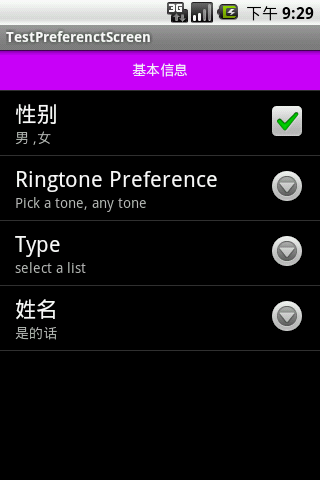
preference.xml
<?xml version="1.0" encoding="utf-8"?>

<PreferenceScreen xmlns:android="http://schemas.android.com/apk/res/android"

    >

    <Preference android:title="基本信息"

        android:layout="@layout/text_view"></Preference> <!--自己定义layout-->

    <CheckBoxPreference android:key="checkbox"

        android:title="性别"

        android:summary="男 ,女"/>

    <RingtonePreference android:key="ringtone"

        android:title="Ringtone Preference"

        android:showDefault="true"

        android:showSilent="true"

        android:summary="Pick a tone, any tone"/>

<ListPreference android:summary="select a list"

    android:title="Type"

    android:entries="@array/my_array" <!--string-array-->

    android:entryValues="@array/my_array"

    android:key="list"/>

<EditTextPreference android:key="edit"

    android:dialogTitle="nihao"

    android:title="姓名"

    />

</PreferenceScreen>
**Activity.java
package com.lin.share;

import android.content.SharedPreferences;

import android.os.Bundle;

import android.preference.EditTextPreference;

import android.preference.ListPreference;

import android.preference.Preference;

import android.preference.Preference.OnPreferenceChangeListener;

import android.preference.PreferenceActivity;

import android.preference.PreferenceManager;

import android.view.View;

public class TestPreferenctScreenActivity extends PreferenceActivity {

    /** Called when the activity is first created. */

    ListPreference  list;

    SharedPreferences prefs;

    EditTextPreference editTextPreference;

    @Override

    public void onCreate(Bundle savedInstanceState) {

        super.onCreate(savedInstanceState);

        addPreferencesFromResource(R.xml.preference);

       prefs=PreferenceManager.getDefaultSharedPreferences(this);

        list=(ListPreference)findPreference("list");

        editTextPreference=(EditTextPreference)findPreference("edit");

        editTextPreference.setSummary(prefs.getString("edit","default"));

        editTextPreference.setOnPreferenceChangeListener(new OnPreferenceChangeListener() {

			@Override

			public boolean onPreferenceChange(Preference preference, Object newValue) {

				// TODO Auto-generated method stub

				editTextPreference.setSummary(newValue.toString());

				editTextPreference.setDefaultValue(newValue);

				editTextPreference.setText(newValue.toString());

				return false;

			}

		});

        list.setOnPreferenceChangeListener(new OnPreferenceChangeListener() {

			@Override

			public boolean onPreferenceChange(Preference preference, Object newValue) {

				System.out.println("change"+newValue);

				list.setSummary(newValue.toString());

				list.setValue(newValue.toString());

				return false;

			}

		});

    }

}
android PreferenceScreen使用笔记的更多相关文章
- Android自动化学习笔记:编写MonkeyRunner脚本的几种方式
---------------------------------------------------------------------------------------------------- ...
- Android自动化学习笔记之MonkeyRunner:官方介绍和简单实例
---------------------------------------------------------------------------------------------------- ...
- android开发学习笔记000
使用书籍:<疯狂android讲义>——李刚著,2011年7月出版 虽然现在已2014,可我挑来跳去,还是以这本书开始我的android之旅吧. “疯狂源自梦想,技术成就辉煌.” 让我这个 ...
- Android动画学习笔记-Android Animation
Android动画学习笔记-Android Animation 3.0以前,android支持两种动画模式,tween animation,frame animation,在android3.0中 ...
- Android 数字签名学习笔记
Android 数字签名学习笔记 在Android系统中,所有安装到系统的应用程序都必有一个数字证书,此数字证书用于标识应用程序的作者和在应用程序之间建立信任关系,如果一个permission的pro ...
- Android高级编程笔记(四)深入探讨Activity(转)
在应用程序中至少包含一个用来处理应用程序的主UI功能的主界面屏幕.这个主界面一般由多个Fragment组成,并由一组次要Activity支持.要在屏幕之间切换,就必须要启动一个新的Activity.一 ...
- Android群英传笔记——第十二章:Android5.X 新特性详解,Material Design UI的新体验
Android群英传笔记--第十二章:Android5.X 新特性详解,Material Design UI的新体验 第十一章为什么不写,因为我很早之前就已经写过了,有需要的可以去看 Android高 ...
- Android群英传笔记——第十章:Android性能优化
Android群英传笔记--第十章:Android性能优化 随着Android应用增多,功能越来越复杂,布局也越来越丰富了,而这些也成为了阻碍一个应用流畅运行,因此,对复杂的功能进行性能优化是创造高质 ...
- Android群英传笔记——第九章:Android系统信息和安全机制
Android群英传笔记--第九章:Android系统信息和安全机制 本书也正式的进入尾声了,在android的世界了,不同的软件,硬件信息就像一个国家的经济水平,军事水平,不同的配置参数,代表着一个 ...
随机推荐
- Objective-C 笔记二 类、对象和方法
对象就是一个物件.面向对象的程序设计可以看成一个物件和你想对它做的事情.这与C语言不同,C语言通常称为过程性语言.在C语言中,通常是先考虑要做什么,然后才关注对象,这几乎总是与面相对象的思考过程相反. ...
- CSS 布局Float 【1】
1.HTML元素分类 HTML元素大题可分为内联(inline)元素和块(block)元素. 1.1 内联元素(inline) ①元素显示方式:"文本方式",1个挨着1个,不独自占 ...
- Python网页爬虫(一)
很多时候我们想要获得网站的数据,但是网站并没有提供相应的API调用,这时候应该怎么办呢?还有的时候我们需要模拟人的一些行为,例如点击网页上的按钮等,又有什么好的解决方法吗?这些正是python和网页爬 ...
- canvas新属性
lineCap默认值是butt,还有aquare,round 使用:context.lineCap="butt" lineJoin miter是默认 还可以是round,bevel ...
- js 鼠标双击滚动单击停止
<!DOCTYPE html> <html> <head> <title>双击滚动代码</title> <script src=&qu ...
- bzoj1188: [HNOI2007]分裂游戏
Description 聪聪和睿睿最近迷上了一款叫做分裂的游戏. 该游戏的规则试: 共有 n 个瓶子, 标号为 0,1,2.....n-1, 第 i 个瓶子中装有 p[i]颗巧克力豆,两个人轮流取豆子 ...
- Yii2——MYSQL操作
先创建连接对象 $connection = new \yii\db\Connection([ 'dsn' => $dsn, 'username' => $username, 'passwo ...
- 转:etc/fstab 文件详解
etc/fstab这个文件的所有参数,这个文件是非常重要的.这个文件是配置文件系统的体系,创建的所有分区,都必须写在这个文件里面,否则下次启动的时候你的分区是挂不起来的.首先学习一个mount –a ...
- nutch fetcher.server.delay
1 配置因素 <property> <name>fetcher.server.delay</name> <value>0.0</value&g ...
- 用UNetbootin来安装USB LINUX,好像比ULTRA ISO省事
UNetbootin can create a bootable Live USB drive, or it can make a "frugal install" on your ...