
php学习,一个简单的Calendar(2) 一个简单的活动页面
有了前面的基础,后面就是将页面展示出来。
预览图如下:1号和31号分别有活动,会一并显示出来
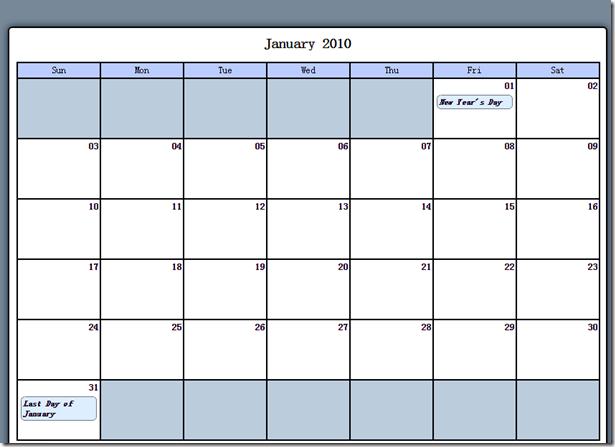
这里需要搞定几个问题,一个就是数据库的连接,我们用\sys\class\class.db_connect.inc.php
<?php
/*
* 数据库操作(数据库访问,认证等)
*/
class DB_Connect
{
/**
* Stores a database object
*
* @var object A database object
*/
protected $db;
/**
* Checks for a DB object or creates one if one isn't found
*
* @param object $dbo A database object
*/
protected function __construct($db = NULL)
{
if (is_object($db)) {
$this->db = $db;
} else {
// Constants are defined in /sys/config/db-cred.inc.php
$dsn = "mysql:host=" . DB_HOST . ";dbname=" . DB_NAME;
try {
$this->db = new PDO($dsn, DB_USER, DB_PASS, array(PDO::MYSQL_ATTR_INIT_COMMAND => 'SET NAMES ' . DB_ENCODE));
} catch (Exception $e) {
// If the DB connection fails, output the error
die ($e->getMessage());
}
}
}
}
?>
程序中需要引入DB_USER等的定义文件:db-cred.inc.php
<?php
/*
* Created on 2012-4-24 by xiongxuebing
*/
/*
* Create an empty array to store constants
*/
$C = array();
/*
* The database host URL
*/
$C['DB_HOST'] = 'localhost';
/*
* The database username
*/
$C['DB_USER'] = 'root';
/*
* The database password
*/
$C['DB_PASS'] = 'root';
/*
* The name of the database to work with
*/
$C['DB_NAME'] = 'php-jquery_example';
$C['DB_ENCODE'] = 'UTF8';
?>
需要注意的是,类似DB_HOST的常量并没有直接定义,而是通过在/sys/core/init.inc.php中进行定义:
foreach ($C as $name => $val) {
    define($name, $val);
}
原文件如下的示:
<?php
/*
* Created on 2016-6-19 by luhx
*/
session_start();
/*
* Generate an anti-CSRF token if one doesn't exist
*/
if (!isset($_SESSION['token'])) {
$_SESSION['token'] = sha1(uniqid(mt_rand(), TRUE));
}
/*
* Include the necessary configuration info
*/
include_once '../sys/config/db-cred.inc.php';
/*
* Define constants for configuration info
*/
foreach ($C as $name => $val) {
define($name, $val);
}
/*
* Create a PDO object
*/
$dsn = "mysql:host=" . DB_HOST . ";dbname=" . DB_NAME;
$dbo = new PDO($dsn, DB_USER, DB_PASS);
/*
* Define the auto-load function for classes
*/
function __autoload($class)
{
$filename = "../sys/class/class." . $class . ".inc.php";
if (file_exists($filename)) {
include_once $filename;
}
}
?>
接下来需显示日历:index.php
<?php
/*
* Created on 2012-4-24 by xiongxuebing
*/
/*
* 包含必须的文件
*/
include_once '../sys/core/init.inc.php';
/*
* 载入日历
*/
$cal = new Calendar($dbo, "2010-01-01 12:00:00");
/**
* 初始化标题和样式文件
*/
$page_title = "Events Calendar";
$css_files = array('style.css');
include_once 'assets/common/header.inc.php';
?>
<?php
/*
* 包含尾页
*/
include_once 'assets/common/footer.inc.php';
?>
<?php
/*
* Created on 2012-4-24 by xiongxuebing
*/
class Calendar extends DB_Connect
{
/**
* 日历根据此日期构建
* YYYY-MM-DD HH:MM:SS
* @var string
*/
private $_useDate;
/**
* 日历显示月份
* @var int
*/
private $_m;
/**
* 年
* @var int
*/
private $_y;
/**
* 这个月有多少天
* @var int
*/
private $_daysInMonth;
/**
* 这个月从周几开始
* @var int
*/
private $_startDay;
public function __construct($dbo = NULL, $useDate = NULL)
{
parent::__construct($dbo);
/*
* Gather and store data relevant to the month
*/
if (isset($useDate)) {
$this->_useDate = $useDate;
} else {
$this->_useDate = date('Y-m-d H:i:s');
}
$ts = strtotime($this->_useDate);
$this->_m = date('m', $ts);
$this->_y = date('Y', $ts);
$this->_daysInMonth = cal_days_in_month(
CAL_GREGORIAN,
$this->_m,
$this->_y
);
$ts = mktime(0, 0, 0, $this->_m, 1, $this->_y);
$this->_startDay = date('w', $ts);
}
/**
* 生成用于显示日历和活动的HTML标记
*
* 使用储存在类属性中的数据,截入给定月份的活动数据,生成并返回完整的日历HTML标记
* @return string 日历HTML标记
*/
public function buildCalendar()
{
/**
* 确定日历显示月份并创建一个用于标识日历每列星期几的缩写数组
*/
$cal_month = date('F Y', strtotime($this->_useDate));
$cal_id = date('Y-m', strtotime($this->_useDate));
$weekdays = array('Sun', 'Mon', 'Tue', 'Wed', 'Thu', 'Fri', 'Sat');
/**
* 给日历标记添加一个标题
*/
$html = "\n\t<h2 id=\"month-$cal_id\">$cal_month</h2>";
for ($d = 0, $labels = NULL; $d < 7; ++$d) {
$labels .= "\n\t\t<li>" . $weekdays[$d] . "</li>";
}
$html .= "\n\t<ul class=\"weekdays\">" . $labels . "\n\t</ul>";
/*
* Load events data
*/
$events = $this->_createEventObj();
/*
* 生成日历HTML标记
*/
$html .= "\n\t<ul>"; // 开始一个新的<ul>
for ($i = 1, $c = 1, $t = date('j'), $m = date('m'), $y = date('Y'); $c <= $this->_daysInMonth; ++$i) {
$event_info = NULL; // clear the variable
//为该月的之前几天添加填充项
$class = $i <= $this->_startDay ? "fill" : NULL;
//如果当前处理日期是今天,则为他添加class today
if ($c == $t && $m == $this->_m && $y == $this->_y) {
$class = "today";
}
$ls = sprintf("\n\t\t<li class=\"%s\">", $class);
$le = "\n\t\t</li>";
if ($this->_startDay < $i && $this->_daysInMonth >= $c) {
if (isset($events[$c])) {
foreach ($events[$c] as $event) {
$link = '<a href="view.php?event_id=' . $event->id . '">' . $event->title . '</a>';
$event_info = "\n\t\t\t$link";
}
}
$date = sprintf("\n\t\t\t<strong>%02d</strong>", $c++);
} else {
$date = " ";
}
//如果赶上星期六,就新起一行
$wrap = $i != 0 && $i % 7 == 0 ? "\n\t</ul>\n\t<ul>" : NULL;
//Assemble the pieces into a finished item
$html .= $ls . $date . $event_info . $le . $wrap;
}
//Add filler to finish out the last week
while ($i % 7 != 1) {
$html .= "\n\t\t<li class=\"fill\"> </li>";
++$i;
}
//Close the final unordered list
$html .= "\n\t</ul>\n\n";
$admin = $this->_adminGeneralOptions();
/**
* 返回用于输出的HTML标记
*/
return $html . $admin;
}
/**
* 得到活动信息HTML
* @param int $id 活动ID
* @return string 用于显示活动信息的基本HTML标记
*/
public function displayEvent($id)
{
/**
* Make sure an ID was passed
* */
if (empty($id)) {
return NULL;
}
/**
* Make sure the ID is an integer
**/
$id = preg_replace('/[^0-9]/', '', $id);
/**
* Load the event data from the DB
**/
$event = $this->_loadEventById($id);
/**
* Generate strings for the date, start, and end time
* */
$ts = strtotime($event->start);
$date = date('F d, Y', $ts);
$start = date('g:ia', $ts);
$end = date('g:ia', strtotime($event->end));
/*
* Load admin options if the user is logged in
*/
$admin = $this->_adminEntryOptions($id);
return "<h2>$event->title</h2>\n\t<p class=\"dates\">$date, $start—$end</p>" .
"\n\t<p>$event->description</p>$admin";
}
public function displayForm()
{
if (isset($_POST['event_id'])) {
$id = (int)$_POST['event_id'];
// Force integer type to sanitize data
} else {
$id = NULL;
}
/*
* Instantiate the headline/submit button text
*/
$submit = "Create new!";
/*
* If an ID is passed, loads the associated event
*/
if (!empty($id)) {
$event = $this->_loadEventById($id);
if (!is_object($event)) {
return NULL;
}
$submit = "Edit event!";
}
return <<<FORM_MARKUP
<form action="assets/inc/process.inc.php" method="post">
<fieldset>
<legend>$submit</legend>
<label for="event_title">Event Title</label>
<input type="text" name="event_title" id="event_title" value="$event->title" />
<label for="event_start">Start Time</label>
<input type="text" name="event_start" id="event_start" value="$event->start" />
<label for="event_end">End Time</label>
<input type="text" name="event_end" id="event_end" value="$event->end" />
<label for="event_description">Event Description</label>
<textarea name="event_description" id="event_description">$event->description</textarea>
<input type="hidden" name="event_id" value="$event->id" />
<input type="hidden" name="token" value="$_SESSION[token]" />
<input type="hidden" name="action" value="event_edit" />
<input type="submit" name="event_submit" value="$submit" /> or <a href="./" class = "link">cancel</a>
</fieldset>
</form>
FORM_MARKUP;
}
public function processForm()
{
if ($_POST['action'] != 'event_edit') {
return "The method processForm was accessed incorrectly";
}
$title = htmlentities($_POST['event_title'], ENT_QUOTES, "UTF-8");
$desc = htmlentities($_POST['event_description'], ENT_QUOTES, "UTF-8");
$start = htmlentities($_POST['event_start'], ENT_QUOTES, "UTF-8");
$end = htmlentities($_POST['event_end'], ENT_QUOTES, "UTF-8");
if (!$this->_validDate($start) || !$this->_validDate($end)) {
return "Invalid date format! Use YYYY-MM-DD HH:MM:SS.";
}
/*
* If no event ID passed, create a new event
*/
if (empty($_POST['event_id'])) {
$sql = "INSERT INTO `events` (`event_title`, `event_desc`, `event_start`, `event_end`)" .
" VALUES (:title, :description, :start, :end)";
} else {
$id = (int)$_POST['event_id'];
$sql = "UPDATE `events` SET `event_title`=:title,`event_desc`=:description,`event_start`=:start,`event_end`=:end WHERE `event_id`=$id";
}
try {
$stmt = $this->db->prepare($sql);
$stmt->bindParam(":title", $title, PDO::PARAM_STR);
$stmt->bindParam(":description", $desc, PDO::PARAM_STR);
$stmt->bindParam(":start", $start, PDO::PARAM_STR);
$stmt->bindParam(":end", $end, PDO::PARAM_STR);
$stmt->execute();
$stmt->closeCursor();
return $this->db->lastInsertId();
} catch (Exception $e) {
return $e->getMessage();
}
}
public function confirmDelete($id)
{
if (empty($id)) {
return NULL;
}
$id = preg_replace('/[^0-9]/', '', $id);
/*
* If the confirmation form was submitted and the form.
* has a valid token, check the form submission
*/
if (isset($_POST['confirm_delete']) && $_POST['token'] == $_SESSION['token']) {
/*
* If the deletion is confirmed,
* remove the event from the database
*/
if ($_POST['confirm_delete'] == "删除") {
$sql = "DELETE FROM `events` WHERE `event_id`=:id LIMIT 1";
try {
$stmt = $this->db->prepare($sql);
$stmt->bindParam(":id", $id, PDO::PARAM_INT);
$stmt->execute();
$stmt->closeCursor();
header("Location: ./");
return;
} catch (Exception $e) {
return $e->getMessage();
}
} /*
* If not confirmed,
* sends the user to the main view
*/
else {
header("Location: ./");
return;
}
}
/*
* If the confirmation form hasn't been submitted, display it
* */
$event = $this->_loadEventById($id);
/*
* If no object is returned, return to the main view
* */
if (!is_object($event)) {
header("Location: ./");
}
return <<<CONFIRM_DELETE
<form action="confirmdelete.php" method="post">
<h2>确定要删除 "$event->title" 吗?</h2>
<p>删除后将<strong>不能恢复</strong>!</p>
<p>
<input type="submit" name="confirm_delete" value="删除" />
<input type="submit" name="confirm_delete" value="取消" />
<input type="hidden" name="event_id" value="$event->id" />
<input type="hidden" name="token" value="$_SESSION[token]" />
</p>
</form>
CONFIRM_DELETE;
}
private function _validDate($date)
{
$pattern = '/^(\d{4}(-\d{2}){2} (\d{2})(:\d{2}){2})$/';
/*
* If a match is found, return TRUE. FALSE otherwise.
*/
return preg_match($pattern, $date) == 1 ? TRUE : FALSE;
}
private function _loadEventData($id = NULL)
{
$sql = "SELECT `event_id`, `event_title`, `event_desc`,`event_start`, `event_end` FROM `events`";
if (!empty($id)) {
$sql .= "WHERE `event_id`=:id LIMIT 1";
} else {
$start_ts = mktime(0, 0, 0, $this->_m, 1, $this->_y);
$end_ts = mktime(23, 59, 59, $this->_m + 1, 0, $this->_y);
$start_date = date('Y-m-d H:i:s', $start_ts);
$end_date = date('Y-m-d H:i:s', $end_ts);
$sql .= "WHERE `event_start` BETWEEN '$start_date' AND '$end_date' ORDER BY `event_start`";
}
try {
$stmt = $this->db->prepare($sql);
/*
* Bind the parameter if an ID was passed
*/
if (!empty($id)) {
$stmt->bindParam(":id", $id, PDO::PARAM_INT);
}
$stmt->execute();
$results = $stmt->fetchAll(PDO::FETCH_ASSOC);
$stmt->closeCursor();
return $results;
} catch (Exception $e) {
die ($e->getMessage());
}
}
/**
* 载入该月全部活动信息到一个数组
* @return array 活动信息
*/
private function _createEventObj()
{
/*
* Load the events array
*/
$arr = $this->_loadEventData();
/**
* Create a new array, then organize the events* by the day of the monthon which they occur
* */
$events = array();
foreach ($arr as $event) {
$day = date('j', strtotime($event['event_start']));
try {
$events[$day][] = new Event($event);
} catch (Exception $e) {
die ($e->getMessage());
}
}
return $events;
}
private function _loadEventById($id)
{
/**
* 如果id为空,返回NULL
*/
if (empty($id)) {
return NULL;
}
/**
* 载入活动信息数组
*/
$event = $this->_loadEventData($id);
/**
* 返回event对象
*/
if (isset($event[0])) {
return new Event($event[0]);
} else {
return NULL;
}
}
private function _adminGeneralOptions()
{
if (isset($_SESSION['user'])) {
return <<<ADMIN_OPTIONS
<a href="admin.php" class="admin">+ 新 建 活 动</a>
<form action="assets/inc/process.inc.php" method="post">
<div>
<input type="submit" value="登 出" class="link" />
<input type="hidden" name="token" value="$_SESSION[token]" />
<input type="hidden" name="action" value="user_logout" />
</div>
</form>
ADMIN_OPTIONS;
} else {
return <<<ADMIN_OPTIONS
<a href="login.php" class="link">登 录</a>
ADMIN_OPTIONS;
}
}
private function _adminEntryOptions($id)
{
if (isset($_SESSION['user'])) {
return <<<ADMIN_OPTIONS
<div class="admin-options">
<form action="admin.php" method="post">
<p>
<input type="submit" name="edit_event" value="编 辑" />
<input type="hidden" name="event_id" value="$id" />
</p>
</form>
<form action="confirmdelete.php" method="post">
<p>
<input type="submit" name="delete_event" value="删 除" />
<input type="hidden" name="event_id" value="$id" />
</p>
</form>
</div>
<!-- end .admin-options -->
ADMIN_OPTIONS;
} else {
return NULL;
}
}
}
?>
然后在目录/public/assets/common/中 加入页头文件header.inc.php
<!DOCTYPE html PUBLIC "-//W3C//DTD XHTML 1.0 Strict//EN"
"http://www.w3.org/TR/xhtml1/DTD/xhtml1-strict.dtd">
<html xmlns="http://www.w3.org/1999/xhtml" xml:lang="en" lang="en">
<head>
<meta htp-equiv="Content-Type" content="text/html;charset=utf-8" />
<title><?php echo $page_title; ?></title>
<?php foreach ($css_files as $css): ?>
<link rel="stylesheet" type="text/css" media="screen,projection"
href="assets/css/<?php echo $css; ?>" />
<?php endforeach; ?>
</head>
<body>
页尾文件footer.inc.php
</body>
</html>
加入css文件:public/assets/css/style.css
body{
background-color:#789;
font-famly:georgia,serif;
font-size:13px;
}
#content {
display:block;
width:812px;
margin:40px auto 10px;
padding:10px;
background-color:#FFF;
-moz-border-radius:6px;
-webkit-border-radius:6px;
border-radius:6px;
border:2px solid black;
-moz-box-shadow:0 0 14px #123;
-webkit-box-shadow:0 0 14px #123;
box-shadow:0 0 14px #123;
}
h2,p{
margin:0 auto 14px;
text-align:center;
}
ul{
display:block;
clear:left;
height:82px;
width:812px;
margin:0 auto;
padding: 0;
list-style:none;
background-color:#FFF;
text-align:center;
border:1px solid black;
border-top: 0;
border-bottom: 2px solid black;
}
li {
position:relative;
float:left;
margin:0;
padding:20px 2px 2px;
border-left:1px solid black;
border-right:1px solid black;
width: 110px;
height: 60px;
overflow:hidden;
background-color:white;
}
li:hover{
background-color:#FCB;
z-index:1;
-moz-box-shadow: 0 0 10px #789;
-webkit-box-shadow: 0 0 10px #789;
box-shadow:0 0 10px #789;
}
.weekdays{
height: 20px;
border-top: 2px solid black;
}
.weekdays li{
height: 16px;
padding: 2px 2px;
background-color: #BCF;
}
.fill{
background-color:#BCD;
}
.weekdays li:hover,li.fill:hover{
background-color:#BCD;
-moz-box-shadow: none;
-webkit-box-shadow: none;
box-shadow: none;
}
.weekdays li:hover,.today{
background-color: #BCF;
}
li strong {
position:absolute;
top: 2px;
right:2px;
}
li a {
position: relative;
display:block;
border: 1px dotted black;
margin:2px;
padding:2px;
font-size:11px;
background-color:#BEF;
text-align:left;
-moz-border-radius: 6px;
-webkit-border-radius:6px;
border-radius:6px;
z-index:1;
text-decoration:none;
color:black;
font-weight:bold;
font-style:italic;
}
li a:hover {
background-color:#BCF;
z-index:2;
-moz-box-shadow: 0 0 6px #789;
-webkit-box-shadow: 0 0 6px #789;
box-shadow: 0 0 6px #789;
}
本篇文章对应代码:http://download.csdn.net/detail/luhouxiang/9554054
php学习,一个简单的Calendar(2) 一个简单的活动页面的更多相关文章
- ROS学习记录(三)————创建一个简单的发布节点和订阅节点
暑假在家有些懈怠,不,非常懈怠- -||!良心已经发痛了,想快些补回原来的进度,但忽然发现,中断了一段时间再重新去学习,有的地方连最基本的符号都忘记了 ,这次特意弄个最最基础的,恢复一下,以前的进度. ...
- QML学习笔记(五)— 做一个简单的待做事项列表
做一个简单的QML待做事项列表,能够动态添加和删除和编辑数据 GitHub:八至 作者:狐狸家的鱼 本文链接:QML学习笔记(五)— 做一个待做事项列表 主要用到QML:ListView 效果 全部代 ...
- python Django 学习笔记(六)—— 写一个简单blog做增删改练手
简单效果图 1,创建一个项目myblog 可参考这里 myblog/ manage.py myblog/ __init__.py settings.py urls.py wsgi.py 2,创建blo ...
- Directx11学习笔记【十】 画一个简单的三角形
本篇笔记要实现的是在屏幕上渲染出一个三角形,重点要学习的是渲染一个几何体的流程方式. 为了渲染几何图形,需要一个顶点缓存和一个描述顶点布局的输入层,还有着色器(主要是顶点着色器和像素着色器),下面来看 ...
- 【WPF】学习笔记(一)——做一个简单的电子签名板
参加实习(WPF)已经有两个多周的时间了,踩了一些坑,也算积累了一些小东西,准备慢慢拿出来分享一下.(●'◡'●) 这次呢就讲讲一个简单的电子签名板的实现. 先上张图(PS:字写得比较丑,不要太在意哈 ...
- 【javaFX学习】(一) 建一个简单的界面
转载注明出处:http://www.cnblogs.com/lensener/p/7976953.html 用过swing都知道有多蛋疼,界面有多丑.自从用了javaFX,腰也不酸了,腿也不疼了. 废 ...
- 学习selenium python版最初的一个小想法
这个还是我在刚开始学习selenium的时候做的,自己觉得有点意思,在接下来我会基于目前我对于selenium的一些深入研究,写下我对selenium的理解以及UIAutomation的一些理解,以此 ...
- Neo4j学习笔记(1)——使用API编写一个Hello World程序
项目的创建及配置 因为Neo4j依赖的jar包比较多,所以推荐使用Maven来管理. 首先创建一个Maven Project,添加依赖: <dependency> <groupId& ...
- go语言,golang学习笔记4 用beego跑一个web应用
go语言,golang学习笔记4 用beego跑一个web应用 首页 - beego: 简约 & 强大并存的 Go 应用框架https://beego.me/ 更新的命令是加个 -u 参数,g ...
随机推荐
- DAS 原文出自【比特网】
http://www.360doc.com/content/13/1114/11/10504424_329109113.shtml
- The TCP three-way handshake (connect)/four wave (closed)
TCP, relative to the SOCKET developers create process and link remove process consists of the TCP/IP ...
- Android之发送短信和接收验证码
最近项目需求需要发送短信和接收验证码并将验证码显示在输入框中 以下是我的记录 前提---权限 <uses-permission android:name="andro ...
- Java加密算法 AES
版权声明:本文为博主原创文章,转载请注明出处. [java] view plain copy print?在CODE上查看代码片派生到我的代码片 package com.stone.security; ...
- php连接oracle
1.安装oracle客户端,不管是32位还是64位:当系统是32位的时候,要装32位的客户端,PL/SQL才能给连上数据库 2.php.ini中对应的oracle相关扩展打开.php_openssl. ...
- Top 10 Questions about Java Exceptions--reference
reference from:http://www.programcreek.com/2013/10/top-10-questions-about-java-exceptions/ This arti ...
- “DBUtility.DbHelperSQL”的类型初始值设定项引发异常 “DBUtility.DbHelperSQL”的类型初始值设定项引发异常
今天遇到了一个这样的问题“DBUtility.DbHelperSQL”的类型初始值设定项引发异常“DBUtility.DbHelperSQL”的类型初始值设定项引发异常 也许有和我遇到这问题的人也在这 ...
- mysq优化参数详解:innodb_buffer_pool_size,innodb_file_per_table
Mysql配置参数: thread_pool:如果支持的话,使用线程池 innodb_buffer_pool_size:物理内存50%-70%最高80%独立实例,多实例:60% innodb_flus ...
- 构建本地yum源之rpmbuild
组内准备搭建内部yum源,在这之前需要规范软件的安装目录,并把现有的应用打包. 目前接触两种rpm打包工具,rpmbuild和fpm. - rpmbuild rpmbuild关键是spec文件编写. ...
- 简单的实现QQ通信功能(二)
第二部分:功能需求以及大体思路 一:功能需求: 1. 角色:登录用户. 2. 登录: (1)检查用户名和密码是否正确,正确登录成功,否则提醒用户名或密码错误. (2)登录时可以选择登录状态,送入数据库 ...