
c++ primer plus 第四章 课后题答案

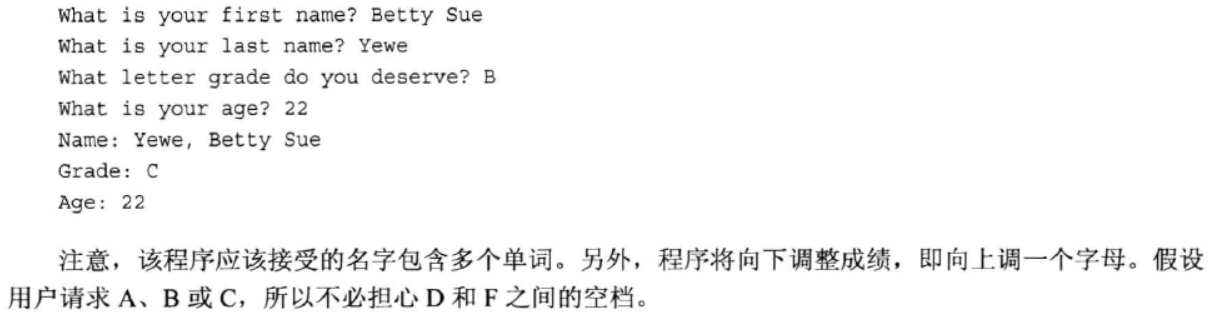
#include<iostream>

#include<string>

using namespace std;

int main()

{

    string first_name;

    string last_name;

    char grade;

    int age;

    cout << "What is your first name? ";

    getline(cin,first_name);

    cout << endl << "What is your last name? ";

    getline(cin,last_name);

    cout << endl << "What letter grade do you deserve? ";

    cin >> grade;

    cout << endl << "What is your age? ";

    cin >> age;

    cout << "Name: " << last_name << ", " << first_name << endl;

    cout << "Grade: " << char(grade + ) << endl;

    cout << "Age: " << age << endl;

    cin.get();

    cin.get();

    return ;

}

#include <iostream>

#include<string>

int main()

{

    using namespace std;

    string name;

    string dessert;

    cout << "Enter your name:\n";

    getline(cin,name);

    cout << "Enter your favorite dessert:\n";

    getline(cin,dessert);

    cout << "I have some delicious " << dessert;

    cout << " for you, " << name << ".\n";

    cin.get();

    return ;

}

#include<iostream>

#include<cstring>

using namespace std;

int main()

{

    char first_name[];

    char last_name[];

    char name[];

    cout << "Enter your first name: ";

    cin >> first_name;

    cout << endl << "Enter your last name: ";

    cin >> last_name;

    strcpy_s(name, last_name);

    strcat_s(name, ",");

    strcat_s(name, first_name);

    cout << endl << "Here’s the information in a single string: " << name;

    //cout << endl << "Here’s the information in a single string: " << last_name << " , " << first_name;

    cin.get();

    cin.get();

    return ;

}

#include<iostream>

#include<string>

using namespace std;

int main()

{

    string first_name;

    string last_name;

    string name;

    cout << "Enter your first name: ";

    getline(cin,first_name);

    cout << "Enter your last name: ";

    getline(cin,last_name);

    name = last_name + "," + first_name;

    cout << "Here's the information in a single string: " << name << endl;

    cin.get();

    //system("pause");

    return ;

}

#include<iostream>

using namespace std;

struct CandyBar

{

    char bard[];

    double weight;

    int calories;

};

int main()

{

    CandyBar snack =

    {

        "Mocha Munch",

        2.3,

    };

    cout << "The bard of this candy is: " << snack.bard << endl;

    cout << "The weight of this candy is: " << snack.weight << endl;

    cout << "The calories of this candy is: " << snack.calories << endl;

    cin.get();

    return ;

}

#include<iostream>

using namespace std;

struct Candy {

    char name[];

    double weight;

    int calories;

};

int main() {

    //Candy snack[3];

    //snack[0] = { "Mocha Munch1", 2.3, 350 };

    //snack[1] = { "Mocha Munch2", 2.5, 360 };

    //snack[2] = { "Mocha Munch3", 2.7, 390 };

    Candy snack[] = { { "Mocha Munch1", 2.3,  } ,

                       { "Mocha Munch2", 2.5,  } ,

                       { "Mocha Munch3", 2.7,  } };

    cout << snack[].name << "'s weight is " << snack[].weight <<

        ", and it includes " << snack[].calories << " calories.\n";

    cout << snack[].name << "'s weight is " << snack[].weight <<

        ", and it includes " << snack[].calories << " calories.\n";

    cout << snack[].name << "'s weight is " << snack[].weight <<

        ", and it includes " << snack[].calories << " calories.\n";

    system("pause");

    return ;

}

#include<iostream>

using namespace std;

struct Pizza

{

    char name[];

    double diameter;

    double weight;

};

int main()

{

    Pizza x;

    cout << "Please enter the name of this pizza: ";

    cin >> x.name;

    cout << "Please enter the diameter of this pizza: ";

    cin >> x.diameter;

    cout << "Please enter the weight of this pizza: ";

    cin >> x.weight;

    cout << "The name of this pizza is " << x.name << endl;

    cout << "The diameter of this pizza is " << x.diameter << endl;

    cout << "The weight of this pizza is " << x.weight << endl;

    system("pause");

    return ;

}

#include<iostream>

using namespace std;

struct Pizza {

    char name[];

    double diameter;

    double weight;

};

int main() {

    Pizza *pizza = new Pizza;

    cout << "Please enter the name of this pizza: ";

    cin >> pizza->name;

    cout << "Please enter the diameter of this pizza: ";

    cin >> pizza->diameter;

    cout << "Please enter the weight of this pizza: ";

    cin >> pizza->weight;

    cout << "The name of this pizza is " << pizza->name << endl;

    cout << "The diameter of this pizza is " << pizza->diameter << endl;

    cout << "The weight of this pizza is " << pizza->weight << endl;

    delete pizza;

    system("pause");

    return ;

}

#include<iostream>

using namespace std;

struct Candy {

    char name[];

    double weight;

    int calories;

};

int main()

{

    Candy *snack = new Candy[];

    snack[] = { "Mocha Munch1", 2.3,  };

    snack[] = { "Mocha Munch2", 2.5,  };

    snack[] = { "Mocha Munch3", 2.7,  };

    cout << snack[].name << "'s weight is " << snack[].weight <<

        ", and it includes " << snack[].calories << " calories.\n";

    cout << snack[].name << "'s weight is " << snack[].weight <<

        ", and it includes " << snack[].calories << " calories.\n";

    cout << snack[].name << "'s weight is " << snack[].weight <<

        ", and it includes " << snack[].calories << " calories.\n";

    delete [] snack;

    system("pause");

    return ;

}

#include<iostream>

#include<array>

using namespace std;

const int Times = ;

int main()

{

    array<double, Times> grade;

    int i;

    double avg_grade=0.0;

    cout << "Please enter your grade: " << endl;

    for (i = ; i <= ; i++)

    {

        cout << endl << ("%d", i+) << " time: ";

        cin >> grade[i];

        avg_grade += grade[i];

    }

    avg_grade = avg_grade / Times;

    cout << endl << "The grade of average is: " << avg_grade << endl;

    system("pause");

    return ;

}
c++ primer plus 第四章 课后题答案的更多相关文章
- c++ primer plus 第七章 课后题答案
#include <iostream> using namespace std; double HAR_AVG(double, double); void TEST(bool); int ...
- c++ primer plus 第六章 课后题答案
#include <iostream> #include <cctype> using namespace std; int main() { char in_put; do ...
- c++ primer plus 第五章 课后题答案
#include <iostream> using namespace std; int main() { ; cout << "Please enter two n ...
- c++ primer plus 第三章 课后题答案
#include<iostream> using namespace std; int main() { ; int shen_gao; cout <<"Please ...
- c++ primer plus 第二章 课后题答案
#include<iostream> using namespace std; int main() { cout << "My name is Jiantong C ...
- 《80x86汇编语言程序设计教程》第二章课后题答案
2.5 习题 2.1 数据寄存器 1. 八个通用寄存器除了各自规定的专门用途外,它们均可以用于传送和暂存数据,可以保存算术逻辑运算中的各种操作数和运算结果. 2.1 AX和Al寄存器又称为累加器(ac ...
- python核心编程第5章课后题答案
5-8Geometry import math def sqcube(): s = float(raw_input('enter length of one side: ')) print 'the ...
- python核心编程第4章课后题答案(第二版75页)
4-1Python objects All Python objects have three attributes:type,ID,and value. All are readonly with ...
- python核心编程第3章课后题答案(第二版55页)
3-4Statements Ues ; 3-5Statements Use\(unless part of a comma-separated sequence in which case \ is ...
随机推荐
- MDX导航结构层次:《Microsoft SQL Server 2008 MDX Step by Step》学习笔记九
<Microsoft SQL Server 2008 MDX Step by Step>学习笔记九:导航结构层次 SQL Server 2008中SQL应用系列及BI笔记系列--目录索 ...
- js判断两个日期是否严格相差整年(合同日期常用)
1.var beginDate = new Date($("#InvoiceStartTime").val()); var endDate = new Date($("# ...
- mysql表空间文件
1.共享表空间文件.默认表空间文件是ibdata1,大小为10M,且可拓展.共享表空间可以由多个文件组成,一个表可以跨多个文件而存在,共享表空间的最大值限制是64T. 2.独立表空间文件.独立表空间只 ...
- mysql表结构文件
- java 事件通告写法
使用场景: 自己模块发生变化后可能引起其他模块变化的部分,需要添加事件通告,通知其他模块. 使用模式: 观察者模式 (以User类为例)写法: 1.创建接口: public interface IUs ...
- pandas练习(一)------ 了解数据
探索Chipotle快餐数据 (相关数据见github) 步骤1 导入pandas库 import pandas as pd 步骤2 导入数据集 path1 = "./data/chipot ...
- Python 迭代器切片
函数itertools.islice() 正好适用于在迭代器和生成器上做切片操作 >>> def count(n): ... while True: ... yield n ... ...
- js 变量 作用域及内存
由于Javascript是松散型的,所以其变量只是在特定时间用于保存特定值的一个名字而已,并不存在某个变量必须保存某种类型的值的规则,变量的值以及其数据类型都可以在脚本的声明周期内改变 一.基本类型与 ...
- nginx+tomcat把带WWW域名自动跳转到不带www域名方法
nginx+tomcat把带WWW域名自动跳转到不带www域名方法在nginx.conf里面 include /etc/nginx/conf.d/*.conf;在应该server里增加: if ($h ...
- MySQL Crash Course #17# Chapter 25. 触发器(Trigger)
推荐看这篇mysql 利用触发器(Trigger)让代码更简单 以及 23.3.1 Trigger Syntax and Examples 感觉有点像 Spring 里的 AOP 我们为什么需要触发器 ...