
前端 html input标签 placeholder属性 标签上显示内容
前端 html input标签 的placeholder属性 标签上显示内容
<!DOCTYPE html>

<html lang="en">

<head>

    <meta charset="UTF-8">

    <title>Title</title>

</head>

<body>

    <div style="width: 600px;margin: auto">

        <input  type="text" placeholder="请输入关键字">

    </div>

</body>

</html>

一输入文本内容 没有了

<!DOCTYPE html>

<html lang="en">

<head>

    <meta charset="UTF-8">

    <meta http-equiv="x-ua-compatible" content="IE=edge">

    <meta name="viewport" content="width=device-width, initial-scale=1">

    <title>Title</title>

</head>

<body>

    <div>

        <form>

            <div>

                <label for="user">用户名:</label>

                <input id="user" name="username" type="text" placeholder="请输入用户名">

            </div>

            <div>

                <label for="pwd">密码:</label>

                <input id="pwd" name="password" type="password" placeholder="请输入密码">

            </div>

        </form>

    </div>

</body>

</html>
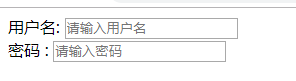
前端 html input标签 placeholder属性 标签上显示内容的更多相关文章
- input 的 placeholder属性在IE8下的兼容处理
placeholder是input标签的新属性,在使用的时候有两个问题: 1.IE8 下不兼容 处理思路: 如果浏览器不识别placeholder属性,给input添加类名placeholder,模仿 ...
- Hmtl5 <input>中placeholder属性(新属性)
Hmtl5 <input>中placeholder属性(新属性) 一.定义和用法 placeholder 属性提供可描述输入字段预期值的提示信息(hint). 该提示会在输入字段为空时显示 ...
- iview+vue 表格任一项实现鼠标划上显示内容
在新版本的iview中,表格新增了tooltip功能: 但做项目时并不是新的iview版本,又不想升级,如何才能实现当内容过多鼠标划上显示内容?下边是我做项目时的改动: { // fixed: 'le ...
- 解决input标签placeholder属性浏览器兼容性问题的一种方法
为文本框input添加文字输入提示,H5为input提供了一个placeholder属性.在支持H5的浏览器中,用此属性设置输入提示,简单方便,但是对于IE8以下版本,都不支持placeholder属 ...
- 修改 input / textarea placeholder 属性的颜色和字体大小
话不多说,直接上代码: input::-webkit-input-placeholder, textarea::-webkit-input-placeholder { color: #666; fon ...
- 前端 HTML form表单标签 input标签 type属性 file 上传文件
加上上传文件功能 input type='file' - 依赖form表单里一个属性 enctype="multipart/form-data" 加上这个属性表示把你上次文件一点 ...
- ie6下使用js替换img标签src属性图片不显示的错误
首先,我必须再次强调一下,F-U-C-K I-E! 其次,简单阐述一下这个bug的出现的情况.页面中有个<a href=”javascript:void(0)” onclick=”swapImg ...
- ie8不兼容input的placeholder属性但是要实现其效果的方法
通过学习前辈的思想,个人想法整理如下: 通过两个元素标签,仿造出placeholder的内容 使用position定位好两个元素标签 第一要隐藏两个元素标签display:none,在<!--[ ...
- angular自定义指令解决IE89不支持input的placeholder属性
下面代码实测通过,直接copy到本地运行即可. <!DOCTYPE html> <html> <head> <meta charset="UTF-8 ...
随机推荐
- JSP基本用法(一)运行机制和语法
一.概述 JSP是一种建立在Servlet规范功能上的动态网页技术,在网页文件中嵌入Java代码和JSP标记用于产生动态内容. 本文简单介绍JSP的运行机制和JSP的语法. 二.JSP的运行机制 JS ...
- WEB-DICT词库计划
欢迎大家支持晓阳童鞋的词库计划,建立一个庞大的中文词库 地址如下:http://webdict.info/ 什么是WEB-DICT词库计划? WEB-DICT词表计划目标是通过机器学习算法以及人工标注 ...
- 浅谈CSS盒子模型
[摘要]盒子模型是CSS中的一个重要概念,虽然CSS中没有盒子这个单独的属性对象,但它却是CSS中无处不在的一个重要组成部分.掌握盒子模型的原理和使用方法可以极大地丰富HTML元素的表现效果,同时对于 ...
- css笔记 - 张鑫旭css课程笔记之 relative 篇
relative地址 relative 对 absolute的限制作用 限制left/top/right/bottom(方位值)定位 限制描述:absolute设置了方位值时,这些方位值是相对于pos ...
- 行逻辑链接的顺序表实现稀疏矩阵的相乘(Java语言描述)
行逻辑链接,带行链接信息.程序有空指针BUG,至今未解决.还是C/C++适合描述算法数据结构.以后复杂的算法还是改用C/C++吧. 有BUG的代码,总有一天会换成没有BUG的. package 行逻辑 ...
- java(4) 异常
1.Throwable 继承体系 * Eorro * Exception --RuntimeException 该类及其子类用于表示运行时异常,Exception类下所有其他子类都用于表示编译时异常. ...
- Sencha Touch 实战开发培训 视频教程 第二期 第六节
2014.4.18 晚上8:20左右开课. 本节课耗时没有超出一个小时. 本期培训一共八节,前两节免费,后面的课程需要付费才可以观看. 本节内容: 图片展示 利用list展示图片: 扩展Carouse ...
- Sencha Touch 实战开发培训 视频教程 第二期 第三节
2014.4.11晚上8:10分开课. 本节课耗时一小时以上. 本期培训一共八节,前两节免费,后面的课程需要付费才可以观看. 本节内容: 本地储存.扩展按钮控件.微博分享 实现 ...
- Linux上VNC 启动和关闭常见问题
0, 重设密码 [root@yqrh5u2 ~]# vncpasswd Password: Verify: [root@yqrh5u2 ~]# 1, ...
- unity3d的优化场景技术LOD+IOC
一.unity3d的优化场景技术 LOD+IOC 遮挡剔除(occlusion culling)其实就是在摄像机范围内的物体才被渲染出来,没有在视野范围内的,统统关掉渲染,这样能让性能大大提高. I ...