
CSS渐变字体、镂空字体、input框提示信息颜色、给图片加上内阴影、3/4圆
1、渐变字体
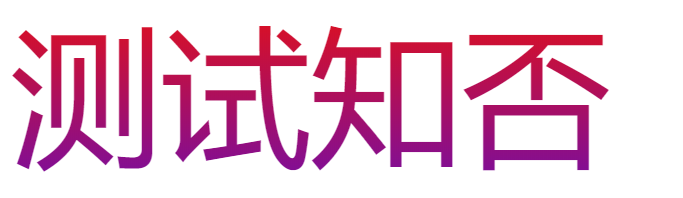
主要是看:-webkit-background-clip: text; 该属性
<style>

        .b1{

          width: 500px;

          height: 200px;

          font-size: 100px;

          background-image: linear-gradient(to bottom, rgb(, , ), rgb(, , ));

          -webkit-background-clip: text;

          color: transparent;

          /* -webkit-text-fill-color: transparent; */

        }

      </style>

    </head>

    <body>

      <div class="b1">

        <div class="b2">测试知否</div>

      </div>

    </body>
2、镂空字体
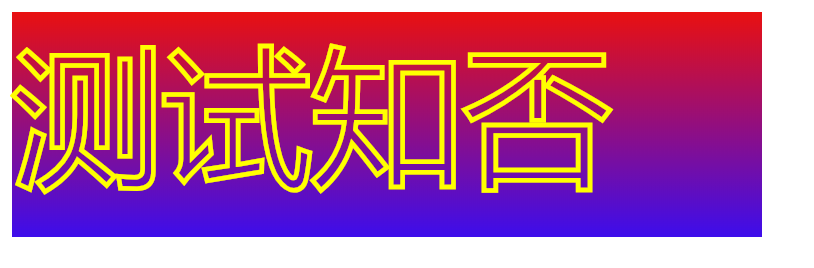
主要是:-webkit-text-stroke: 3px yellow; 该属性。
.b1{

          width: 500px;

          height: 150px;

          font-size: 100px;

          background-image: linear-gradient(to bottom, rgb(, , ), rgb(, , ));

          /* -webkit-background-clip: text; */

          color: transparent;

          -webkit-text-stroke: 3px yellow;

        }
3、input框提示信息颜色


<style>

      /* .b1{

        -webkit-text-stroke: 1px yellow;

      } */

      input::-webkit-input-placeholder { color: red; }/* WebKit browsers */

      input:-moz-placeholder { color: red; }/* Mozilla Firefox 4 to 18 */

      input::-moz-placeholder { color: red; }/* Mozilla Firefox 19+ */

      input:-ms-input-placeholder { color: red; }/* Internet Explorer 10+ */

    </style>

  </head>

  <body>

    <input class="b1" type="text" placeholder="测试知否">

  </body>
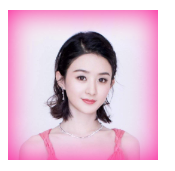
4、给图片加上内阴影
通过 box-shadow 属性可以给DIV增加外阴影,而 inset 这个属性则可以变为内阴影
这里有个小技巧通过给图片设置相对定位并给上叠层顺序为 -1 就可以实现图片内阴影
<style>

      .b1{

        box-shadow:inset   30px #FF1493;

        display:inline-block;

      }

      img{

        position: relative;

        display: block;

        z-index: -;

      }

    </style>

  </head>

  <body>

    <div class="b1">

      <img src="./ly.png" width="100px">

    </div>

  </body>
5、3/4圆
其实3/4圆弧可以用一句css就能解决,border-left:2px solid transparent; 绘出圆后,将一侧边框设置为透明即可搞定
#cir{

    width: 100px;

    height: 100px;

    border: 2px solid red;

    border-radius: %;

    border-left: 2px solid transparent;

    transform: rotate(45deg);

}
CSS渐变字体、镂空字体、input框提示信息颜色、给图片加上内阴影、3/4圆的更多相关文章
- input 框提示信息
给input添加提示信息,只需添加 “placeholder”的class,将提示信息放在value中, 其中“placeholder”的名字是随便取的,不是H5的“placeholder”属性 例子 ...
- from表单、css选择器、css组合器、字体样式、背景属性、边框设置、display设置
目录 一.form表单 1.form表单功能 2.表单使用原理 二.前端基础之css 1.关于css的介绍 2.css语法 3.三种编写CSS的方式 3.1.style内部直接编写css代码 3.2. ...
- 四、Input框改placeholder中字体的颜色
Input框改placeholder中字体的颜色 input::-webkit-input-placeholder { color: #ccc; font-size: 12px; }
- 解决input框中加入disabled="disabled"之后,改变字体的颜色(默认的是灰色)
在input框中加入disabled="disabled"之后,字体默认的就变成灰色了 解决方案 input[disabled]{color:#fff;opacity:1} dis ...
- css 修改placeholder字体颜色字体大小 修改input记住账号密码后的默认背景色
壹 ❀ 引 本来这个阶段的项目页面都是给实习生妹子做的,我只用写写功能接接数据,但这两天妹子要忙翻译,这个工作阶段也快结束了导致有点慌,只能自己把剩余的几个小页面给写了. 那么做页面的过程中,UI也 ...
- 我给女朋友讲编程CSS系列(3) CSS如何设置字体的类型、大小、颜色,如何使用火狐浏览器的Firebug插件查看网页的字体
一.CSS如何设置字体的类型.大小.颜色 设计网页时,一般设置body的字体,让其他标签继承body的字体,这样设置特别方便,但是标题标签h1到h6和表单标签(input类型)是没有继承body的字体 ...
- DIV+CSS+JS实现色彩渐变字体
<!DOCTYPE html> <html> <head> <meta http-equiv="Content-Type" content ...
- 【CSS】input 框的一些事情
1.input框光标太长与不居中的问题 如果input框height:40px 为了字体垂直居中line-height也设为40px 问题来了,这样光标在刚刚focus时候是占据整个input框并且输 ...
- CSS基本知识6-CSS字体
首先要考虑的是文本的排版,实际上有这玩意,Word还需要吗?不需要了.我们列下文本所涉及的操作: CSS 文本属性 属性 描述 color 设置文本颜色 direction 设置文本方向. line- ...
随机推荐
- poj 2253 最短路floyd **
题意:有两只青蛙和若干块石头,现在已知这些东西的坐标,两只青蛙A坐标和青蛙B坐标是第一个和第二个坐标,现在A青蛙想要到B青蛙那里去,并且A青蛙可以借助任意石头的跳跃,而从A到B有若干通路,问从A到B的 ...
- svn简单记录
记录一下工作中常用到的svn命令 一.文件的提交流程 1.svn up // 先更新本地文件 2.svn st // svn status 查看要提交的文件 3.#svn ci -m &quo ...
- OpenVPN推送默认路由表
根据官方Server配置文件:https://github.com/OpenVPN/openvpn/blob/master/sample/sample-config-files/server.conf ...
- PHP上传文件大小限制的问题(转)
在用PHP进行文件上传的操作中,需要知道怎么控制上传文件大小的设置,而文件可传大小是受到多种因素制约的,现总结如下:1.php.ini:upload_max_filesize 所上传的文件的最大大 ...
- In order to use an interrupt in a Cortex-M3/M4, you need the following
a stack. The core automatically saves several registers on the stack when an interrupt fires. Initia ...
- jQuery $('div>ul') $('div ul'
$('div>ul')是<div>的直接后代里找<ul>: 而$('div ul')是在<div>的所有后代里找<ul>.
- MySQL查询报错 ERROR: No query specified
今天1网友,查询报错ERROR: No query specified,随后它发来截图. root case:查询语法错误 \G后面不能再加分号;,由于\G在功能上等同于;,假设加了分号,那么就是;; ...
- 快速将wax配置到项目中进行lua开发
通过Finder浏览到你保存该项目的文件夹.创建三个新的文件夹:wax.scripts和Classes. 第一:首先,下载源代码的压缩包.Wax放在GitHub上(https://github.com ...
- 【mybatis】【mysql】mybatis查询mysql,group by分组查询报错:Expression #1 of SELECT list is not in GROUP BY clause and contains nonaggregated column
mybatis查询mysql,group by分组查询报错:Expression #1 of SELECT list is not in GROUP BY clause and contains no ...
- svn导出文件进行比较
之前有介绍svn log 的命令,即可导出版本A~B之间所有的修改动作,然后复制出相应的文件(中间有一个算法去处理每一个动作,然后得到最终需要导出的文件列表,svn常用动作有:Modified.Add ...