
腾讯云主机安装登录mysql失败--解决方案[重置root密码并实现远程连接]
登录MySQL时报错:Access denied for user 'root'@'localhost' (using password: YES)
解决步骤:
1、使用ssh工具连接主机,使用mysqld_safe命令进入安全模式:
Last login: Thu Jun 22 09:56:57 2017 from 182.50.118.228

[root@VM_219_131_centos ~]# service msyqld status

msyqld: unrecognized service

[root@VM_219_131_centos ~]# service mysqld stop

Stopping mysqld:  [  OK  ]

[root@VM_219_131_centos ~]# service msyqld status

msyqld: unrecognized service

[root@VM_219_131_centos ~]# mysqld_safe --user=mysql --skip-grant-tables --skip-networking &

[] 4436

[root@VM_219_131_centos ~]# 170622 09:58:15 mysqld_safe Logging to '/var/log/mysqld.log'.

170622 09:58:15 mysqld_safe Starting mysqld daemon with databases from /var/lib/mysql

170622 10:02:45 mysqld_safe mysqld from pid file /var/run/mysqld/mysqld.pid ended
2、再打开一个窗口,连接MySQL,就可以为root用户设置密码了:
Last login: Thu Jun 22 09:57:25 2017 from 182.50.118.228

[root@VM_219_131_centos ~]# mysql -uroot mysql

Reading table information for completion of table and column names

You can turn off this feature to get a quicker startup with -A

Welcome to the MySQL monitor.  Commands end with ; or \g.

Your MySQL connection id is 1

Server version: 5.1.73 Source distribution

Copyright (c) 2000, 2013, Oracle and/or its affiliates. All rights reserved.

Oracle is a registered trademark of Oracle Corporation and/or its

affiliates. Other names may be trademarks of their respective

owners.

Type 'help;' or '\h' for help. Type '\c' to clear the current input statement.

mysql> UPDATE user SET Password=PASSWORD('你的密码') where USER='root' and host='root' or host='localhost';

Query OK, 2 rows affected (0.03 sec)

Rows matched: 2  Changed: 2  Warnings: 0

mysql> FLUSH PRIVILEGES;

Query OK, 0 rows affected (0.00 sec)

mysql> quit

Bye

[root@VM_219_131_centos ~]#
3、打开远程连接权限:
Last login: Thu Jun 22 09:58:24 2017 from 182.50.118.228

[root@VM_219_131_centos ~]# service mysqld status

mysqld (pid  4532) is running...

[root@VM_219_131_centos ~]# service mysqld restart

Stopping mysqld:  [  OK  ]

Starting mysqld:  [  OK  ]

[root@VM_219_131_centos ~]# mysql -uroot -p

Enter password:

Welcome to the MySQL monitor.  Commands end with ; or \g.

Your MySQL connection id is 2

Server version: 5.1.73 Source distribution

Copyright (c) 2000, 2013, Oracle and/or its affiliates. All rights reserved.

Oracle is a registered trademark of Oracle Corporation and/or its

affiliates. Other names may be trademarks of their respective

owners.

Type 'help;' or '\h' for help. Type '\c' to clear the current input statement.

mysql> show databases;

+--------------------+

| Database           |

+--------------------+

| information_schema |

| mysql              |

| test               |

+--------------------+

3 rows in set (0.00 sec)

mysql> GRANT ALL PRIVILEGES ON *.* TO 'root'@'%' IDENTIFIED BY '你的密码' WITH GRANT OPTION;

Query OK, 0 rows affected (0.00 sec)

mysql>
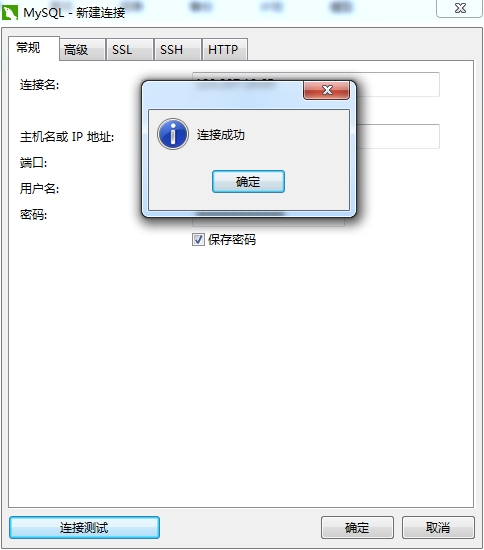
4、使用Navicat工具远程连接,点击左下角的"连接测试",连接成功:
腾讯云主机安装登录mysql失败--解决方案[重置root密码并实现远程连接]的更多相关文章
- Ubuntu腾讯云主机安装分布式memcache服务器,C#中连接云主机进行存储的示例
Ubuntu腾讯云主机安装分布式memcache服务器,C#中连接云主机进行存储的示例(github代码:https://github.com/qq719862911/MemcacheTestDemo ...
- 【转】CentOS6下安装mysql后,重置root密码方法
本文转自:CentOS6下安装mysql后,重置root密码方法 centos下安装mysql,居然不知道root用户密码,本想重装,不过还是先度娘了一些,发现这篇文章,刚好解决我的燃眉之急,太赞了. ...
- 腾讯云ubuntu安装使用MySQL
安装步骤 ubuntu@VM---ubuntu:~$ sudo apt-get install mysql-server (密码: root/root) ubuntu@VM---ubuntu:~$ s ...
- Navicat连接远程主机(腾讯云服务器)的mysql失败,解决
赋予所有用户远程连接的权限,重启mysql即可连接成功: grant all privileges on . to 'root'@'%' identified by 'admin'; systemct ...
- MySql 5.7 重置root密码
一.以安全模式登录 # Stop MySQL sudo service mysql stop # Make MySQL service directory. sudo mkdir -p /var/ru ...
- 腾讯云主机 MySQL 远程访问配置方法
使用腾讯云主机安装 MySQL 之后,需要通过以下步骤进行配置以实现远程访问,主要分为两大部分 一.服务器端口配置 1.如果你的云主机配置了安全组,如果没有配置安全组就可以直接跳过“步骤1”的操作,否 ...
- 访问腾讯云主机mysql的设置问题
---恢复内容开始--- 1.需要打开腾讯云主机的防火墙端口3306,具体实现可以在腾讯云控制台安全组中设置开放全部端口(安全组对应入站.出战规则): 2.将云主机mysql中mysql数据库user ...
- 腾讯云 ubuntuservermysql安装和外网訪问
1 腾讯云 购买ubuntu 默认账户是ubuntu(因为winscp 使用ubuntu没有权限写文件) 因为腾讯云主机ubuntu系统默认username为ubuntu,不喜欢每次做什么都要sudo ...
- 腾讯云-ASP.NET Core+Mysql+Jexus+CDN上云实践
腾讯云-ASP.NET Core+Mysql+Jexus+CDN上云实践.md 开通腾讯云服务器和Mysql 知识点: ASP.NET Core和 Entity Framework Core的使用 L ...
随机推荐
- iOS中判断网络是否联网
#import "AppDelegate.h" #import "ViewController.h" #import "Reachability.h& ...
- hihocoder第218周:AC自动机
题目链接 问题描述 给定n个单词,给定一个长字符串s,单词总长度和字符串s的长度都不超过1e5.要求把s中所有的出现单词的位置用*替代. 例如: 样例输入 2 abc cd abcxyzabcd 样例 ...
- Debug 路漫漫-03
Debug 路漫漫-03:SVD++的 Matlab 版本 SVD++ 的 pu 这一项: 圈圈中的这一项,它既然要和pu 相加 的话 ,那么,它的维度也应该是 m*K.(就是维度和Pu一致的 . 而 ...
- Linux内核的ioctl函数学习
Linux内核的ioctl函数学习 来源:Linux公社 作者:Linux 我这里说的ioctl函数是在驱动程序里的,因为我不知道还有没有别的场合用到了ioctl, 所以就规定了我们讨论的范围.为什 ...
- java线程池的应用
package com.test; import java.util.concurrent.Callable; public class TestThread implements Callable& ...
- 【Oracle】Oracle自定义的函数与过程
本篇主要内容如下: 6.1 引言 6.2 创建函数 6.3 存储过程 6.3.1创建过程 6.3.2调用存储过程 6.3.3 AUTHID 6.3.4 PRAGMA AUTONOMOUS_TRANSA ...
- SQL临时表
临时表就是那些名称以井号 (#) 开头的表.如果当用户断开连接时没有除去临时表,SQL Server 将自动除去临时表.临时表不存储在当前数据库内,而是存储在系统数据库 tempdb 内. 临时表有 ...
- 【AaronYang风格】第一篇 CodeFirst 初恋
原著:Prorgamming Entity Framework Entitywork Code First 大家好! 我是AaronYang,这本书我也挺喜欢的,看了一半了,今晚也没 ...
- MySQL复制的管理和维护
1.查看主库 mysql> show master status; mysql> show master status; +------------------+-----------+- ...
- 供CImage类显示的半透明PNG文件处理方法
原文链接: http://blog.sina.com.cn/s/blog_4070692f010003gy.html 前补:没想到这个帖子好像挺多人看哪……看来大家都被这个png郁闷的够呛.显示p ...