
CSS(八):定位属性
一、position属性
1、relative(相对定位)
- 相对它原来的位置,通过指定偏移,到达新的位置。
- 扔在标准流中,它对父级盒子和相邻的盒子都没有任何影响。
看下面的例子:
<!DOCTYPE html>

<html lang="en">

<head>

    <meta charset="UTF-8">

    <meta name="viewport" content="width=device-width, initial-scale=1.0">

    <meta http-equiv="X-UA-Compatible" content="ie=edge">

    <title>相对定位</title>

    <style type="text/css">

      .box1,.box2,.box3{

         width: 100px;

         height: 100px;

      }

      .box1{

        background-color: red;

      }

      .box2{

        background-color:blue;

      }

      .box3{

        background-color: yellow;

      }

    </style>

</head>

<body>

    <div class="box"></div>

    <div class="box1"></div>

    <div class="box2"></div>

    <div class="box3"></div>

</body>

</html>
效果:

然后分别给第一个和第二个盒子添加定位:
<!DOCTYPE html>

<html lang="en">

<head>

    <meta charset="UTF-8">

    <meta name="viewport" content="width=device-width, initial-scale=1.0">

    <meta http-equiv="X-UA-Compatible" content="ie=edge">

    <title>相对定位</title>

    <style type="text/css">

      .box1,.box2,.box3{

         width: 100px;

         height: 100px;

      }

      .box1{

        background-color: red;

        position: relative;

        left: 100px;

      }

      .box2{

        background-color:blue;

        position: relative;

        left: 100px;

        top: 50px;

      }

      .box3{

        background-color: yellow;

      }

    </style>

</head>

<body>

    <div class="box"></div>

    <div class="box1"></div>

    <div class="box2"></div>

    <div class="box3"></div>

</body>

</html>
效果:
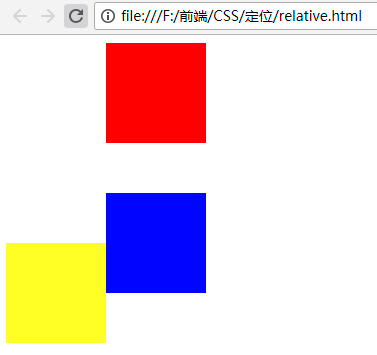
观察上面的截图会发现:第一个和第二个盒子分别相对于原来的位置进行了偏移,但是对父级盒子和相邻的盒子都没有影响。
2、absolute(绝对定位)
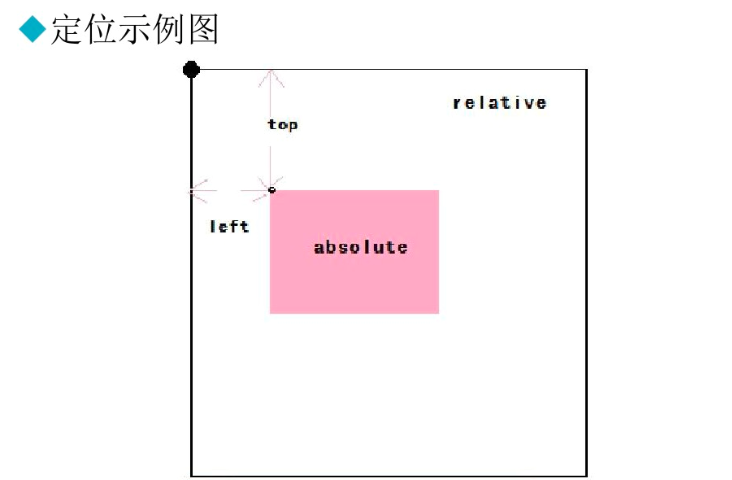
- 相对已设定非static定位属性的父元素计算偏移量,脱离文档流。
看下面的例子:
<!DOCTYPE html>

<html lang="en">

<head>

    <meta charset="UTF-8">

    <meta name="viewport" content="width=device-width, initial-scale=1.0">

    <meta http-equiv="X-UA-Compatible" content="ie=edge">

    <title>绝对定位</title>

    <style type="text/css">

      .box1,.box2,.box3{

         width: 100px;

         height: 100px;

      }

      .box1{

        background-color: red;

        position: relative;

        left: 100px;

      }

      .box2{

        background-color:blue;

        position: absolute;

        left: 100px;

        top: 50px;

      }

      .box3{

        background-color: yellow;

        width: 120px;

      }

    </style>

</head>

<body>

    <div class="box"></div>

    <div class="box1"></div>

    <div class="box2"></div>

    <div class="box3"></div>

</body>

</html>
效果:

观察上面的截图可以发现:absolute定位是脱离文档流的,是相对于父元素进行偏移。
3、fixed(相对浏览器固定定位,IE6不支持)
看下面的例子:
<!DOCTYPE html>

<html lang="en">

<head>

    <meta charset="UTF-8">

    <meta name="viewport" content="width=device-width, initial-scale=1.0">

    <meta http-equiv="X-UA-Compatible" content="ie=edge">

    <title>fixed</title>

    <style type="text/css">

      .box1,.box2,.box3{

         width: 100px;

         height: 100px;

      }

      .box1{

        background-color: red;

        position: relative;

        left: 100px;

      }

      .box2{

        background-color:blue;

        position: absolute;

        left: 100px;

        top: 50px;

      }

      .box3{

        background-color: yellow;

        width: 120px;

        position: fixed;

        left: 100px;

        top: 200px;

      }

    </style>

</head>

<body>

    <div class="box"></div>

    <div class="box1"></div>

    <div class="box2"></div>

    <div class="box3"></div>

    <br /><br /><br /><br /><br /><br /><br /><br /><br /><br /><br /><br /><br /><br /><br />

    <br /><br /><br /><br /><br /><br /><br /><br /><br /><br /><br /><br /><br />

    <br /><br /><br /><br /><br /><br /><br /><br /><br /><br /><br /><br /><br />

    <br /><br /><br /><br /><br /><br /><br />

</body>

</html>
效果:
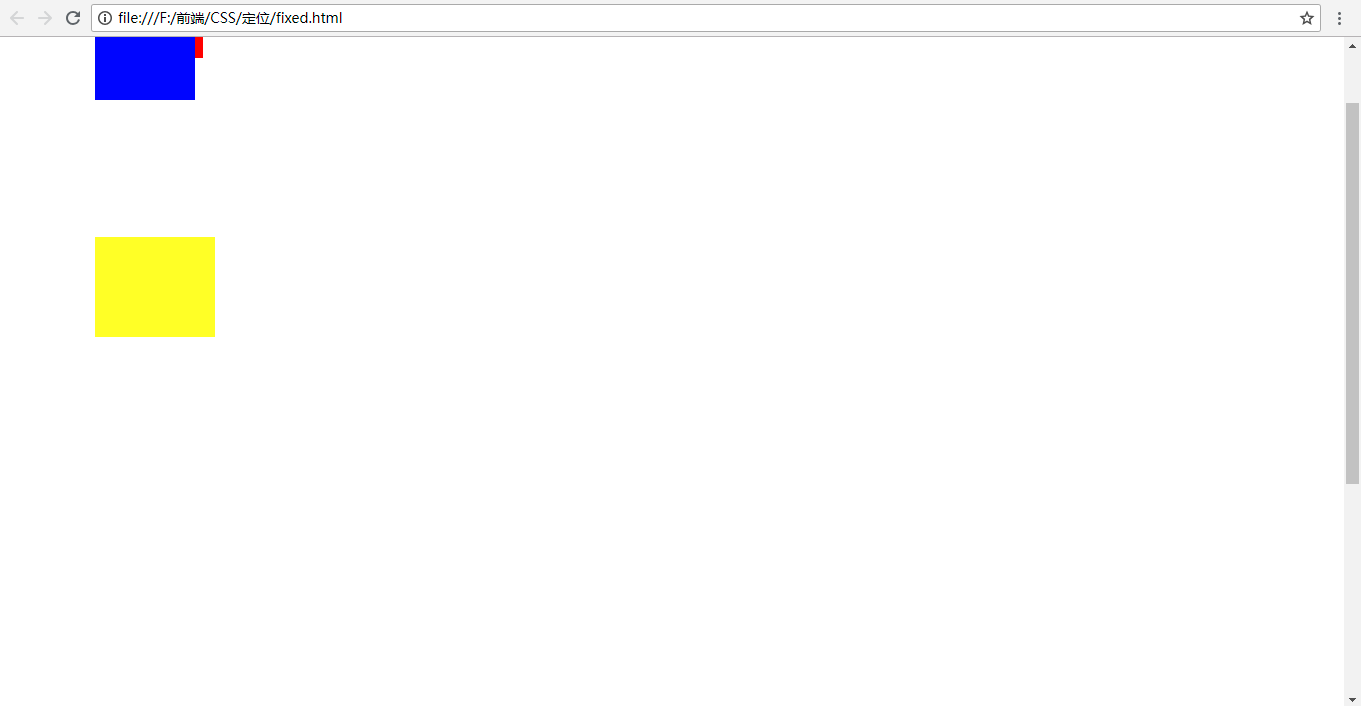
上下移动滚动条的时候你会发现,第三个盒子的位置不会随着滚动条的滚动而上下移动,相对于浏览器是固定的。
4、static(默认)
- 偏移量设置
- X轴(left、right属性)与Y轴(top、bottom属性)
- 可取值:像素或百分比。
5、定位图解
6、Z-Index
Z-Index用来设置定位盒子的层级
- 数字越大层级越高,越在上层。
例如:Z-Index:2;
注意:
- 数字之后没有单位。
- 数字可以设置为负值。
看下面的例子:
<!DOCTYPE html>

<html lang="en">

<head>

    <meta charset="UTF-8">

    <meta name="viewport" content="width=device-width, initial-scale=1.0">

    <meta http-equiv="X-UA-Compatible" content="ie=edge">

    <title>绝对定位</title>

    <style type="text/css">

      .box1,.box2,.box3{

         width: 100px;

         height: 100px;

      }

      .box1{

        background-color: red;

        position: relative;

        left: 100px;

      }

      .box2{

        background-color:blue;

        position: absolute;

        left: 100px;

        top: 50px;

      }

      .box3{

        background-color: yellow;

        width: 120px;

      }

    </style>

</head>

<body>

    <div class="box"></div>

    <div class="box1"></div>

    <div class="box2"></div>

    <div class="box3"></div>

</body>

</html>
效果:

现在给box1添加层级:
<!DOCTYPE html>

<html lang="en">

<head>

    <meta charset="UTF-8">

    <meta name="viewport" content="width=device-width, initial-scale=1.0">

    <meta http-equiv="X-UA-Compatible" content="ie=edge">

    <title>绝对定位</title>

    <style type="text/css">

      .box1,.box2,.box3{

         width: 100px;

         height: 100px;

      }

      .box1{

        background-color: red;

        position: relative;

        left: 100px;

        z-index: 1;

      }

      .box2{

        background-color:blue;

        position: absolute;

        left: 100px;

        top: 50px;

      }

      .box3{

        background-color: yellow;

        width: 120px;

      }

    </style>

</head>

<body>

    <div class="box"></div>

    <div class="box1"></div>

    <div class="box2"></div>

    <div class="box3"></div>

</body>

</html>
效果:

这时box1就会在box2上面。
也可以给box2添加层级:
<!DOCTYPE html>

<html lang="en">

<head>

    <meta charset="UTF-8">

    <meta name="viewport" content="width=device-width, initial-scale=1.0">

    <meta http-equiv="X-UA-Compatible" content="ie=edge">

    <title>绝对定位</title>

    <style type="text/css">

      .box1,.box2,.box3{

         width: 100px;

         height: 100px;

      }

      .box1{

        background-color: red;

        position: relative;

        left: 100px;

        /* z-index: 1; 添加层级 */

      }

      .box2{

        background-color:blue;

        position: absolute;

        left: 100px;

        top: 50px;

        z-index: -2;/*添加负数的层级*/

      }

      .box3{

        background-color: yellow;

        width: 120px;

      }

    </style>

</head>

<body>

    <div class="box"></div>

    <div class="box1"></div>

    <div class="box2"></div>

    <div class="box3"></div>

</body>

</html>
效果:

实例:
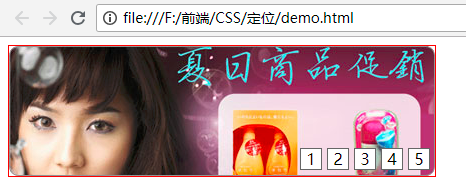
实现网页横幅的效果:
<!DOCTYPE html>

<html lang="en">

<head>

    <meta charset="UTF-8">

    <meta name="viewport" content="width=device-width, initial-scale=1.0">

    <meta http-equiv="X-UA-Compatible" content="ie=edge">

    <title>定位基本应用</title>

    <style type="text/css">

      #adverImg{

          width: 426px;

          height: 130px;/*和图片的宽度和高度一致*/

          position: relative;/*父元素添加相对定位*/

          border: 1px solid red;

      }

      #number{

          position: absolute;

          right: 5px;

          bottom: -10px;

      }

      /*li标签设置样式,使用后代选择器*/

      #number li{

          list-style: none;/*设置li标签样式:不显示前面的圆点*/

          float: left; /*设置浮动:使li标签在一行显示*/

          width: 20px;

          height: 20px;

          border: 1px solid #666666;/*设置边框*/

          margin-left: 5px;/*设置向左的外边距,使每个li标签之间有空格*/

          text-align: center;/*设置文字水平方向居中*/

          line-height: 20px;/*设置文字垂直方向居中*/

          /* color: white; */

          cursor: pointer;/*设置鼠标移动到li标签时显示小手的形状*/

          background-color: white;

      }

    </style>

</head>

<body>

    <div id="adverImg">

        <img src="data:images/adver-01.jpg" alt="商品促销" />

        <ul id="number">

            <li>1</li>

            <li>2</li>

            <li>3</li>

            <li>4</li>

            <li>5</li>

        </ul>

    </div>

</body>

</html>
效果:
CSS(八):定位属性的更多相关文章
- css - Position定位属性与层级关系
今天同事发现一个有意思的问题,关于position的层级关系的,他要不说我也没注意过 测试后果然有趣,有待深入研究: <!DOCTYPE html> <html> <he ...
- CSS Position 定位属性
本篇文章主要介绍元素的Position属性,此属性可以设置元素在页面的定位方式. 目录 1. 介绍 position:介绍position的值以及辅助属性. 2. position 定位方式:介绍po ...
- CSS position(定位)属性
关于CSS position,来自MDN的描述: CSS position属性用于指定一个元素在文档中的定位方式.top.right.bottom.left 属性则决定了该元素的最终位置. 然后来看看 ...
- CSS position定位属性
css中的position属性是用于设置元素位置的定位方式 它有以下几种取值: static:默认定位方式,子容器在父容器中按照默认顺序进行摆放 absolute:绝对定位,元素不占据父容器空间,相当 ...
- CSS的定位属性实现text-shadow属性的文本下产生阴影效果
只要先理解text-shadow的原理,就能用定位元素进行效果的模仿. text-shadow: h-shadiv v-shadov blur color h-shadv为文本水平移动的距离,正值相对 ...
- CSS属性:定位属性(图文详解)
本文最初发表于博客园,并在GitHub上持续更新前端的系列文章.欢迎在GitHub上关注我,一起入门和进阶前端. 以下是正文. CSS的定位属性有三种,分别是绝对定位.相对定位.固定定位. posit ...
- css中的定位属性position(转)
css中的定位属性position 同样的也是上课的时候发现学生难以理解的一些问题拿出来记录一下,希望帮助初学者. 在css中定位属性position的运用在页面中是很常用的,特别是一些结合js来 ...
- css 08-CSS属性:定位属性
08-CSS属性:定位属性 CSS的定位属性有三种,分别是绝对定位.相对定位.固定定位. position: absolute; <!-- 绝对定位 --> position: relat ...
- CSS定位属性Position详解
CSS中最常用的布局类属性,一个是Float(CSS浮动属性Float详解),另一个就是CSS定位属性Position. 1. position:static 所有元素的默认定位都是:position ...
随机推荐
- CentOS 7 设置iptables防火墙开放proftpd端口
由于ftp的被动模式是这样的,客户端跟服务器端的21号端口交互信令,服务器端开启21号端口能够使客户端登录以及查看目录.但是ftp被动模式用于传输数据的端口却不是21,而是大于1024的随机或配置文件 ...
- SQL SERVER 数据库被标记为“可疑”的解决办法
问题背景: 日常对Sql Server 2005关系数据库进行操作时,有时对数据库(如:Sharepoint网站配置数据库名Sharepoint_Config)进行些不正常操作如数据库在读写时而无故停 ...
- [svc]Linux中Swap与Memory内存简单介绍
swap区域是干嘛的 cpu 内存(不常用到的进程swap区) 磁盘 当内存没有可用的,就必须要把内存中不经常运行的程序给踢出去.但是踢到哪里去,这时候swap就出现了. 背景介绍 对于Linux来说 ...
- sql server获取时间格式
在本文中,GetDate()获得的日期由两部分组成,分别是今天的日期和当时的时间: Select GetDate() 用DateName()就可以获得相应的年.月.日,然后再把它们连接起来就可以了: ...
- 菜鸟学Java(十二)——搭建一个完整的Java开发环境
作为一个Java程序员,配置一个java开发环境是必备的技能,今天给广大菜鸟初学者补上一课.环境的配置,大概就分三个1,JDK 2,Tomcat(或者其他的)3,eclipse(或者myeclipse ...
- GitBash: 右键添加 Git Bash Here 菜单
步骤: 1.通过在“运行”中输入‘regedit’,打开注册表. 2.找到[HKEY_CLASSES_ROOT\Directory\Background]. 3.在[Background]下如果没有[ ...
- C++中的typedef typename 作用
今天在代码里看到了这样一段代码: typedef typename RefBase::weakref_type weakref_type; 起初一直搞不懂为什么要加个typename,后来搜索了一下才 ...
- how-apache-flink-enables-new-streaming-applications-part-1
https://data-artisans.com/blog/how-apache-flink-enables-new-streaming-applications-part-1 http://www ...
- angular的uiRouter服务学习(1)
angular有内置的路由服务$route:angular -- $route API翻译 使用$route可以帮助实现路由的切换,视图的改变,但是这个内置的$route只包含了基本的功能,在很多场合 ...
- Pycharm 2017.1 激活服务器
最近发现pycharm激活异常困难 原来的激活码 都不能用了 so 根据网上 教程 自己建了激活服务器 尝试可用服务器 20170504 测试发现 给需要域名 http://www.05nb.com: ...