
Spring Boot 自定义属性 以及 乱码问题
自定义属性
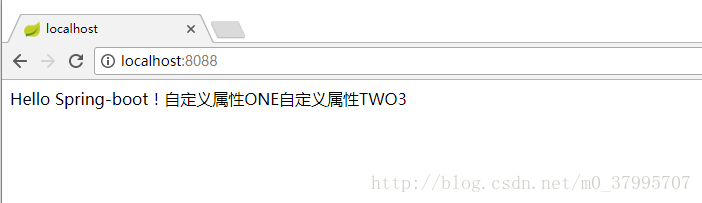
application.properties提供自定义属性的支持,这样我们就可以把一些常量配置在这里:
#自定义属性

com.waiting.custom.one=自定义属性ONE

com.waiting.custom.two=自定义属性TWO

com.waiting.custom.three=3- 1
- 2
- 3
- 4
然后直接在要使用的地方通过注解@Value(value="${config.name}")取出:
@RestController

public class HelloController {

    public final static Logger logger = LoggerFactory.getLogger(HelloController.class);

    @Value("${com.waiting.custom.one}")

    private String stringOne;

    @Value("${com.waiting.custom.two}")

    private String stringTwo;

    @Value("${com.waiting.custom.three}")

    private Integer integerThree;

    @RequestMapping(value = "/",name = "Hello")

    public String testHello(){

        logger.info("logback-ok");

        return "Hello Spring-boot!"+stringOne+stringTwo+integerThree;

    }

}- 1
- 2
- 3
- 4
- 5
- 6
- 7
- 8
- 9
- 10
- 11
- 12
- 13
- 14
- 15
- 16
- 17
- 18
使用随机数及自定义配置类
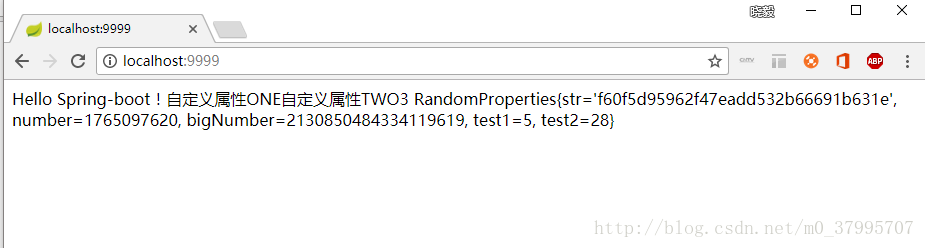
有时候我们需要我们的参数不是一个固定值,而是一个随机数(比如密钥)。Spring Boot的属性配置文件中可以通过${random}来产生int值、long值或者String字符串,来支持属性的随机值。
#随机字符串

com.waiting.random.str=${random.value}

#随机int

com.waiting.random.number=${random.int}

#随机long

com.waiting.random.bigNumber=${random.long}

#10以内的随机数

com.waiting.random.test1=${random.int(10)}

#10-20的随机数

com.waiting.random.test2=${random.int[10,20]}- 1
- 2
- 3
- 4
- 5
- 6
- 7
- 8
- 9
- 10
在这边配置中我们发现有一个特点,所有配置都是以"com.waiting.random"开头的,而且有时候属性太多了,一个个绑定到属性字段上太累,官方提倡绑定一个对象的bean,这里我们建一个RandomProperties .java类,顶部需要使用注解@ConfigurationProperties(prefix = "com.waiting.random")来进行声明:
//@Configuration

//@Component

@ConfigurationProperties(prefix = "com.waiting.random")

public class RandomProperties {

    private String str;

    private Integer number;

    private Long bigNumber;

    private Integer test1;

    private Integer test2;

    // getter/setter方法省略

}- 1
- 2
- 3
- 4
- 5
- 6
- 7
- 8
- 9
- 10
- 11
- 12
- 13
- 14
此时配置完还需要在spring Boot入口类加上@EnableConfigurationProperties并指明要加载哪个bean,如果不写RandomProperties.class,在bean类那边添加@Configuration或者@Component
@SpringBootApplication

@EnableConfigurationProperties({RandomProperties.class})

public class SpringbootdemoApplication {

    public static void main(String[] args) {

        SpringApplication.run(SpringbootdemoApplication.class, args);

    }

}- 1
- 2
- 3
- 4
- 5
- 6
- 7
- 8
把所有的自定义配置都放在application.properties里面会显得臃肿,这时候我们可以另外定义一个配置文件,这里我明取名为random.properties,路径放在src/main/resources/waiting下面。
这里只需要在之前的bean上添加@PropertySource("classpath:waiting/random.properties") 和@Configuration这个注解就可以了。
注意:不能再采取之前的@EnableConfigurationProperties({RandomProperties.class})这个方法。
最后controller层或service获取的时候用@Autowired注解就可以获取。
    @Autowired

    private  RandomProperties randomProperties;

    @Value("${com.waiting.custom.one}")

    private String stringOne;

    @Value("${com.waiting.custom.two}")

    private String stringTwo;

    @Value("${com.waiting.custom.three}")

    private Integer integerThree;

    @RequestMapping(value = "/",name = "Hello")

    public String testHello(){

        logger.info("logback-ok");

        return "Hello Spring-boot!"+stringOne+stringTwo+integerThree+"\r"+randomProperties;

    }
- 1
- 2
- 3
- 4
- 5
- 6
- 7
- 8
- 9
- 10
- 11
- 12
- 13
- 14
- 15
- 16
- 17
中文乱码问题
当在.properties的配置文件中有中文时,读取出来的是乱码。需要进行如下操作:
1、添加配置
#设置spring-boot 编码格式

banner.charset=UTF-8

server.tomcat.uri-encoding=UTF-8

spring.http.encoding.charset=UTF-8

spring.http.encoding.enabled=true

spring.http.encoding.force=true

spring.messages.encoding=UTF-8- 1
- 2
- 3
- 4
- 5
- 6
- 7
2、设置文件类型
将application.properites的文件类型修改为UTF-8的编码类型。
通过以上方法测试获取出来的值还是乱码。
解决办法
2.1、IDEA
设置 File Encodings的Transparent native-to-ascii conversion为true,具体步骤如下:
依次点击
File -> Settings -> Editor -> File Encodings
将Properties Files (*.properties)下的Default encoding for properties files设置为UTF-8,将Transparent native-to-ascii conversion前的勾选上。
2.2、eclipse
在eclipse中安装properties插件PropertiesEditor及设置(附图),ASCII码转换成中文
推荐使用里面的离线安装。安装完成PropertiesEditor 插件后,使用该编辑器重新编辑属性文件中的中文,然后重新运行程序,发现读取的中文配置文件不是乱码了。
Spring Boot 自定义属性 以及 乱码问题的更多相关文章
- spring boot: 中文显示乱码,在applicationContext里面配置
spring boot: 中文显示乱码,在applicationContext里面配置 applicationContext.properties ########################## ...
- 再谈Spring Boot中的乱码和编码问题
编码算不上一个大问题,即使你什么都不管,也有很大的可能你不会遇到任何问题,因为大部分框架都有默认的编码配置,有很多是UTF-8,那么遇到中文乱码的机会很低,所以很多人也忽视了. Spring系列产品大 ...
- spring boot 自定义属性覆盖application文件属性
参考 Spring boot源码分析-ApplicationListener应用环境: https://blog.csdn.net/jamet/article/details/78042486 加载a ...
- Spring Boot自定义属性配置文件开启提示
前言:有时候在Sping Boot项目中需要自定义属性.又想在配置文件(*.properties)中显示提示时. 测试环境:Sping Boot2x + Maven + Lombok 准备测试的配置类 ...
- spring boot + velocity中文乱码解决方式
在application.properties文件中,加入如下配置: spring.velocity.properties.input.encoding=UTF-8spring.velocity.pr ...
- spring boot application.properties乱码问题
1. 在application.properties 中增加 spring.http.encoding.force=true spring.http.encoding.charset=UTF- spr ...
- spring boot 的中文乱码
首先 自检IDEA的编码 配置文件加入设置http tomcat spring.http.encoding.force=true spring.http.encoding.charset=UTF-8 ...
- Spring Boot 从入门到实战汇总
之前写过几篇spring boot入门到实战的博文,因为某些原因没能继续. 框架更新迭代很快,之前还是基于1.x,现在2.x都出来很久了.还是希望能从基于该框架项目开发的整体有一个比较系统的梳理,于是 ...
- Spring Boot整合Activiti,查看流程图出现中文乱码问题
最近研究SpringBoot 整合Activiti时,实现流程图高亮追踪是出现中文乱码问题,找了很多方法,现在把我最后的解决方法提供给大家. Spring Boot是微服务快速开发框架,强调的是零配置 ...
随机推荐
- Android Studio 代码导航快捷键总结
Android Studio 代码导航快捷键总结 这篇文章主要介绍了Android Studio 代码导航快捷键的相关资料,需要的朋友可以参考下 简评:作为一位 Android 开发者,Andro ...
- nginx增加ssl支持 - 编译时参数详情列表
./configure \ --with-http_ssl_module \ make && make install nginx编译参数说明如下: --prefix=&l ...
- 对 /sbin/nologin 的理解
对 /sbin/nologin 的理解 系统账号的shell使用 /sbin/nologin ,此时无法登陆系统,即使给了密码也不行. 所谓“无法登陆”指的仅是这个用户无法使用bash或其他she ...
- sprintboot 发布
http://blog.csdn.net/hguisu/article/details/51072683
- Android各版本代号、版本号、API/NDK级别、发布时间及市场份额
Android各版本代号.版本号.API/NDK级别.发布时间及市场份额 代号 版本号 API/NDK级别 发布时间 - O 8.0 API level 26 2017-3-21 牛轧糖 Nougat ...
- oracle 负载均衡连接方式常用SQL语句备忘录
1.---表中有重复记录用SQL语句查询出来 select * from Recharge where RechargeSerial in (select RechargeSerial from Re ...
- [Windows Azure] Windows Azure Identity
Windows Azure Identity Managing identity is just as important in the public cloud is it is on premis ...
- (原创)c++11改进我们的模式之改进单例模式
我会写关于c++11的一个系列的文章,会讲到如何使用c++11改进我们的程序,本次讲如何改进我们的模式,会讲到如何改进单例模式.观察者模式.访问者模式.工厂模式.命令模式等模式.通过c++11的改进, ...
- python(50):python 向上取整 ceil 向下取整 floor 四舍五入 round
取整:ceil 向下取整:floor 四舍五入:round 使用如下:
- (原) windows下autohotkey的快捷键脚本编写
autohotkey 脚本很强大,可以接受传参.能各种程序逻辑控制.还可以把脚本转换成独立执行的EXE.(安装完后程序目录下有个小程序:Convert .ahk to .exe,直接UI上转换.)总之 ...