
angular学习笔记(三十)-指令(3)-templateUrl
这篇主要介绍指令中的templateUrl属性:
templateUrl属性值是一个url路径,路径指向一个html模板,html模板会填充(或替换)指令内容:
比如上一篇文章里的案例,我们把原来的template属性改用为templateUrl属性:
方法一:
html:
<!DOCTYPE html>

<html ng-app = 'dirAppModule'>

<head>

  <title>20.2 指令(templateUrl)</title>

  <meta charset="utf-8">

  <script src="angular.js"></script>

  <script src="script.js"></script>

  <style type="text/css">

    *{

      font-family:'MICROSOFT YAHEI';

      font-size:12px

    }

    h3 {

      color: #CB2027;

    }

  </style>

</head>

<body>

<div>

  <cd-hello></cd-hello>

  <div cd-hello></div>

  <div class="cd-hello"></div>

</div>

</body>

</html>
js:
var dirAppModule = angular.module('dirAppModule',[]);

dirAppModule.directive('cdHello',function(){

    return {

        restrict:'EAC',

        replace:true,

        templateUrl:'hello.html'

    }

});
hello.html:
<h3>hi,code_bunny</h3>
这样得到的结果和使用template:<h3>hi,code_bunny</h3>得到的结果是一致的.
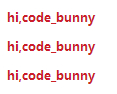
*以这种方式使用templateUrl属性必须在环境中运行,本地文件是不行的.
方法二:
上面这种方式加载模板,在模板文件比较大,加载需要一定时间的情况下,用户可能先看到标识符,等待模板加载完后才看到内容.如果要避免这种情况,可以使用以下方法:
html:
<!DOCTYPE html>

<html ng-app="dirAppModule">

<head>

  <title>20.3指令</title>

  <meta charset="utf-8">

  <script src="../angular.js"></script>

  <script type="text/ng-template" id="hello.html">

    <h3>hi,code_bunny</h3>

  </script>

  <script src="script.js"></script>

</head>

<body>

  <cd-hello></cd-hello>

  <div cd-hello></div>

  <div class="cd-hello"></div>

</body>

</html>
js:
/*20.3 指令 */

var dirAppModule = angular.module('dirAppModule',[]);

dirAppModule.directive('cdHello',function(){

    return {

        restrict:'EAC',

        templateUrl:'hello.html',

        replace:true

    }

});
直接在页面里添加一个script标签,script的type属性为:text/ng-template, script的id属性值自己定义,templateUrl的值就是这个script标签的id属性值,比如这个例子中的hello.html
注意这个script标签是不会发送http请求的.
方法三:
html:
<!DOCTYPE html>

<html ng-app="dirAppModule">

<head>

  <title>20.4指令</title>

  <meta charset="utf-8">

  <script src="../angular.js"></script>

  <script src="script.js"></script>

</head>

<body>

  <cd-hello></cd-hello>

  <div cd-hello></div>

  <div class="cd-hello"></div>

</body>

</html>
js:
/*20.4 指令 */

var appModule = angular.module('dirAppModule', []);

appModule.run(function($templateCache){

    $templateCache.put('hello.html','<h3>hi,code_bunny</h3>')

});

appModule.directive('cdHello',function(){

    return {

        restrict:'EAC',

        templateUrl:'hello.html',

        replace:true

    }

});
说明: 通过angular创建的模块,都有一个run方法,接受一个函数作为参数.该函数会被执行.
$templateCache是angular内置的一个服务,它的put方法用于存放模板.它接受两个参数,第一个参数为模板的名字,也就是templateUrl的值,这里就是hello.html,第二个参数就是html字符串,也就是模板的内容.
这种方法常用于模板内容是通过$http异步获取的.然后将模板放入$templateCache中以便后面使用.
完整代码:https://github.com/OOP-Code-Bunny/angular/tree/master/OREILLY/20.2%20%E6%8C%87%E4%BB%A4
https://github.com/OOP-Code-Bunny/angular/blob/master/OREILLY/20.3%20%E6%8C%87%E4%BB%A4.html
https://github.com/OOP-Code-Bunny/angular/blob/master/OREILLY/20.4%20%E6%8C%87%E4%BB%A4.html
https://github.com/OOP-Code-Bunny/angular/blob/master/OREILLY/script.js
angular学习笔记(三十)-指令(3)-templateUrl的更多相关文章
- angular学习笔记(三十)-指令(10)-require和controller
本篇介绍指令的最后两个属性,require和controller 当一个指令需要和父元素指令进行通信的时候,它们就会用到这两个属性,什么意思还是要看栗子: html: <outer‐direct ...
- angular学习笔记(三十)-指令(7)-compile和link(2)
继续上一篇:angular学习笔记(三十)-指令(7)-compile和link(1) 上一篇讲了compile函数的基本概念,接下来详细讲解compile和link的执行顺序. 看一段三个指令嵌套的 ...
- angular学习笔记(三十)-指令(6)-transclude()方法(又称linker()方法)-模拟ng-repeat指令
在angular学习笔记(三十)-指令(4)-transclude文章的末尾提到了,如果在指令中需要反复使用被嵌套的那一坨,需要使用transclude()方法. 在angular学习笔记(三十)-指 ...
- angular学习笔记(三十)-指令(5)-link
这篇主要介绍angular指令中的link属性: link:function(scope,iEle,iAttrs,ctrl,linker){ .... } link属性值为一个函数,这个函数有五个参数 ...
- angular学习笔记(三十)-指令(2)-restrice,replace,template
本篇主要讲解指令中的 restrict属性, replace属性, template属性 这三个属性 一. restrict: 字符串.定义指令在视图中的使用方式,一共有四种使用方式: 1. 元素: ...
- angular学习笔记(三十)-指令(7)-compile和link(1)
这篇主要讲解指令中的compile,以及它和link的微妙的关系. link函数在之前已经讲过了,而compile函数,它和link函数是不能共存的,如果定义了compile属性又定义link属性,那 ...
- angular学习笔记(三十)-指令(1)-概述
之前在 angular学习笔记(十九)-指令修改dom 里面已经简单的提到了angular中的指令,现在来详细的介绍 '指令' 一.指令的创建: dirAppModule.directive('dir ...
- angular学习笔记(三十)-指令(8)-scope
本篇讲解指令的scope属性: scope属性值可以有三种: 一.scope:false 默认值,这种情况下,指令的作用域就是指令元素当前所在的作用域. 二.scope:true 创建一个继承了父作用 ...
- angular学习笔记(三十)-指令(7)-compile和link(3)
本篇接着上一篇来讲解当指令中带有template(templateUrl)时,compile和link的执行顺序: 把上一个例子的代码再进行一些修改: 1.将level-two指令改成具有templa ...
随机推荐
- Arduino的光敏传感器和超声波测距传感器测试代码
光敏传感器测试代码 使用的是一个未知名4pin模块, 4pin依次为Vcc, Gnd, DO, AO, 板载一个可调电阻以及一个LED, 调节电阻大小, 可以控制LED亮灭和DO输出变化对光亮的灵敏度 ...
- 转:Ogre源码剖析1
初学Ogre 貌似看到一些套路(ajohn) 1 Ogre的编译 获得最新的Ogre 1.71 和之前的Ogre比起来,除了sampler集成之外,最大的改变就是编译过程加入了Cmake,这个东西其 ...
- MySQL与OLAP:分析型SQL查询最佳实践探索
搞点多维分析,糙快猛的解决方式就是使用ROLAP(关系型OLAP)了.数据经维度建模后存储在MySQL,ROLAP引擎(比方开源的Mondrian)负责将OLAP请求转化为SQL语句提交给数据库.OL ...
- EntityFramework 5.0 CodeFirst 教程01-搭建环境和快速上手
----------------------------目录------------------------------ EntityFramework 5.0 CodeFirst 教程03-数据结构 ...
- 【RS】Local Collaborative Ranking - LCR: 局部协同排序
[论文标题]Local Collaborative Ranking (WWW '14 23rd WWW ) [论文作者]Joonseok [论文链接]Paper(11-pages // Doubl ...
- Linux shell命令:用 !$ 防止误操作
shell 的通配符匹配非常强大,不过也非常危险,不少同学都碰到这样的问题,比如 rm a*,结果一个手抖,a 和星号之间多了个空格,结果目录下的文件都灰飞烟灭了…… bash 支持一个特殊的变量 ! ...
- du命令解决linux磁盘空间满的问题(很不错的哦)
首先你要确定是不是真正的是因为数据空间占满磁盘,经常是因为某个程序的日志占满了空间.当发现磁盘满了以后不要着急,使用以下命令从根目录开始排除查找哪个文件夹最大: du --max-depth=1 找到 ...
- HDU 3062 Party ( 2-sat tarjan)
Party Time Limit: 2000/1000 MS (Java/Others) Memory Limit: 32768/32768 K (Java/Others)Total Submi ...
- Android——检测TXT文件中是否含有双字节字符
在读取双字节字符时,主要涉及到编码的选取: public static boolean isRightfulTXT(File f) { // TODO Auto-generated method st ...
- 【MyBatis】MyBatis之如何存储NULL
如果在sql语句中,不指定jdbcType,那么在存储中遇见null就会发生错误.一般情况下应该在每一个SQL语句的参数中指定jdbcType.比如: #{loginIp,jdbcType=VARCH ...