
Authentication failed (rejected by the remote node), please check the Erlang

Synchronise Erlang Cookies (when running a manually installedWindows Service) Erlang Security Cookies used by the service account
and the userrunning rabbitmqctl.bat must besynchronised for rabbitmqctl.bat tofunction.

To ensure Erlang cookie files contain the same string,
copy the.erlang.cookie file from the Windowsdirectory (normallyC:\WINDOWS\.erlang.cookie) to replace the user.erlang.cookie.
The user cookie will be in the user's home directory (%HOMEDRIVE%%HOMEPATH%),e.g.C:\Documents and Settings\%USERNAME%\.erlang.cookie or C:\Users\%USERNAME%\.erlang.cookie (Windows Vista andlater).
以上英文意思是:使C:\Windows\.erlang.cookie 和C:\User\lujie\.erlang.cookie两个文件内容一致
但是我的C:\Windows下没有这个文件
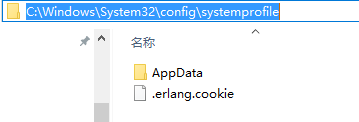
用搜索工具对电脑文件系统进行检索,找到C:\Windows\System32\config\systemprofile下有个.erlang.cookie文件,
内容与C:\User\lujie\.erlang.cookie不一样,后来修改其中一个文件的内容,使两个文件内容一样。
再次执行命令rabbitmqctl status,成功

Authentication failed (rejected by the remote node), please check the Erlang的更多相关文章
- remote: Incorrect username or password ( access token ) fatal: Authentication failed for
gitee推送到远程仓库时提示错误remote: Incorrect username or password ( access token )fatal: Authentication failed ...
- remote: http basic: access denied fatal: authentication failed for '‘解决办法
问题描述 由于这个项目代码使用https 进行clone,为什么?因为代码库ssh有问题!fuck! 导致在push代码的时候出现了 remote: http basic: access denied ...
- Username for 'https://github.com': remote: Invalid username or password. fatal: Authentication failed for 'https://github.com/GLSmile/pythontest.git/' 问题
使用$ git push -u origin master 进行同步时,提示输入用户名和密码,但是我输入正确的信息后,仍然 会报Username for 'https://github.com': r ...
- github提交失败并报错java.io.IOException: Authentication failed:
一.概述 我最近在写一个android的项目. 软件:android studio.Android studio VCS integration(插件) Android studio VCS inte ...
- fatal: Authentication failed for又不弹出用户名和密码 解决办法
各位,如果能弹出来,一定是你账号密码搞错了,就别继续看了. image.png 切换命令行: image.png 依然报错, 说到这个问题,又可以长篇大论了, 我使用的是tortoisegit ...
- Updates were rejected because the remote contains work that you do(gitee报错解决方案)
今天向Gitee远程仓库提交本地项目文件时,遇到了下列错误,很是郁闷 正在推送 1203笔记本Error: failed to push some refs to 'https://gitee.com ...
- Git在提交代码时出现的fatal: Authentication failed的问题
git push origin master remote: Incorrect username or password ( access token ) fatal: Authentication ...
- windows 切换git远程仓库地址后 git push 提示Authentication failed
git切换远程分支: 方法一: git remote set-url origin 你新的远程仓库地址 方法二: git remote rm origin git remote add origin ...
- Git客户端执行命令报错: fatal: Authentication failed for'xxxxx.git',但是又不弹出窗口重新输入用户名和密码的解决办法
1.Git版本:Git-2.17.0 2.引起git报错的原因 在变更远程仓库路径的的时候,弹出过一个窗口输入用户名和密码,但是输错了,之后执行任何拉取和更新的命令都会报如下的错: fatal: Au ...
随机推荐
- Notes of Head.First.HTML.and.CSS.2nd.Edition
What does the web server do? tirelessly waiting for requests from webbrowsers What does the web brow ...
- PHP-ThinkPHP5砍价活动相关设计
近期我们公司项目里陆陆续续有很多为了招引新用户的活动推出,砍价的活动由我来负责,我们的项目是在微信浏览器里供用户浏览访问. 大概描述:进入砍价活动列表页选择有意向的商品,用户点击商品图片可以看到WEB ...
- Java中字符转int
Java中字符转int 方法一代码: //直接使用静态方法,不会产生多余的对象,但会抛出异常 //parseInt 方法都有两个参数, 第一个参数就是要转换的对象, 第二个参数是进制基数, 可以是 2 ...
- Win10 Edge浏览器怎么重装 Win10重装Edge浏览器
具体如下: 重新安装Microsoft Edge 1.按Windows键+ R,打开 输入以下代码,可以直接复制黏贴. %LocalAppData%\Packages\Microsoft.Micros ...
- C语言结构体,点运算和箭头运算
C语言有一种数据类型叫结构体,其定义格式为: struct 结构体名 { 结构体成员变量定义; }; 如: struct student { char name[20]; int age ; doub ...
- Python3基础 os.path.getsize 获得文件的大小
Python : 3.7.0 OS : Ubuntu 18.04.1 LTS IDE : PyCharm 2018.2.4 Conda ...
- 多线程中的信号机制--signwait()函数【转】
本文转载自:http://blog.csdn.net/yusiguyuan/article/details/14237277 在Linux的多线程中使用信号机制,与在进程中使用信号机制有着根本的区别, ...
- MYSQL语句:创建、授权、查询、修改、统计分析等 二 用户的创建、权限设置、删除
接着上面一的内容 4.设置更改用户密码 命令格式:SET PASSWORD FOR 'username'@'host'=PASSWORD('newpassword'); 如果是当前登录用户用:SET ...
- bugfree 数据库配置 显示No such file or directory
把数据库服务器 localhost 改成127.0.0.1 sudo vi /etc/hosts 增加: 127.0.0.1 localhost 127.0.0.1 你的hostname ...
- Could NOT find SDL_image (missing:SDL_IMAGE_LIBRARIES SDL_IMAGE_INCLUDE_DIRS)
sudo apt-get install libsdl-image1.2-dev