
10、JPA-二级缓存
pom.xml
<?xml version="1.0" encoding="UTF-8"?>

<project xmlns="http://maven.apache.org/POM/4.0.0"

         xmlns:xsi="http://www.w3.org/2001/XMLSchema-instance"

         xsi:schemaLocation="http://maven.apache.org/POM/4.0.0 http://maven.apache.org/xsd/maven-4.0.0.xsd">

    <modelVersion>4.0.0</modelVersion>

    <groupId>com</groupId>

    <artifactId>jpa</artifactId>

    <version>1.0-SNAPSHOT</version>

    <dependencies>

        <dependency>

            <groupId>mysql</groupId>

            <artifactId>mysql-connector-java</artifactId>

            <version>8.0.14</version>

        </dependency>

        <dependency>

            <groupId>org.hibernate</groupId>

            <artifactId>hibernate-core</artifactId>

            <version>5.4.1.Final</version>

        </dependency>

        <dependency>

            <groupId>org.hibernate</groupId>

            <artifactId>hibernate-jpamodelgen</artifactId>

            <version>5.4.1.Final</version>

            <scope>provided</scope>

        </dependency>

        <dependency>

            <groupId>junit</groupId>

            <artifactId>junit</artifactId>

            <version>4.12</version>

            <scope>test</scope>

        </dependency>

    </dependencies>

    <build>

        <plugins>

            <!-- 指定jdk -->

            <plugin>

                <groupId>org.apache.maven.plugins</groupId>

                <artifactId>maven-compiler-plugin</artifactId>

                <configuration>

                    <source>1.8</source>

                    <target>1.8</target>

                </configuration>

            </plugin>

        </plugins>

    </build>

</project>
persistence.xml
<?xml version="1.0" encoding="UTF-8" standalone="yes"?>

<persistence xmlns="http://xmlns.jcp.org/xml/ns/persistence"

             xmlns:xsi="http://www.w3.org/2001/XMLSchema-instance"

             xsi:schemaLocation="http://xmlns.jcp.org/xml/ns/persistence http://xmlns.jcp.org/xml/ns/persistence/persistence_2_2.xsd"

             version="2.2">

    <persistence-unit name="jpaname">

        <!-- 实体类 -->

        <class>com.jpa.yingshe.Customer</class>

        <properties>

            <!-- 数据库信息 -->

            <property name="javax.persistence.jdbc.driver" value="com.mysql.cj.jdbc.Driver"/>

            <property name="javax.persistence.jdbc.url" value="jdbc:mysql://192.168.8.136/jpa?useSSL=false"/>

            <property name="javax.persistence.jdbc.user" value="root"/>

            <property name="javax.persistence.jdbc.password" value="root"/>

            <!-- 配置 hibernate 属性 -->

            <property name="hibernate.format_sql" value="true"/>

            <property name="hibernate.show_sql" value="true"/>

            <property name="hibernate.hbm2ddl.auto" value="update"/>

        </properties>

    </persistence-unit>

</persistence>
Customer
package com.jpa.yingshe;

import javax.persistence.*;

@Table(name = "JPA_CUTOMERS")

@Entity

public class Customer {

    private Integer id;

    private String lastName;

    private String email;

    public Customer() {

    }

    public Customer(String lastName) {

        this.lastName = lastName;

    }

    @GeneratedValue(strategy = GenerationType.AUTO)

    @Id

    public Integer getId() {

        return id;

    }

    public void setId(Integer id) {

        this.id = id;

    }

    @Column(name = "LAST_NAME", length = 50, nullable = false)

    public String getLastName() {

        return lastName;

    }

    public void setLastName(String lastName) {

        this.lastName = lastName;

    }

    public String getEmail() {

        return email;

    }

    public void setEmail(String email) {

        this.email = email;

    }

}
测试
先看JPA自带的一级缓存
package jpa.test;

import com.jpa.yingshe.Customer;

import org.junit.After;

import org.junit.Before;

import org.junit.Test;

import javax.persistence.EntityManager;

import javax.persistence.EntityManagerFactory;

import javax.persistence.EntityTransaction;

import javax.persistence.Persistence;

public class JPAyingshe {

    private EntityManagerFactory entityManagerFactory;

    private EntityManager entityManager;

    private EntityTransaction transaction;

    @Before

    public void init() {

        entityManagerFactory = Persistence.createEntityManagerFactory("jpaname");

        entityManager = entityManagerFactory.createEntityManager();

        transaction = entityManager.getTransaction();

        transaction.begin();

    }

    @After

    public void destroy() {

        transaction.commit();

        entityManager.close();

        entityManagerFactory.close();

    }

    @Test

    public void testFirstLevelCache() {

        Customer customer1 = entityManager.find(Customer.class, 1);

        Customer customer2 = entityManager.find(Customer.class, 1);

    }

}
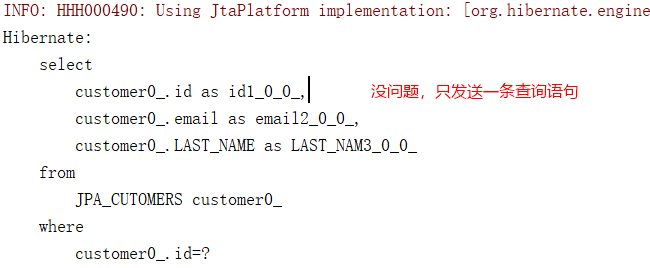
中间关闭会话再试试
@Test

public void testFirstLevelCache() {

    Customer customer1 = entityManager.find(Customer.class, 1);

    transaction.commit();

    entityManager.close();

    entityManager = entityManagerFactory.createEntityManager();

    transaction = entityManager.getTransaction();

    transaction.begin();

    Customer customer2 = entityManager.find(Customer.class, 1);

}

配置二级缓存,让关闭会话后也只发送一次查询
添加 ehcache 依赖
<dependency>

    <groupId>org.hibernate</groupId>

    <artifactId>hibernate-ehcache</artifactId>

    <version>5.4.1.Final</version>

</dependency>

<dependency>

    <groupId>org.ehcache</groupId>

    <artifactId>ehcache</artifactId>

    <version>3.6.3</version>

</dependency>
添加 ehcache.xml 配置
<ehcache>

    <diskStore path="./target/tmp"/>

    <defaultCache

        maxElementsInMemory="10000"

        eternal="false"

        timeToIdleSeconds="120"

        timeToLiveSeconds="120"

        overflowToDisk="true"

        />

    <cache name="sampleCache1"

        maxElementsInMemory="10000"

        eternal="false"

        timeToIdleSeconds="300"

        timeToLiveSeconds="600"

        overflowToDisk="true"

        />

    <cache name="sampleCache2"

        maxElementsInMemory="1000"

        eternal="true"

        timeToIdleSeconds="0"

        timeToLiveSeconds="0"

        overflowToDisk="false"

        /> -->

</ehcache>
修改 persistence.xml 配置
<?xml version="1.0" encoding="UTF-8" standalone="yes"?>

<persistence xmlns="http://xmlns.jcp.org/xml/ns/persistence"

             xmlns:xsi="http://www.w3.org/2001/XMLSchema-instance"

             xsi:schemaLocation="http://xmlns.jcp.org/xml/ns/persistence http://xmlns.jcp.org/xml/ns/persistence/persistence_2_2.xsd"

             version="2.2">

    <persistence-unit name="jpaname" transaction-type="RESOURCE_LOCAL">

        <!-- 配置使用什么 ORM 产品来作为 JPA 的实现 -->

        <provider>org.hibernate.jpa.HibernatePersistenceProvider</provider>

        <!-- 实体类 -->

        <class>com.jpa.yingshe.Customer</class>

        <!--

        配置二级缓存的策略

        ALL:所有的实体类都被缓存

        NONE:所有的实体类都不被缓存.

        ENABLE_SELECTIVE:标识 @Cacheable(true) 注解的实体类将被缓存

        DISABLE_SELECTIVE:缓存除标识 @Cacheable(false) 以外的所有实体类

        UNSPECIFIED:默认值,JPA 产品默认值将被使用

        -->

        <shared-cache-mode>ENABLE_SELECTIVE</shared-cache-mode>

        <properties>

            <!-- 数据库信息 -->

            <property name="javax.persistence.jdbc.driver" value="com.mysql.cj.jdbc.Driver"/>

            <property name="javax.persistence.jdbc.url" value="jdbc:mysql://192.168.8.136/jpa?useSSL=false"/>

            <property name="javax.persistence.jdbc.user" value="root"/>

            <property name="javax.persistence.jdbc.password" value="root"/>

            <!-- 配置 hibernate 属性 -->

            <property name="hibernate.format_sql" value="true"/>

            <property name="hibernate.show_sql" value="true"/>

            <property name="hibernate.hbm2ddl.auto" value="update"/>

            <!-- 二级缓存相关 -->

            <property name="hibernate.cache.use_second_level_cache" value="true"/>

            <property name="hibernate.cache.region.factory_class" value="org.hibernate.cache.ehcache.internal.EhcacheRegionFactory"/>

            <property name="hibernate.cache.use_query_cache" value="true"/>

        </properties>

    </persistence-unit>

</persistence>
修改实体类,添加缓存注解
@Cacheable

@Table(name = "JPA_CUTOMERS")

@Entity

public class Customer {

    private Integer id;
查询
@Test

public void testSecondLevelCache() {

    Customer customer1 = entityManager.find(Customer.class, 1);

    transaction.commit();

    entityManager.close();

    entityManager = entityManagerFactory.createEntityManager();

    transaction = entityManager.getTransaction();

    transaction.begin();

    Customer customer2 = entityManager.find(Customer.class, 1);

}
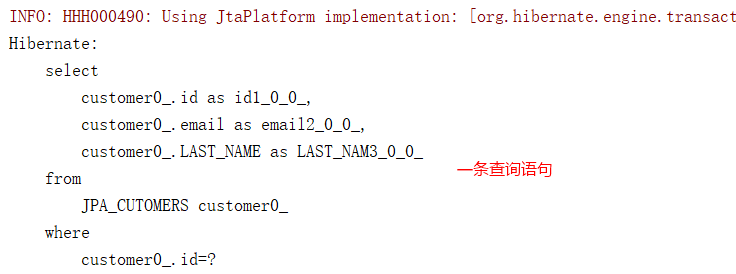
项目结构
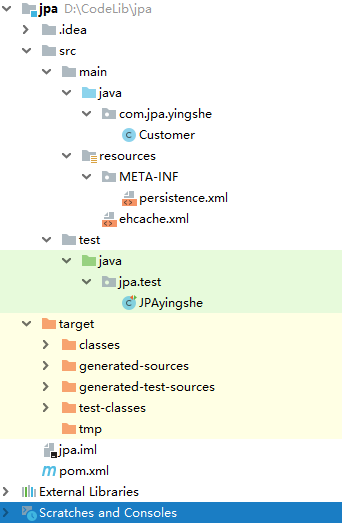
官方文档
10、JPA-二级缓存的更多相关文章
- 使用OSCache优化性能,及JPA二级缓存
1.使用静态化页面技术: 要统计产品的浏览次数: 在<body> <img src="http://www.site.com/data/count.do?productId ...
- 【SSH网上商城项目实战16】Hibernate的二级缓存处理首页的热门显示
转自:https://blog.csdn.net/eson_15/article/details/51405911 网上商城首页都有热门商品,那么这些商品的点击率是很高的,当用户点击某个热门商品后需要 ...
- SpringMVC +Spring + MyBatis + Mysql + Redis(作为二级缓存) 配置
转载:http://blog.csdn.net/xiadi934/article/details/50786293 项目环境: 在SpringMVC +Spring + MyBatis + MySQL ...
- JPA学习笔记(11)——使用二级缓存
一级缓存 查询两次id为1的user User user1 = entityManager.find(User.class, 1); User user2 = entityManager.find(U ...
- JPA学习(五、JPA_二级缓存)
框架学习之JPA(五) JPA是Java Persistence API的简称,中文名Java持久层API,是JDK 5.0注解或XML描述对象-关系表的映射关系,并将运行期的实体对象持久化到数据库中 ...
- JPA(5)使用二级缓存
jpa的缓存分为一级缓存和二级缓存,一级缓存值得是会话级别的,而二级缓存是跨会话级别的. 使用二级缓存,使用到了Ehcache,首先第一步需要在配置文件中配置使用了二级缓存 <shared-ca ...
- Hibernate JPA 中配置Ehcache二级缓存
在Hibernate3 JPA里配置了一下非分布式环境的二级缓存,效果不错.具体过程如下: 1, 需要引入的jar包 http://ehcache.org/downloads/catalog 下载的包 ...
- spring boot集成ehcache 2.x 用于hibernate二级缓存
https://www.jianshu.com/p/87b2c309b776 本文将介绍如何在spring boot中集成ehcache作为hibernate的二级缓存.各个框架版本如下 spring ...
- Spring 整合 Hibernate 时启用二级缓存实例详解
写在前面: 1. 本例使用 Hibernate3 + Spring3: 2. 本例的查询使用了 HibernateTemplate: 1. 导入 ehcache-x.x.x.jar 包: 2. 在 a ...
- 探索ASP.NET MVC5系列之~~~5.缓存篇(页面缓存+二级缓存)
其实任何资料里面的任何知识点都无所谓,都是不重要的,重要的是学习方法,自行摸索的过程(不妥之处欢迎指正) 汇总:http://www.cnblogs.com/dunitian/p/4822808.ht ...
随机推荐
- Ehcache Monitor使用一例
场景介绍:系统集成Shiro,使用Ehcache保存用户登录限制次数,常有用户密码被锁,影响工作效率. 在不考虑集成SSO,LDAP,也不引入身份校验,邮件,短信等解锁特性下.使用Ehcache Mo ...
- node的router路由。
使用router可以实现一个小型的express. router继承了大部分的app = express()的方法. 使用router可以工程化管理项目.router使用以后app只能在最开始去存在. ...
- MSTSC 3389 端口修改
1. 启动注册表编辑器. 2. 找到并单击以下注册表子项: 3. HKEY_LOCAL_MACHINE\System\CurrentControlSet\Control\Terminal Server ...
- [linux学习]sysctl 以及 net.ipv4.ip_forward
1. sysctl 命令显示 当前系统的参数配置信息 显示全部配置信息 sysctl -a 帮助信息主要如下: [root@k8s-master ~]# sysctl -help Usage: sys ...
- 通过几个例子看sed的模式空间与保持空间
SED之所以能以行为单位的编辑或修改文本,其原因在于它使用了两个空间:一个是活动的“模式空间(pattern space)”,另一个是起辅助作用的“暂存缓冲区(holdingspace)这2个空间的使 ...
- Axure8.0从入门到精通
1. 新建工程 菜单->File->New 2. 添加组件并编辑组件 选中左侧Libary可选择Default/Flow/Icons,找到相应的组件并移动到工作区:并在右侧选中相应的组件属 ...
- python之datetime类
datetime.time时间类,一般用于显示当地时间 import datetime # 新建对象 datetime_obj = datetime.time(hour=12, minute=20, ...
- selenium之截图
selenium支持对当前页面保存截图,使用方法: driver.get_screenshot_as_file(file_path) 代码举例: ...... def get_screenshot(d ...
- selenium之安装和登陆操作举例
安装selenium: python -m pip install selenium-3.4.3-py2.py3-none-any.whl 下载对应浏览器版本的驱动,且在环境变量PATH中指定驱动程序 ...
- python 模块之-logging
python 模块logging import logging ### 简单使用格式 日志级别等级CRITICAL > ERROR > WARNING > INFO > ...