
Python Pandas 时间序列双轴折线图
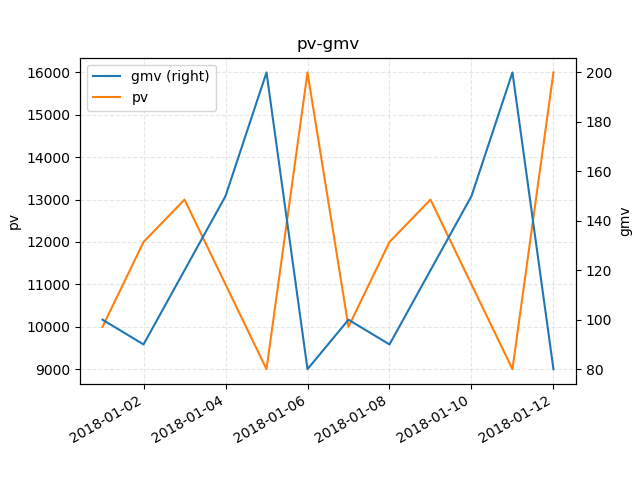
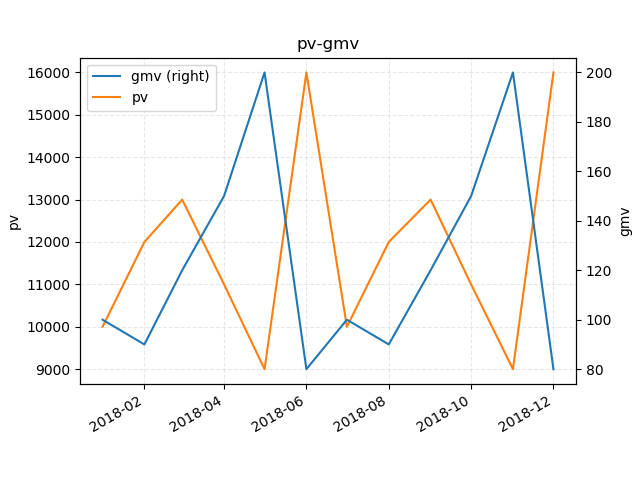
时间序列pv-gmv双轴折线图
import numpy as np

import pandas as pd

import matplotlib.pyplot as plt

n = 12

date_series = pd.date_range(start='2018-01-01', periods=n, freq="D")

data = {

    'pv': [10000, 12000, 13000, 11000, 9000, 16000, 10000, 12000, 13000, 11000, 9000, 16000],

    'gmv': [100, 90, 120, 150, 200, 80, 100, 90, 120, 150, 200, 80]

}

df = pd.DataFrame(data, index=date_series)

ax = df.plot(

    secondary_y=['gmv'],

    x_compat=True,

    grid=True)

ax.set_title("pv-gmv")

ax.set_ylabel('pv')

ax.grid(linestyle="--", alpha=0.3)

ax.right_ax.set_ylabel('gmv')

plt.show()
import math

import numpy as np

import pandas as pd

import matplotlib.pyplot as plt

n = 12

date_series = pd.period_range(start='2018-01', periods=n, freq="M")

data = {

    'pv': [10000, 12000, 13000, 11000, 9000, 16000, 10000, 12000, 13000, 11000, 9000, 16000],

    'gmv': [100, 90, 120, 150, 200, 80, 100, 90, 120, 150, 200, 80]

}

df = pd.DataFrame(data, index=date_series)

ax = df.plot(

    secondary_y=['gmv'],

    x_compat=True,

    grid=True)

ax.set_title("pv-gmv")

ax.set_ylabel('pv')

ax.grid(linestyle="--", alpha=0.3)

ax.right_ax.set_ylabel('gmv')

plt.show()
Python Pandas 时间序列双轴折线图的更多相关文章
- 4-Highcharts曲线图之时间轴折线图
鼠标按住左键 左右移动可以试试<!DOCTYPE> <html lang='en'> <head> <title>4-Highcharts曲线图之时间轴 ...
- highcharts.js的时间轴折线图
工作中正好用到. 鼠标按住左键 左右移动可以试试 <!DOCTYPE> <html lang='en'> <head> <title>4-Highcha ...
- python的turtle模块画折线图
代码如下: import turtle yValues = [10.0,7.4,6.4,5.3,4.4,3.7,2.6] def main(): t = turtle.Turtle() t.hidet ...
- echarts双y轴折线图柱状图混合实时更新图
先看下效果,自己用ps做了张gif图,发现很好玩啊..不喜勿喷 自己下载个echarts.min.js 直接上代码: <!DOCTYPE html><html><head ...
- Python——Pandas 时间序列数据处理
介绍 Pandas 是非常著名的开源数据处理库,我们可以通过它完成对数据集进行快速读取.转换.过滤.分析等一系列操作.同样,Pandas 已经被证明为是非常强大的用于处理时间序列数据的工具.本节将介绍 ...
- python ---Pandas时间序列:生成指定范围的日期
引入包 import pandas as pd import numpy as np 1.生成指定范围的日期 print pd.date_range('11/1/2018','11/9/2018') ...
- python画最最简单的折线图
# encoding=utf-8import matplotlib.pyplot as pltfrom pylab import * #支持中文mpl.rcParams['font.sans-seri ...
- pandas 数据可视化之折线图
官网地址:https://openpyxl.readthedocs.io/en/stable/charts/line.html#id1 openpyxl+pandas # coding=utf-8 i ...
- matlab 双坐标折线图画法
%%各时段电量需求 clc close all clear all cost_gd = [2200 1800 3800 4600]; cost_bj = [2.7 2.2 1.8 3.6]; cost ...
随机推荐
- Servlet(5)—ServletRequest接口和ServletResponse接口
ServletRequest接口: 使用ServletRequest接口创建对象,用于使客户端请求信息对Servlet可用,创建的对象作为参数传递之Servlet的Service() ServletR ...
- java/javac命令行如何同时引用多个包;错误 TypeError: 'JavaPackage' object is not callable 的含义
出现这类错误提示:'JavaPackage' object is not callable,可以看下所引用的jar包或者class文件是否在java的路径搜索范围内 命令行模式下:javac可以编译* ...
- 14、Spark的核心术语
Application:spark应用程序,就是用户基于spark api开发的程序,一定是通过一个有main方法的类执行的,比如java开发spark,就是在eclipse中,建立的一个工程 App ...
- Centos7离线安装redis
1.1 下载.上传.解压redis4.0.11 下载地址:http://download.redis.io/releases/redis-4.0.11.tar.gz下载后上传到服务器上,并解压:备注: ...
- Android设置屏幕旋转后保存数据
1.onCreate()方法中最后判断需要保存的状态值 if(savedInstanceState != null){ mCurrentIndex = savedInstanceState.getIn ...
- UseSwagger
if [ "$UseSwagger" != "true" ]; then sed -i "s/\"UseSwagger\": tr ...
- [转]恕我直言,在座的各位根本不会写 Java!
导语 自 2013 年毕业后,今年已经是我工作的第 4 个年头了,总在做 Java 相关的工作,终于有时间坐下来,写一篇关于 Java 写法的一篇文章,来探讨一下如果你真的是一个 Java 程序员,那 ...
- springboot-admin自定义事件通知
springboot-admin组建已经提供了很多开箱即用的通知器(例如邮件),但在有些业务场景下我们需要做一些企业内部的通知渠道,这就需要我们来自定义通知器. 实现其实很简单,只需要往spring注 ...
- 通过groovy表达式拓展oval——实现根据同一实体中的其他属性值对某个字段进行校验
在java的参数校验中,开源验证框架OVAL基本能够满足所有需求,如下面通过简单的添加注解,就可实现对参数的非空和长度校验. @NotNull(message="计息周期月数不能为空&quo ...
- zabbix之微信告警(python版):微信个人报警,微信企业号告警脚本
微信个人告警脚本 微信个人告警:使用个人微信,发送到微信群组,微信好友 两个脚本执行: 1)能连接网络2)先执行server.py,扫描登录微信,登录之后没有报错,打开新终端查看端口是否起来了3)在z ...