
Hibernate3.0配置
我的系统Win10(64x),Eclipse jee 2018-09 ,Sql2018版本。
以下是Hibernate3.0配置包
链接:https://pan.baidu.com/s/10KizbyeMwjnHlG4JQ8WtaA
提取码:iptb
以下再lib下导入8个包。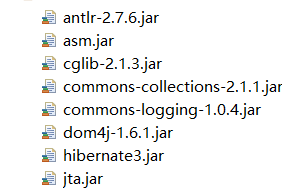
以下是hibernate.cfg.xml(创建文件)
<?xml version="1.0" encoding="UTF-8"?>

<!DOCTYPE hibernate-configuration PUBLIC "-//Hibernate/Hibernate Configuration DTD 3.0//EN" "http://hibernate.sourceforge.net/hibernate-configuration-3.0.dtd" >

<hibernate-configuration>

  <session-factory>

      <property name="connection.driver_class">com.microsoft.sqlserver.jdbc.SQLServerDriver</property>

      <property name="connection.url">jdbc:sqlserver://localhost:1433; DatabaseName=Student</property>

      <property name="connection.username">sa</property>

      <property name="connection.password">******</property>

      <property name="dialect">org.hibernate.dialect.SQLServerDialect</property>

      <property name="hbm2ddl.auto">update</property>

      <property name="show_sql">true</property>

      <mapping resource="domain/hf.hbm.xml" /><!--加入一个空格-->

  </session-factory>

</hibernate-configuration>
以下是一个用例建立hf表
hf.hbm.xml文件(跟domain再同一个package下)
<?xml version="1.0"?>

<!DOCTYPE hibernate-mapping PUBLIC

    "-//Hibernate/Hibernate Mapping DTD 3.0//EN"

    "http://hibernate.sourceforge.net/hibernate-mapping-3.0.dtd">

<hibernate-mapping package="domain">

 <class name="hf">

     <id name="id" type="java.lang.Integer">

     <column name="id"/>

         <generator class="native"/>

     </id>

     <property name="name"/>

     <property name="birthday"/>

 </class>

</hibernate-mapping>
bean代码
package domain;

import java.util.Date;

public class hf {

    private Integer id;

    private String name;

    private String birthday;

    public Integer getId() {

        return id;

    }

    public void setId(Integer id) {

        this.id = id;

    }

    public String getName() {

        return name;

    }

    public void setName(String name) {

        this.name = name;

    }

    public String getBirthday() {

        return birthday;

    }

    public void setBirthday(String birthday) {

        this.birthday = birthday;

    }

}
loginservlet类
package src.servlet;

import java.io.IOException;

import java.io.PrintWriter;

import java.sql.*;

import javax.servlet.ServletException;

import javax.servlet.annotation.WebServlet;

import javax.servlet.http.HttpServlet;

import javax.servlet.http.HttpServletRequest;

import javax.servlet.http.HttpServletResponse;

import org.hibernate.Session;

import org.hibernate.SessionFactory;

import org.hibernate.Transaction;

import org.hibernate.cfg.Configuration;

import domain.hf;

/**

 * Servlet implementation class loginservlet

 */

public class loginservlet extends HttpServlet {

    private static final long serialVersionUID = 1L;

    /**

     * @see HttpServlet#HttpServlet()

     */

    public loginservlet() {

        super();

        // TODO Auto-generated constructor stub

    }

    /**

     * @see HttpServlet#doGet(HttpServletRequest request, HttpServletResponse response)

     */

    protected void doGet(HttpServletRequest request, HttpServletResponse response) throws ServletException, IOException {

        // TODO Auto-generated method stub

        response.setHeader("content-type","text/html;charset=UTF-8");

        request.setCharacterEncoding("UTF-8");

        String name=request.getParameter("name");

        String birthday=request.getParameter("birthday");

        Configuration cfg =new Configuration();

        cfg.configure();

        SessionFactory sf=cfg.buildSessionFactory();

        Session se=null;

        Transaction tx=null;

        try {

            se=sf.openSession();

            tx=se.beginTransaction();

            hf user=new hf();

            user.setName(name);

            user.setBirthday(birthday);

            se.save(user);

            tx.commit();

        }catch(Exception e) {

            if(tx != null) tx.rollback();

        }finally {

            if(se != null) se.close();

            PrintWriter out=response.getWriter();

            out.println("注册操作完成!");//乱码?

            System.out.println(name);

            System.out.println(birthday);

        }

    }

    /**

     * @see HttpServlet#doPost(HttpServletRequest request, HttpServletResponse response)

     */

    protected void doPost(HttpServletRequest request, HttpServletResponse response) throws ServletException, IOException {

        // TODO Auto-generated method stub

        doGet(request, response);

    }

}
Web.xml配置
<?xml version="1.0" encoding="UTF-8"?>

<web-app xmlns:xsi="http://www.w3.org/2001/XMLSchema-instance" xmlns="http://java.sun.com/xml/ns/javaee" xmlns:web="http://java.sun.com/xml/ns/javaee/web-app_2_5.xsd" xsi:schemaLocation="http://java.sun.com/xml/ns/javaee http://java.sun.com/xml/ns/javaee/web-app_2_5.xsd" id="WebApp_ID" version="2.5">

<servlet>

 <servlet-name>loginservlet</servlet-name>

 <servlet-class>src.servlet.loginservlet</servlet-class>

 </servlet>

 <servlet-mapping>

 <servlet-name>loginservlet</servlet-name>

 <url-pattern>/loginservlet</url-pattern>

 </servlet-mapping>

<welcome-file-list>

    <welcome-file>index.jsp</welcome-file>

</welcome-file-list>

</web-app>
login JSP页面
<%@ page language="java" contentType="text/html; charset=UTF-8"

    pageEncoding="UTF-8"%>

<!DOCTYPE html>

<html>

<head>

<meta charset="UTF-8">

<title>用户注册提交页面</title>

</head>

<body>

<form action="loginservlet" method="post">

用户名:<input type="text" name="name"><br><br>

出生日期:<input type="text" name="birthday"><br><br>

<input type="submit" value="登录">

</form>

</body>

</html>
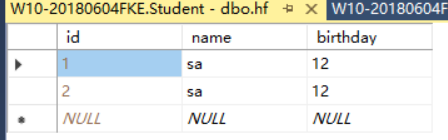
数据运行成功的结果:
Hibernate3.0配置的更多相关文章
- hibernate3.0 org.dom4j.DocumentException: Connection timed out: connect Nested exception:
hibernate3.0 org.dom4j.DocumentException: Connection timed out: connect Nested exception: 所报异常: 严重 ...
- IIS运行.NET4.0配置
IIS运行.NET4.0配置 “/CRM”应用程序中的服务器错误.配置错误说明: 在处理向该请求提供服务所需的配置文件时出错.请检查下面的特定错误详细信息并适当地修改配置文件. 分析器错误消息: 无法 ...
- kafka0.9.0及0.10.0配置属性
问题导读1.borker包含哪些属性?2.Producer包含哪些属性?3.Consumer如何配置?borker(0.9.0及0.10.0)配置Kafka日志本身是由多个日志段组成(log segm ...
- VC++6.0 配置CppUTest测试环境
最近看<软件项目成功之道>,书中无数次提及到“单元测试”对于项目成败的重要性,看到同事将CppUTest用于Linux动态库测试,于是在VC++6.0环境下搭建一个基于CppUTest的单 ...
- win7下VS2015+opencv3.1.0配置
由于opencv与vs的适配版本不同,本人在官网下载opencv3.1.0,其可以和VS2013.VS2015适配,文中以VS2015为例 opencv2.4.13-----vc11;vc12 ope ...
- Windows 8.0上Eclipse 4.4.0 配置CentOS 6.5 上的Hadoop2.2.0开发环境
原文地址:http://www.linuxidc.com/Linux/2014-11/109200.htm 图文详解Windows 8.0上Eclipse 4.4.0 配置CentOS 6.5 上的H ...
- windows下Qt5.1.0配置android环境搭建 good
1.首先下载好需要配置的软件: 1>Qt 5.1.0 for Android (Windows 32-bit, 716 MB)(Info)下载地址: http://qt-project.org/ ...
- ganglia监控hadoop2.0配置方法
ganglia监控hadoop2.0配置方法前提:hadoop2.0集群已安装ganglia监控工具第一步:Hadoop用户登录集群每一个节点,修改文件:vi /opt/hadoop-2.0.0-cd ...
- nginx1.9.4 +php 5.5.29+yii2.0配置手册
nginx1.9.4 +php 5.5.29+yii2.0配置手册 目录 一. php5.5.29安装配置 2 二. nginx1.9.4安装配置 2 三. yii2.0 ...
随机推荐
- Spring 中 Bean 的生命周期
所谓 Bean 的生命周期,就是一个 Bean 从创建到销毁,所经历的各种方法调用.大致包含下面几个方法(不是全部) Bean 的实例化,调用了构造方法. 使用 setter 方法填充属性. 一旦依赖 ...
- gentoo 图像方面的软件
图像方面的软件一般包括:查看图像,屏幕截图,图像修改. 查看图像简单的可以安装 feh,但是 feh 一般作为墙纸来用.稍微好一些的是 gqview. 屏幕截图可以用 screengrab,使用的时候 ...
- (2) linux文件系统简介
bin -- 存放可执行的命令程序 sbin -- 系统管理相关的命令程序 boot -- 存放启动相关的内容 dev -- 存放设备和硬件 etc -- 存放程序,系统的配置文件 home -- 存 ...
- TypeError: Fetch argument None has invalid type <type 'NoneType'>
(fetch, type(fetch)))TypeError: Fetch argument None has invalid type <type 'NoneType'> 我的解决方案是 ...
- idea常用快捷键及操作
ctrl+j ===== 智能提示 可用模版及关键字 ctrl+p ===== 显示方法可填入的参数 ctrl+space ===== 补全提示项目中可用的变量 ctrl+shift+j ==== ...
- 【python-dict】dict的使用及实现原理
以下内容是针对:python源码剖析中的第五章——python中Dict对象 的读书笔记(针对书中讲到的内容进行了自己的整理,并且针对部分内容根据自己的需求进行了扩展) 一.Dict的用法 Dict的 ...
- maven小结
1.首先要安装maven,我的在: F:\apache-maven-3.0.4 2.手动创建本地仓库的地址为:F:\.m2\repository 3.从windows的环境变量中增加了:M2_HOME ...
- MySQL 树节点递归遍历所以子节点
DELIMITER $$ DROP FUNCTION IF EXISTS `getChildList`$$ CREATE FUNCTION `getChildList`(rootId INT) RET ...
- Django实现支付宝支付
一 去支付宝申请 - 正式:营业执照 - 测试: 沙箱测试环境 APPID:2016092000554391 买家: esnrce2727@sandbox.com 登录和支付密码: ...
- Spring源码-循环依赖源码解读
Spring源码-循环依赖源码解读 笔者最近无论是看书还是从网上找资料,都没发现对Spring源码是怎么解决循环依赖这一问题的详解,大家都是解释了Spring解决循环依赖的想法(有的解释也不准确,在& ...