
Android的Fragment中的互相通信-桥梁activity
效果图如下:
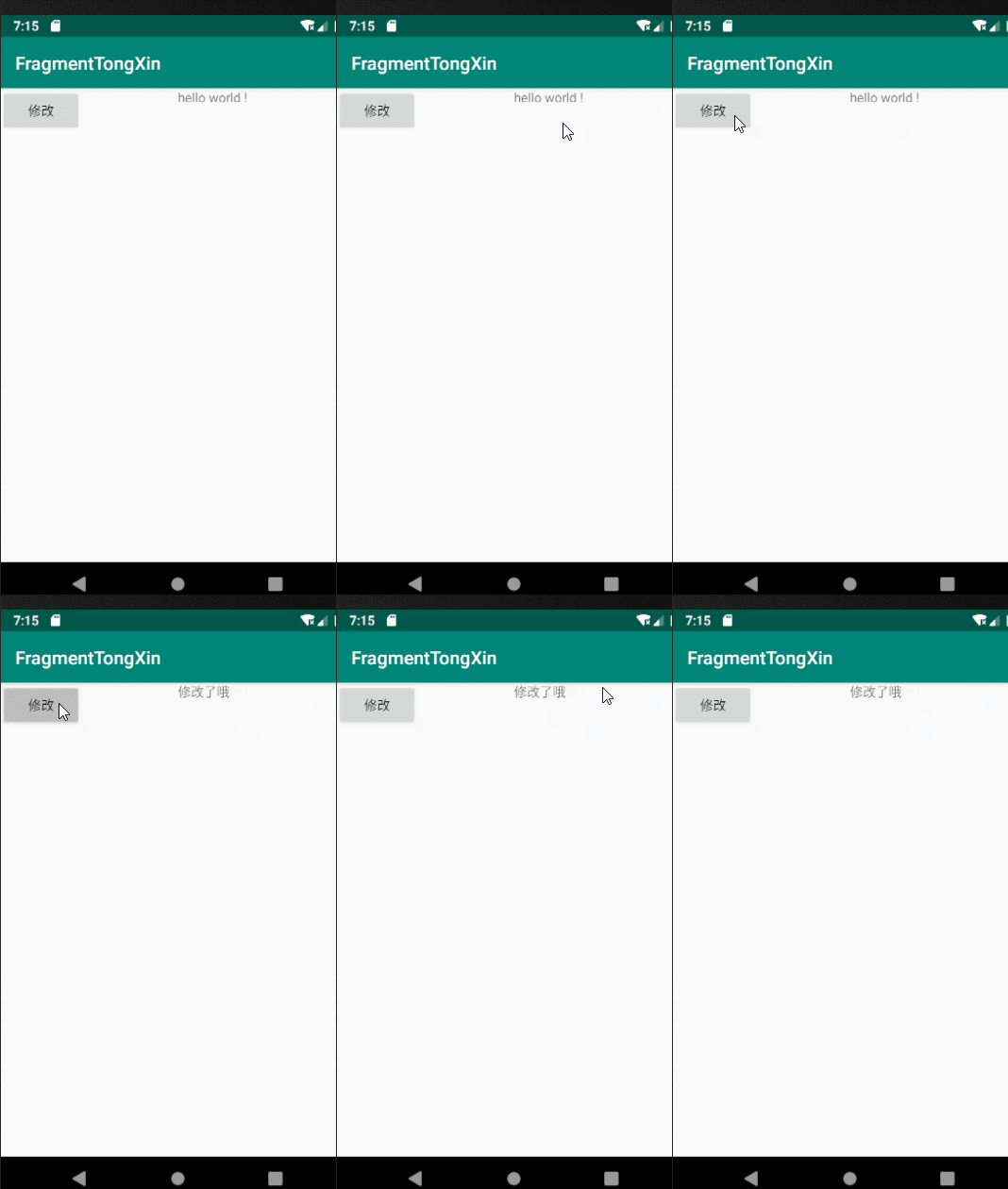
项目结构图如下:

Fragment1:
package com.demo.fragmenttongxin;

import android.app.Activity;

import android.app.Fragment;

import android.os.Bundle;

import android.view.LayoutInflater;

import android.view.View;

import android.view.ViewGroup;

import android.widget.Button;

public class Fragment1 extends Fragment {

    @Override

    public View onCreateView(LayoutInflater inflater,  ViewGroup container, Bundle savedInstanceState) {

        final View view = inflater.inflate(R.layout.fragment1, null);

        //找到按钮

        Button updBtn = view.findViewById(R.id.btn_update);

        updBtn.setOnClickListener(new View.OnClickListener() {

            @Override

            public void onClick(View v) {

                Fragment2 fragment2 = (Fragment2) getActivity().getFragmentManager().findFragmentByTag("f2");

                //修改2

                fragment2.updateText("修改了哦");

            }

        });

        return view;

    }

}
Fragment2:
package com.demo.fragmenttongxin;

import android.app.Fragment;

import android.os.Bundle;

import android.view.LayoutInflater;

import android.view.View;

import android.view.ViewGroup;

import android.widget.TextView;

public class Fragment2 extends Fragment {

    TextView tv_content;

    @Override

    public View onCreateView(LayoutInflater inflater,ViewGroup container, Bundle savedInstanceState) {

        View view = inflater.inflate(R.layout.fragment2, null);

        //找到tv

         tv_content = view.findViewById(R.id.tv_content);

        return view;

    }

    //修改textView的内容

    public  void updateText(String content){

        tv_content.setText(content);

    }

}
MainActivity:
package com.demo.fragmenttongxin;

import android.app.FragmentManager;

import android.app.FragmentTransaction;

import android.support.v7.app.AppCompatActivity;

import android.os.Bundle;

public class MainActivity extends AppCompatActivity {

    @Override

    protected void onCreate(Bundle savedInstanceState) {

        super.onCreate(savedInstanceState);

        setContentView(R.layout.activity_main);

        //获取fragment管理者

        FragmentManager fragmentManager = getFragmentManager();

        //2.开启一个事务

        FragmentTransaction beginTransaction = fragmentManager.beginTransaction();

        beginTransaction.replace(

                R.id.ll1,new Fragment1(),"f1"

        );

        beginTransaction.replace(

                R.id.ll2,new Fragment2(),"f2"

        );

        //3.开启事务

        beginTransaction.commit();

    }

}
activity_main.xml:
<?xml version="1.0" encoding="utf-8"?>

<LinearLayout xmlns:android="http://schemas.android.com/apk/res/android"

    xmlns:tools="http://schemas.android.com/tools"

    android:layout_width="match_parent"

    android:layout_height="match_parent"

    android:orientation="horizontal"

    tools:context=".MainActivity">

 <LinearLayout

     android:id="@+id/ll1"

     android:layout_width="0dp"

     android:layout_weight="1"

     android:layout_height="match_parent">

 </LinearLayout>

 <LinearLayout

     android:id="@+id/ll2"

     android:layout_width="0dp"

     android:layout_weight="1"

     android:layout_height="match_parent">

 </LinearLayout>

</LinearLayout>
fragment1.xml:
<?xml version="1.0" encoding="utf-8"?>

<LinearLayout xmlns:android="http://schemas.android.com/apk/res/android"

    android:layout_width="match_parent"

    android:layout_height="match_parent"

    android:orientation="vertical"

    >

    <Button

        android:id="@+id/btn_update"

        android:layout_width="wrap_content"

        android:layout_height="wrap_content"

        android:text="修改"

        />

</LinearLayout>
fragment2.xml:
<?xml version="1.0" encoding="utf-8"?>

<LinearLayout xmlns:android="http://schemas.android.com/apk/res/android"

    android:layout_width="match_parent"

    android:layout_height="match_parent">

<TextView

    android:id="@+id/tv_content"

    android:layout_width="wrap_content"

    android:layout_height="wrap_content"

    android:text="hello world !"

    />

</LinearLayout>
Android的Fragment中的互相通信-桥梁activity的更多相关文章
- android,在fragment中使用listview,不使用listfragment
public class LeftFragment extends Fragment{ private ListView listView; @Override public View onCreat ...
- Android 在Fragment中执行onActivityResult不被调用的简单解决方法
在Android开发中,我们经常会用到FragmentActivity下嵌套多个Fragment,但是在开发过程中会发现在嵌套的Fragment中使用onActivityResult回调方法没有被执行 ...
- Android 在 Fragment 中使用 getActivity() NullPointException 的思考和解决办法
问题: 使用 AS 在 Fragment 中调用 getActivity() 方法的时候会出现可能为空指针的提醒 使用 monkey 多次十万次测试,会出现 getActivity() NullPoi ...
- Android的Fragment中onActivityResult不被调用的解决方案
常见的,我们会在FragmentActivity中嵌套一层Fragment使用,甚至两次或多层Fragment嵌套使用.这个时候,在第二级或者更深级别的Fragment调用startActivityF ...
- Android的Fragment中onActivityResult不被调用
1.检查该Fragment所属的Activity中,是否重写了onActivityResult方法. 2.检查Fragment中的startActivityForResult的调用方式. 请确保不要使 ...
- Android 在fragment中实现返回键单击提醒 双击退出
尝试用mvp架构加dagger2来重写了一下,大致功能都实现了,还没有全部完成. 项目地址 接近完成的时候,想在天气信息页面实现一个很常见的功能,也就是点击屏幕下方的返回键的时候不是返回到上一个act ...
- Android 在Fragment中修改Activity中的控件
在当前的Fragment中调用getActivity方法获取依附着的那个Activity,然后再用获取到的Activity去findViewById拿到你需要的控件对其操作就行了.
- Fragment中启动一个新的Activity
最近遇到一个小问题,就是我在主界面中用的是Fragment,其中四个Fragment,然后打算在其中一个里边,写一个TextView(准确地说是Linearout)的单击事件,然后跳转到另外一个Act ...
- android开发—Fragment中onCreateView()和onActivityCreated()的区别
在编写Fragment时,在onCreateView()方法中启动了一个初始化自定义View的方法 initView(),但是调试时就崩溃,打印日志发现是这里出了问题,就将这个方法放到了onActiv ...
随机推荐
- matplotlib坐标轴的一些操作
- Dubbo helloword
首先,开始编写服务提供者的api接口, SampleService 接口 package bhz.dubbo.sample.provider; import java.util.List; publ ...
- Mybatis配置问题解决Invalid bound statement (not found)
首先这个异常的原因是系统根据Mapper类的方法名找不到对应的映射文件. 网上也搜索了到了类似的文章,一般可以从以下几个点排查: mapper.xml的namespace要写所映射接口的全称类名,而且 ...
- BZOJ1880或洛谷2149 [SDOI2009]Elaxia的路线
BZOJ原题链接 洛谷原题链接 显然最长公共路径是最短路上的一条链. 我们可以把最短路经过的边看成有向边,那么组成的图就是一张\(DAG\),这样题目要求的即是两张\(DAG\)重合部分中的最长链. ...
- 开始Dev之路
从今天开始,开启Dev的发展之路.
- 地址重写 No input file specified的解决方法
转载自:http://blog.csdn.net/williamsblog/article/details/37532737 (一)IIS Noinput file specified 方法一:改PH ...
- jexus托管.net core
https://blog.csdn.net/gongzhe2011/article/details/72757863
- 5阶m序列
void echo32(int m) { printf("%d%d%d%d%d%d%d%d%d%d%d%d%d%d%d%d%d%d%d%d%d%d%d%d%d%d%d%d%d%d%d%d\n ...
- 《C#从现象到本质》读书笔记(八)第10章反射
<C#从现象到本质>读书笔记(八)第10章反射 个人感觉,反射其实就是为了能够在程序运行期间动态的加载一个外部的DLL集合,然后通过某种办法找到这个DLL集合中的某个空间下的某个类的某个成 ...
- Knockout.js组件系统的详解之(一) - 组件的定义和注册
(Knockout版本:3.4.1 ) KO的组件主要从以下四个部分进行详细介绍: 1.组件的定义和注册 2.组件绑定 3.使用自定义元素 4.自定义组件加载器(高级) 目录结构 1.通过" ...