
centos中单进程监控
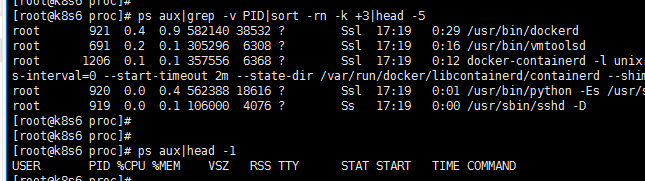
[root@k8s6 proc]# ps aux|grep -v PID|sort -rn -k +|head -

root         0.4  0.9   ?        Ssl  :   : /usr/bin/dockerd

root         0.2  0.1    ?        Ssl  :   : /usr/bin/vmtoolsd

root        0.1  0.1    ?        Ssl  :   : docker-containerd -l unix:///var/run/docker/libcontainerd/docker-containerd.sock --metrics-interval=0 --start-timeout 2m --state-dir /var/run/docker/libcontainerd/containerd --shim docker-containerd-shim --runtime docker-runc

root         0.0  0.4   ?        Ssl  :   : /usr/bin/python -Es /usr/sbin/tuned -l -P

root         0.0  0.1    ?        Ss   :   : /usr/sbin/sshd -D

[root@k8s6 proc]#

[root@k8s6 proc]#

[root@k8s6 proc]# ps aux|head -

USER       PID %CPU %MEM    VSZ   RSS TTY      STAT START   TIME COMMAND
一、用python实现前5个进程的监控
1)用该命令把内容实时更新推送至该文件
ps aux|grep -v PID|sort -rn -k +3|head -5 > test.txt
2)用python获取该文件的内容
status = []

with open('test.txt',mode='r',encoding='utf-8') as f:

    for line in f:

        line = line.split('\n')[].split(' ')

        for li in line:

            if len(li) != :

                pass

            else:

                line.remove(li)

        status.append(line)

for i in status:

    print(i)
3)利用传值的方式获取每个进程的cpu
import sys

run = sys.argv

cmd = int(run[]) -

status = []

with open('test.txt',mode='r',encoding='utf-8') as f:

    for line in f:

        line = line.split('\n')[].split(' ')

        for li in line:

            if len(li) != :

                pass

            else:

                line.remove(li)

        status.append(line)

print(status[cmd][])
指定获取每行的cpu进程
python cpu_test.py         # 第1高进程

python cpu_test.py         # 第2高进程

python cpu_test.py         # 第3高进程

python cpu_test.py         # 第4高进程

python cpu_test.py         # 第5高进程
4)修改脚本文件,也可以实现获取到每个进程所占用的内存空间
import sys

run = sys.argv

cmd = int(run[]) -

status = []

with open('test.txt',mode='r',encoding='utf-8') as f:

    for line in f:

        line = line.split('\n')[].split(' ')

        for li in line:

            if len(li) != :

                pass

            else:

                line.remove(li)

        status.append(line)

print(status[cmd][])
获取每行的所占用的内存
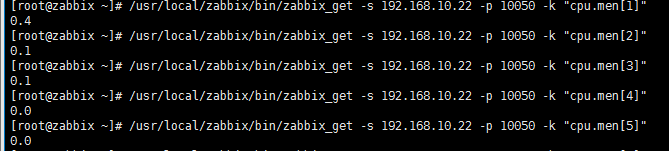
python cpu_test.py         # 第1高进程

python cpu_test.py         # 第2高进程

python cpu_test.py         # 第3高进程

python cpu_test.py         # 第4高进程

python cpu_test.py         # 第5高进程
二、完善脚本,直接获取结果至内存
1) 针对cpu
import sys

import subprocess

run = sys.argv

cmd=int(run[]) -

status = []

obj=subprocess.Popen('ps aux|grep -v PID|sort -rn -k +3|head -3',

                 shell=True,

                 stdout=subprocess.PIPE,

                 stderr=subprocess.PIPE

                 )

result = obj.stdout

status = []

for line in result:

        line = line.split('\n')[].split(' ')

        for li in line:

            if len(li) != :

                pass

            else:

                line.remove(li)

        status.append(line)

result= float(status[cmd][]) *

print(result)
cpu.py
执行 python cpu.py 1 到 3
2)针对men
import sys

import subprocess

run = sys.argv

cmd=int(run[]) -

status = []

obj=subprocess.Popen('ps aux|grep -v PID|sort -rn -k +3|head -3',

                 shell=True,

                 stdout=subprocess.PIPE,

                 stderr=subprocess.PIPE

                 )

result = obj.stdout

status = []

for line in result:

        line = line.split('\n')[].split(' ')

        for li in line:

            if len(li) != :

                pass

            else:

                line.remove(li)

        status.append(line)

result= float(status[cmd][]) *

print(result)
men.py
执行 python men.py 1 到 3
三、监控cpu,内存
#!/usr/bin/env python

# -*- coding:utf-8 -*- -

import os, time

last_worktime=0

last_idletime=0

def get_cpu():

        global last_worktime, last_idletime

        f=open("/proc/stat","r")

        line=""

        while not "cpu " in line: line=f.readline()

        f.close()

        spl=line.split(" ")

        worktime=int(spl[2])+int(spl[3])+int(spl[4])

        idletime=int(spl[5])

        dworktime=(worktime-last_worktime)

        didletime=(idletime-last_idletime)

        rate=float(dworktime)/(didletime+dworktime)

        last_worktime=worktime

        last_idletime=idletime

        if(last_worktime==0): return 0

        return rate

def get_mem_usage_percent():

    try:

        f = open('/proc/meminfo', 'r')

        for line in f:

            if line.startswith('MemTotal:'):

                mem_total = int(line.split()[1])

            elif line.startswith('MemFree:'):

                mem_free = int(line.split()[1])

            elif line.startswith('Buffers:'):

                mem_buffer = int(line.split()[1])

            elif line.startswith('Cached:'):

                mem_cache = int(line.split()[1])

            elif line.startswith('SwapTotal:'):

                vmem_total = int(line.split()[1])

            elif line.startswith('SwapFree:'):

                vmem_free = int(line.split()[1])

            else:

                continue

        f.close()

    except:

        return None

    physical_percent = usage_percent(mem_total - (mem_free + mem_buffer + mem_cache), mem_total)

    virtual_percent = 0

    if vmem_total > 0:

        virtual_percent = usage_percent((vmem_total - vmem_free), vmem_total)

    return physical_percent, virtual_percent

def usage_percent(use, total):

    try:

        ret = (float(use) / total) * 100

    except ZeroDivisionError:

        raise Exception("ERROR - zero division error")

    return ret

statvfs = os.statvfs('/')

total_disk_space = statvfs.f_frsize * statvfs.f_blocks

free_disk_space = statvfs.f_frsize * statvfs.f_bfree

disk_usage = (total_disk_space - free_disk_space) * 100.0 / total_disk_space

disk_usage = int(disk_usage)

disk_tip = "硬盘空间使用率(最大100%):"+str(disk_usage)+"%"

print(disk_tip)

mem_usage = get_mem_usage_percent()

mem_usage = int(mem_usage[0])

mem_tip = "物理内存使用率(最大100%):"+str(mem_usage)+"%"

print(mem_tip)

cpu_usage = int(get_cpu()*100)

cpu_tip = "CPU使用率(最大100%):"+str(cpu_usage)+"%"

print(cpu_tip)

load_average = os.getloadavg()

load_tip = "系统负载(三个数值中有一个超过3就是高):"+str(load_average)

print(load_tip)
cpu_disk_men

centos中单进程监控的更多相关文章
- centos 7中监控mysql 数据库脚本(监控端口)
centos 7中监控mysql 数据库脚本(监控端口) 监控mysql数据库的方法如下: 1.监控端口 netstat -nltp |grep 3306 2.监控进程 ps -ef |grep 33 ...
- 【SFTP】使用Jsch实现Sftp文件下载-支持断点续传和进程监控
参考上篇文章: <[SFTP]使用Jsch实现Sftp文件下载-支持断点续传和进程监控>:http://www.cnblogs.com/ssslinppp/p/6248763.html ...
- linux 进程监控
linux 进程监控 supervise Supervise是daemontools的一个工具,可以用来监控管理unix下的应用程序运行情况,在应用程序出现异常时,supervise可以重新启动指定程 ...
- linux 进程监控和自动重启的简单实现
目的:linux 下服务器程序会因为各种原因dump掉,就会影响用户使用,这里提供一个简单的进程监控和重启功能. 实现原理:由定时任务crontab调用脚本,脚本用ps检查进程是否存在,如果不存在则重 ...
- linux 进程监控和自动重启的简单实现(转)
目的:linux 下服务器程序会因为各种原因dump掉,就会影响用户使用,这里提供一个简单的进程监控和重启功能. 实现原理:由定时任务crontab调用脚本,脚本用ps检查进程是否存在,如果不存在则重 ...
- Prometheus — Process-exporter进程监控
由于我们常用的node_exporter并不能覆盖所有监控项,这里我们使用Process-exporter 对进程进行监控. 安装process-exporter wget https://githu ...
- centos服务器如何监控访问ip,并将非法ip通过防火墙禁用
centos服务器如何监控访问ip,并将非法ip通过防火墙禁用 上周给朋友帮忙,上架了一款小游戏(年年有鱼),项目刚一上线,就遇到了ddos攻击,阿里云连续给出了6次ddos预警提示,服务器一度处于黑 ...
- Zabbix4.0添加端口和进程监控
一:Zabbix设置主动模式: vim /etc/zabbix/zabbix_agent.conf Server=192.168.1.10 #被动模式的serverip地址,如果设置纯被动模式,可以注 ...
- CentOS下zabbix监控mysql5.6版本主从
目录 CentOS下zabbix监控mysql5.6版本主从 1. Zabbix添加自定义监控流程 2. 具体步骤 1. 编写监控mysql主从脚本 2. mysql赋权 3. 查看脚本执行效果 4. ...
随机推荐
- BZOJ 4584 luogu P3643: [Apio2016]赛艇
4584: [Apio2016]赛艇 Time Limit: 70 Sec Memory Limit: 256 MB[Submit][Status][Discuss] Description 在首尔 ...
- jquery中live is not a function的问题
jquery中的live()方法在jquery1.9及以上的版本中已被废弃了,如果使用,会抛出TypeError: $(...).live is not a function错误. 解决方法: 之前的 ...
- ARCore中Pose类变换点的算法实现
ARCore中Pose类变换点的算法实现,主要分为两步,分别是平移和旋转. 1. 旋转向量:通过四元数计算旋转后的向量 参数列表:q表示四元数, v是长度为4的float数组,表示待旋转的向量, ...
- leetcode11
public class Solution { //public int MaxArea(int[] height) //{ // var max = 0; // for (int i = 0; i ...
- sys模块的介绍
sys.argv 命令行参数List,第一个元素是程序本身路径 sys.exit(n) 退出程序,正常退出时exit(0) sys.version 获取 ...
- 转:java使用Filter过滤器对Response返回值进行修改
练习时只做了对request 的处理,这里记录一下,filter 对 response的处理. 原文地址:java使用Filter过滤器对Response返回值进行修改 有时候在开发过程中会有这样一个 ...
- idhttp.post方式 调用datasnap rest 远程方法(转咏南兄)
idhttp.get方式调用,这种比较简单,大家都会.post方式网上却没有任何成功的代码,本人也是摸索了一个上午才搞定. 分享给大家. (1)post方式调用的远程方法,方法名必须加“update” ...
- grains和pillar的联合使用
在编写sls文件的时候,对于不同的客户端,在配置管理的时候,其安装的环境,配置文件和启动的服务都相同: 如果完全是不同的环境,建议写单独的sls文件,不要混合在一起; 如果是相同的环境,只不过对于不同 ...
- cacti监控服务器
1.Cacti基本概念详解 Cacti是用php语言实现的一个软件,它的主要功能是用snmp服务获取数据,然后用rrdtool储存和更新数据,当用户需要查看数据的时候用rrdtool生成图表呈现给用户 ...
- 2019/1/15 python基础学习
一.列表切片a.快捷方式:spam[:3] ----表示从列表开始到3位置结束:拿到的内容是0,1,2没有3位置上的数字.spam[3:]b.列表的拼接.复制: 拼接:使用 + [1,2,3]+['A ...