
position:fix相对父元素定位
大家都知道,当position的值为fix时,生成绝对定位的元素,相对于浏览器窗口进行定位。
它常常应用的场合是,当下拉滚动条时固定导航栏到顶部,将广告固定在页面两侧或浏览器中间。
如果需要将导航栏div固定到浏览器顶部,只需要将top设置为0即可。
如果要将广告div固定在特定位置,只需要用js计算出div应显示的位置,再设置top和left属性。
当我们想要设置一个div相对于其父元素定位,大家一定会想,将父元素position设置为relative,子元素为absolute不就可以了吗?
但有些时候,我们想要这个div相对父元素定位,要想保留fix定位的一些特征。比如,一个父容器下有一个div,我们想将这个div固定在父容器的顶部(而不是整个浏览器的顶部),当拉动滚动条时它的位置不发生变化,这时应该怎么做呢
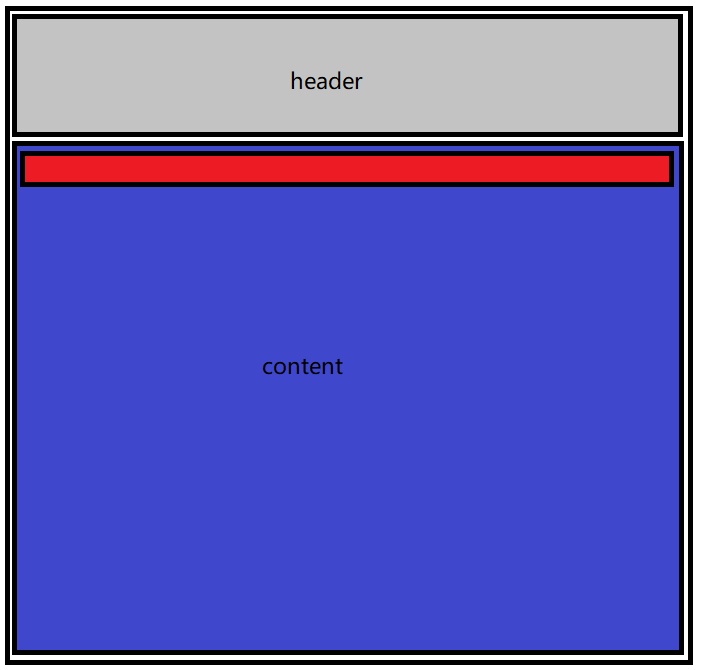
如上图,我们想实现的效果是,红色部分固定在content的顶部位置,实现代码为
 <!doctype html>

 <html lang="en">

 <head>

     <meta charset="UTF-8" />

     <meta http-equiv="X-UA-Compatible" content="IE=edge,chrome=1" />

     <title> 页面名称 </title>

 <style type="text/css">

 html, body {

     margin: 0;

     padding: 0;

 }

 </style>

 </head>

 <body>

 <div id="par" style='margin-top:150px;background-color:blue; position: relative;height:1500px'>

 <div id="fix" style="position: absolute;top:0px;left:60px;width:180px;background-color:red;">

 这个是固定的DIV

 </div>

 </div>

 <script type="text/javascript">

 window.onscroll = function () {

     var fix = document.getElementById("fix");

     var par = document.getElementById("par");

     var st = document.documentElement.scrollTop || document.body.scrollTop;

     var pt = par.offsetTop;

     fix.style.position = st>pt ? "fixed" : "absolute";

 }

 </script>

 </body>

 </html>
还有一种存在左侧导航栏的情况
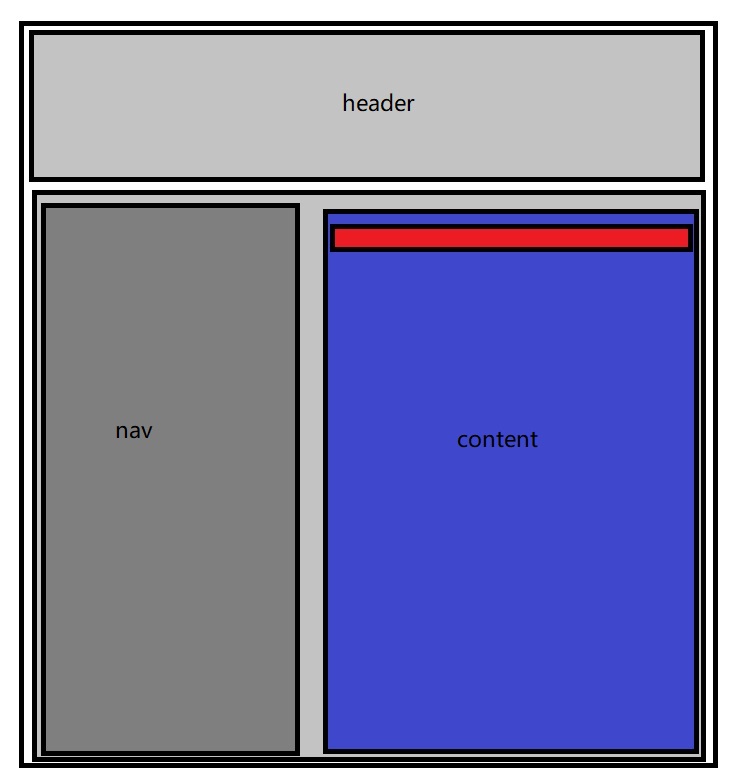
实现代码为
 <!doctype html>

 <html lang="en">

 <head>

     <meta charset="UTF-8" />

     <meta http-equiv="X-UA-Compatible" content="IE=edge,chrome=1" />

     <title> 页面名称 </title>

     <script src="https://cdn.bootcss.com/jquery/1.11.1/jquery.js"></script>

 <style type="text/css">

 html, body {

     margin: 0;

     padding: 0;

 }

 </style>

 </head>

 <body>

 <div>

    <div style="width:100%;height: 100px; background-color: #ccc;">

    </div>

    <div>

           <div style="width:20%;height:100%;background-color: #bbb;float: left">333333333333</div>

        <div id="par" style=' float: left; width:80%;background-color:blue; position: relative;height: 1500px'>

                <div id="fix" style="position: absolute;top:0px;left:0px;width:100%;background-color:red;height:100px">

                这个是固定的DIV

               </div>

               <div id='ct' style="margin-top: 120px">

                </div>

         </div>

    </div>

 </div>

 <script type="text/javascript">

 window.onscroll = function () {

     var fix = document.getElementById("fix");

     var par = document.getElementById("par");

     //var sp = document.getElementById("sp");

     var ct = document.getElementById("ct");

     var st = document.documentElement.scrollTop || document.body.scrollTop;

     var pt = par.offsetTop;

     if (st>pt) {

         fix.style.left = par.offsetLeft + "px";

         fix.style.width = par.offsetWidth +  "px";

         fix.style.position = "fixed";

        var top = (document.documentElement.scrollTop - 200 + 120) + 'px';

        console.log(top);

         $(ct).css('margin-top','120px');

     } else {

         fix.style.left = "0px";

         fix.style.width = "100%";

         fix.style.position = "absolute";

     }

 }

 </script>

 </body>

 </html>
position:fix相对父元素定位的更多相关文章
- position:fixed 相对父元素定位
position:fixed是对于浏览器窗口定位的,要实现相当于父元素定位,可以这样: 不设置fixed元素的top,bottom,left,right,只设置margin来实现. 这种方法本质上fi ...
- 解决IE6,IE7下子元素使用position:relative、父元素使用overflow:auto后,子元素不随着滚动条滚动的问题
解决IE6,IE7下子元素使用position:relative.父元素使用overflow:auto后,子元素不随着滚动条滚动的问题 在IE6,IE7下,子元素使用position:relati ...
- 关于元素设置margin-top能够改变body位置的原因及解决(子元素设置margin-top改变父元素定位)
关于元素设置margin-top能够改变body位置的原因及解决(子元素设置margin-top改变父元素定位) 起因:在进行bootstrap的.navbar-brand内文字设置垂直居中时采用li ...
- 【随笔】关于绝对定位absolute相对于父元素定位的问题
绝对定位absolute的官方定义: 设置为绝对定位的元素框从文档流完全删除,并相对于其包含块定位,包含块可能是文档中的另一个元素或者是初始包含块.元素原先在正常文档流中所占的空间会关闭,就好像该元素 ...
- 内层元素设置position:relative后父元素overflow:hidden overflow:scroll失效 解决方法
内层元素设置position:relative后父元素overflow:hidden overflow:scroll 都失效 解决方法:在position:relative的外层父容器加positio ...
- margin-top影响父元素定位
写样式时无意中发现margin-top会影响到父元素的定位,下面是示例: HTML代码: <div class="demo"> <div class=" ...
- jquery的相对父元素和相对文档定位示例代码
在开发jquery时候经常需要用到定位,有相对父元素定位和相对文档定位,本文为此总结下,有需要的朋友可以参考下 在开发jquery时候经常需要用到定位,这里概括两种定位: 1.相对父元素定位: $(& ...
- CSS 实现:父元素包含子元素,子元素垂直居中布局
☊[实现要求]:父元素包含子元素,子元素垂直居中布局 <div class="demo5"> <div class="child">A& ...
- 父元素高度设置为min-height,子元素高度设置为100%,但实际上子元素高度你知道是多少吗?
前言 给父元素一个min-height,子元素设置height:100%. 代码 <!DOCTYPE html> <html> <head> <title&g ...
随机推荐
- linux下安装mysql解决乱码、时间差、表的大小写问题
编辑vi /etc/mysql/my.cnf,有的则是:/etc/my.cnf,加入 [client]default-character-set=utf8mb4 [mysql]default-char ...
- RabbitMQ python模块pika生产者消费者轮询模型。
完整代码如下: 生产者,producer import pika connection = pika.BlockingConnection( pika.ConnectionParameters('lo ...
- Linux Centos7下如何确认MySQL服务已经启动
Linux CentOS一般做为服务器使用,因此,MySQL服务应该随开机自动启动的.正常情况下,查看开机自动启动的服务使用chkconfig命令,如下: #chkconfig --list 实际使用 ...
- PythonStudy——第一阶段性测试
1.Python解释器,在2.x和3.x上分别采用的是什么默认编码8 2.定义字符串变量时,单引号,双引号,三引号什么区别? 3.编程语言可以分为哪三类,特点都是什么 4.定义一个变量有三个特性, 5 ...
- esxi5 的tart命令使用注意点
esxi5.0 注意tar命令参数使用和centos6稍微有点不一样,注意下 注意需要把-f参数单独分离出来,紧接着文件. 而不能和cz命令一起用 ~ # touch abc.txt ~ # ec ...
- 解决java.lang.IllegalArgumentException: No converter found for return value of type 的问题
controller返回一个dto,并且定义了@ResponseBody注解,表示希望将这个dto对象转换为json字符串返回给前端,但是运行时报错:nested exception is java. ...
- CentOS 7安装php
我们已经在上一篇里安装上了nginx:现在我们想要php(也许还包括mysql). (CentOS 7里使用mariadb替代了mysql) # yum install mariadb-client ...
- note 1 对象和数据类型
/#行注释 print "Hello World" 对象 五种基本类型 字符串 (string),简记为str 使用 ' ' 或 " " 括起来的一系列字符 整 ...
- cookie and sesssion
会话(Session)跟踪是Web程序中常用的技术,用来跟踪用户的整个会话.常用的会话跟踪技术是Cookie与Session.Cookie通过在客户端记录信息确定用户身份,Session通过在服务器端 ...
- impala daemon启动失败
启动错误日志: perl: warning: Setting locale failed. perl: warning: Please check that your locale settings: ...