
java框架之SpringBoot(4)-资源映射&thymeleaf
资源映射
静态资源映射
查看 SpringMVC 的自动配置类,里面有一个配置静态资源映射的方法:
 @Override
 public void addResourceHandlers(ResourceHandlerRegistry registry) {
     if (!this.resourceProperties.isAddMappings()) {
         logger.debug("Default resource handling disabled");
         return;
     }
     Integer cachePeriod = this.resourceProperties.getCachePeriod();
     if (!registry.hasMappingForPattern("/webjars/**")) {
         // 将路径为 "/webjars/**" 匹配到的资源在 "classpath:/META-INF/resources/webjars/"
         customizeResourceHandlerRegistration(registry
                 .addResourceHandler("/webjars/**")
                 .addResourceLocations("classpath:/META-INF/resources/webjars/")
                 .setCachePeriod(cachePeriod));
     }
     // 从配置中获取静态路由规则
     String staticPathPattern = this.mvcProperties.getStaticPathPattern();
     if (!registry.hasMappingForPattern(staticPathPattern)) {
         // 将路径为 staticPathPattern 匹配到的资源在 this.resourceProperties.getStaticLocations()
         customizeResourceHandlerRegistration(
                 registry.addResourceHandler(staticPathPattern)
                         .addResourceLocations(
                                 this.resourceProperties.getStaticLocations())
                         .setCachePeriod(cachePeriod));
     }
 }
org.springframework.boot.autoconfigure.web.WebMvcAutoConfiguration.WebMvcAutoConfigurationAdapter#addResourceHandlers
从第 8-14 行可以看到,有一个默认配置,将能匹配 "/webjars/**" 的请求路径映射到 "classpath:/META-INF/resources/webjars/" 中。
接着从 16-24 行又将 this.mvcProperties.getStaticPathPattern() 变量对应值的路径映射 this.resourceProperties.getStaticLocations() 对应值的目录下。
查看 this.mvcProperties 对应的配置类:
 /*
  * Copyright 2012-2017 the original author or authors.
  *
  * Licensed under the Apache License, Version 2.0 (the "License");
  * you may not use this file except in compliance with the License.
  * You may obtain a copy of the License at
  *
  *      http://www.apache.org/licenses/LICENSE-2.0
  *
  * Unless required by applicable law or agreed to in writing, software
  * distributed under the License is distributed on an "AS IS" BASIS,
  * WITHOUT WARRANTIES OR CONDITIONS OF ANY KIND, either express or implied.
  * See the License for the specific language governing permissions and
  * limitations under the License.
  */

 package org.springframework.boot.autoconfigure.web;

 import java.util.LinkedHashMap;
 import java.util.Locale;
 import java.util.Map;

 import org.springframework.boot.context.properties.ConfigurationProperties;
 import org.springframework.http.MediaType;
 import org.springframework.validation.DefaultMessageCodesResolver;

 /**
  * {@link ConfigurationProperties properties} for Spring MVC.
  *
  * @author Phillip Webb
  * @author Sébastien Deleuze
  * @author Stephane Nicoll
  * @author Eddú Meléndez
  * @since 1.1
  */
 @ConfigurationProperties(prefix = "spring.mvc")
 public class WebMvcProperties {

     /**
      * Formatting strategy for message codes (PREFIX_ERROR_CODE, POSTFIX_ERROR_CODE).
      */
     private DefaultMessageCodesResolver.Format messageCodesResolverFormat;

     /**
      * Locale to use. By default, this locale is overridden by the "Accept-Language"
      * header.
      */
     private Locale locale;

     /**
      * Define how the locale should be resolved.
      */
     private LocaleResolver localeResolver = LocaleResolver.ACCEPT_HEADER;

     /**
      * Date format to use (e.g. dd/MM/yyyy).
      */
     private String dateFormat;

     /**
      * Dispatch TRACE requests to the FrameworkServlet doService method.
      */
     private boolean dispatchTraceRequest = false;

     /**
      * Dispatch OPTIONS requests to the FrameworkServlet doService method.
      */
     private boolean dispatchOptionsRequest = true;

     /**
      * If the content of the "default" model should be ignored during redirect scenarios.
      */
     private boolean ignoreDefaultModelOnRedirect = true;

     /**
      * If a "NoHandlerFoundException" should be thrown if no Handler was found to process
      * a request.
      */
     private boolean throwExceptionIfNoHandlerFound = false;

     /**
      * Enable warn logging of exceptions resolved by a "HandlerExceptionResolver".
      */
     private boolean logResolvedException = false;

     /**
      * Maps file extensions to media types for content negotiation, e.g. yml->text/yaml.
      */
     private Map<String, MediaType> mediaTypes = new LinkedHashMap<String, MediaType>();

     /**
      * Path pattern used for static resources.
      */
     private String staticPathPattern = "/**";

     private final Async async = new Async();

     private final Servlet servlet = new Servlet();

     private final View view = new View();

     public DefaultMessageCodesResolver.Format getMessageCodesResolverFormat() {
         return this.messageCodesResolverFormat;
     }

     public void setMessageCodesResolverFormat(
             DefaultMessageCodesResolver.Format messageCodesResolverFormat) {
         this.messageCodesResolverFormat = messageCodesResolverFormat;
     }

     public Locale getLocale() {
         return this.locale;
     }

     public void setLocale(Locale locale) {
         this.locale = locale;
     }

     public LocaleResolver getLocaleResolver() {
         return this.localeResolver;
     }

     public void setLocaleResolver(LocaleResolver localeResolver) {
         this.localeResolver = localeResolver;
     }

     public String getDateFormat() {
         return this.dateFormat;
     }

     public void setDateFormat(String dateFormat) {
         this.dateFormat = dateFormat;
     }

     public boolean isIgnoreDefaultModelOnRedirect() {
         return this.ignoreDefaultModelOnRedirect;
     }

     public void setIgnoreDefaultModelOnRedirect(boolean ignoreDefaultModelOnRedirect) {
         this.ignoreDefaultModelOnRedirect = ignoreDefaultModelOnRedirect;
     }

     public boolean isThrowExceptionIfNoHandlerFound() {
         return this.throwExceptionIfNoHandlerFound;
     }

     public void setThrowExceptionIfNoHandlerFound(
             boolean throwExceptionIfNoHandlerFound) {
         this.throwExceptionIfNoHandlerFound = throwExceptionIfNoHandlerFound;
     }

     public boolean isLogResolvedException() {
         return this.logResolvedException;
     }

     public void setLogResolvedException(boolean logResolvedException) {
         this.logResolvedException = logResolvedException;
     }

     public Map<String, MediaType> getMediaTypes() {
         return this.mediaTypes;
     }

     public void setMediaTypes(Map<String, MediaType> mediaTypes) {
         this.mediaTypes = mediaTypes;
     }

     public boolean isDispatchOptionsRequest() {
         return this.dispatchOptionsRequest;
     }

     public void setDispatchOptionsRequest(boolean dispatchOptionsRequest) {
         this.dispatchOptionsRequest = dispatchOptionsRequest;
     }

     public boolean isDispatchTraceRequest() {
         return this.dispatchTraceRequest;
     }

     public void setDispatchTraceRequest(boolean dispatchTraceRequest) {
         this.dispatchTraceRequest = dispatchTraceRequest;
     }

     public String getStaticPathPattern() {
         return this.staticPathPattern;
     }

     public void setStaticPathPattern(String staticPathPattern) {
         this.staticPathPattern = staticPathPattern;
     }

     public Async getAsync() {
         return this.async;
     }

     public Servlet getServlet() {
         return this.servlet;
     }

     public View getView() {
         return this.view;
     }

     public static class Async {

         /**
          * Amount of time (in milliseconds) before asynchronous request handling times
          * out. If this value is not set, the default timeout of the underlying
          * implementation is used, e.g. 10 seconds on Tomcat with Servlet 3.
          */
         private Long requestTimeout;

         public Long getRequestTimeout() {
             return this.requestTimeout;
         }

         public void setRequestTimeout(Long requestTimeout) {
             this.requestTimeout = requestTimeout;
         }

     }

     public static class Servlet {

         /**
          * Load on startup priority of the dispatcher servlet.
          */
         private int loadOnStartup = -1;

         public int getLoadOnStartup() {
             return this.loadOnStartup;
         }

         public void setLoadOnStartup(int loadOnStartup) {
             this.loadOnStartup = loadOnStartup;
         }

     }

     public static class View {

         /**
          * Spring MVC view prefix.
          */
         private String prefix;

         /**
          * Spring MVC view suffix.
          */
         private String suffix;

         public String getPrefix() {
             return this.prefix;
         }

         public void setPrefix(String prefix) {
             this.prefix = prefix;
         }

         public String getSuffix() {
             return this.suffix;
         }

         public void setSuffix(String suffix) {
             this.suffix = suffix;
         }

     }

     public enum LocaleResolver {

         /**
          * Always use the configured locale.
          */
         FIXED,

         /**
          * Use the "Accept-Language" header or the configured locale if the header is not
          * set.
          */
         ACCEPT_HEADER

     }

 }
org.springframework.boot.autoconfigure.web.WebMvcProperties
查看 this.resourceProperties 对应的配置类:
/*
 * Copyright 2012-2018 the original author or authors.
 *
 * Licensed under the Apache License, Version 2.0 (the "License");
 * you may not use this file except in compliance with the License.
 * You may obtain a copy of the License at
 *
 *      http://www.apache.org/licenses/LICENSE-2.0
 *
 * Unless required by applicable law or agreed to in writing, software
 * distributed under the License is distributed on an "AS IS" BASIS,
 * WITHOUT WARRANTIES OR CONDITIONS OF ANY KIND, either express or implied.
 * See the License for the specific language governing permissions and
 * limitations under the License.
 */

package org.springframework.boot.autoconfigure.web;

import java.util.ArrayList;
import java.util.Collections;
import java.util.List;

import org.springframework.beans.factory.InitializingBean;
import org.springframework.boot.context.properties.ConfigurationProperties;
import org.springframework.boot.context.properties.NestedConfigurationProperty;
import org.springframework.context.ResourceLoaderAware;
import org.springframework.core.io.ClassPathResource;
import org.springframework.core.io.Resource;
import org.springframework.core.io.ResourceLoader;

/**
 * Properties used to configure resource handling.
 *
 * @author Phillip Webb
 * @author Brian Clozel
 * @author Dave Syer
 * @author Venil Noronha
 * @since 1.1.0
 */
@ConfigurationProperties(prefix = "spring.resources", ignoreUnknownFields = false)
public class ResourceProperties implements ResourceLoaderAware, InitializingBean {

    private static final String[] SERVLET_RESOURCE_LOCATIONS = { "/" };

    private static final String[] CLASSPATH_RESOURCE_LOCATIONS = {
            "classpath:/META-INF/resources/", "classpath:/resources/",
            "classpath:/static/", "classpath:/public/" };

    private static final String[] RESOURCE_LOCATIONS;

    static {
        RESOURCE_LOCATIONS = new String[CLASSPATH_RESOURCE_LOCATIONS.length
                + SERVLET_RESOURCE_LOCATIONS.length];
        System.arraycopy(SERVLET_RESOURCE_LOCATIONS, 0, RESOURCE_LOCATIONS, 0,
                SERVLET_RESOURCE_LOCATIONS.length);
        System.arraycopy(CLASSPATH_RESOURCE_LOCATIONS, 0, RESOURCE_LOCATIONS,
                SERVLET_RESOURCE_LOCATIONS.length, CLASSPATH_RESOURCE_LOCATIONS.length);
    }

    /**
     * Locations of static resources. Defaults to classpath:[/META-INF/resources/,
     * /resources/, /static/, /public/] plus context:/ (the root of the servlet context).
     */
    private String[] staticLocations = RESOURCE_LOCATIONS;

    /**
     * Cache period for the resources served by the resource handler, in seconds.
     */
    private Integer cachePeriod;

    /**
     * Enable default resource handling.
     */
    private boolean addMappings = true;

    private final Chain chain = new Chain();

    private ResourceLoader resourceLoader;

    @Override
    public void setResourceLoader(ResourceLoader resourceLoader) {
        this.resourceLoader = resourceLoader;
    }

    @Override
    public void afterPropertiesSet() {
        this.staticLocations = appendSlashIfNecessary(this.staticLocations);
    }

    public String[] getStaticLocations() {
        return this.staticLocations;
    }

    public void setStaticLocations(String[] staticLocations) {
        this.staticLocations = appendSlashIfNecessary(staticLocations);
    }

    private String[] appendSlashIfNecessary(String[] staticLocations) {
        String[] normalized = new String[staticLocations.length];
        for (int i = 0; i < staticLocations.length; i++) {
            String location = staticLocations[i];
            if (location != null) {
                normalized[i] = (location.endsWith("/") ? location : location + "/");
            }
        }
        return normalized;
    }

    public Resource getWelcomePage() {
        for (String location : getStaticWelcomePageLocations()) {
            Resource resource = this.resourceLoader.getResource(location);
            try {
                if (resource.exists()) {
                    resource.getURL();
                    return resource;
                }
            }
            catch (Exception ex) {
                // Ignore
            }
        }
        return null;
    }

    private String[] getStaticWelcomePageLocations() {
        String[] result = new String[this.staticLocations.length];
        for (int i = 0; i < result.length; i++) {
            String location = this.staticLocations[i];
            if (!location.endsWith("/")) {
                location = location + "/";
            }
            result[i] = location + "index.html";
        }
        return result;
    }

    List<Resource> getFaviconLocations() {
        List<Resource> locations = new ArrayList<Resource>(
                this.staticLocations.length + 1);
        if (this.resourceLoader != null) {
            for (String location : this.staticLocations) {
                locations.add(this.resourceLoader.getResource(location));
            }
        }
        locations.add(new ClassPathResource("/"));
        return Collections.unmodifiableList(locations);
    }

    public Integer getCachePeriod() {
        return this.cachePeriod;
    }

    public void setCachePeriod(Integer cachePeriod) {
        this.cachePeriod = cachePeriod;
    }

    public boolean isAddMappings() {
        return this.addMappings;
    }

    public void setAddMappings(boolean addMappings) {
        this.addMappings = addMappings;
    }

    public Chain getChain() {
        return this.chain;
    }

    /**
     * Configuration for the Spring Resource Handling chain.
     */
    public static class Chain {

        /**
         * Enable the Spring Resource Handling chain. Disabled by default unless at least
         * one strategy has been enabled.
         */
        private Boolean enabled;

        /**
         * Enable caching in the Resource chain.
         */
        private boolean cache = true;

        /**
         * Enable HTML5 application cache manifest rewriting.
         */
        private boolean htmlApplicationCache = false;

        /**
         * Enable resolution of already gzipped resources. Checks for a resource name
         * variant with the "*.gz" extension.
         */
        private boolean gzipped = false;

        @NestedConfigurationProperty
        private final Strategy strategy = new Strategy();

        /**
         * Return whether the resource chain is enabled. Return {@code null} if no
         * specific settings are present.
         * @return whether the resource chain is enabled or {@code null} if no specified
         * settings are present.
         */
        public Boolean getEnabled() {
            return getEnabled(getStrategy().getFixed().isEnabled(),
                    getStrategy().getContent().isEnabled(), this.enabled);
        }

        public void setEnabled(boolean enabled) {
            this.enabled = enabled;
        }

        public boolean isCache() {
            return this.cache;
        }

        public void setCache(boolean cache) {
            this.cache = cache;
        }

        public Strategy getStrategy() {
            return this.strategy;
        }

        public boolean isHtmlApplicationCache() {
            return this.htmlApplicationCache;
        }

        public void setHtmlApplicationCache(boolean htmlApplicationCache) {
            this.htmlApplicationCache = htmlApplicationCache;
        }

        public boolean isGzipped() {
            return this.gzipped;
        }

        public void setGzipped(boolean gzipped) {
            this.gzipped = gzipped;
        }

        static Boolean getEnabled(boolean fixedEnabled, boolean contentEnabled,
                Boolean chainEnabled) {
            return (fixedEnabled || contentEnabled) ? Boolean.TRUE : chainEnabled;
        }

    }

    /**
     * Strategies for extracting and embedding a resource version in its URL path.
     */
    public static class Strategy {

        @NestedConfigurationProperty
        private final Fixed fixed = new Fixed();

        @NestedConfigurationProperty
        private final Content content = new Content();

        public Fixed getFixed() {
            return this.fixed;
        }

        public Content getContent() {
            return this.content;
        }

    }

    /**
     * Version Strategy based on content hashing.
     */
    public static class Content {

        /**
         * Enable the content Version Strategy.
         */
        private boolean enabled;

        /**
         * Comma-separated list of patterns to apply to the Version Strategy.
         */
        private String[] paths = new String[] { "/**" };

        public boolean isEnabled() {
            return this.enabled;
        }

        public void setEnabled(boolean enabled) {
            this.enabled = enabled;
        }

        public String[] getPaths() {
            return this.paths;
        }

        public void setPaths(String[] paths) {
            this.paths = paths;
        }

    }

    /**
     * Version Strategy based on a fixed version string.
     */
    public static class Fixed {

        /**
         * Enable the fixed Version Strategy.
         */
        private boolean enabled;

        /**
         * Comma-separated list of patterns to apply to the Version Strategy.
         */
        private String[] paths = new String[] { "/**" };

        /**
         * Version string to use for the Version Strategy.
         */
        private String version;

        public boolean isEnabled() {
            return this.enabled;
        }

        public void setEnabled(boolean enabled) {
            this.enabled = enabled;
        }

        public String[] getPaths() {
            return this.paths;
        }

        public void setPaths(String[] paths) {
            this.paths = paths;
        }

        public String getVersion() {
            return this.version;
        }

        public void setVersion(String version) {
            this.version = version;
        }

    }

}
org.springframework.boot.autoconfigure.web.ResourceProperties
即 16-24 行就是将能匹配 "/**" 的请求路径映射到项目路径下 "classpath:/META-INF/resources/", "classpath:/resources/", "classpath:/static/", "classpath:/public/" 中。
结论:
- 请求路径如果匹配 "/webjars/**" 规则,那么 SpringBoot 就会去 classpath:/META-INF/resources/webjars/ 目录下寻找对应资源。
- 请求路径如果匹配 "/**" 规则(即任意请求路径),那么 SpringBoot 就会去 "classpath:/META-INF/resources/", "classpath:/resources/", "classpath:/static/", "classpath:/public/" 目录下寻找对应资源。
欢迎页
依旧是 SpringMVC 配置类中,有一个注册欢迎页映射 bean 的方法:
 @Bean
 public WelcomePageHandlerMapping welcomePageHandlerMapping(
         ResourceProperties resourceProperties) {
     return new WelcomePageHandlerMapping(resourceProperties.getWelcomePage(),
             this.mvcProperties.getStaticPathPattern());
 }
org.springframework.boot.autoconfigure.web.WebMvcAutoConfiguration.WebMvcAutoConfigurationAdapter#welcomePageHandlerMapping
查看 resourceProperties.getWelcomePage() 方法:
 public Resource getWelcomePage() {
     for (String location : getStaticWelcomePageLocations()) {
         Resource resource = this.resourceLoader.getResource(location);
         try {
             if (resource.exists()) {
                 resource.getURL();
                 return resource;
             }
         }
         catch (Exception ex) {
             // Ignore
         }
     }
     return null;
 }
org.springframework.boot.autoconfigure.web.ResourceProperties#getWelcomePage
接着查看 getStaticWelcomePageLocations() 方法:
 private static final String[] SERVLET_RESOURCE_LOCATIONS = { "/" };

 private static final String[] CLASSPATH_RESOURCE_LOCATIONS = {
             "classpath:/META-INF/resources/", "classpath:/resources/",
             "classpath:/static/", "classpath:/public/" };

 private static final String[] RESOURCE_LOCATIONS;

 static {
     RESOURCE_LOCATIONS = new String[CLASSPATH_RESOURCE_LOCATIONS.length
             + SERVLET_RESOURCE_LOCATIONS.length];
     System.arraycopy(SERVLET_RESOURCE_LOCATIONS, 0, RESOURCE_LOCATIONS, 0,
             SERVLET_RESOURCE_LOCATIONS.length);
     System.arraycopy(CLASSPATH_RESOURCE_LOCATIONS, 0, RESOURCE_LOCATIONS,
             SERVLET_RESOURCE_LOCATIONS.length, CLASSPATH_RESOURCE_LOCATIONS.length);
 }

 private String[] staticLocations = RESOURCE_LOCATIONS;

 private String[] getStaticWelcomePageLocations() {
     String[] result = new String[this.staticLocations.length];
     for (int i = 0; i < result.length; i++) {
         String location = this.staticLocations[i];
         if (!location.endsWith("/")) {
             location = location + "/";
         }
         result[i] = location + "index.html";
     }
     return result;
 }
org.springframework.boot.autoconfigure.web.ResourceProperties#getStaticWelcomePageLocations
即 resourceProperties.getWelcomePage() 方法默认就是从静态资源目录下即 "classpath:/META-INF/resources/", "classpath:/resources/", "classpath:/static/", "classpath:/public/" 目录中寻找名为 "index.html" 的资源。
结论:
- SpringBoot 中默认的欢迎页为 "classpath:/META-INF/resources/", "classpath:/resources/", "classpath:/static/", "classpath:/public/" 目录下名为的 "index.html" 的页面。
页面图标
在 SpringMVC 配置类中还有一个页面图标配置类:
 @Configuration
 @ConditionalOnProperty(value = "spring.mvc.favicon.enabled", matchIfMissing = true)  // 默认开启图标显示
 public static class FaviconConfiguration {

     private final ResourceProperties resourceProperties;

     public FaviconConfiguration(ResourceProperties resourceProperties) {
         this.resourceProperties = resourceProperties;
     }

     @Bean
     public SimpleUrlHandlerMapping faviconHandlerMapping() {
         SimpleUrlHandlerMapping mapping = new SimpleUrlHandlerMapping();
         mapping.setOrder(Ordered.HIGHEST_PRECEDENCE + 1);
         mapping.setUrlMap(Collections.singletonMap("**/favicon.ico",
                 faviconRequestHandler()));
         return mapping;
     }

     @Bean
     public ResourceHttpRequestHandler faviconRequestHandler() {
         ResourceHttpRequestHandler requestHandler = new ResourceHttpRequestHandler();
         requestHandler
                 .setLocations(this.resourceProperties.getFaviconLocations());
         return requestHandler;
     }

 }
org.springframework.boot.autoconfigure.web.WebMvcAutoConfiguration.WebMvcAutoConfigurationAdapter.FaviconConfiguration
第 12 行的 FaviconConfiguration 方法便是用来处理图标映射,在第 15 行为匹配 "**/favicon.ico" 的请求路径指定了图标请求处理器 faviconRequestHandler() ,在第 24 行设置了图标请求处理器寻找图标的目录为 this.resourceProperties.getFaviconLocations() ,查看该方法:
 List<Resource> getFaviconLocations() {
     List<Resource> locations = new ArrayList<Resource>(
             this.staticLocations.length + 1);
     if (this.resourceLoader != null) {
         for (String location : this.staticLocations) {
             locations.add(this.resourceLoader.getResource(location));
         }
     }
     locations.add(new ClassPathResource("/"));
     return Collections.unmodifiableList(locations);
 }
org.springframework.boot.autoconfigure.web.ResourceProperties#getFaviconLocations
可以看到,该方法返回的是静态文件夹目录资源。
结论:
- 在 SpringBoot 工程中的静态资源目录放置一个名为 "favicon.ico" 的网页图标,该图标就会被 SpringBoot 使用。
模板引擎thymeleaf
thymeleaf中文离线文档下载(提取码:ip1g) | thymeleaf官网
引入
thymeleaf 是 SpringBoot 推荐使用的一款模板引擎框架,要引入很简单,SpringBoot 为它提供了场景启动器:
<dependency>
    <groupId>org.springframework.boot</groupId>
    <artifactId>spring-boot-starter-thymeleaf</artifactId>
</dependency>
切换版本
如 SpringBoot 1.5.19 版本使用的 thymeleaf 版本默认为 2.1.6,如果想切换到 3.0 以上,直接覆盖它的版本定义属性即可,要注意的是需要同时更新它的布局功能支持程序的版本:
<thymeleaf.version>3.0.2.RELEASE</thymeleaf.version>
<!--布局功能支持程序,thymeleaf 使用 3.0 版本以上时支持程序要使用 2.0 以上-->
<thymeleaf-layout-dialect.version>2.1.1</thymeleaf-layout-dialect.version>
SpringBoot中使用
要在 SpringBoot 中使用 thymeleaf,可以先看下 thymeleaf 的自动配置类:
@Configuration
@EnableConfigurationProperties(ThymeleafProperties.class)
@ConditionalOnClass(SpringTemplateEngine.class)
@AutoConfigureAfter(WebMvcAutoConfiguration.class)
public class ThymeleafAutoConfiguration {
查看它的属性映射类:
@ConfigurationProperties(prefix = "spring.thymeleaf")
public class ThymeleafProperties {

    private static final Charset DEFAULT_ENCODING = Charset.forName("UTF-8");

    private static final MimeType DEFAULT_CONTENT_TYPE = MimeType.valueOf("text/html");

    public static final String DEFAULT_PREFIX = "classpath:/templates/";

    public static final String DEFAULT_SUFFIX = ".html";
一目了然,thymeleaf 默认使用的模板路径为 classpath:/templates/ ,且可省略后缀 .html ,下面我们就开始在 SpringBoot 项目中使用 thymeleaf:
1、创建测试控制器:
package com.springboot.webdev1;

import org.springframework.stereotype.Controller;
import org.springframework.ui.Model;
import org.springframework.web.bind.annotation.RequestMapping;

@Controller
public class TestController {

    @RequestMapping("test")
    public String test(Model model){
        // 传值
        model.addAttribute("name", "张三");
        // SpringBoot 会找到 classpath:templates/test.html 使用 thymeleaf 渲染
        return "test";
    }
}
com.springboot.webdev1.TestController
2、新建模板页面:
<!DOCTYPE html>
<html lang="en" xmlns:th="http://www.thymeleaf.org">
<head>
    <meta charset="UTF-8">
    <title>test</title>
</head>
<body>
<h1 th:text="${name}"></h1>
</body>
</html>
templates/test.html
3、测试:
启动项目,访问 localhost:8080/test:

test
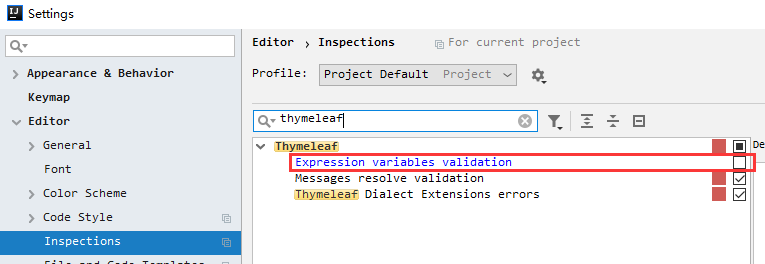
IDEA语法报错解决
关闭 thymeleaf 的表达式语法检查:
热部署
这里选用的是 Idea 工具进行操作,thymeleaf 的实时变更依赖于此 IDE。
1、导入依赖:
<dependency>
    <groupId>org.springframework.boot</groupId>
    <artifactId>spring-boot-devtools</artifactId>
</dependency>
2、开启 Idea 的自动编译,也可以通过 Ctrl+F9 手动编译:

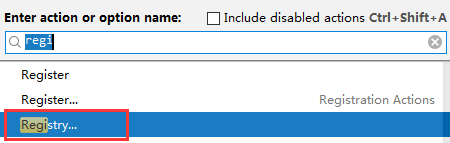
3、事件设置,让 thymeleaf 变更即时生效, Ctrl+Shift+A 打开时间对话框,选择勾选如下:

标准表达式
变量表达式
thymeleaf 的变量表达式类似于 EL 表达式,通过 ${} 取值。
List<String> nameList = new ArrayList<>();
nameList.add("张三");
nameList.add("李四");
nameList.add("王五");

model.addAttribute("name", "张三");
model.addAttribute("nameList", nameList);
controller
<!--取值-->
<span th:text="${name}"></span>
<hr>
<!--循环-->
<ul>
    <li th:each="name : ${nameList}"><span th:text="${name}"/></li>
</ul>

html
选择变量表达式
选择变量表达式很像,不同它需要预先选择一个对象作为上下文变量容器。
public class User {
    public User(){}
    public User(String name, Integer age) {
        this.name = name;
        this.age = age;
    }

    private String name;

    private Integer age;

    public String getName() {
        return name;
    }

    public void setName(String name) {
        this.name = name;
    }

    public Integer getAge() {
        return age;
    }

    public void setAge(Integer age) {
        this.age = age;
    }
}
com.springboot.webdev1.bean.User
model.addAttribute("user", new User("张三", 18));
controller
<div th:object="${user}">
    <p>姓名:<span th:text="*{name}"></span></p>
    <p>年龄:<span th:text="*{age}"></span></p>
</div>
html
URL表达式
URL 表达式可以帮助我们更轻松的动态拼装请求 URL。
<!--() 中可以指定要传递的参数-->
<span th:text="@{/order/details(type=1,keyword=ff)}"></span>
html
表达式支持语法
字面量
文本文字 : 'one text', 'Another one!',…
数字文本 : 0, 34, 3.0, 12.3,…
布尔文本 : true, false
空 : null
文字标记 : one, sometext, main,…
文本操作
字符串连接 : +
文本替换 : |The name is ${name}|
算术运算
二元运算符 : +, -, *, /, %
减号(单目运算符) : -
布尔操作
二元运算符 : and, or
布尔否定(一元运算符) : !, not
比较
比较 : >, <, >=, <= (gt, lt, ge, le)
等值运算符 :==, != (eq, ne)
条件运算
If-then : (if) ? (then)  # 例:<span th:text="${name} == '张三' ? 'Administrator'"/>
If-then-else : (if) ? (then) : (else)  # 例:<span th:text="${name} == '张三' ? 'Administrator' : (${name} ?: 'Unknown')"/>
Default : (value) ?: (defaultvalue)  # 例:<span th:text="${name} ?: 'Unknown'"/>
常用标签
| 关键字 | 功能介绍 | 案例 |
|---|---|---|
| th:id | 替换id | <input th:id="'xxx' + ${collect.id}"/> |
| th:text | 文本替换 | <p th:text="${collect.description}">description</p> |
| th:utext | 支持html的文本替换 | <p th:utext="${htmlcontent}">conten</p> |
| th:object | 替换对象 | <div th:object="${session.user}"> |
| th:value | 属性赋值 | <input th:value="${user.name}" /> |
| th:with | 变量赋值运算 | <div th:with="isEven=${prodStat.count}%2==0"></div> |
| th:style | 设置样式 | <span th:style="'display:' + @{(${sitrue} ? 'none' : 'inline-block')} + ''"/> |
| th:onclick | 点击事件 | <button th:onclick="'getCollect()'"></button> |
| th:each | 属性赋值 | <tr th:each="user,userStat:${users}"></tr> |
| th:if | 判断条件 | <a th:if="${userId == collect.userId}" > |
| th:unless | 和th:if判断相反 |
<a th:href="@{/login}" th:unless=${session.user != null}>Login</a>
|
| th:href | 链接地址 |
<a th:href="@{/login}" th:unless=${session.user != null}>Login</a>
|
| th:switch | 多路选择 配合th:case 使用 | <div th:switch="${user.role}"> |
| th:case | th:switch的一个分支 | <p th:case="'admin'">User is an administrator</p> |
| th:fragment | 布局标签,定义一个代码片段,方便其它地方引用 | <div th:fragment="alert"> |
| th:include | 布局标签,替换内容到引入的文件 | <head th:include="layout :: htmlhead" th:with="title='xx'"></head> /> |
| th:replace | 布局标签,替换整个标签到引入的文件 | <div th:replace="fragments/header :: title"></div> |
| th:selected | selected选择框 选中 | <option th:selected="(${xxx.id} == ${configObj.dd})"></option> |
| th:src | 图片类地址引入 | <img class="img-responsive" alt="App Logo" th:src="@{/img/logo.png}" /> |
| th:inline | 定义js脚本可以使用变量 | <script type="text/javascript" th:inline="javascript"> |
| th:action | 表单提交的地址 | <form action="subscribe.html" th:action="@{/subscribe}"> |
| th:remove | 删除某个属性 |
1.all:删除包含标签和所有的孩子。2.body:不包含标记删除,但删除其所有的孩子。3.tag:包含标记的删除,但不删除它的孩子。4.all-but-first:删除所有包含标签的孩子,除了第一个。5.none:什么也不做。这个值是有用的动态评估。 |
| th:attr | 设置标签属性,多个属性可以用逗号分隔 |
<img th:attr="src=@{/image/aa.jpg},title=#{logo}"/> 此标签不太优雅,一般用的比较少。 |
一个标签内可以包含多个th:x属性,其生效优先级顺序如下:
include、each、if/unless/switch/case、with、attr、attrprepend、attrappend、value、href、src、etc、text、utext、fragment、remove
常用操作
字符串拼接
<!--使用 + 号-->
<span th:text="'Welcome to our application, ' + ${name} + '!'"/> <br>
<!--使用 | 进行字符串格式化-->
<span th:text="|Welcome to our application, ${name}!|"/>
条件判断
<span th:if="${name}=='张三'">是张三</span>
<span th:unless="${name}=='张三'">不是张三</span>
<span th:text="${name} ?: 'Unknown'"/>
<span th:text="${name} == '张三' ? 'Administrator'"/>
<span th:text="${name} == '张三' ? 'Administrator' : (${name} ?: 'Unknown')"/>
<div th:switch="${name}">
    <span th:case="张三">name 为张三</span>
    <span th:case="李四">name 为李四</span>
</div>
循环
<ul>
    <li th:each="name,iterStat : ${nameList}" th:text="${iterStat.count} + ':'+ ${name}"></li>
</ul>
<!--
iterStat称作状态变量,属性有:
    index:当前迭代对象的index(从0开始计算)
    count: 当前迭代对象的index(从1开始计算)
    size:被迭代对象的大小
    current:当前迭代变量
    even/odd:布尔值,当前循环是否是偶数/奇数(从0开始计算)
    first:布尔值,当前循环是否是第一个
    last:布尔值,当前循环是否是最后一个
-->
组装URL
<!--() 中可以指定要传递的参数-->
<form th:action="@{/order/details(type=1,keyword=ff)}" ></form>
<!--上述对应的 URL 为 /order/details?type=1&keyword=ff-->
常用内置对象
thymeleaf 为我们提供了很多内置对象,通过 ${#内置对象名称} 即可访问到,下面列出一些比较常用的:
| 内置对象 | 作用 | 示例 |
|---|---|---|
| dates | 日期操作 |
<span th:text="${#dates.format(currentDate,'yyyy-MM-dd HH:mm:ss')}"/>
<!--格式化日期-->
|
| numbers | 数字格式化 |
<span th:text="${#numbers.formatDecimal(13.213, 0, 2)}"></span>
<!--此示例表示保留两位小数位,整数位自动  结果 13.21-->
<span th:text="${#numbers.formatDecimal(13.213, 3, 2)}"></span>
<!--此示例表示保留两位小数位,3位整数位(不够的前加0) 结果 013.21-->
|
| lists | 列表操作 |
<p th:text="${#lists.size(nameList)}"/>
<!--获取列表长度-->
|
| calendars | 日历操作 |
<p th:text="${#calendars.format(#calendars.createNow(),'yyyy-MM-dd HH:mm:ss')}"></p>
<!--格式化日期,与 #dates 相似-->
|
| strings | 字符串操作 |
<p th:text="${#strings.startsWith('abcde','aab')}"/>
<!--判断字符串是否以指定字符串开头-->
|
| objects | 对象操作 |
<p th:text="${#objects.nullSafe(name,'Unknown')}"></p>
<!--判断指定对象是否为空,如果是空则返回指定默认值,否则原样返回-->
|
| bools | 布尔值操作 |
<p th:text="${#bools.isFalse(1>2)}">aa</p>
<!--判断一个表达式结果是否为假-->
|
| arrays | 数组操作 |
<p th:text="${#arrays.isEmpty(testArr)}"></p>
<!--判断一个数组是否为空-->
|
| sets | 集合操作 |
<p th:text="${#sets.size(set)}"></p>
<!--获取一个集合中元素个数-->
|
| maps | 地图操作 |
<p th:text="${#maps.containsKey(map,'key1')}"></p>
<!--判断一个 Map 中是否存在指定 key-->
|
| aggregates | 统计运算 |
<p th:text="${#aggregates.avg(numArr)}"></p>
<!--计算一个数组中的平均值-->
|
| messages | 属性文件取值 |
<p th:text="${#messages.msg('hahah')}"/>
<!--取一个属性文件中的属性值,相当于 <p th:text="#{hahah}"/>-->
|
| convertions | 类型转换 |
<p th:text="${#conversions.convert('213','java.lang.Integer')+23}"></p>
<!--将一个字符串转成 Integer 类型-->
|
| execInfo | 模板信息 |
<p th:text="${#execInfo.getTemplateName()}"></p>
<!--获取运行时当前模板名称-->
|
| request | 请求对象 |
<p th:text="${#request.method}"></p>
<!--通过请求对象获取当前的请求方法 #httpServletRequest 与之相同-->
|
| response | 响应对象 |
<p th:text="${#response.getWriter().write('aaa')}"/>
<!--通过相应对象输出字符串 -->
|
| session | 会话对象 |
<p th:text="${#session.getId()}"></p>
<!--通过会话对象获取当前会话id #httpSession 与之相同-->
|
布局
介绍
在 web 开发中,我们经常会将公共头,公共尾,菜单等部分提取成模板供其它页面使用。在 thymeleaf 中,通过 th:fragment、th:include、th:replace、参数化模板配置、css 选择器加载代码块等实现。
依赖
Spring Boot 2.0 将布局单独提取了出来,需要单独引入依赖:thymeleaf-layout-dialect。
<dependency>
    <groupId>nz.net.ultraq.thymeleaf</groupId>
    <artifactId>thymeleaf-layout-dialect</artifactId>
</dependency>
选择器使用
1、定义模板:
<div class="header">
    这是头部
</div>
templates/common/header.html
<div class="body">
    这是主体
</div>
templates/common/body.html
<div class="footer">
    这是尾部
</div>
templates/common/footer.html
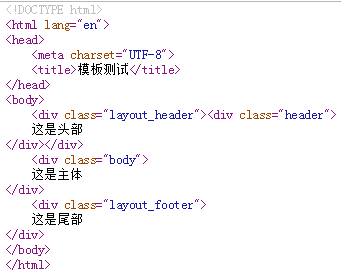
2、引用模板:
<!DOCTYPE html>
<html lang="en" xmlns:th="http://www.thymeleaf.org">
<head>
    <meta charset="UTF-8">
    <title>模板测试</title>
</head>
<body>
    <!--insert 会将所有选择的标签及内容插入到当前标签内-->
    <div class="layout_header" th:insert="common/header :: .header"></div>
    <!--replace 会让选择的标签替换当前的标签-->
    <div class="layout_body" th:replace="common/body :: .body"></div>
    <!--include 会将选择的标签内容插入到当前标签内-->
    <div class="layout_footer" th:include="common/footer :: .footer"></div>
</body>
</html>
templates/layout.html
fragment使用
1、定义模板块:
<!DOCTYPE html>
<html lang="en" xmlns:th="http://www.thymeleaf.org">
<head>
    <meta charset="UTF-8">
    <title>fragment Test</title>
</head>
<body>
<!--fragment 定义用于被加载的块-->
<span th:fragment="copy">msg from fragment</span>
<!--定义能接收参数的块-->
<span th:fragment="sayHello(msg, name)">[[|${msg} ${name}|]]</span>
</body>
</html>
templates/common/fragment.html
2、使用模板块:
<!DOCTYPE html>
<html lang="en" xmlns:th="http://www.thymeleaf.org">
<head>
    <meta charset="UTF-8">
    <title>模板测试</title>
</head>
<body>
<div th:include="common/fragment::copy"></div>
<div th:include="common/fragment::sayHello('hello','bob')"></div>
</body>
</html>

templates/layout.html
java框架之SpringBoot(4)-资源映射&thymeleaf的更多相关文章
- springboot静态资源映射
springboot静态资源映射 WebMvcAutoConfiguration @Override public void addResourceHandlers(ResourceHandlerRe ...
- java框架之SpringBoot(5)-SpringMVC的自动配置
本篇文章内容详细可参考官方文档第 29 节. SpringMVC介绍 SpringBoot 非常适合 Web 应用程序开发.可以使用嵌入式 Tomcat,Jetty,Undertow 或 Netty ...
- java框架之SpringBoot(6)-Restful风格的CRUD示例
准备 环境 IDE:Idea SpringBoot版本:1.5.19 UI:BootStrap 4 模板引擎:thymeleaf 3 效果:Restful 风格 CRUD 功能的 Demo 依赖 &l ...
- Java - 框架之 SpringBoot 攻略day01
Spring-Boot 攻略 day01 spring-boot 一. 基本配置加运行 1. 导入配置文件(pom.xml 文件中) <parent> <gr ...
- java框架之SpringBoot(1)-入门
简介 Spring Boot 用来简化 Spring 应用开发,约定大于配置,去繁从简,just run 就能创建一个独立的.产品级别的应用. 背景: J2EE 笨重的开发.繁多的配置.低下的开发效率 ...
- java框架之SpringBoot(2)-配置
规范 SpringBoot 使用一个全局的配置文件,配置文件名固定为 application.properties 或 application.yml .比如我们要配置程序启动使用的端口号,如下: s ...
- java框架之SpringBoot(9)-数据访问及整合MyBatis
简介 对于数据访问层,无论是 SQL 还是 NOSQL,SpringBoot 默认采用整合 SpringData 的方式进行统一处理,添加了大量的自动配置,引入了各种 Template.Reposit ...
- java框架之SpringBoot(10)-启动流程及自定义starter
启动流程 直接从 SpringBoot 程序入口的 run 方法看起: public static ConfigurableApplicationContext run(Object source, ...
- java框架之SpringBoot(15)-安全及整合SpringSecurity
SpringSecurity介绍 Spring Security 是针对 Spring 项目的安全框架,也是 Spring Boot 底层安全模块默认的技术选型.它可以实现强大的 Web 安全控制.对 ...
随机推荐
- Kafka 生产者和消费者入门代码基础
这篇博文讲解Kafka 的生产者和消费者实例. 基础版本一 生产者 ProducerFastStart.java package com.xingyun.tutorial_1; import org. ...
- crawler_exa1
编辑中... #! /usr/bin/env python # -*- coding:utf-8 -*- # Author: Tdcqma ''' 网页爬虫,版本 2017-09-20 21:16 ' ...
- postMessage使用方法
1.子页面向父页面发送消息 var parentData = {type: 'passDataBack', data: passData}; window.parent.postMessage(par ...
- 数据类型表(DELPHI、C++)
delphi整型数据表 Integer -2147483648..2147483647 signed 32-bit Cardinal 0..4294967295 unsigned 32-bit Sho ...
- 自己动手DIY macos下的绘图软件Pencil之原生菜单
自从进入到Nodejs这个生态后,体验到了更多的可能性. Pencil是我从Linux时代就开始用的免费开源的原型/流程图软件,它之前版本是基于Firefox的XUL生态开发的,其作者从15年开始基于 ...
- Git进阶用法
Git高阶用法 1. 基本概念 你的本地仓库由Git维护的三棵树组成.第一个是你的工作目录,它持有实际文件:第二个是缓存区(Index),它像个缓存区域,临时保存您的改动:最后是HEAD,指向你最近一 ...
- XMind8 破解激活教程(最详细,一定是有效的!!!)
下载安装包 首先去xmind国外官网下载对应操作系统的安装包,国内官网的那个是有残缺的,不支持破解. 点击链接进行下载安装包:https://pan.baidu.com/s/1VITXSEQvwGDi ...
- elasticsearch 二、elasticsearch-head安装
简介 elastricsearch-head是用于elasticsearch群集浏览和交互的插件. 源码:https://github.com/mobz/elasticsearch-head (上图来 ...
- 【规范】前端编码规范——css 规范
编码 在 css 首行设置文件编码为 UTF-8. @charset "UTF-8"; class 命名 class 名称应当尽可能短,并且意义明确.使用有意义的名称,使用有组织的 ...
- win10下安装基于caffe的 Faster-Rcnn
安装教程 本篇博客将会教会你在Windows下配置py-faster-rcnn,请细心仔细阅读.说白了,Windows下配置这些东西就是一个坑. 安装配置Anaconda 由于py-faste ...