
Jenkins修改workspace和build目录
Jenkins: Change Workspaces and Build Directory Locations
Have you ever wanted to change the location of the workspace directory of a Jenkins job? Not enough space on your hard drive or your hard drive is too slow? Whatever the reason might have been for your wish, there is a simple solution. Every job in Jenkins has a well “hidden”, I mean really not so obvious, setting to modify the Workspace root location of the job. To change this location, you need to configure your job and click on theAdvanced… button in the “Advanced Project Options” section.

Once you opened the settings, you will find some more configuration options for your job. Look for the “Use custom workspace” option on the right hand side and check the box.

Here is some information that you should consider reading, prior to change the workspace.
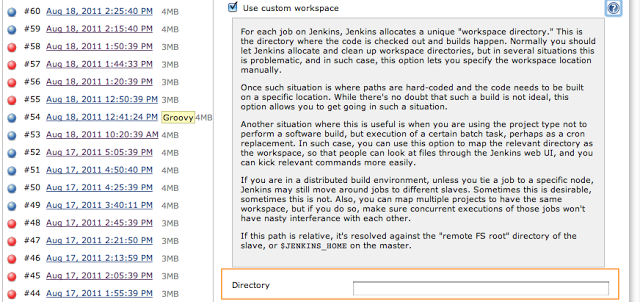
Important: The next build will use the new location, but you have to manually relocate all the existing content from the previous location.
Globally Changing the workspace location for all Jobs
In order of changing the workspace for a single job, there is another option in the Jenkins system settings that allows for changing the workspace for every job.
Navigate to Jenkins->Manage Jenkins->Configure System and click on the AdvancedButton on the right hand side.

Voilà! This opens up the following options section

Now you can change your workspace and build directory to any other location on your machine. Jenkins provides 3 predefined variables that can be used to specify the new location:
- ${JENKINS_HOME} — Jenkins home directory
- ${ITEM_ROOTDIR} — Root directory of a job for which the workspace is allocated
- ${ITEM_FULLNAME} — ‘/’-separated job name, like “foo/bar”
The default value for the “Workspace Root Directory” is ${ITEM_ROOTDIR}/workspace and for the “Build Record Root Directory” it’s ${ITEM_ROOTDIR}/builds.
Some Notes
Please be aware, that if you change your workspace to a different location, the contents of the “old” workspace directory are not copied over to the new workspace.
Doing this on OSX could require to change the owner of the newly created workspace. So, if you encounter permission issues during your next build, then have a look at the new location.
Jenkins修改workspace和build目录的更多相关文章
- Jenkins报错Caused: java.io.IOException: Cannot run program "sh" (in directory "D:\Jenkins\Jenkins_home\workspace\jmeter_test"): CreateProcess error=2, 系统找不到指定的文件。
想在本地执行我的python文件,我本地搭建了一个Jenkins,使用了execute shell来运行我的脚本,发现报错 [jmeter_test] $ sh -xe D:\tomcat\apach ...
- vue-cli脚手架build目录中的dev-server.js配置文件
本文系统讲解vue-cli脚手架build目录中的dev-server.js配置文件 这个配置文件是命令npm run dev 和 npm run start 的入口配置文件,主要用于开发环境 由于这 ...
- 【转】eclipse修改workspace
[转]eclipse修改workspace 以下方法选其中一种 1.进入 Window > Preferences > General > Startup and Shutdown ...
- Jenkins修改默认主目录及数据迁移
前言 在使用Jenkins做持续集成的初期,未能预估项目量的大小.于是乎,配置都是使用的默认配置,而Jenkins的默认主目录放在了服务器的根目录下. 随着时间的推移,项目量的持续增加,在运维过程中就 ...
- 一个完整的JENKINS下的ANT BUILD.XML文件(Jenkins可以参考)
一个完整的JENKINS下的ANT BUILD.XML文件 <?xml version="1.0" encoding="UTF-8"?> <p ...
- linux下修改tomcat的默认目录
1.修改tomcat的默认目录.它的默认目录是webapps/ROOT,对应的conf目录下的server.xml里的内容是: 1.修改tomcat的默认目录.它的默认目录是webapps/ROOT, ...
- 直接修改workspace下的配置文件与tomcat下的文件
项目中直接修改workspace下的配置文件与tomcat下的文件,可是还有错误,例如修改了4个配置文件中的一个配置文件.经查如下: 直接修改workspace下的配置文件与tomcat下的文件,可能 ...
- Jenkins修改管理员密码
前言:Jenkins修改管理员密码,我看了网上所有的教程,竟然全都是拿着一串已经加密好的111111的密文去替代config.xml文件里面的密码,然后大家的密码都是111111!我觉得这种做法实在太 ...
- 修改 docker image 安装目录 (解决加载大image时报错:"no space left on device")
修改 docker image 安装目录 (解决加载大image时报错:"no space left on device" ) 基于Ubuntu16.04 docker版本: 17 ...
随机推荐
- C# DataGridView 在最左侧显示行号方法
代码: private void dataGridView1_RowPostPaint(object sender, DataGridViewRowPostPaintEventArgs e) { Da ...
- Appium+Python 自动化-appium常用元素定位方法
https://www.cnblogs.com/rabbit-testing/p/8042733.html 大牛 https://blog.csdn.net/kaka1121/article/deta ...
- WebView使用_WebView监听网页下载_DownloadManager使用
最近在做一个较简单的项目:通过一个webview来显示一个网页的App 这个网页有下载的功能,关于这一功能需要用到两个知识点: 1.webview监听网页的下载链接.(webview默认情况下是没有开 ...
- Android_如何将.9的图片转换成bitmap
//这里也可以是从sd卡上面加载.9图片 Bitmap bitmap = BitmapFactory.decodeResource(getResources(),R.drawable.ic_launc ...
- Apache Flume 1.7.0 源码编译 导入Eclipse
前言 最近看了看Apache Flume,在虚拟机里跑了一下flume + kafka + storm + mysql架构的demo,功能很简单,主要是用flume收集数据源(http上报信息),放入 ...
- Django使用Channels实现WebSocket--上篇
WebSocket - 开启通往新世界的大门 WebSocket是什么? WebSocket是一种在单个TCP连接上进行全双工通讯的协议.WebSocket允许服务端主动向客户端推送数据.在WebSo ...
- JVM笔记11-类加载器和OSGI
一.JVM 类加载器: 一个类在使用前,如何通过类调用静态字段,静态方法,或者new一个实例对象,第一步就是需要类加载,然后是连接和初始化,最后才能使用. 类从被加载到虚拟机内存中开始,到卸载出内存为 ...
- Solidity中uint转bytes
Solidity中uint转bytes方法如下: pragma solidity ^0.4.2; contract Test { function toBytesNickJohnson(uint256 ...
- SaltStack数据系统-Pillar详解
1:存储位置 存储在master端,存放需要提供给minion的信息 每个minion只能访问master分配给自己的(应用场景) 2:在centos7 salt 2015.5.10 (Lithium ...
- phpStorm使用技巧总结
工欲善其事,必先利其器. 拥有一个好的工具不仅可以事半功倍,而且也令人神清气爽. 在编辑器上,我所走过的路是这样的:notepad(对,就是最原始的WIN下的note) -> editplus ...