
Elasticsearch Query DSL 整理总结(四)—— Multi Match Query
该做的事情一定要做,决心要做的事情一定要做好
——本杰明·富兰克林
引言
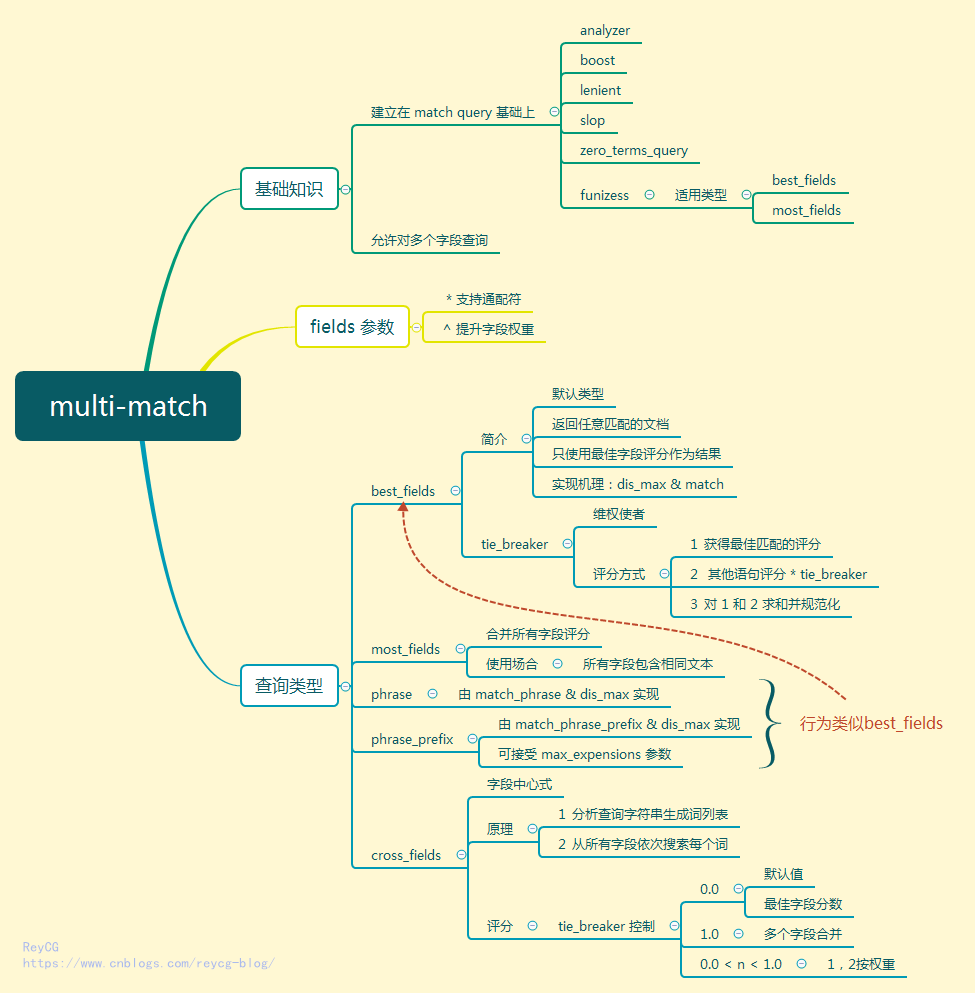
最近很喜欢使用思维导图来学习总结知识点,如果你对思维导图不太了解,又非常感兴趣,请来看下这篇文章。这次介绍下 MutiMatch, 正文之前,请先看下本文的思维导图预热下:
概要
multi_match 查询建立在 match 查询之上,重要的是它允许对多个字段查询。
先构建一个实例, multimatch_test 中设置了两个字段 subject 和 message , 使用 fields 参数在两个字段上都查询 multimatch ,从而得到了两个匹配文档。
PUT multimatchtest

{

}

PUT multimatchtest/_mapping/multimatch_test

{

  "properties": {

    "subject": {

      "type": "text"

    },

    "message": {

      "type": "text"

    }

  }

}

PUT multimatchtest/multimatch_test/1

{

  "subject": "this is a multimatch test",

  "message": "blala blalba"

}

PUT multimatchtest/multimatch_test/2

{

  "subject": "blala blalba",

  "message": "this is a multimatch test"

}

GET multimatchtest/multimatch_test/_search

{

  "query": {

    "multi_match": {

      "query": "multimatch",

      "fields": ["subject", "message"]

    }

  }

}
下面来讲解下 fields 参数的使用
fields 字段
通配符
fields 字段中的值支持通配符* , 设置 mess* 依旧可以查询出 message 字段中的匹配。
GET multimatchtest/multimatch_test/_search

{

  "query": {

    "multi_match": {

      "query": "multimatch",

      "fields": ["subject", "mess*"]

    }

  }

}
提升字段权重
在查询字段后使用 ^ 符号可以提高字段的权重,增加字段的分数 _score 。例如,我们想增加 subject 字段的权重。
GET multimatchtest/multimatch_test/_search

{

  "query": {

    "multi_match": {

      "query": "multimatch",

      "fields": ["subject^3", "mess*"]

    }

  }

}
虽然文档 1 和 文档 2 中都含有相同数量的 multimatch 词条,但可以看出,搜索结果中 subject 中含有multimatch 的分数是另一个文档的 3 倍。
  "hits": {

    "total": 2,

    "max_score": 0.8630463,

    "hits": [

      {

        "_index": "multimatchtest",

        "_type": "multimatch_test",

        "_id": "1",

        "_score": 0.8630463,

        "_source": {

          "subject": "this is a multimatch test",

          "message": "blala blalba"

        }

      },

      {

        "_index": "multimatchtest",

        "_type": "multimatch_test",

        "_id": "2",

        "_score": 0.2876821,

        "_source": {

          "subject": "blala blalba",

          "message": "this is a multimatch test"

        }

      }

    ]

  }

}
如果在 multimatch 查询中不指定 fields 参数,默认会将文档中的所有字段都匹配一遍。但不建议这么做,可能会出现性能问题,也没有什么意义。
multi_match查询的类型
multi_match 查询内部到底如何执行主要取决于它的 type 参数,这个参数的可取得值如下
best_fields是默认类型,会将任何与查询匹配的文档作为结果返回,但是只使用最佳字段的 _score 评分作为评分结果返回。most_fields将任何与查询匹配的文档作为结果返回,并所有匹配字段的评分合并起来phrase在fields中的每个字段上均执行match_phrase查询,并将最佳字段的 _score 作为结果返回phrase_prefix在fields中的字段上均执行match_phrase_prefix查询,并将每个字段的分数进行合并
下面我们来依次查看写这些类型的意义和具体使用。
best_fields 类型
要搞懂 best_fields 类型,首先要了解下 dis_max 。
dis_max 分离最大化查询
dis_max 查询英文全称为 Disjunction Max Query 就是分离最大化查询的意思。
- 分离(Disjunction)的意思是 或(or) ,表示把同一个文档中每个字段上的查询都分离开,分别计算出分数。
- 分离最大化查询(Disjunction Max Query)指的是: 将任何与任一查询匹配的文档作为结果返回,但 只将最佳匹配的评分作为查询的评分结果返回
来看一个例子, 我们将上面两个文档的内容重写
PUT multimatchtest/multimatch_test/1

{

  "subject": "food is delicious!",

  "message": "cook food"

}

PUT multimatchtest/multimatch_test/2

{

  "subject": "blabla blala",

  "message": "I like chinese food"

}
这时我们在 subject 和 message 两个字段上都查询 chinese food ,看得到什么结果?(我们先不使用 multimatch 而是 match)
GET multimatchtest/multimatch_test/_search

{

  "query": {

    "dis_max": {

      "queries": [

        {

          "match": {

            "subject": "chinese food"

          }

        },

        {

          "match": {

            "message": "chinese food"

          }

        }

        ]

    }

  }

}
而得到的结果则是
  "hits": {

    "total": 2,

    "max_score": 0.5753642,

    "hits": [

      {

        "_index": "multimatchtest",

        "_type": "multimatch_test",

        "_id": "2",

        "_score": 0.5753642,

        "_source": {

          "subject": "blabla blala",

          "message": "I like chinese food"

        }

      },

      {

        "_index": "multimatchtest",

        "_type": "multimatch_test",

        "_id": "1",

        "_score": 0.2876821,

        "_source": {

          "subject": "food is delicious!",

          "message": "cook food"

        }

      }

    ]

  }

}
虽然文档 1 中的 subject 和 message 字段中都含有 food 能够匹配到,但由于使用的 dis_max 查询,只会将它们单独计算得分,而文档 2 中只有 message 匹配到,但是它的分数更高。由此比较,文档 2 的得分当然比文档 1 高,而这就是 best_fields 类型的计算方式。
best_fields
上个小节中的 dis_max 查询则直接就可以用
best_fields 在查询多个词条最佳匹配度方面是最有用的,它和 dis_max 方式是等价的。例如,上节中的 dis_max 查询就可以写成下面的形式。而且 best_fields 类型是 multi_match 查询时的默认类型。
GET multimatchtest/multimatch_test/_search

{

  "query": {

    "multi_match": {

      "query": "chinese food",

      "fields": ["subject", "message"]

    }

  }

}
按照这种方式,只是最佳匹配语句起作用,其他语句对分数一点贡献度也没有了。这样太纯粹了似乎也不太好。有没有折中的办法,其他语句也参与评分,只不过要打下折扣,让它们的贡献度不那么高?嗯,还真有,这就是 tie_breaker 参数。
维权使者 tie_breaker
感觉 tie_breaker 参数就是为了维护其他语句的权利而生的,先了解下它的评分方式:
- 先由
best_fieldstype 获得最佳匹配语句的评分_score。 - 将其他匹配语句的评分结果与
tie_breaker相乘。 - 对以上评分求和并规范化。
有了 tie_breaker ,世界变得更美好了,在计算时会考虑所有匹配语句,但tie_breaker 并没有喧宾夺主, 最佳匹配语句依然是老大,但其他语句在 tie_breaker 的帮助下也有了一定的话语权。
将上节查询语句添加一个 tie_breaker 参数才来看结果。
GET multimatchtest/multimatch_test/_search

{

  "query": {

    "multi_match": {

      "query": "chinese food",

      "fields": ["subject", "message"],

      "tie_breaker": 0.3

    }

  }

}
结果如下:
"hits": {

    "total": 2,

    "max_score": 0.5753642,

    "hits": [

      {

        "_index": "multimatchtest",

        "_type": "multimatch_test",

        "_id": "2",

        "_score": 0.5753642,

        "_source": {

          "subject": "blabla blala",

          "message": "I like chinese food"

        }

      },

      {

        "_index": "multimatchtest",

        "_type": "multimatch_test",

        "_id": "1",

        "_score": 0.37398672,

        "_source": {

          "subject": "food is delicious!",

          "message": "cook food"

        }

      }

    ]

  }
和上节的文档 1 的评分对比,由于文档 1 中 message 字段和 subject 都只有一个 "food" 单词,它们的评分是一样的,且 tie_breaker 为 0.3,那就相当于 0.2876821x1.3=0.37398672 ,正好与结果吻合。
开篇时我们就说到, multi-match 查询是构建在 match 查询基础上的,因此 match 查询的参数,multi-match 都可以使用,可以参考我之前写的 match query 文档来查看。
most_fields
most_fields 主要用在多个字段都包含相同的文本的场合,会将所有字段的评分合并起来。
GET multimatchtest/multimatch_test/_search

{

  "query": {

    "multi_match": {

      "query": "multimatch",

      "fields": ["subject", "message"],

      "type": "most_fields"

    }

  }

}
phrase 和 phrase_prefix
phrase 和 phrase_prefix 类型的行为与 best_fields 参数类似,区别就是
phrase使用match_phrase&dis_max实现phrase_prefix使用match_phrase_prefix&dis_max实现best_fields使用match&dis_max实现
GET multimatchtest/multimatch_test/_search

{

  "query": {

    "multi_match": {

      "query": "this is",

      "fields": ["subject", "message"],

      "type": "phrase"

    }

  }

}
上面查询等价于
GET multimatchtest/multimatch_test/_search

{

  "query": {

    "dis_max": {

      "queries": [{

        "match_phrase": {

          "subject": "this is"

        }

      },

      {

        "match_phrase": {

          "message": "this is"

        }

      }]

    }

  }

}
cross_fields
像 most_fields 和 best_fields 类型都是词中心式(field-centric),什么意思呢?举个例子,假如要查询 "blabla like" 字符串,并且指定 operator 为 and ,则会在同一个字段内搜索整个字符串,只有一个字段内都有这两个词,才匹配上。
GET multimatchtest/_search

{

  "query": {

    "multi_match": {

      "query": "blabla like",

      "operator": "and",

      "fields": [ "subject", "message"],

      "type": "best_fields"

    }

  }

}
而 cross_fields 类型则是字段中心式的,例如,要查询 "blabla like" 字符串,查询字段为 "subject" 和 "message"。此时首先分析查询字符串并生成一个词列表,然后从所有字段中依次搜索每个词,只要查询到,就算匹配上。
GET multimatchtest/_search

{

  "query": {

    "multi_match": {

      "query": "blabla like",

      "operator": "and",

      "fields": [ "subject", "message"],

      "type": "cross_fields"

    }

  }

}
评分
那么 cross_fields 的评分是怎么完成的呢?
cross_fields 也有 tie_breaker 配置,就是由它来控制 cross_fields 的评分。tie_breaker 的取值及意义如下:
0.0获取最佳字段的分数为最终分数,默认值1.0将多个字段的分数合并0.0 < n < 1.0最佳字段评分与其它字段结合评分
GET multimatchtest/_search

{

  "query": {

    "multi_match": {

      "query": "blabla like",

      "fields": [ "subject", "message"],

      "type": "cross_fields",

      "tie_breaker": 0.5

    }

  }

}
小结
Muti-Match 是非常常用的全文搜索,它构建在 Match 查询的基础上,同时又添加了许多类型来符合多字段搜索的场景。最后,请在通过思维导图一起来回顾下本节的知识点吧.
参考
https://www.elastic.co/guide/en/elasticsearch/reference/6.3/query-dsl-multi-match-query.html
相关文档
Elasticsearch Query DSL 整理总结(四)—— Multi Match Query的更多相关文章
- Elasticsearch Query DSL 整理总结(一)—— Query DSL 概要,MatchAllQuery,全文查询简述
目录 引言 概要 Query and filter context Match All Query 全文查询 Full text queries 小结 参考文档 引言 虽然之前做过 elasticse ...
- Elasticsearch Query DSL 整理总结(三)—— Match Phrase Query 和 Match Phrase Prefix Query
目录 引言 Match Phase Query slop 参数 analyzer 参数 zero terms query Match Phrase 前缀查询 max_expansions 小结 参考文 ...
- elasticsearch 中的Multi Match Query
在Elasticsearch全文检索中,我们用的比较多的就是Multi Match Query,其支持对多个字段进行匹配.Elasticsearch支持5种类型的Multi Match,我们一起来深入 ...
- Elasticsearch Query DSL 整理总结(二)—— 要搞懂 Match Query,看这篇就够了
目录 引言 构建示例 match operator 参数 analyzer lenient 参数 Fuzziness fuzzniess 参数 什么是模糊搜索? Levenshtein Edit Di ...
- elasticsearch 嵌套对象使用Multi Match Query、query_string全文检索设置
参考: https://www.elastic.co/guide/en/elasticsearch/reference/1.7/mapping-nested-type.html https://sta ...
- elasticsearch系列四:搜索详解(搜索API、Query DSL)
一.搜索API 1. 搜索API 端点地址 从索引tweet里面搜索字段user为kimchy的记录 GET /twitter/_search?q=user:kimchy 从索引tweet,user里 ...
- elasticsearch入门使用(三) Query DSL
Elasticsearch Reference [6.2] » Query DSL 参考官方文档 :https://www.elastic.co/guide/en/elasticsearch/refe ...
- Elasticsearch Query DSL 语言介绍
目录 0. 引言 1. 组合查询 2. 全文搜索 2.1 Match 2.2 Match Phase 2.3 Multi Match 2.4 Query String 2.5 Simple Query ...
- Elasticsearch.Net 异常:[match] query doesn't support multiple fields, found [field] and [query]
用Elasticsearch.Net检索数据,报异常: )); ElasticLowLevelClient client = new ElasticLowLevelClient(settings); ...
随机推荐
- JAVA 设计模式遵循的六大基本准则
JAVA 设计模式遵循的六大基本准则 一.单一职责原则:(Single Responsibility Pinciple) 一个类只负责一项职责. 当超过一项职责需要负责时,需要增加新的类来负责新的职 ...
- [转]Docker容器可视化监控中心搭建
[原文链接]https://www.jianshu.com/p/9e47ffaf5e31?hmsr=toutiao.io&utm_medium=toutiao.io&utm_sourc ...
- [20171225]没有备份数据文件的恢复.txt
[20171225]没有备份数据文件的恢复.txt --//别人问的问题,增加了数据文件没有备份,如何恢复,实际上很简单,因为当前控制文件有记录建立时间只要从建立数据文件开始的--//归档日志都存在恢 ...
- python第三十一天-----类的封装、继承,多态.....
封装 封装最好理解了.封装是面向对象的特征之一,是对象和类概念的主要特性. 封装,也就是把客观事物封装成抽象的类,并且类可以把自己的数据和方法只让可信的类或者对象操作,对不可信的进行信息隐藏. cla ...
- 用Python实现数据结构之链表
链表 链表与栈,队列不一样,它是由一个个节点构成的,每个节点存储着本身的一些信息,也存储着其他一个或多个节点的引用,可以从一个节点找到其他的节点,节点与节点之间就像是有链连在一起一样,这种数据结构就叫 ...
- CentOS7查询系统版本内核信息
1. 查看版本号 查看CentOS的版本号命令: [root@localhost ~]# cat /etc/centos-releaseCentOS Linux release 7.4.1708 (C ...
- JRE、JDK概述
JRE(java Runtime Environment java运行环境) 包括java虚拟机(JVM Java Virtual Machine)和Java程序所需的核心类库等, 如果想要运行一个开 ...
- iOS解析XML实现省市区选择
1.具体内容就不再赘述了.直接看关键代码. viewController.h // // ViewController.h // ParseXmlToRealizeChooseCityDemo // ...
- SAP CRM 忠诚度相关表的关系图
这是一张有关会员,积分,活动等内容的相关表的关系图,对相关的开发工作会有帮助. 原文标题:Table schema for managing customer loyality 本文链接:http:/ ...
- NDK/JNI学习--环境搭建
基于Windows来开发Android的NDK.JNI须要的环境搭建,所须要的软件例如以下: Android 开发环境的基本配置(SDk,ADT.Eclipse IDE.JDK) 这些都是 ...