
java 使用mongodb
1.先连接你的mongodb
看连接是否有问题,代码
public class MongoDB2 {

	private static MongoDatabase mongoDatabase = null;

	private static int port = 27017;

	private static String userName = "XX";

	private static String password="XX" ;

	private static String database = "gatp";

	private static String host="XXX";

	/**

	 * mongo db 连接

	 *

	 *

	 */

	public  void mongoConnect() {

		try {

			// host和port进行转换

			encryptionDecryption decryption = new encryptionDecryption();

			ServerAddress serverAddress = new ServerAddress(host, port);

			List<ServerAddress> addresses = new ArrayList<ServerAddress>();

			addresses.add(serverAddress);

			MongoCredential credential = MongoCredential.createCredential(userName,database, password.toCharArray());

			List<MongoCredential> credentials = new ArrayList<MongoCredential>();

			credentials.add(credential);

			// 通过连接认证获取MongoDB连接

			MongoClient mongoClient = new MongoClient(addresses, credentials);

			mongoDatabase = mongoClient.getDatabase(database);

			Log.logInfo(mongoDatabase);

		} catch (Exception e) {

			// TODO: handle exception

			e.printStackTrace();

		}

	}

public static void main(String[] args) {

		MongoDB2 db=new MongoDB2();

		db.mongoConnect(); //确认连接正确

}
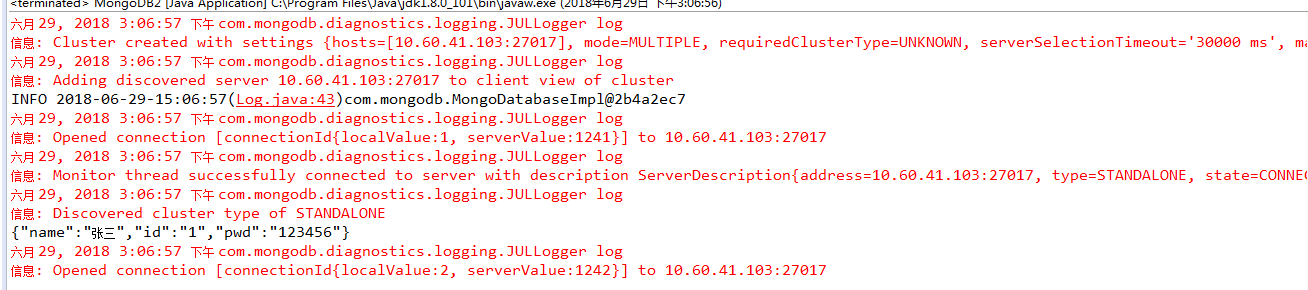
连接成功后会显示mogodb的id,错误会显示认证失败
连接失败的案例
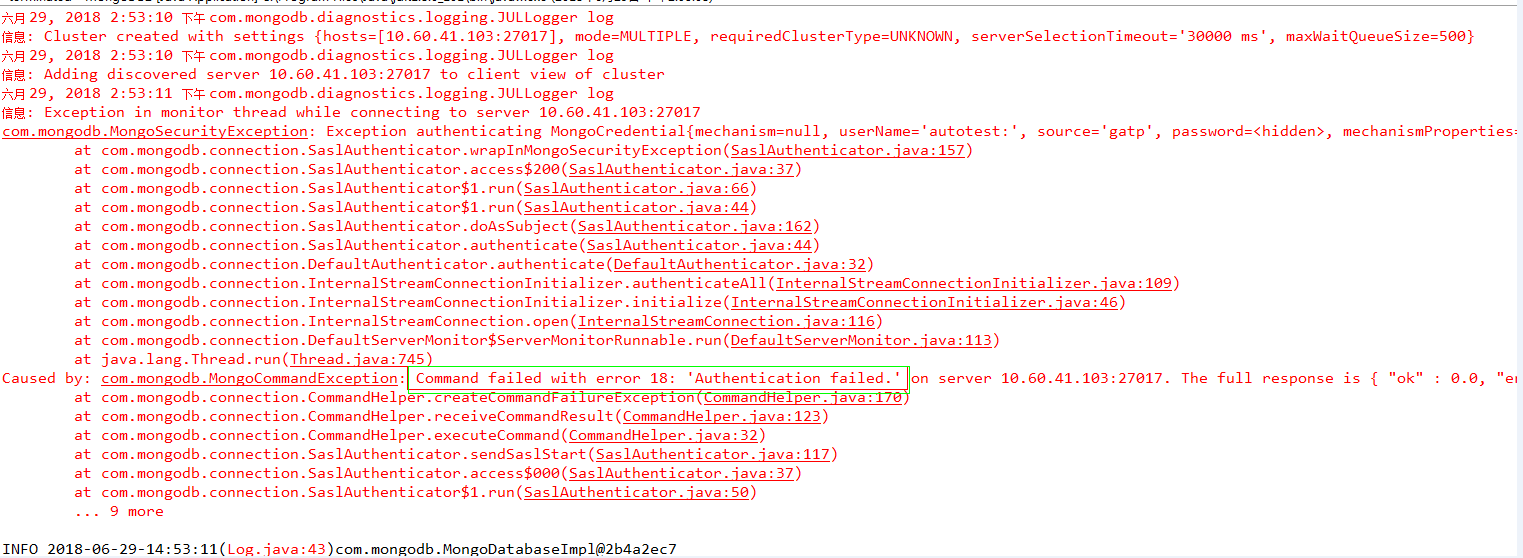
成功会显示

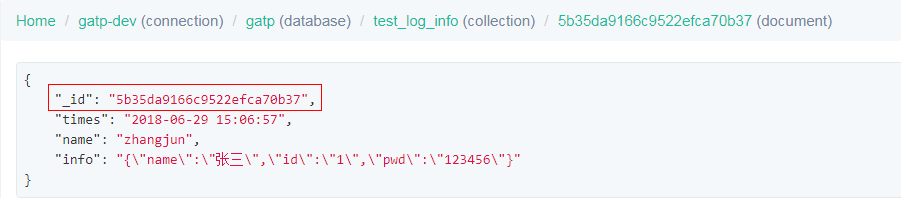
2.对mogodb进行数据的插入
封装的方法insertCollection,插入可数字,字符串,
	public boolean insertCollection(String collectionName, List<Document> documents) {

		boolean insertResult = false;

		try {

			MongoCollection<Document> collection = mongoDatabase.getCollection(collectionName);

			collection.insertMany(documents);

			insertResult = true;

		} catch (Exception e) {

			// TODO: handle exception

			e.printStackTrace();

		}

		return insertResult;

	}

public static void main(String[] args) {

		MongoDB2 db=new MongoDB2();

		db.mongoConnect(); //确认连接正确

		Date day=new Date();

		SimpleDateFormat df = new SimpleDateFormat("yyyy-MM-dd HH:mm:ss");

		//生成json字符串

		JSONObject json = new JSONObject();

		json.put("id","1");

		json.put("name","张三");

		json.put("pwd","123456");

		System.out.println(json);

		Document testDocument = new Document();

		testDocument.put("times", df.format(day));//插入时间

		testDocument.put("name","zhangjun" ); //插入名称

		testDocument.put("info", json.toString()); //插入json字符串

		List<Document> documents = new ArrayList<Document>();

		documents.add(testDocument);

		db.insertCollection("test_log_info", documents);

	}
3.查询数据
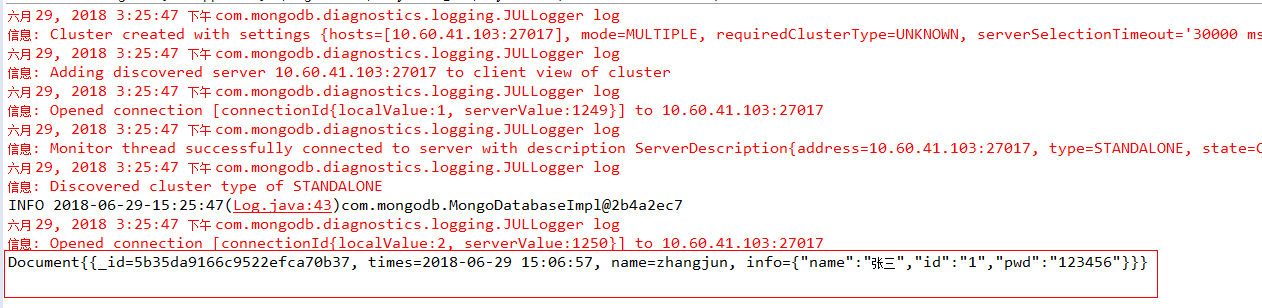
/**

	 * 获取集合

	 *

	 * @param collectionName

	 *            集合名

	 * @param testDocument

	 *            条件 , 支持多对条件

	 * @return

	 *

	 */

	public MongoCursor<Document> getCollection(String collectionName, Document testDocument) {

		MongoCursor<Document> mongoCursor = null;

		try {

			MongoCollection<Document> collection = mongoDatabase.getCollection(collectionName);

			FindIterable<Document> resultDocument = collection.find(testDocument);

			mongoCursor = resultDocument.iterator();

		} catch (Exception e) {

			// TODO: handle exception

			e.printStackTrace();

		}

		return mongoCursor;

	}

public static void main(String[] args) {

		MongoDB2 db=new MongoDB2();

		db.mongoConnect(); //确认连接正确

		Document testDocument = new Document();

		testDocument.put("name", "zhangjun");

		MongoCursor<Document> resultDocument = db.getCollection("test_log_info", testDocument);

		while(resultDocument.hasNext()){

			System.out.println(resultDocument.next());//获取所有

			System.out.println(resultDocument.next().get("_id")); //获取某个值

        }

}
java 使用mongodb的更多相关文章
- 【MongoDB for Java】Java操作MongoDB
上一篇文章: http://www.cnblogs.com/hoojo/archive/2011/06/01/2066426.html介绍到了在MongoDB的控制台完成MongoDB的数据操作,通过 ...
- JAVA操作MongoDB数据库
1. 首先,下载MongoDB对Java支持的驱动包 驱动包下载地址:https://github.com/mongodb/mongo-java-driver/downloads 2.Java操作Mo ...
- [转]MongoDB for Java】Java操作MongoDB
原文地址: MongoDB for Java]Java操作MongoDB 开发环境: System:Windows IDE:eclipse.MyEclipse 8 Database:mongoDB 开 ...
- Java 连接MongoDB
1.驱动 通过java连接MongoDB需要一个java版的驱动 下载地址:http://mongodb.github.io/mongo-java-driver/ 2.连接MongoDB 通过 com ...
- Java操作MongoDB
上一篇文章: http://www.cnblogs.com/hoojo/archive/2011/06/01/2066426.html 介绍到了在MongoDB的控制台完成MongoDB的数据操作,通 ...
- mongDB基本命令和Java操作MongoDB
上一篇博文<mongoDB安装>我们安装了mongoDB,现在来复习一下它的一些基本命令:mongoDB的bin目录加入到path之后,命令行中输入mongo: 然后我们进入正题 1.查看 ...
- Mongodb快速入门之使用Java操作Mongodb
[IT168 专稿]在上一篇文章中,我们学习了Mongodb的安装和初步使用,在本文中,将学习如何使用Java去编程实现对Mongodb的操作. HelloWorld程序 学习任何程序的第一步,都是编 ...
- Mongodb入门并使用java操作Mongodb
转载请注意出处:http://blog.csdn.net/zcm101 最近在学习NoSql,先从Mongodb入手,把最近学习的总结下. Mongodb下载安装 Mongodb的下载安装就不详细说了 ...
- 浅谈如何用Java操作MongoDB
NoSQL数据库因其可扩展性使其变得越来越流行,利用NoSQL数据库可以给你带来更多的好处,MongoDB是一个用C++编写的可度可扩展性的开源NoSQL数据库.本文主要讲述如何使用Java操作Mon ...
- Java实现mongodb原生增删改查语句
Java实现mongodb原生增删改查语句 2018-03-16 自动化测试时,需校验数据库数据,为了快速自动化,在代码中用原生增删改查语句操作mongodb 结构 代码 0 pom.xml < ...
随机推荐
- sqlserver 数据库阻塞和死锁
参考原文:http://blog.csdn.net/ha196200/article/details/44985597 (1) 数据库阻塞: 假设第一个连接T1占有且没有释放资源,第二个连接T2请求同 ...
- Problem01 不死神兔
题目:有一对兔子,从出生后第3个月起每个月都生一对兔子,小兔子长到第三个月后每个月又生一对兔子,假如兔子都不死,问每个月的兔子对数为多少? 程序分析:兔子的规律为数列1,1,2,3,5,8,13,21 ...
- PHP、thinkPHP5.0开发网站文件管理功能(四)下载文件
public function download($currdir = null){ $file = urldecode($currdir); $file = iconv('UTF-8', " ...
- Dev Express Report 学习总结(六)Dev Express Reports自定义Summary
在我们使用DevExpress开发报表的过程中,对于页面中复杂的数据合计,我们可能会使用到自定义Summary.下面通过一个例子来进行说明: 首先,我建立了如上图所示的报表页面,其中的数据源来自cla ...
- Mybatis学习笔记6 - #{}和${}
#{}:可以获取map中的值或者pojo对象属性的值.${}:可以获取map中的值或者pojo对象属性的值. 区别: #{}:是以预编译的形式,将参数设置到sql语句中:PreparedStateme ...
- 【密码学】CSP的概念
CSP加密服务提供者(Cryptographic Service Provider)具有一下几个特点: CSP是真正执行密码运算的独立模块 物理上一个CSP由两部分组成:一个动态连接库,一个签名文件 ...
- [PHP]AES加密----PHP服务端和Android客户端
本文采取128位AES-CBC模式加密和解密 1.首先对服务端安装mcrypt: sudo apt-get install php5-mcrypt php5-dev sudo php5enmod mc ...
- DedeCMS {dede:field name='array' /}的用法
field支持用array获取任意字段的值.(支持标记:文章列表模板的 {dede:field name='array' /}.arclist.arclistsg.loop.sql 标签) 例如平 ...
- AngularJS directive 不执行
检查下directive的命名,是不是含有特殊符号和大写,全部改为小写就ok: 原因:html不支持骆驼峰命名,只支持小写:
- Aspose.Cells导入导出execl
插件:Aspose.Cells 没有安装office插件也能使用: 导出:不能使用ajax异步· /// <summary> /// 导出试题 /// </summary> / ...