
java 使用mongodb
1.先连接你的mongodb
看连接是否有问题,代码
public class MongoDB2 {

	private static MongoDatabase mongoDatabase = null;

	private static int port = 27017;

	private static String userName = "XX";

	private static String password="XX" ;

	private static String database = "gatp";

	private static String host="XXX";

	/**

	 * mongo db 连接

	 *

	 *

	 */

	public  void mongoConnect() {

		try {

			// host和port进行转换

			encryptionDecryption decryption = new encryptionDecryption();

			ServerAddress serverAddress = new ServerAddress(host, port);

			List<ServerAddress> addresses = new ArrayList<ServerAddress>();

			addresses.add(serverAddress);

			MongoCredential credential = MongoCredential.createCredential(userName,database, password.toCharArray());

			List<MongoCredential> credentials = new ArrayList<MongoCredential>();

			credentials.add(credential);

			// 通过连接认证获取MongoDB连接

			MongoClient mongoClient = new MongoClient(addresses, credentials);

			mongoDatabase = mongoClient.getDatabase(database);

			Log.logInfo(mongoDatabase);

		} catch (Exception e) {

			// TODO: handle exception

			e.printStackTrace();

		}

	}

public static void main(String[] args) {

		MongoDB2 db=new MongoDB2();

		db.mongoConnect(); //确认连接正确

}
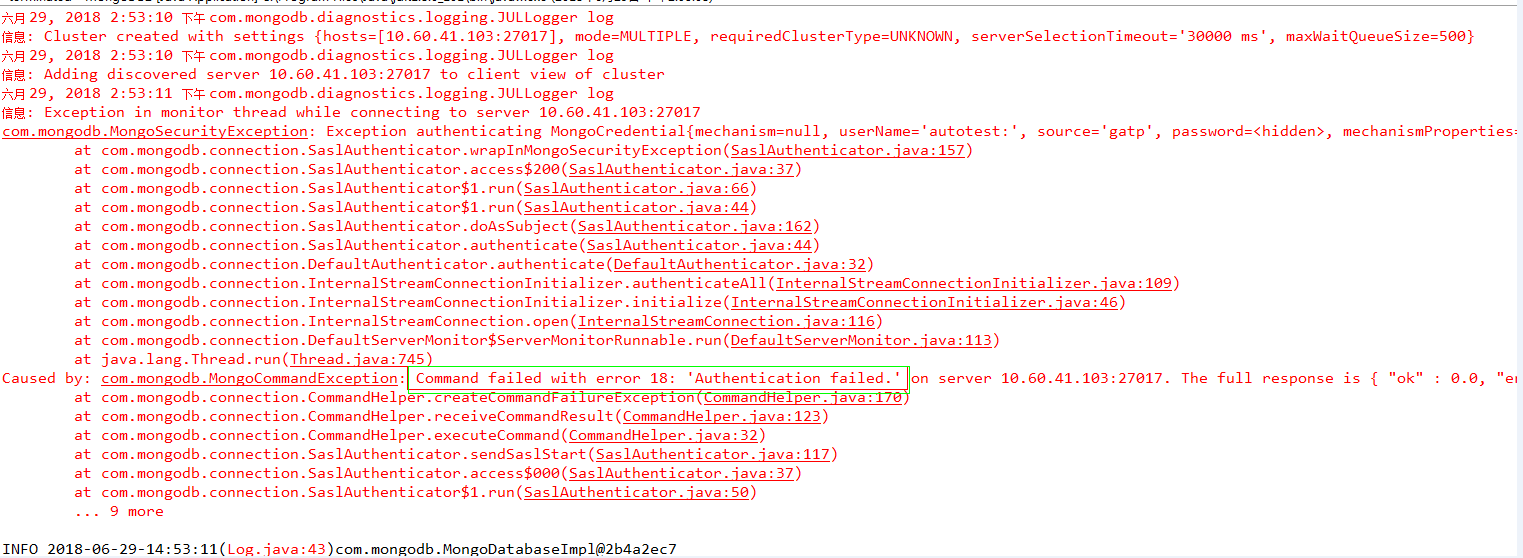
连接成功后会显示mogodb的id,错误会显示认证失败
连接失败的案例
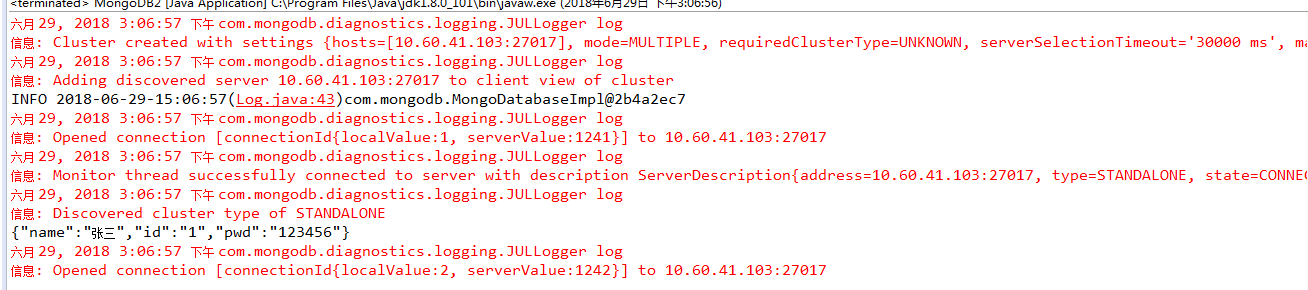
成功会显示

2.对mogodb进行数据的插入
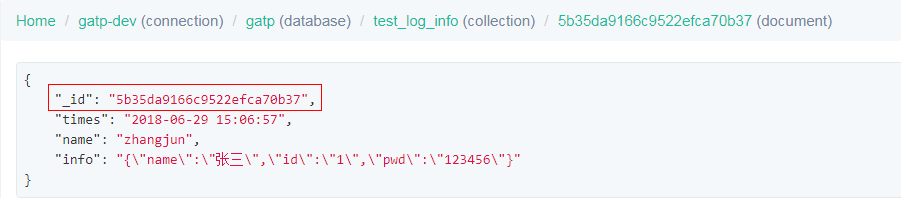
封装的方法insertCollection,插入可数字,字符串,
	public boolean insertCollection(String collectionName, List<Document> documents) {

		boolean insertResult = false;

		try {

			MongoCollection<Document> collection = mongoDatabase.getCollection(collectionName);

			collection.insertMany(documents);

			insertResult = true;

		} catch (Exception e) {

			// TODO: handle exception

			e.printStackTrace();

		}

		return insertResult;

	}

public static void main(String[] args) {

		MongoDB2 db=new MongoDB2();

		db.mongoConnect(); //确认连接正确

		Date day=new Date();

		SimpleDateFormat df = new SimpleDateFormat("yyyy-MM-dd HH:mm:ss");

		//生成json字符串

		JSONObject json = new JSONObject();

		json.put("id","1");

		json.put("name","张三");

		json.put("pwd","123456");

		System.out.println(json);

		Document testDocument = new Document();

		testDocument.put("times", df.format(day));//插入时间

		testDocument.put("name","zhangjun" ); //插入名称

		testDocument.put("info", json.toString()); //插入json字符串

		List<Document> documents = new ArrayList<Document>();

		documents.add(testDocument);

		db.insertCollection("test_log_info", documents);

	}
3.查询数据
/**

	 * 获取集合

	 *

	 * @param collectionName

	 *            集合名

	 * @param testDocument

	 *            条件 , 支持多对条件

	 * @return

	 *

	 */

	public MongoCursor<Document> getCollection(String collectionName, Document testDocument) {

		MongoCursor<Document> mongoCursor = null;

		try {

			MongoCollection<Document> collection = mongoDatabase.getCollection(collectionName);

			FindIterable<Document> resultDocument = collection.find(testDocument);

			mongoCursor = resultDocument.iterator();

		} catch (Exception e) {

			// TODO: handle exception

			e.printStackTrace();

		}

		return mongoCursor;

	}

public static void main(String[] args) {

		MongoDB2 db=new MongoDB2();

		db.mongoConnect(); //确认连接正确

		Document testDocument = new Document();

		testDocument.put("name", "zhangjun");

		MongoCursor<Document> resultDocument = db.getCollection("test_log_info", testDocument);

		while(resultDocument.hasNext()){

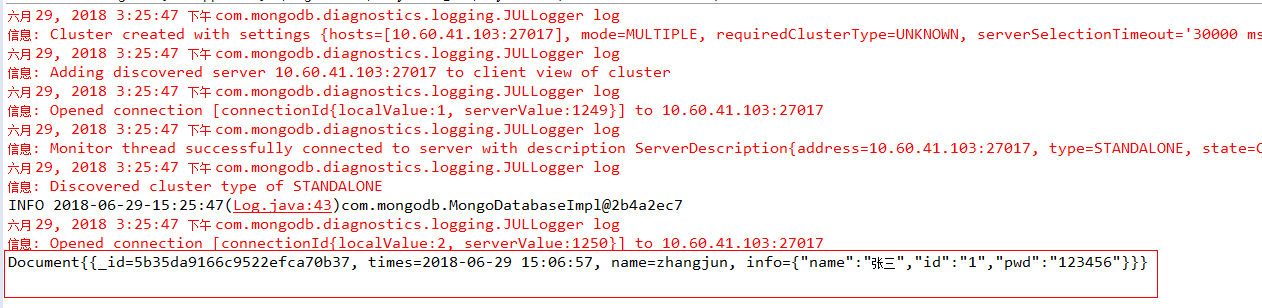
			System.out.println(resultDocument.next());//获取所有

			System.out.println(resultDocument.next().get("_id")); //获取某个值

        }

}
java 使用mongodb的更多相关文章
- 【MongoDB for Java】Java操作MongoDB
上一篇文章: http://www.cnblogs.com/hoojo/archive/2011/06/01/2066426.html介绍到了在MongoDB的控制台完成MongoDB的数据操作,通过 ...
- JAVA操作MongoDB数据库
1. 首先,下载MongoDB对Java支持的驱动包 驱动包下载地址:https://github.com/mongodb/mongo-java-driver/downloads 2.Java操作Mo ...
- [转]MongoDB for Java】Java操作MongoDB
原文地址: MongoDB for Java]Java操作MongoDB 开发环境: System:Windows IDE:eclipse.MyEclipse 8 Database:mongoDB 开 ...
- Java 连接MongoDB
1.驱动 通过java连接MongoDB需要一个java版的驱动 下载地址:http://mongodb.github.io/mongo-java-driver/ 2.连接MongoDB 通过 com ...
- Java操作MongoDB
上一篇文章: http://www.cnblogs.com/hoojo/archive/2011/06/01/2066426.html 介绍到了在MongoDB的控制台完成MongoDB的数据操作,通 ...
- mongDB基本命令和Java操作MongoDB
上一篇博文<mongoDB安装>我们安装了mongoDB,现在来复习一下它的一些基本命令:mongoDB的bin目录加入到path之后,命令行中输入mongo: 然后我们进入正题 1.查看 ...
- Mongodb快速入门之使用Java操作Mongodb
[IT168 专稿]在上一篇文章中,我们学习了Mongodb的安装和初步使用,在本文中,将学习如何使用Java去编程实现对Mongodb的操作. HelloWorld程序 学习任何程序的第一步,都是编 ...
- Mongodb入门并使用java操作Mongodb
转载请注意出处:http://blog.csdn.net/zcm101 最近在学习NoSql,先从Mongodb入手,把最近学习的总结下. Mongodb下载安装 Mongodb的下载安装就不详细说了 ...
- 浅谈如何用Java操作MongoDB
NoSQL数据库因其可扩展性使其变得越来越流行,利用NoSQL数据库可以给你带来更多的好处,MongoDB是一个用C++编写的可度可扩展性的开源NoSQL数据库.本文主要讲述如何使用Java操作Mon ...
- Java实现mongodb原生增删改查语句
Java实现mongodb原生增删改查语句 2018-03-16 自动化测试时,需校验数据库数据,为了快速自动化,在代码中用原生增删改查语句操作mongodb 结构 代码 0 pom.xml < ...
随机推荐
- 字符串 Instant 互转
Instant inst = Instant.now(); System.out.println(inst);//2018-05-15T02:27:09.909Z String s1 = s.subs ...
- AdvancedEncryptionStandard
import java.security.GeneralSecurityException; import javax.crypto.Cipher; import javax.crypto.spec. ...
- linux安装php7
之前一直对linux研究的比较少,终于下定决心好好把linux玩一下 首先~我是安装了vm虚拟机,然后使用的是centos7的版本.因为vm不好复制粘贴,故使用了xshell连接了我的linux进行操 ...
- Smarty保留变量信息
对php里边的超级全局数组变量信息的使用 例如:$_GET.$_POST.$_SESSION.$_COOKIE.$_REQUEST.$_SERVER.$_ENV.$GLOBALS.$_FILES.常量 ...
- GBDT,FM,FFM推导
GBDT推导: https://xgboost.readthedocs.io/en/latest/tutorials/model.html FM,FFM推导: https://tech.meituan ...
- 性能测试工具LoadRunner18-LR之Controller 集合点
含义 当通过controller虚拟多个用户执行该脚本时.用户的启动或运行步骤不一定是同步的.集合点是在脚本的某处设置一个标记.当有虚拟用户运行到这个标记时,停下等待,直到所有用户都达到这个标记时,再 ...
- python3+Appium自动化09-Capability配置数据分离实践
代码实现 参数配置表:desired_caps.yaml platformName: Android deviceName: 192.168.175.101:5555 platformVersion: ...
- rails4 ckeditor 的部署以及 中文化
首先ckeditor 要基于paperclip 之后paperclip 需要你在linux 下安装 ImageMagick 具体安装可参考http://my.eoe.cn/guanmac/arc ...
- script脚本中写不写$(document).ready(function() {});的区别
$(document).ready() 里的代码是在页面内容都加载完才执行的,如果把代码直接写到script标签里,当页面加载完这个script标签就会执行里边的代码了,此时如果你标签里执行的代码调用 ...
- [LeetCode]19. Remove Nth Node From End of List删除链表的倒数第N个节点
Given a linked list, remove the n-th node from the end of list and return its head. Example: Given l ...