
Flash3D学习计划(四)——学习纹理相关知识,载入一张纹理,并应用于前面的矩形;并学习多层纹理映射相关知识,尝试dark map, glow map
实现效果
主要代码
  1 package

  2 {

  3     import com.adobe.utils.AGALMiniAssembler;

  4     import com.adobe.utils.PerspectiveMatrix3D;

  5

  6     import flash.display.Bitmap;

  7     import flash.display.BitmapData;

  8     import flash.display.Sprite;

  9     import flash.display.Stage3D;

 10     import flash.display3D.Context3D;

 11     import flash.display3D.Context3DProgramType;

 12     import flash.display3D.Context3DTextureFormat;

 13     import flash.display3D.Context3DVertexBufferFormat;

 14     import flash.display3D.IndexBuffer3D;

 15     import flash.display3D.Program3D;

 16     import flash.display3D.VertexBuffer3D;

 17     import flash.display3D.textures.Texture;

 18     import flash.events.Event;

 19     import flash.geom.Matrix;

 20     import flash.geom.Matrix3D;

 21     import flash.geom.Vector3D;

 22

 23     /**

 24      * @author smartqi

 25      * @E-mail: [email=408176274@qq.com]408176274@qq.com[/email]

 26      * 创建时间:2013-6-29 上午9:36:36

 27      *

 28      */

 29     public class TextureTest extends Sprite

 30     {

 31

 32         private var context:Context3D;

 33         private var vertexBuff:VertexBuffer3D;

 34         private var indexBuff:IndexBuffer3D;

 35         private var vertexData:Vector.<Number>;

 36         private var indexData:Vector.<uint>;

 37         private var shaderProgram:Program3D;

 38         private var perspectiveMatrix:PerspectiveMatrix3D;

 39         private var i:int;

 40         private var sign:int = 1;

 41         private const angleGap:Number = 20;

 42         private var angle:Number = 0;

 43         private var modelMatrix:Matrix3D;

 44         private var viewMatrix:Matrix3D;

 45         private var finalMatrix:Matrix3D;

 46         private var texture:Texture;

 47         [Embed (source = "texture.jpg")]

 48         private var textureClass:Class;

 49

 50

 51         public function TextureTest()

 52         {

 53             var stage3d:Stage3D = stage.stage3Ds[0];

 54             stage3d.addEventListener(Event.CONTEXT3D_CREATE,onContextCreate);

 55             stage3d.requestContext3D();

 56         }

 57

 58         private function onContextCreate(e:Event):void{

 59             context = (e.target as Stage3D).context3D;

 60             if(context == null) return;

 61             context.enableErrorChecking = true; //允许进行错误检测,release版本应设置

 62             context.configureBackBuffer(500,500,0); //设置显示区域的大小

 63             setupVertexBuff(); //设置顶点缓冲

 64             setupTexture(); //设置纹理缓冲

 65             setupShaderProgram(); //设置shander

 66             setupPerspectiveMatrix(); //设置投影矩阵

 67             initMatrix();

 68             addEventListener(Event.ENTER_FRAME,onEnterFrame);

 69         }

 70

 71         private function setupVertexBuff():void{

 72             vertexData = Vector.<Number>([

 73                 // x    y     z     r     g     b        u    v

 74                 40,        40,        -40,    1,    0,    0, 0, 0,

 75                 40,        -40,    -40,    0,    1,    0, 0, 1,

 76                 -40,    -40,    -40,    0,    0,    1, 1, 1,

 77                 -40,    40,        -40,    1,    1,    1, 1, 0

 78             ]);

 79

 80             indexData = Vector.<uint>([0,1,2,0,2,3]);

 81             vertexBuff = context.createVertexBuffer(4,vertexData.length/4);

 82             vertexBuff.uploadFromVector(vertexData,0,4);

 83             indexBuff = context.createIndexBuffer(6);

 84             indexBuff.uploadFromVector(indexData,0,6);

 85             context.setVertexBufferAt(0,vertexBuff,0,Context3DVertexBufferFormat.FLOAT_3);

 86             context.setVertexBufferAt(1,vertexBuff,3,Context3DVertexBufferFormat.FLOAT_3);

 87             context.setVertexBufferAt(2,vertexBuff,6,Context3DVertexBufferFormat.FLOAT_2);

 88         }

 89

 90         private function setupTexture():void{

 91             var bitmap:Bitmap = new textureClass();

 92             texture = context.createTexture(512,512,Context3DTextureFormat.BGRA,true);

 93             uploadTextureWithMipmaps(texture,bitmap.bitmapData);

 94             context.setTextureAt(0,texture);

 95         }

 96

 97         public function uploadTextureWithMipmaps(dest:Texture, src:BitmapData):void

 98         {

 99             var ws:int = src.width;

100             var hs:int = src.height;

101             var level:int = 0;

102             var tmp:BitmapData;

103             var transform:Matrix = new Matrix();

104             tmp = new BitmapData(src.width, src.height, true, 0x00000000);

105             while ( ws >= 1 && hs >= 1 )

106             {

107                 tmp.draw(src, transform, null, null, null, true);

108                 dest.uploadFromBitmapData(tmp, level);  //上传不同层次的纹理,满足miplinear映射的需要

109                 transform.scale(0.5, 0.5);

110                 level++;

111                 ws >>= 1;

112                 hs >>= 1;

113                 if (hs && ws)

114                 {

115                     tmp.dispose();

116                     tmp = new BitmapData(ws, hs, true, 0x00000000);

117                 }

118             }

119             tmp.dispose();

120         }

121

122         private function setupShaderProgram():void{

123             var vertexProgram:AGALMiniAssembler =  new AGALMiniAssembler();

124             vertexProgram.assemble(Context3DProgramType.VERTEX,

125                 "m44 op,va0,vc0\n" +

126                 "mov v1,va1\n" +

127                 "mov v2,va2\n");

128             var fragmentProgram:AGALMiniAssembler = new AGALMiniAssembler();

129             fragmentProgram.assemble(Context3DProgramType.FRAGMENT,

130                 "tex ft0, v2, fs0 <2d,repeat,miplinear>\n" +

131                 "mov oc,ft0\n");

132             shaderProgram = context.createProgram();

133             shaderProgram.upload(vertexProgram.agalcode,fragmentProgram.agalcode);

134             context.setProgram(shaderProgram);

135         }

136

137         private function setupPerspectiveMatrix():void{

138             perspectiveMatrix = new PerspectiveMatrix3D();

139             perspectiveMatrix.perspectiveFieldOfViewRH(Math.PI*90/180,1,1,1000);  //注意这里的角度使用的是弧度

140         }

141

142         private function initMatrix():void{

143             modelMatrix = new Matrix3D();

144             viewMatrix = new Matrix3D();

145             finalMatrix = new Matrix3D();

146         }

147

148         private function onEnterFrame(e:Event):void{

149             context.clear(0,0,0);

150             angle += angleGap;

151             modelMatrix.identity();

152             modelMatrix.prependRotation(angle,Vector3D.Z_AXIS);  //绕着Z轴旋转物体,注意这里的角度使用的是角度

153             if(i>40){

154                 sign = -1;

155             }

156             if(i<0){

157                 sign = 1;

158             }

159             i += sign;

160             viewMatrix.identity();

161             viewMatrix.prependTranslation(0,0,-50 + i); //将相机向后移,使物体看起来变小了,将相机向前移,使物体看起来变大

162             finalMatrix.identity();

163             finalMatrix.append(modelMatrix);

164             finalMatrix.append(viewMatrix);

165             finalMatrix.append(perspectiveMatrix);

166             context.setProgramConstantsFromMatrix(Context3DProgramType.VERTEX,0,finalMatrix,true); //上传最终的顶点转换矩阵,注意这里最后一个参数为true

167             context.drawTriangles(indexBuff,0,2);

168             context.present();

169         }

170     }

171 }
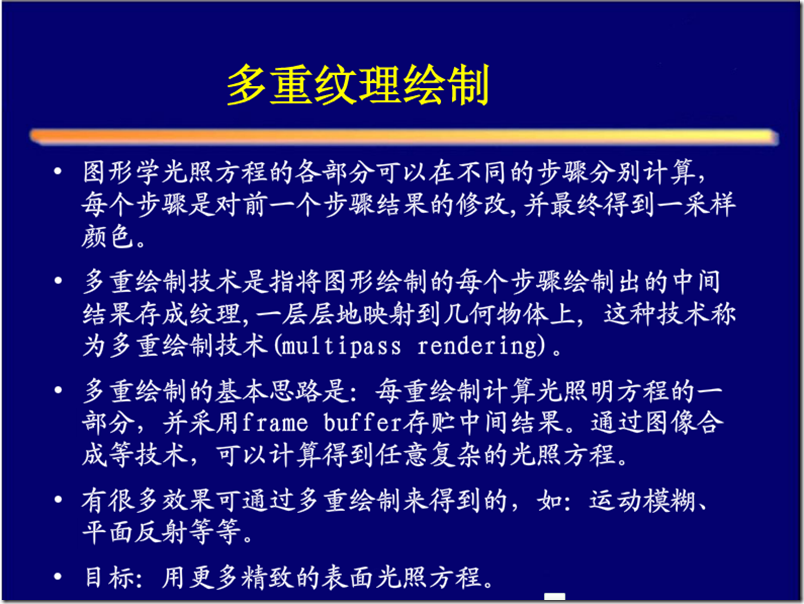
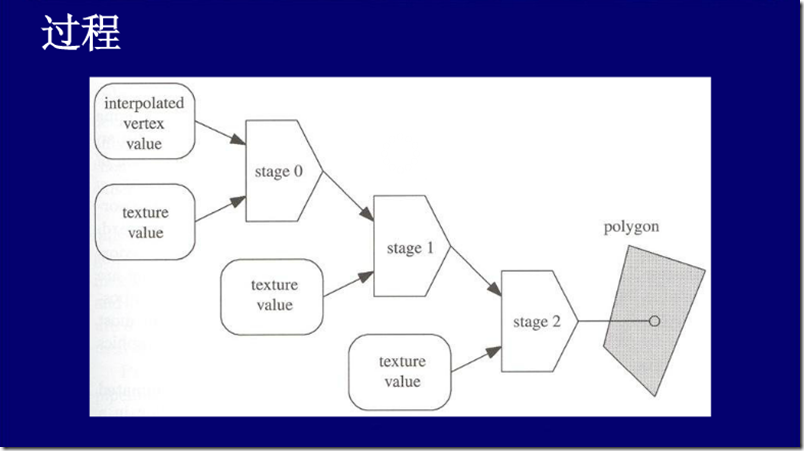
Glow Map (发光纹理)
Dark Map(暗纹理)
Decal Map(贴花纹理)
Detail Map(细节纹理)
Gloss Map(高光纹理)
Bump Map(凹凸纹理)
Normal Map(法线纹理)
Parallax Map(四叉纹理)
Shader Map(着色纹理)
http://www.cnblogs.com/arun/articles/1966255.html
参考文献
http://wenku.baidu.com/view/b27454d7360cba1aa811da02.html
http://shiba.hpe.sh.cn/jiaoyanzu/WULI/showArticle.aspx?articleId=376&classId=4
http://blog.csdn.net/huangzhipeng/article/details/7957233
Flash3D学习计划(四)——学习纹理相关知识,载入一张纹理,并应用于前面的矩形;并学习多层纹理映射相关知识,尝试dark map, glow map的更多相关文章
- [转]Android系统Surface机制的SurfaceFlinger服务简要介绍和学习计划
转自:Android系统Surface机制的SurfaceFlinger服务简要介绍和学习计划 前面我们从Android应用程序与SurfaceFlinger服务的关系出发,从侧面简单学习了Surfa ...
- Flash 3D学习计划
1.理解并记住3D渲染的一般管线流程(一天). 2.理解世界,取景,投影变换,并理解投影坐标系(一天). 3.学习VB,IB相关,理解三角形顶点顺序:在屏幕上显示2D矩形,并实现缩放,平移,旋转(三天 ...
- 官网实例详解-目录和实例简介-keras学习笔记四
官网实例详解-目录和实例简介-keras学习笔记四 2018-06-11 10:36:18 wyx100 阅读数 4193更多 分类专栏: 人工智能 python 深度学习 keras 版权声明: ...
- Python学习报告及后续学习计划
第一次有学习Python的想法是源于寒假在家的时候,高中同学问我是否学了Python(用于深度学习),当时就到b站收藏了黑马最新的教学视频,但是"收藏过等于我看了",后续就是过完年 ...
- 酒旗少年狂暖风,至0基本的前端开发project教师们学习计划
酒旗风暖少年狂,为0基础前端开发project师做学习计划 夜幕降暂时.走到一张废弃已久的书桌前,打开台灯,看到书桌上已经布满灰尘,而桌上的那盆羸弱的文竹已经枝繁叶茂.我擦干净了桌面,坐了下来,把买回 ...
- openresty 学习笔记四:连接mysql和进行相关操作
openresty 学习笔记四:连接mysql和进行相关操作 毕竟redis是作为缓存,供程序的快速读写,虽然reidis也可以做持久化保存,但还是需要一个做数据存储的数据库.比如首次查询数据在red ...
- Java知识图谱(附:阿里Java学习计划)
摘要: 本文主要描绘了Java基础学习过程,给出Java知识结构图,以及阿里Java岗学习计划,对Java学习爱好者.准备及将要从事Java开发方面的同学大有裨益. 温馨提示: 由于C ...
- [转] Android资源管理框架(Asset Manager)简要介绍和学习计划
转自:http://blog.csdn.net/luoshengyang/article/details/8738877 Android应用程序主要由两部分内容组成:代码和资源.资源主要就是指那些与U ...
- Android资源管理框架(Asset Manager)简要介绍和学习计划
文章转载至CSDN社区罗升阳的安卓之旅,原文地址:http://blog.csdn.net/luoshengyang/article/details/8738877 Android应用程序主要由两部分 ...
随机推荐
- 聊聊、Git 常用命令
创建本地仓库git initgit add .git commit -m "xxxxx"git remote add origin http://git.xxx.com/xxx.g ...
- 按住ALT键复制
按住ALT键可以选择一块进行操作. 这个在数据库in查询.代码中批量删除头部一些东西特别方便.
- ocrosoft Contest1316 - 信奥编程之路~~~~~第三关 问题 P: 【数组】1234方阵(phalanx)
http://acm.ocrosoft.com/problem.php?cid=1316&pid=15 题目描述 编程打印如下规律的n*n方阵.输入n,按规律输出方阵. 方阵规律如下图:使左对 ...
- 如何使能diskquota
quotacheck -avug quotaon -avug setquota -u test1 10000 20000 /mountpoint quota -uv test1
- Redis、Mongodb、memcache区别在哪里?
最近在看一本书<php mvc开发实战>看到Redis实战部分,详细介绍了几种缓存的区别和对比,帮助解决这方面的疑惑 Redis适合哪些业务场景?
- 【bzoj3438】小M的作物 网络流最小割
原文地址:http://www.cnblogs.com/GXZlegend/p/6801522.html 题目描述 小M在MC里开辟了两块巨大的耕地A和B(你可以认为容量是无穷),现在,小P有n中作物 ...
- easyui中的依赖关系
参考自:http://www.easyui.info/archives/765.html 在使用easyui的过程中发现各个组件直接存在依赖关系,也就是上层的复杂组件依赖于一个或者多个简单组件,复杂组 ...
- CLion 的 Debug 模式是怎么回事
我对这个问题产生兴趣的起因是 Codeoforces Avito Challenges 2018 的 E 题,我想到了正解,但写得太慢,最后一刻才提交.有个地方写错,结果是 Runtime error ...
- Codeforces 359D Pair of Numbers | 二分+ST表+gcd
题面: 给一个序列,求最长的合法区间,合法被定义为这个序列的gcd=区间最小值 输出最长合法区间个数,r-l长度 接下来输出每个合法区间的左端点 题解: 由于区间gcd满足单调性,所以我们可以二分区间 ...
- PL/SQL 查询结果集直接修改数据
使用t.rowid,查询可以直接在查询结果中修改提交 SELECT t.rowid,t.* from UC_ROLE t where ROLE_NAME like '% %'