
Angular Material 18+ 高级教程 – CDK Layout の Breakpoints
前言
CDK Layout 主要是用于处理 Breakpoints,它底层是依靠 window.matchMedia 来实现的。
Material Design 2 & 3 Breakpoints
Material Design 有对 Breakpoints 的规范,Angular CDK 依照的是 Material Design 2。
相关源码在 breakpoints.ts
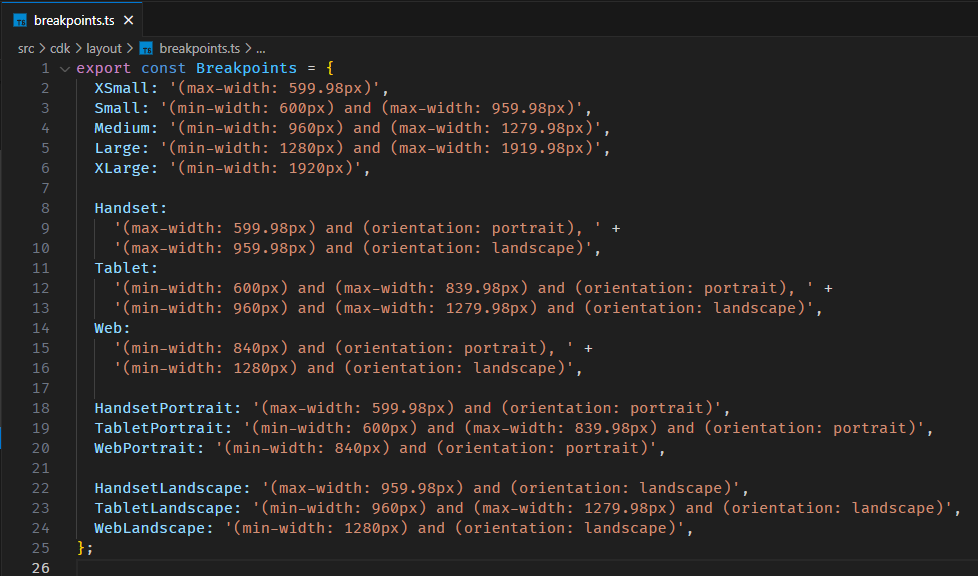
没什么特别的,它就只是一个 Definition,不同 Viewport Size / Device 对应不同的 Media Query。
如果我们不喜欢 Material Design 2 的规范,我们自己也可以 Define 一个 Material Design 3 的 Breakpoints。
export const M3Breakpoints = {

  Compact: '(max-width: 599.98px)',

  Medium: '(min-width: 600px) and (max-width: 839.98px)',

  Expanded: '(min-width: 840px) and (max-width: 1199.98px)',

  Large: '(min-width: 1200px) and (max-width: 1599.98px)',

  Extralarge: '(min-width: 1600px)',

  PhoneInPortrait: '(max-width: 599.98px)',

  TabletInPortrait: '(min-width: 600px) and (max-width: 839.98px)',

  PhoneInLandscape: '(min-width: 840px) and (max-width: 1199.98px)',

  TabletInLandscape: '(min-width: 840px) and (max-width: 1199.98px)',

  DesktopSmall: '(min-width: 840px) and (max-width: 1199.98px)',

  DesktopMedium: '(min-width: 1200px) and (max-width: 1599.98px)',

  DesktopLarge: '(min-width: 1600px)',

};
MediaMatcher
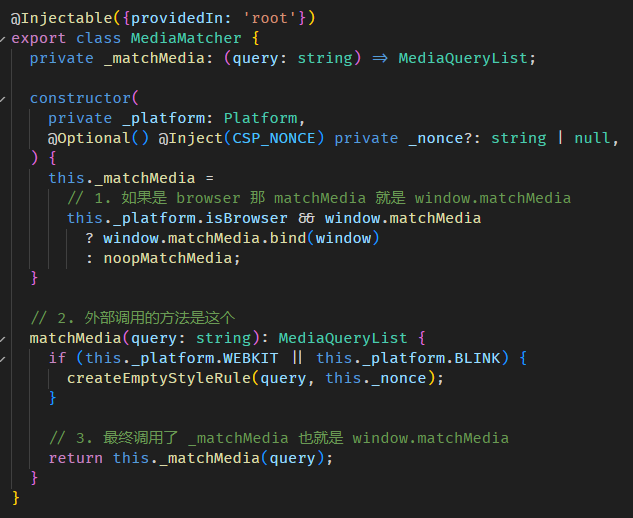
MediaMatcher 是一个 Root Level Injector Service Provider。
它是 Angular CDK 对 window.mediaMatch 的封装。
源码在 media-matcher.ts
使用方式
export class AppComponent {

  constructor() {

    // 1. inject MediaMatcher

    const mediaMatcher = inject(MediaMatcher);

    // 2. match media query

    const mediaQueryList = mediaMatcher.matchMedia('(max-width: 599.98px)');

    // 3. 使用 MediaQueryList

    const isMatched = mediaQueryList.matches;

    mediaQueryList.addEventListener('change', () => {});

  }

}
和 window.matchMedia 用法一模一样。
BreakpointObserver
BreakpointObserver 是一个 Root Level Injector Service Provider。

isMatched 方法
BreakpointObserver.isMatched 方法可以判断当前的 viewport 是否满足特定的 media query。
export class AppComponent {

  constructor() {

    // 1. inject BreakpointObserver

    const breakpointObserver = inject(BreakpointObserver);

    // 2. 判断当前 viewport 是否满足 media query

    const matched1 = breakpointObserver.isMatched('(max-width: 599.98px)');

    // 3. 判断当前 viewport 是否满足 Material Design 2 XSmall media query

    const matched2 = breakpointObserver.isMatched(Breakpoints.XSmall);

    // 4. 判断当前 viewport 是否满足 Material Design 3 Compact media query

    const matched3 = breakpointObserver.isMatched(M3Breakpoints.Compact);

  }

}
isMatched 还支持 multiple media query,只要其中一个 matched 就算 matched。
const matched3 = breakpointObserver.isMatched(

  [

    M3Breakpoints.Compact,

    M3Breakpoints.Medium

  ]

);
传入一个 array 就可以了。
或者用 string join by 逗号也行
const matched5 = breakpointObserver.isMatched(`${M3Breakpoints.Compact}, ${M3Breakpoints.Medium}`);
逛源码
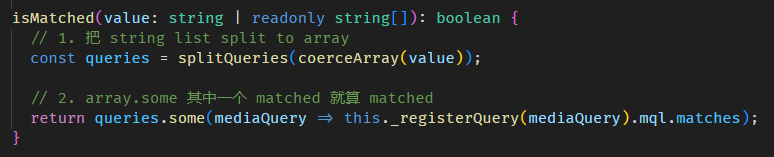
调用 _regsiterQuery 方法然后拿 mql.matches,我们继续看 mql 是什么
_regsiterQuery 方法
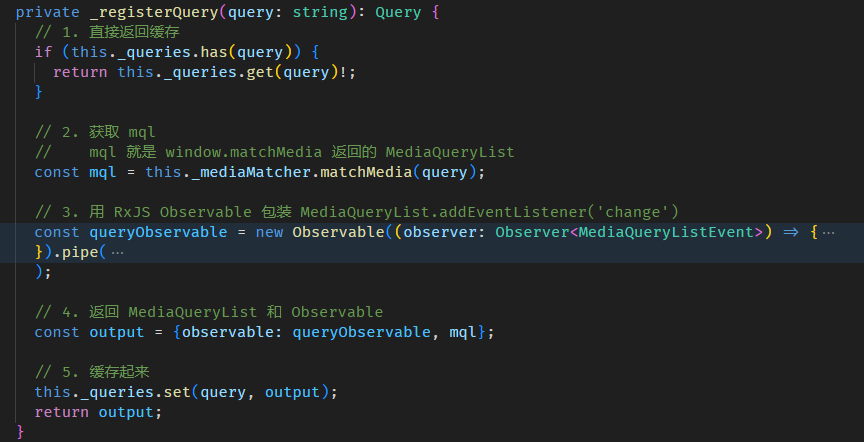
简而言之
const matched1 = breakpointObserver.isMatched('(max-width: 599.98px)');

const matched2 = window.matchMedia('(max-width: 599.98px)').matches;
这 2 句是等价的。
observe 方法
constructor() {

  // 1. inject BreakpointObserver

  const breakpointObserver = inject(BreakpointObserver);

  // 2. 监听 media query

  breakpointObserver.observe(

    [

      M3Breakpoints.Compact,

      M3Breakpoints.Medium

    ]

  ).subscribe(({ breakpoints, matches }) => {

      console.log('breakpoints', breakpoints);

      console.log('matches', matches);

  });

}
效果

observe 和 isMatched 用法大同小异,只有 2 个区别:
次数不同
isMatched 只判断当前 viewport 一次,而 observe 会一直监听 viewport (resize),然后每一次重新判断。
因此 isMatched 返回的是 boolean,而 observe 返回的是可监听的 RxJS Observable。
返回的 result 不同
当有你有 multiple media query 时,
isMatched 只能告诉你整体是 matched or not matched,你无法知道具体是哪一个 media query matched。
observe 除了告诉你整体是 matched or not matched,它还会返回一个对象,里面的 key 是 media query,value 是表示这个 media query 有没有 matched。

observe 源码我们就不逛,它底层实现方式是 window.matchMedia + addEventListener(''change),上一 part 逛源码时已经有看到一点了。
另外,subscribe observe 返回的 Observable 会立马触发一次,获得当下 viewport match media query result,这点和 window.matchMedia + addEventListener(''change) 不同哦。

总结
虽然它们只是对 window.matchMedia 的小封装,但还是鼓励大家用,尽量不要直接依赖 window 是顺风水的。
目录
上一篇 Angular Material 18+ 高级教程 – CDK Portal
下一篇 Angular Material 18+ 高级教程 – CDK Scrolling
想查看目录,请移步 Angular 18+ 高级教程 – 目录
喜欢请点推荐,若发现教程内容以新版脱节请评论通知我。happy coding
Angular Material 18+ 高级教程 – CDK Layout の Breakpoints的更多相关文章
- [转]VS Code 扩展 Angular 6 Snippets - TypeScript, Html, Angular Material, ngRx, RxJS & Flex Layout
本文转自:https://marketplace.visualstudio.com/items?itemName=Mikael.Angular-BeastCode VSCode Angular Typ ...
- Angular Material 教程之布局篇
Angular Material 教程之布局篇 (一) : 布局简介https://segmentfault.com/a/1190000007215707 Angular Material 教程之布局 ...
- Angular Material TreeTable Component 使用教程
一. 安装 npm i ng-material-treetable --save npm i @angular/material @angular/cdk @angular/animations -- ...
- Angular Material design设计
官网: https://material.io/design/ https://meterial.io/components 优秀的Meterial design站点: http://material ...
- Material使用11 核心模块和共享模块、 如何使用@angular/material
1 创建项目 1.1 版本说明 1.2 创建模块 1.2.1 核心模块 该模块只加载一次,主要存放一些核心的组件及服务 ng g m core 1.2.1.1 创建一些核心组件 页眉组件:header ...
- Angular 2 to Angular 4 with Angular Material UI Components
Download Source - 955.2 KB Content Part 1: Angular2 Setup in Visual Studio 2017, Basic CRUD applicat ...
- Siki_Unity_2-9_C#高级教程(未完)
Unity 2-9 C#高级教程 任务1:字符串和正则表达式任务1-1&1-2:字符串类string System.String类(string为别名) 注:string创建的字符串是不可变的 ...
- Angular Material Starter App
介绍 Material Design反映了Google基于Android 5.0 Lollipop操作系统的原生应用UI开发理念,而AngularJS还发起了一个Angular Material ...
- 关于 Angular引用Material出现node_modules/@angular/material/button-toggle/typings/button-toggle.d.ts(154,104): error TS2315: Type 'ElementRef' is not generic.问题
百度了好久 ,,,最后谷歌出来了.. 该错误可能来自于您将@ angular / material设置为6.0.0, 但所有其他Angular包都是5.x.您应该始终确保Material主要版本与An ...
- Angular Material & Hello World
前言 Angular Material(下称Material)的组件样式至少是可以满足一般的个人开发需求(我真是毫无设计天赋),也是Angular官方推荐的组件.我们通过用这个UI库来快速实现自己的i ...
随机推荐
- 解决方案 | vba批量冻结首行,所有sheet一次性设置
Sub FreezeTopRowAllSheets() Dim ws As Worksheet ' 遍历所有工作表 For Each ws In ThisWorkbook.Worksheets ' 激 ...
- 说说RabbitMQ延迟队列实现原理?
使用 RabbitMQ 和 RocketMQ 的人是幸运的,因为这两个 MQ 自身提供了延迟队列的实现,不像用 Kafka 的同学那么苦逼,还要自己实现延迟队列.当然,这都是题外话,今天咱们重点来聊聊 ...
- [oeasy]python0093_电子游戏起源_视频游戏_达特茅斯_Basic_家酿俱乐部
编码进化 回忆上次内容 Ed Robert 的 创业之路 从 售卖 diy 组装配件 到进军 计算器市场 最后 发布 牛郎星8800 intel 8080 的出现 让 人人都有 自己的 个人电脑 Bi ...
- ComfyUI进阶:Comfyroll插件 (四)
ComfyUI进阶:Comfyroll插件 (四) 前言: 学习ComfyUI是一场持久战,而Comfyroll 是一款功能强大的自定义节点集合,专为 ComfyUI 用户打造,旨在提供更加丰富和专业 ...
- DASCTF 2023 & 0X401七月暑期挑战赛【PWN】(FileEditor篇)
DASCTF 2023 & 0X401七月暑期挑战赛[PWN](FileEditor篇) 题目保护情况(保护全家桶) 64位ida逆向 模拟了一个类似vim的功能,有打开文件,打印内容,插入行 ...
- WPF MVVM模式简介
WPF是Windows Presentation Foundation的缩写,它是一种用于创建桌面应用程序的用户界面框架.WPF支持多种开发模式,其中一种叫做MVVM(Model-View-ViewM ...
- vue3 + ts 中出现 类型“typeof import(".........../node_modules/vue/dist/vue")”的参数不能赋给类型“Component<any, any, any, ComputedOptions, MethodOptions>”的参数。
错误示例截图 解决方法 修改shims-vue.d.ts中的内容 declare module "*.vue" { import { defineComponent } from ...
- 【Java】Collection子接口:其二 Set 组接口
Collection子接口:其二 Set 组接口 - Set接口是Collection的子接口,Set没有提供额外的方法 - Set集合中不允许包含重复的元素,如果重复添加,只保留最新添加的那一个 - ...
- 【SpringBoot】16 数据访问P4 整合JPA
DAO面向SpringData操作 Spring Data 项目的目的是为了简化构建基于 Spring 框架应用的数据访问技术, 包括非关系数据库.Map-Reduce 框架.云数据服务等等: 另外也 ...
- 【Node】下载安装(Linux)
不要使用源码包安装!!!编译时间太长!! 不要使用源码包安装!!!编译时间太长!! 不要使用源码包安装!!!编译时间太长!! 使用Node源码包安装 这里使用的是源码包安装 Node官网地址:也不是官 ...