
nginx优化实践与验证
nginx优化实践
实践场景1: 单台nginx 2核4G
实践场景2: 三台nginx 2核4G
压测工具:WRK
初始安装的nginx压测:
yum install -y nginx
安装WRK压测工具
git clone https://gitee.com/mirrors/wrk.git

cd wrk

make

cp -a  wrk  /usr/local/bin/
wrk参数:
使用方法: wrk <选项> <被测HTTP服务的URL>

  Options:

    -c, --connections <N>  跟服务器建立并保持的TCP连接数量

    -d, --duration    <T>  压测时间

    -t, --threads     <N>  使用多少个线程进行压测

    -s, --script      <S>  指定Lua脚本路径

    -H, --header      <H>  为每一个HTTP请求添加HTTP头

        --latency          在压测结束后,打印延迟统计信息

        --timeout     <T>  超时时间

    -v, --version          打印正在使用的wrk的详细版本信息

  <N>代表数字参数,支持国际单位 (1k, 1M, 1G)

  <T>代表时间参数,支持时间单位 (2s, 2m, 2h)
云服务器配置
3台Linux服务器-绑定了一个公网IP39.98.77.148用于配置服务器

1台负载均衡slb

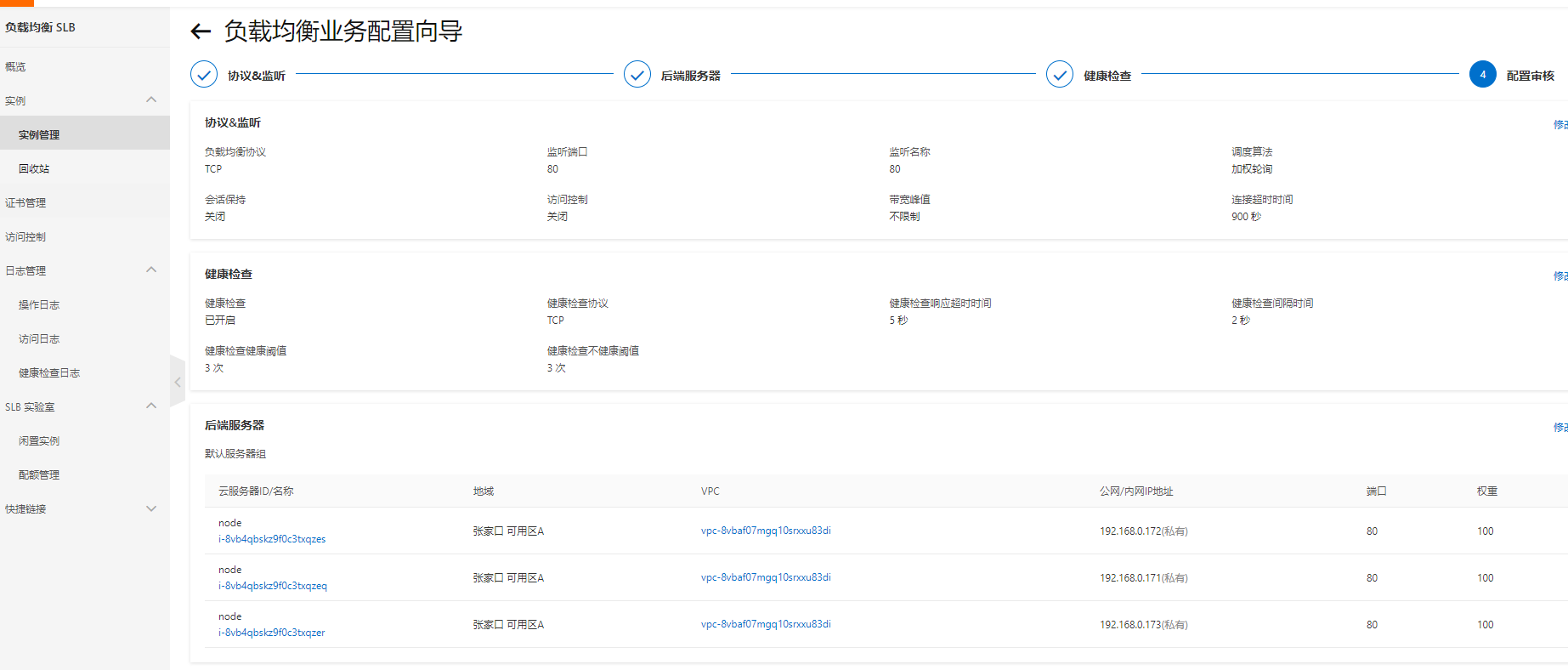
3台服务器安装nginx
yum isntall -y nginx

标识不同nginx

echo "nginx-171" >/usr/share/nginx/html/index.html

echo "nginx-171" >/usr/share/nginx/html/index.html

echo "nginx-171" >/usr/share/nginx/html/index.html

#nginx配置[每台服务器都使用最基础的配置]:

egrep -v "^$|#" /etc/nginx/nginx.conf.default >/etc/nginx/nginx.conf

nginx -s reload

#配置概览:

worker_processes  1;

events {

    worker_connections  1024;

}

http {

    include       mime.types;

    default_type  application/octet-stream;

    sendfile        on;

    keepalive_timeout  65;

    server {

        listen       80;

        server_name  localhost;

        location / {

            root   html;

            index  index.html index.htm;

        }

        error_page   500 502 503 504  /50x.html;

        location = /50x.html {

            root   html;

        }

    }

}

检查轮询算法:

[root@nginx-172 ~]# curl 192.168.0.171

nginx-171

[root@nginx-172 ~]# curl 192.168.0.172

nginx-172

[root@nginx-172 ~]# curl 192.168.0.173

nginx-173
wrk压测 初始[root@master wrk]# wrk -t2 -c800 -d120s http://39.99.217.208
初始配置压测:

[root@master wrk]# wrk -t2 -c800 -d120s http://39.99.217.208

Running 2m test @ http://39.99.217.208

  2 threads and 800 connections

  Thread Stats   Avg      Stdev     Max   +/- Stdev

    Latency   246.22ms  289.79ms   2.00s    85.67%

    Req/Sec     1.12k   427.18     3.51k    72.62%

  265348 requests in 2.00m, 1.34GB read

  Socket errors: connect 0, read 20, write 7873, timeout 3620

Requests/sec:   2210.37

Transfer/sec:     11.41MB

初始数据:

延迟  246.22ms
优化1: work进程连接数优化:
worker_processes  1;

events {

    worker_connections  100000;    <----连接数配置,3台都配置成这个,重启后测试

}

http {

    include       mime.types;

    default_type  application/octet-stream;

    sendfile        on;

    keepalive_timeout  65;

    server {

        listen       80;

        server_name  localhost;

        location / {

            root   html;

            index  index.html index.htm;

        }

        error_page   500 502 503 504  /50x.html;

        location = /50x.html {

            root   html;

        }

    }

}
结果:
[root@master wrk]# wrk -t2 -c800 -d120s http://39.99.217.208

Running 2m test @ http://39.99.217.208

  2 threads and 800 connections

  Thread Stats   Avg      Stdev     Max   +/- Stdev

    Latency   238.58ms  279.94ms   2.00s    84.64%

    Req/Sec     1.06k   420.61     2.89k    70.18%

  250585 requests in 2.00m, 1.26GB read

  Socket errors: connect 0, read 12, write 10299, timeout 2497

Requests/sec:   2086.60

Transfer/sec:     10.77MB

--------------------------------------

结果:

延迟降低   289.79ms --> 238.58ms

丢包率减少 3620 --> 2497
优化2: work进程数量优化:
worker_processes  auto;   <--- 这里直接改为了auto,而不是1

events {

    worker_connections  100000;

}

http {

    include       mime.types;

    default_type  application/octet-stream;

    sendfile        on;

    keepalive_timeout  65;

    server {

        listen       80;

        server_name  localhost;

        location / {

            root   html;

            index  index.html index.htm;

        }

        error_page   500 502 503 504  /50x.html;

        location = /50x.html {

            root   html;

        }

    }

}
结果:
[root@master wrk]# wrk -t2 -c800 -d120s http://39.99.217.208

Running 2m test @ http://39.99.217.208

  2 threads and 800 connections

  Thread Stats   Avg      Stdev     Max   +/- Stdev

    Latency   263.22ms  298.89ms   2.00s    86.82%

    Req/Sec     1.10k   382.66     2.81k    71.77%

  259948 requests in 2.00m, 1.31GB read

  Socket errors: connect 0, read 10, write 6921, timeout 3454

Requests/sec:   2165.50

Transfer/sec:     11.18MB

结果:

每秒处理请求数   2086.60 --> 2165.50
优化3: cpu亲和力和优先级:
worker_processes  2;

worker_cpu_affinity 0101 1010;  <--- 亲和力

worker_priority -20;     <---优先级

events {

    worker_connections  100000;

}

http {

    include       mime.types;

    default_type  application/octet-stream;

    sendfile        on;

    keepalive_timeout  65;

    server {

        listen       80;

        server_name  localhost;

        location / {

            root   html;

            index  index.html index.htm;

        }

        error_page   500 502 503 504  /50x.html;

        location = /50x.html {

            root   html;

        }

    }

}
结果:
[root@master wrk]# wrk -t2 -c800 -d120s http://39.99.217.208

Running 2m test @ http://39.99.217.208

  2 threads and 800 connections

  Thread Stats   Avg      Stdev     Max   +/- Stdev

    Latency   222.80ms  267.85ms   2.00s    84.34%

    Req/Sec   805.34    333.47     2.61k    73.99%

  190706 requests in 2.00m, 0.96GB read

  Socket errors: connect 0, read 15, write 16445, timeout 1272    # timeout明显减少

Requests/sec:   1588.88

Transfer/sec:      8.20MB
优化4: gzip优化:
worker_processes  2;

worker_cpu_affinity 0101 1010;  <--- 亲和力

worker_priority -20;     <---优先级

events {

    worker_connections  100000;

}

http {

    include       mime.types;

    default_type  application/octet-stream;

    sendfile        on;

    keepalive_timeout  65;

    gzip on;

    gzip_min_length 500;

    gzip_buffers 4 256;

    gzip_http_version 1.1;

    gzip_comp_level 2;

    gzip_types text/plain application/javascript application/x-javascript text/javascript text/css application/xml application/xml+rss;

    gzip_vary on;

    gzip_proxied expired no-cache no-store private auth;

    gzip_disable "MSIE [1-6]\.";

    server {

        listen       80;

        server_name  localhost;

        location / {

            root   html;

            index  index.html index.htm;

        }

        error_page   500 502 503 504  /50x.html;

        location = /50x.html {

            root   html;

        }

    }

}
[root@master wrk]# wrk -t2 -c800 -d120s http://39.99.217.208

Running 2m test @ http://39.99.217.208

  2 threads and 800 connections

  Thread Stats   Avg      Stdev     Max   +/- Stdev

    Latency   232.83ms  277.62ms   2.00s    84.19%

    Req/Sec     0.95k   346.60     2.94k    75.79%

  225026 requests in 2.00m, 1.14GB read

  Socket errors: connect 0, read 13, write 12248, timeout 2490

Requests/sec:   1873.72

Transfer/sec:      9.71MB
优化5 CPU开销优化
events {

    worker_connections  100000;

    multi_accept on;

    accept_mutex on;

    accept_mutex_delay 1ms;

}
[root@master wrk]# wrk -t2 -c800 -d120s http://39.99.217.208

Running 2m test @ http://39.99.217.208

  2 threads and 800 connections

  Thread Stats   Avg      Stdev     Max   +/- Stdev

    Latency   213.94ms  260.76ms   2.00s    84.76%

    Req/Sec     0.87k   371.67     3.34k    77.82%

  206969 requests in 2.00m, 1.05GB read

  Socket errors: connect 0, read 13, write 15329, timeout 1713

Requests/sec:   1724.03

Transfer/sec:      8.93MB
优化6 日志优化
access_log /var/log/nginx/access.log aaa buffer=1m;
[root@master wrk]# wrk -t2 -c800 -d120s http://39.99.217.208

Running 2m test @ http://39.99.217.208

  2 threads and 800 connections

  Thread Stats   Avg      Stdev     Max   +/- Stdev

    Latency   246.08ms  278.00ms   2.00s    84.53%

    Req/Sec   804.20    420.24     3.23k    75.12%

  189759 requests in 2.00m, 0.96GB read

  Socket errors: connect 0, read 30, write 14936, timeout 1451

Requests/sec:   1580.08

Transfer/sec:      8.19MB
nginx优化实践与验证的更多相关文章
- 基于 Nginx 的 HTTPS 性能优化实践
前言 分享一个卓见云的较多客户遇到HTTPS优化案例. 随着相关浏览器对HTTP协议的“不安全”.红色页面警告等严格措施的出台,以及向 iOS 应用的 ATS 要求和微信.支付宝小程序强制 HTTPS ...
- 【实战分享】又拍云 OpenResty / Nginx 服务优化实践
2018 年 11 月 17 日,由 OpenResty 主办的 OpenResty Con 2018 在杭州举行.本次 OpenResty Con 的主题涉及 OpenResty 的新开源特性.业界 ...
- 直播推流端弱网优化策略 | 直播 SDK 性能优化实践
弱网优化的场景 网络直播行业经过一年多的快速发展,衍生出了各种各样的玩法.最早的网络直播是主播坐在 PC 前,安装好专业的直播设备(如摄像头和麦克风),然后才能开始直播.后来随着手机性能的提升和直播技 ...
- 2.Nginx优化
[教程主题]:Nginx优化 [课程录制]: 创E [主要内容] Nginx 优化 nginx介绍 Nginx是俄罗斯人编写的十分轻量级的HTTP服务器,Nginx,它的发音为"engine ...
- 美图App的移动端DNS优化实践:HTTPS请求耗时减小近半
本文引用了颜向群发表于高可用架构公众号上的文章<聊聊HTTPS环境DNS优化:美图App请求耗时节约近半案例>的部分内容,感谢原作者. 1.引言 移动互联网时代,APP 厂商之间的竞争非常 ...
- 长连接锁服务优化实践 C10K问题 nodejs的内部构造 limits.conf文件修改 sysctl.conf文件修改
小结: 1. 当文件句柄数目超过 10 之后,epoll 性能将优于 select 和 poll:当文件句柄数目达到 10K 的时候,epoll 已经超过 select 和 poll 两个数量级. 2 ...
- 技术干货:实时视频直播首屏耗时400ms内的优化实践
本文由“逆流的鱼yuiop”原创分享于“何俊林”公众号,感谢作者的无私分享. 1.引言 直播行业的竞争越来越激烈,进过2018年这波洗牌后,已经度过了蛮荒暴力期,剩下的都是在不断追求体验.最近正好在做 ...
- Spring Boot 2 (五):Docker Compose + Spring Boot + Nginx + Mysql 实践
Spring Boot 2 (五):Docker Compose + Spring Boot + Nginx + Mysql 实践 Spring Boot + Nginx + Mysql 是实际工作中 ...
- Nginx优化(十七)
[教程主题]:Nginx优化 [课程录制]: 创E [主要内容] Nginx 优化 nginx介绍 Nginx是俄罗斯人编写的十分轻量级的HTTP服务器,Nginx,它的发音为“engine X”,是 ...
- 高并发IM系统架构优化实践
互联网+时代,消息量级的大幅上升,消息形式的多元化,给即时通讯云服务平台带来了非常大的挑战.高并发的IM系统背后究竟有着什么样的架构和特性? 以上内容由网易云信首席架构师内部分享材料整理而成 相关阅读 ...
随机推荐
- 实验2 C语言分支与循环基础应用编程
#include <stdio.h> #include <stdlib.h> #include <time.h> #define N 5 int main() { ...
- WPF开发随笔收录-获取程序专有内存
分享一个C#获取程序当前所占用的内存大小的方法,实测跟任务管理器上的内存值一样 /// <summary> /// 性能计数器组件类 /// </summary> privat ...
- Vue 路由组件传参的 8 种方式
我们在开发单页面应用时,有时需要进入某个路由后基于参数从服务器获取数据,那么我们首先要获取路由传递过来的参数,从而完成服务器请求,所以,我们需要了解路由传参的几种方式,以下方式同 vue-router ...
- linux中nginx的https证书过期替换
linux中nginx的https证书过期替换 工作记录,不然老是忘 一般提示这个就说明过期了 首先把新的证书换上去,最好和之前的文件名字一样,这样就不用改配置文件了 路径就自己找了需要,不过一般挺好 ...
- 力扣619(MySQL)-只出现一次的最大数字(简单)
题目: MyNumbers 表: 单一数字 是在 MyNumbers 表中只出现一次的数字. 请你编写一个 SQL 查询来报告最大的 单一数字 .如果不存在 单一数字 ,查询需报告 null . 查询 ...
- 力扣852(java&python)-山脉数组的峰顶索引(中等)
题目: 符合下列属性的数组 arr 称为 山脉数组 : arr.length >= 3 存在 i(0 < i < arr.length - 1)使得: arr[0] < arr ...
- 暑期集训 Day9 —— 模拟赛复盘
${\color{Green} \mathrm{Problem\ 1 :大河的序列 }} $ 巨思维... 其实只需要输出序列 max 即可. 死因: \({\tiny 去你的}\) 快速幂 int ...
- 超大福利 | 这款免费 Java 在线诊断利器,不用真的会后悔!
线上系统为何经常出错?数据库为何屡遭黑手?业务调用为何频频失败?连环异常堆栈案,究竟是哪次调用所为? 数百台服务器意外雪崩背后又隐藏着什么?是软件的扭曲还是硬件的沦丧? 走进科学带你了解 Arthas ...
- Spring Cloud Gateway一次请求调用源码解析
简介: 最近通过深入学习Spring Cloud Gateway发现这个框架的架构设计非常简单.有效,很多组件的设计都非常值得学习,本文就Spring Cloud Gateway做一个简单的介绍,以及 ...
- [Go] 浅谈 Golang struct 与 PHP class 的相似
Golang 中的 struct 与 PHP 的 class 在使用方式上差不多. struct 中的成员可以类比 class 中的属性,struct 中的成员函数可以类比 class 中的方法. 对 ...