
vue axiox网络请求
一、首先安装axios ,vue-axios
前提:搭建一个vue3的项目
项目搭建参考:https://www.cnblogs.com/yclh/p/15356171.html
使用npm安装axios
npm install axios
npm install vue-axios
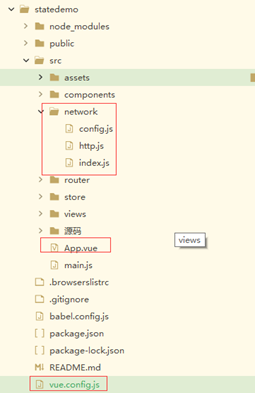
二、文件结构
文件说明:
vue.config.js:为了解决跨域问题添加的文件。
network->config.js:配置网络接口中的公共设置
network->http.js:创建axios的实例instance,并编写get、post的通用方法,这里还设置了请求拦截器和相应拦截器。
network->index.js:设置具体调用的接口路径和提供给App.vue的方法。
注:这里要的接口路径是后端提供的可以访问的get和post接口。
例如:/xyresourcesinfot/xyResourcesInfoT/list 这个路径是后台提供的。
App.vue:页面展示为了调用http网络接口效果。
三、效果
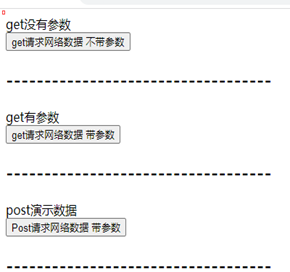
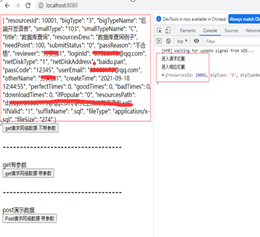
分别展示:
1、 不带参数的get请求。
2、 带参数的get请求。
3、 form-data形式的post请求
四、源码:
vue.config.js
//创建vue.config.js文件

  module.exports = {

  	lintOnSave: false, //是否在保存时检查

  	devServer: {

  		host: 'localhost', //本机ip

  		port: 8080, //本机端口

  		open: true,

  		proxy: {

  			'/api': { //代理别名

  				target: 'http://192.168.0.8:8081', //代理目标值

  				changeOrigin: true,

  				secure: true,

  				pathRewrite: { //替换路径中的/api

  					'^/api': ''

  				}

  			}

  		},

  		overlay: {

  			warning: false,

  			errors: true

  		}

  	}

  }
config.js
export default {

    baseUrl: {

      dev: "/api/xy", // 开发环境

	  changeOrigin: true,

    },

  };
http.js
import axios from "axios"; // 引用axios

import qs from 'qs';

import config from "@/network/config";

const instance = axios.create({

	baseURL: config.baseUrl.dev,

	timeout: 60000,

	// post 使用form-data

	transformRequest: [function(data) {

		data = qs.stringify(data);

		return data;

	}],

	headers: {

		'Content-Type': 'application/x-www-form-urlencoded'

	}

});

//get请求

export function get(url, params = {}) {

	// console.log('22222')

	// console.log(params)

	return new Promise((resolve, reject) => {

		instance.get(url, {

				params: params,

			})

			.then((response) => {

				resolve(response);

			})

			.catch((err) => {

				reject(err);

			});

	});

}

//post请求

export function post(url, data = {}) {

	return new Promise((resolve, reject) => {

		instance.post(url, data).then(

			(response) => {

				resolve(response.data);

			},

			(err) => {

				reject(err);

			}

		);

	});

}

  //-------------------- axios的拦截器----------------------

  // 1.请求拦截的作用

  instance.interceptors.request.use(config => {

     console.log('进入请求拦截'  );

    // 1.比如config中的一些信息不符合服务器的要求

    // 2.比如每次发送网络请求时, 都希望在界面中显示一个请求的图标

    // 3.某些网络请求(比如登录(token)), 必须携带一些特殊的信息

    return config

  }, err => {

    // console.log(err);

  })

  // 2.响应拦截

  instance.interceptors.response.use(res => {

      console.log('进入相应拦截');

    return res

  }, err => {

    console.log(err);

  })

// 请求拦截器  post 使用form-data

// instance.interceptors.request.use(

//   config => {

//     config.data = qs.stringify(config.data) // 转为formdata数据格式

//     return config

//   },

//   error => Promise.error(error)

// )
index.js
import { get,post } from "@/network/http";

export const getResourcesMany = (params) => get("/xyresourcesinfot/list",params);

export const getResourcesSingle = (params) => get("/xyresourcesinfot/get/",params);

export const PostUserInfoT = (data) => post("/xyuserinfot/add",data);
App.vue
<template>

	<div>

		<div>{{noParams}}</div>

		<button @click="getNoParams">get请求网络数据 不带参数</button>

		<h2>-----------------------------------</h2>

		<div>{{haveParams}}</div>

	<!--  <button @click="getHaveParams({  'smallType': '103',  'needPoint': '100'  } )">get请求网络数据 带参数</button> -->

		<button @click="getHaveParams">get请求网络数据 带参数</button>

		<h2>-----------------------------------</h2>

		<div>{{postResult}}</div>

		<button @click="PostHaveParams">Post请求网络数据 带参数</button>

		<h2>-----------------------------------</h2>

	</div>

</template>

<script>

	import { computed,ref } from 'vue'

	import { useStore } from 'vuex'

	import { getResourcesMany,PostUserInfoT 	} from '@/network/index.js';

	export default {

		components: {},

		setup() {

			let noParams = ref('get没有参数');

			let haveParams = ref('get有参数');

			let postResult = ref('post演示数据');

			let getNoParams = () => {

				getResourcesMany()

				.then(res => {

					console.log(res.data.obj.dataList[0]);

					 noParams.value = res.data.obj.dataList[0];})

				.catch(error => { });

			}

			let params =    {

			    smallType : '103',

			    needPoint : '100'

			  }

			let getHaveParams = () => {

				getResourcesMany(params)

				.then(res => {

					console.log(res.data.obj.dataList[0]);

					 haveParams.value = res.data.obj.dataList[0];})

				.catch(error => { });

			}

			let paramsData =    {

			   userEmail: 'yangcheng8517@163.com',

			   userPassword: 'yangcheng123412312356$abc',

			   otherName: 'yc'

			  }

			let PostHaveParams = () => {

				console.log('1111');

				console.log(paramsData);

				PostUserInfoT(paramsData)

				.then(res => {

					console.log(res);

					 postResult.value = res})

				.catch(error => { });

			}

			return {

				noParams  ,haveParams,

				getNoParams,getHaveParams,PostHaveParams,

				params ,paramsData,postResult

			}

		}

		// methods: {

		// getCompany() {

		// 	getData()

		// 	.then(res => {

		// 		//console.log(res.data);

		// 		console.log(res.data.obj.dataList[0]);

		 //     这里不是响应式的

		// 		this.result.value = res.data.obj.dataList[0];})

		// 	.catch(error => { });

		// }

		// }

	}

</script>
vue axiox网络请求的更多相关文章
- vue vue-resource网络请求
在使用get/post 网络请求,需要下载插件 "vue-resource" npm install vue-resource -s 在路由要导入及注册 import Vue fr ...
- Vue 网络请求
Vue网络请求,用的是vue-resource 1. 首先需要安装vue-resource npm install vue-resource 2. 安装好之后,会在package.json文件中自动加 ...
- vue使用vue-resource,进行网络请求
首先使用vue-resource,需要安装 : https://blog.csdn.net/qq_36947128/article/details/72832977 下面我写的一个例子: 网络请求应该 ...
- Spring Boot + Vue 前后端分离开发,前端网络请求封装与配置
前端网络访问,主流方案就是 Ajax,Vue 也不例外,在 Vue2.0 之前,网络访问较多的采用 vue-resources,Vue2.0 之后,官方不再建议使用 vue-resources ,这个 ...
- vue(24)网络请求模块axios使用
什么是axios Axios 是一个基于 promise 的 HTTP 库,可以用在浏览器和 node.js 中. 主要的作用:axios主要是用于向后台发起请求的,还有在请求中做更多是可控功能. a ...
- 十. Axios网络请求封装
1. 网络模块的选择 Vue中发送网络请求有非常多的方式,那么在开发中如何选择呢? 选择一:传统的Ajax是基于XMLHttpRequest(XHR) 为什么不用它呢?非常好解释配置和调用方式等非常混 ...
- 使用axios优雅的发起网络请求
原文链接:https://www.jianshu.com/p/73585303fdc0 公司项目使用了vue作为技术栈,便理所应当地使用了官方推荐的axios进行网络请求,这里记录下axios的封装方 ...
- Axios 网络请求组件封装 (鉴权、刷新、拦截)
一.前言 注意:本教程需要你对axios有一定的了解,不适用于小白(只能借鉴,希望你能自己动手),注释都写的很清楚.此封装并非完整版,已进行部分删减修改操作,但仍然适用于大部分业务场景,如果不适用于你 ...
- uni-app之网络请求
uni-app之网络请求 一,介绍 uni.request(OBJECT),发起网络请求,以下主要是一些特殊的参数说明,详细的可查看uni-app官网. 1,method的有效值必须是大写,默认GET ...
- vue中异步请求渲染问题(swiper不轮播)(在开发过程中遇到过什么问题、踩过的坑)
问题描述: 用vue封装一个swiper组件的时候,发现轮播图不能轮播了. 原因: 异步请求的时间远大于生命周期执行的时间,mounted初始化DOM时数据未返回,渲染数据是空数组,导致轮播图的容器层 ...
随机推荐
- 0x05.HelloJAVA
基础知识 java的类目和文件名必须相同(区分大小写) java文件,先编译成字节码(.class文件),然后在JAVA的虚拟机JVM上以解释方式执行字节码 java的项目里面包含了源代码.依赖.配置 ...
- h5移动端使用video实现拍照、上传文件对象、选择相册,做手机兼容。
html部分 <template> <div class="views"> <video style="width: 100vw; heig ...
- SpringBoot Seata 死锁问题排查
现象描述:Spring Boot项目,启动的时候卡住了,一直卡在那里不动,没有报错,也没有日志输出 但是,奇怪的是,本地可以正常启动 好吧,姑且先不深究为什么本地可以启动而部署到服务器上就无法启动的问 ...
- [ABC274E] Booster
Problem Statement In a two-dimensional plane, there are $N$ towns and $M$ chests. Town $i$ is at the ...
- tensorflow GPU版本配置加速环境
import tensorflow as tf tf.test.is_gpu_available() 背景 环境:Anaconda .tensorflow_gpu==1.4.0 (这里就用1.4.0版 ...
- 8、switch语句
1.switch语句:"开关" switch是一个条件语句,它计算表达式并将其与可能匹配的列表进行比较,并根据匹配执行代码块.它可以被认为是一种惯用的方式来写多个if else子句 ...
- JXNU acm选拔赛 壮壮的数组
壮壮的数组 Time Limit : 3000/1000ms (Java/Other) Memory Limit : 65535/32768K (Java/Other) Total Submiss ...
- ezbypass-cat【目录穿透】
ezbypass-cat[目录穿透][难度:4] 题目界面 尝试SQL注入无果,看题解发现是目录穿透,需要抓包才能得到flag. 解题步骤 随便输入用户名和密码抓包 更改请求方式(POST→GET), ...
- Scrapyd、scrapyd-client部署爬虫项目
命令参考:https://github.com/scrapy/scrapyd-client https://scrapyd.readthedocs.io 安装组件 pip install scrapy ...
- java判断两个日期是否连续
使用java判断两个日期的天是否连续 import java.text.SimpleDateFormat; import java.util.Date; /** * @author lingkang ...