
FaceFusion:探索无限创意,创造独一无二的面孔融合艺术!
FaceFusion:探索无限创意,创造独一无二的面孔融合艺术!
它使用先进的图像处理技术,允许用户将不同的面部特征融合在一起,创造有趣和令人印象深刻的效果。这个项目的潜在应用包括娱乐、虚拟化妆和艺术创作,为用户提供了创造性的工具
1.效果预览
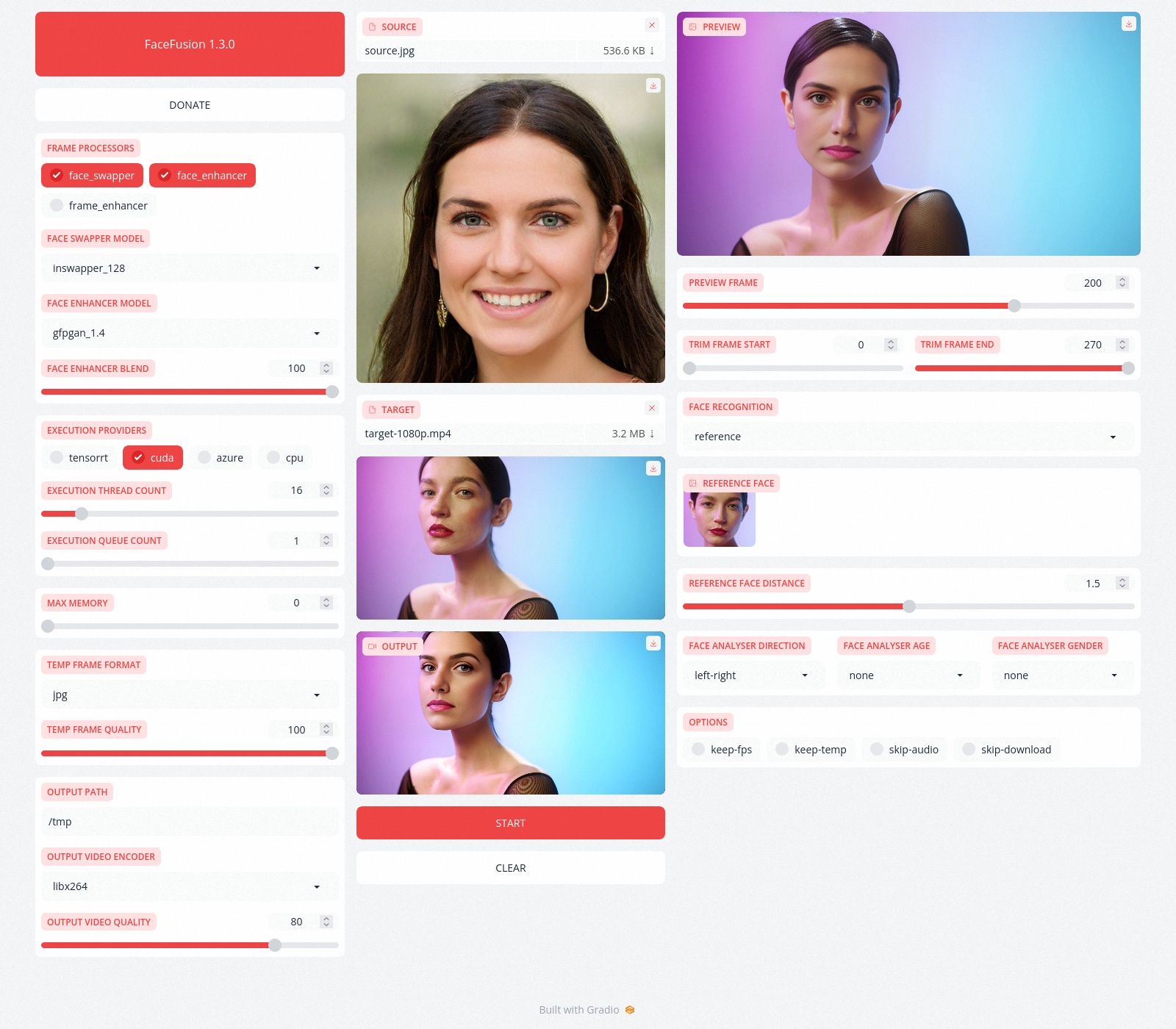
2.安装
请注意,安装需要技术技能,不适合初学者。请不要在GitHub上打开平台和安装相关问题。我们有一个非常有用的Discord社区,将指导您安装FaceFusion。
Read the installation now.
2.1 使用指南
Run the command:
python run.py [options]

options:

  -h, --help                                                                                       show this help message and exit

  -s SOURCE_PATH, --source SOURCE_PATH                                                             select a source image

  -t TARGET_PATH, --target TARGET_PATH                                                             select a target image or video

  -o OUTPUT_PATH, --output OUTPUT_PATH                                                             specify the output file or directory

  -v, --version                                                                                    show program's version number and exit

misc:

  --skip-download                                                                                  omit automate downloads and lookups

  --headless                                                                                       run the program in headless mode

execution:

  --execution-providers {cpu} [{cpu} ...]                                                          choose from the available execution providers (choices: cpu, ...)

  --execution-thread-count EXECUTION_THREAD_COUNT                                                  specify the number of execution threads

  --execution-queue-count EXECUTION_QUEUE_COUNT                                                    specify the number of execution queries

  --max-memory MAX_MEMORY                                                                          specify the maximum amount of ram to be used (in gb)

face recognition:

  --face-recognition {reference,many}                                                              specify the method for face recognition

  --face-analyser-direction {left-right,right-left,top-bottom,bottom-top,small-large,large-small}  specify the direction used for face analysis

  --face-analyser-age {child,teen,adult,senior}                                                    specify the age used for face analysis

  --face-analyser-gender {male,female}                                                             specify the gender used for face analysis

  --reference-face-position REFERENCE_FACE_POSITION                                                specify the position of the reference face

  --reference-face-distance REFERENCE_FACE_DISTANCE                                                specify the distance between the reference face and the target face

  --reference-frame-number REFERENCE_FRAME_NUMBER                                                  specify the number of the reference frame

frame extraction:

  --trim-frame-start TRIM_FRAME_START                                                              specify the start frame for extraction

  --trim-frame-end TRIM_FRAME_END                                                                  specify the end frame for extraction

  --temp-frame-format {jpg,png}                                                                    specify the image format used for frame extraction

  --temp-frame-quality [0-100]                                                                     specify the image quality used for frame extraction

  --keep-temp                                                                                      retain temporary frames after processing

output creation:

  --output-image-quality [0-100]                                                                   specify the quality used for the output image

  --output-video-encoder {libx264,libx265,libvpx-vp9,h264_nvenc,hevc_nvenc}                        specify the encoder used for the output video

  --output-video-quality [0-100]                                                                   specify the quality used for the output video

  --keep-fps                                                                                       preserve the frames per second (fps) of the target

  --skip-audio                                                                                     omit audio from the target

frame processors:

  --frame-processors FRAME_PROCESSORS [FRAME_PROCESSORS ...]                                       choose from the available frame processors (choices: face_enhancer, face_swapper, frame_enhancer, ...)

  --face-enhancer-model {codeformer,gfpgan_1.2,gfpgan_1.3,gfpgan_1.4,gpen_bfr_512}                 choose from the mode for the frame processor

  --face-enhancer-blend [0-100]                                                                    specify the blend factor for the frame processor

  --face-swapper-model {inswapper_128,inswapper_128_fp16}                                          choose from the mode for the frame processor

  --frame-enhancer-model {realesrgan_x2plus,realesrgan_x4plus,realesrnet_x4plus}                   choose from the mode for the frame processor

  --frame-enhancer-blend [0-100]                                                                   specify the blend factor for the frame processor

uis:

  --ui-layouts UI_LAYOUTS [UI_LAYOUTS ...]                                                         choose from the available ui layouts (choices: benchmark, webcam, default, ...)
2.相关文档
Read the documentation for a deep dive.
更多优质内容请关注公号:汀丶人工智能;会提供一些相关的资源和优质文章,免费获取阅读。

FaceFusion:探索无限创意,创造独一无二的面孔融合艺术!的更多相关文章
- 时尚前沿:15个创意的 3D 字体设计艺术作品欣赏
在这里,我们为大家呈现30个创意的3D版式设计,注意每个设计中字体,颜色,款式的使用,让您享受并得到他们的灵感. 版式设计是一个美丽的艺术形式.无论是粗体还是细体,用不同的字体或使用拟物化技术操纵文本 ...
- 【Android开发日记】之入门篇(十五)——ViewPager+自定义无限ViewPager
ViewPager 在 Android 控件中,ViewPager 一直算是使用率比较高的控件,包括首页的banner,tab页的切换都能见到ViewPager的身影. viewpager 来源自 v ...
- 你会喜欢的25个创意的扁平化 LOGO 设计
扁平设计的风暴席卷了整个设计领域,它不仅影响网页设计,也影响了用户界面和标志设计.最近,我们看到了很多大公司,如谷歌和必应开始使用扁平设计的标识. 一个 LOGO 应该简单,显眼和精美,以适应产品的整 ...
- Cool!12幅由小图片组成的创意图像重组作品
这里分享15幅创意插图作品,这些创意插图作品都是有成千上万的小图片组成的,很多创意广告会采用这个形式的设计.下面这组创意作品的作者是 Charis Tsevis,来自希腊的视觉设计师,擅长图像重组的创 ...
- 专门为码农定制的14款创意的T裇(T-Shirt)设计
T裇衫是人们在各种场合都可穿着的服装,如在T裇衫上作适当的装饰,即可增添无穷的韵味.通过图案直接反映人类的精神风貌,你可以把日常生活中的兴趣.习惯.喜怒哀乐.嗜好等展露无疑,张扬个性.秀出自我.对于码 ...
- [书籍分享]0-008.商业模式新生代[Business Model Generation]
封面 内容简介 <商业模式新生代>内容简介:当你愉快的看完第一章:商业模式画布,赫然发现这些构成要素全都交织成一幅清晰的图像在脑海中呈现,它们如何互相影响.如何交互作用全都历历在目.利用商 ...
- ps技巧
ADOBE PHOTOSHOP 同义词 PS(位图图像处理软件Photoshop)一般指ADOBE PHOTOSHOP 本词条由“科普中国”百科科学词条编写与应用工作项目 审核 . Adobe Pho ...
- 张艾迪(创始人):AOOOiA.global因梦想而诞生
AOOOiA.global因梦想而诞生 The World No.1 Girl :Eidyzhang The World No.1 Internet Girl :Eidyzhang AOOOiA.gl ...
- Photoshop功能组成色彩快捷键
功能 专业测评 Photoshop的专长在于图像处理,而不是图形创作.图像处理是对已有的位图图像进行编辑加工处理以及运用一些特殊效果,其重点在于对图像的处理加工:图形创作软件是按照自己的构思创意,使用 ...
- 图形设计必备软件:CorelDRAW
[CorelDRAW 激发创意] CorelDRAW Graphics Suite 是一款领先的图形设计软件,收到数百万专业人士.小型企业主以及全球设计爱好者的热捧.它可以提供无缝的图形.版面.插图. ...
随机推荐
- selenium-web自动化(po模型)
什么是po模型呢?简单理解就是:把每个页面当成一个对象,给这些页面当成一个类,主要就是完成元素定位和业务操作:把它和测试脚本区分开来,需要什么取这些页面类去调用即可.这样的好处在于页面元素发生变化时, ...
- JDK,Mysql,Tomcat Linux安装
Linux的软件安装 JDK安装 注意:rpm与软件相关命令 相当于window下的软件助手 管理软件 步骤: 1)查看当前Linux系统是否已经安装java 输入 rpm -qa | grep ja ...
- POJ 1015 Jury Compromise (完全背包)
题目大意: 在遥远的国家佛罗布尼亚,嫌犯是否有罪,须由陪审团决定.陪审团是由法官从公众中挑选的.先随机挑选n 个人作为陪审团的候选人,然后再从这n 个人中选m 人组成陪审团.选m 人的办法是:控方和辩 ...
- Codeforces Round #669 (Div. 2) A、B题题解
Problem A - Ahahahahahahahaha https://codeforces.com/contest/1407/problem/A 题意: 给定一个偶数数组(元素值 0,1),在删 ...
- InnoDB 事务加锁分析
本文首发于 vivo互联网技术 微信公众号 链接:https://mp.weixin.qq.com/s/S7MhlsZveBHRSQhq5aTIJA作者:何志创 一般大家对数据库事务的了解可能停留在事 ...
- JSONObject--- JSON---与bean对象的转换
1.对象PO转json-string: String json = JSON.toJSONString(customerBueventAccountPO); 1.可能用到的jar宝: json-li ...
- apache-jmeter-5.6.3版本报错:errorlevel=1的解决办法
一.背景: 今天遇到了apache-jmeter-5.6.3版本,下载解决后,打开bin下的:jmeter.bat报错 二.解决方法: 尝试解决了jmeter.bat的内存占用还是没有解决 最终发现 ...
- loadrunner12的安装教程
一.LR12安装包: 链接:https://pan.baidu.com/s/1UU304e-nP7qAL-fV8T39YQ 密码:jpln 二.LR12安装: 1.下载完成后点击解压
- 面向对象SOLID原则-设计模式-第2篇
面向对象设计的SOLID原则 1.开放封闭原则 一个软件实体 (类,函数,模块) 对扩展开放,对修改关闭.也就是 软件实体 应该尽量在不修改原有代码的情况下 进行扩展 举个例子, 装饰器的使用,就可以 ...
- 2023-SWPU NSS秋季招新赛(校外赛道)Misc—我要成为原神高手WP
1.题目信息 我是神里绫华的狗!!! 2.解题方法 有个genshin.h文件夹,打开看看发现里面是一堆文件夹0 1A 1A0等等,而且每个文件夹里面都有文件,0 1A 1A0...看着很眼熟,我们用 ...