
spring-自动加载配置文件\使用属性文件注入
在上一篇jsf环境搭建的基础上 , 加入spring框架 , 先看下目录结构
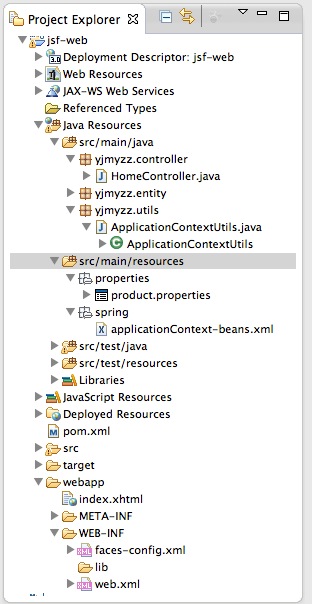
src/main/resources 这个source folder 放置web项目所需的主要配置,打包时,会自动打包到WEB-INF下
首先看下pom.xml,需要引入一些依赖项:
 <project xmlns="http://maven.apache.org/POM/4.0.0" xmlns:xsi="http://www.w3.org/2001/XMLSchema-instance"

     xsi:schemaLocation="http://maven.apache.org/POM/4.0.0 http://maven.apache.org/xsd/maven-4.0.0.xsd">

     <modelVersion>4.0.0</modelVersion>

     <groupId>yjmyzz</groupId>

     <artifactId>jsf-web</artifactId>

     <version>1.0</version>

     <packaging>war</packaging>

     <dependencies>

         <!-- 单元测试 -->

         <dependency>

             <groupId>junit</groupId>

             <artifactId>junit</artifactId>

             <version>4.7</version>

             <scope>test</scope>

         </dependency>

         <!-- jsf -->

         <dependency>

             <groupId>org.jboss.spec.javax.faces</groupId>

             <artifactId>jboss-jsf-api_2.1_spec</artifactId>

             <version>2.1.19.1.Final-redhat-1</version>

             <scope>compile</scope>

         </dependency>

         <!-- spring -->

         <dependency>

             <groupId>org.springframework</groupId>

             <artifactId>spring-context</artifactId>

             <version>4.0.2.RELEASE</version>

         </dependency>

         <dependency>

             <groupId>org.springframework</groupId>

             <artifactId>spring-web</artifactId>

             <version>4.0.2.RELEASE</version>

         </dependency>

         <!-- servlet支持 -->

         <dependency>

             <groupId>javax.servlet</groupId>

             <artifactId>servlet-api</artifactId>

             <version>2.5</version>

         </dependency>

     </dependencies>

     <build>

         <plugins>

             <plugin>

                 <artifactId>maven-compiler-plugin</artifactId>

                 <version>3.1</version>

                 <configuration>

                     <source>1.7</source>

                     <target>1.7</target>

                 </configuration>

             </plugin>

             <plugin>

                 <artifactId>maven-war-plugin</artifactId>

                 <version>2.3</version>

                 <configuration>

                     <warSourceDirectory>webapp</warSourceDirectory>

                     <failOnMissingWebXml>false</failOnMissingWebXml>

                 </configuration>

             </plugin>

         </plugins>

     </build>

 </project>
pom.xml
1. 自动加载配置文件
在web项目中,可以让spring自动加载配置文件(即上图中的src/main/resouces/spring下的xml文件),WEB-INF/web.xml中参考以下设置:
 <?xml version="1.0" encoding="UTF-8"?>

 <web-app xmlns:xsi="http://www.w3.org/2001/XMLSchema-instance" xmlns="http://java.sun.com/xml/ns/javaee" xsi:schemaLocation="http://java.sun.com/xml/ns/javaee http://java.sun.com/xml/ns/javaee/web-app_3_0.xsd" id="WebApp_ID" version="3.0">

      <display-name>jsf-web</display-name>

      <welcome-file-list>

        <welcome-file>index.html</welcome-file>

      </welcome-file-list>

     <listener>

      <listener-class>

        org.springframework.web.context.ContextLoaderListener

       </listener-class>

     </listener>

     <context-param>

      <param-name>contextConfigLocation</param-name>

       <param-value>

        classpath*:spring/applicationContext-*.xml

       </param-value>

     </context-param>

 </web-app>
web.xml
解释一下: classpath*:spring/applicationContext-*.xml 这里表示将加载classpath路径下 spring目录下的所有以applicationContext-开头的xml文件 , 通常为了保持配置文件的清爽 , 我们会把配置分成多份 : 比如 applicationContext-db.xml 用来配置DataSource , applicationContext-cache.xml用来配置缓存...等等.
2.代码中如何取得ApplicationContext实例
 package yjmyzz.utils;

 import javax.faces.context.FacesContext;

 import javax.servlet.ServletContext;

 import org.springframework.context.ApplicationContext;

 import org.springframework.web.context.support.WebApplicationContextUtils;

 public class ApplicationContextUtils {

     public static ApplicationContext getApplicationContext() {

         ServletContext context = (ServletContext) FacesContext

                 .getCurrentInstance().getExternalContext().getContext();

         ApplicationContext appctx = WebApplicationContextUtils

                 .getRequiredWebApplicationContext(context);

         return appctx;

     }

     public static <T> T getBean(Class<T> t) {

         return getApplicationContext().getBean(t);

     }

 }
ApplicationContextUtils
有了这个工具类 , 就可以方便的取得注入的Bean
3. 使用properties文件注入
为了演示注入效果,先定义一个基本的Entity类
 package yjmyzz.entity;

 import java.io.Serializable;

 public class ProductEntity implements Serializable {

     private static final long serialVersionUID = -2055674628624266800L;

     /*

      * 产品编码

      */

     private String productNo;

     /**

      * 产品名称

      */

     private String productName;

     /**

      * 产品ID

      */

     private Long productId;

     public String getProductNo() {

         return productNo;

     }

     public void setProductNo(String productNo) {

         this.productNo = productNo;

     }

     public String getProductName() {

         return productName;

     }

     public void setProductName(String productName) {

         this.productName = productName;

     }

     public Long getProductId() {

         return productId;

     }

     public void setProductId(Long productIdLong) {

         this.productId = productIdLong;

     }

     @Override

     public String toString() {

         return productId + "/" + productNo + "/" + productName;

     }

 }
ProductEntity
然后在applicationContext-beans.xml中配置以下内容:
 <?xml version="1.0" encoding="UTF-8"?>

 <beans xmlns="http://www.springframework.org/schema/beans"

     xmlns:xsi="http://www.w3.org/2001/XMLSchema-instance"

     xsi:schemaLocation="http://www.springframework.org/schema/beans

            http://www.springframework.org/schema/beans/spring-beans-3.0.xsd">

     <bean id="propertyConfigurer"

         class="org.springframework.beans.factory.config.PropertyPlaceholderConfigurer">

         <property name="locations">

             <list>

                 <value>classpath:properties/*.properties</value>

             </list>

         </property>

     </bean>

     <bean id="productEntity" class="yjmyzz.entity.ProductEntity">

         <property name="productId" value="${product.id}" />

         <property name="productNo" value="${product.no}" />

         <property name="productName" value="${product.name}" />

         <!-- <property name="productId">

             <bean class="java.lang.Long">

                 <constructor-arg index="0" value="${product.id}" />

             </bean>

         </property>

          -->

     </bean>

 </beans>
spring配置文件
注:classpath:properties/*.properties表示运行时 , spring容器会自动加载classpath\properties目录下的所有以.properties后缀结尾的文件 , 我们在src/main/resources/properties/下放置一个product.properties属性文件 , 内容如下:
 product.id=3

 product.no=n95

 product.name=phone
product.properties
该文件被spring自动加载后 , 就可以用里面定义的属性值 , 为Bean做setter属性注入 , 即配置文件中的<property name="productId" value="${product.id}" />
4.验证注入是否成功
在HomeController里 , 向Spring容器要一个Bean , 显示下它的属性:
 package yjmyzz.controller;

 import javax.faces.bean.ManagedBean;

 import yjmyzz.entity.ProductEntity;

 import yjmyzz.utils.ApplicationContextUtils;

 @ManagedBean(name = "Home")

 public class HomeController {

     public String sayHello() {

         ProductEntity product = ApplicationContextUtils

                 .getBean(ProductEntity.class);

         return product.toString();

     }

 }
HomeController
index.xhtml里仍然跟上篇相同:
 <!DOCTYPE html PUBLIC "-//W3C//DTD XHTML 1.0 Transitional//EN" "http://www.w3.org/TR/xhtml1/DTD/xhtml1-transitional.dtd">

 <html xmlns="http://www.w3.org/1999/xhtml"

       xmlns:h="http://java.sun.com/jsf/html"

       xmlns:f="http://java.sun.com/jsf/core"

       xmlns:ui="http://java.sun.com/jsf/facelets">

 <h:head>

     <title>jsf-web</title>

 </h:head>

 <body>

     <h1>

         #{Home.sayHello()}

     </h1>

 </body>

 </html>
index.xhtml
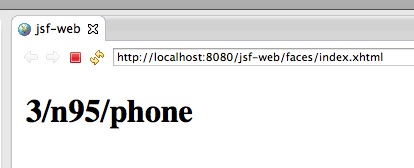
最后部署到jboss上 , 运行截图如下:
spring-自动加载配置文件\使用属性文件注入的更多相关文章
- springboot属性类自动加载配置文件中的值
springboot属性类自动加载配置文件中的值,如Person类加载在yml中配置的name,age等属性值,可以通过如下步骤获取: 类上添加@ConfigurationProperties注解,p ...
- 关于不重启Tomcat自动加载改变的class文件
修改server.xml,在Host标签下加入以下配置 <Context path="" docBase="FileManager" reloadable ...
- tmux不自动加载配置文件.tmux.conf
/********************************************************************** * tmux不自动加载配置文件.tmux.conf * ...
- Nginx自动加载配置文件方案
nginx自动加载配置文件方案一.nginx+consul+consul-template实现过程:consul作为服务发现软件,consul-template作为nginx配置文件的模板,consu ...
- Spring Boot加载配置文件
问题1:Spring如何加载配置,配置文件位置? 1.默认位置: Spring Boot默认的配置文件名称为application.properties,SpringApplication将从以下位置 ...
- Tomcat7 自动加载类及检测文件变动原理
在一般的web应用开发里通常会使用开发工具(如Eclipse.IntelJ)集成tomcat,这样可以将web工程项目直接发布到tomcat中,然后一键启动.经常遇到的一种情况是直接修改一个类的源文件 ...
- Tomcat 7 自动加载类及检测文件变动原理
在一般的 web 应用开发里通常会使用开发工具(如 Eclipse.IntelJ )集成 tomcat ,这样可以将 web 工程项目直接发布到 tomcat 中,然后一键启动.经常遇到的一种情况是直 ...
- Spring中加载配置文件的方式
原文:http://blog.csdn.net/snowjlz/article/details/8158560 Spring 中加载XML配置文件的方式,好像有3种, XML是最常见的Spring 应 ...
- spring boot加载配置文件的顺序
四个默认加载配置文件地方的优先级,四个文件相同配置有优先级概念 不同位置相互补充 外部配置文件不建议使用,不符合maven项目结构,打包会打不进去
随机推荐
- jar 命令 打包装class文件的文件夹
由于将spring源代码导入到eclipse后,缺少jar包, 所以从maven仓库中下载spring发布的spring-core jar包. 为了方便理解目录结构,使用tree命令: tr ...
- 最新Internet Download Manager (IDMan) 6.25 Build 20 32位 64位注册破解补丁
0x00 IDMan介绍 Internet Download Manager提升你的下载速度最多达5倍,安排下载时程,或续传一半的软件.Internet Download Manager的续传功能可以 ...
- EMC Documentum DQL整理(二)
1.Get file extension SELECT dos_extension FROM dm_format WHERE name IN (SELECT a_content_type FROM d ...
- 这些web前端特效你造吗?
友情提示:所有特效效果均是GIF图片演示(均有源码下载),所以这个博文可能加载的比较慢,请谅解. 凛冬将至(Winter Is Coming),在上一篇博客凛冬将至,用几款特效暖暖身得到了比较好的响应 ...
- VBA宏 合并EXCEL
1.合并多个Excel工作簿 Sub MergeWorkbooks() Dim FileSet Dim i As Integer Application.ScreenUpdating = False ...
- TCP校验和的原理和实现
http://blog.csdn.net/zhangskd/article/details/11770647 分类: Linux TCP/IP Linux Kernel 2013-09-24 ...
- Android Studio中使用android:src="@drawable/ic_launcher"报错
今天尝试着安装了Android Studio,界面确实不错,列表什么的也改了很多. 然后新建工程,习惯性在activity_main那里加上一段代码测试看看: <ImageView androi ...
- Microsoft.Bcl.Build 1.0.10 稳定版发布
Microsoft.Bcl.Build 1.0.10 稳定版发布 解决了之前 1.0.8 在未下载相应的Nuget Package 的情况下项目无法加载的情况 但由于 Microsoft.Net.Ht ...
- [转]12篇学通C#网络编程——第二篇 HTTP应用编程(上)
本文转自:http://www.cnblogs.com/huangxincheng/archive/2012/01/09/2316745.html 我们学习网络编程最熟悉的莫过于Http,好,我们就从 ...
- 《Inside UE4》-1-基础概念
<Inside UE4>-1-基础概念 InsideUE4 创建测试项目 接上文的准备工作,双击生成的UE4Editor.exe,选择创建测试C++空项目Hello(以后的源码分析 ...