
轻量级通信引擎StriveEngine —— C/S通信demo(附源码)
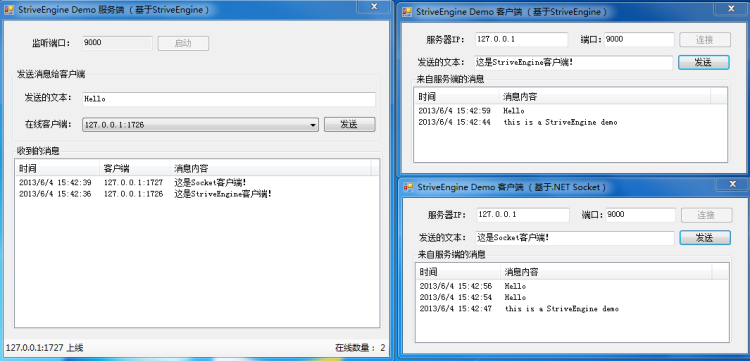
前段时间,有几个研究ESFramework网络通讯框架的朋友对我说,ESFramework有点庞大,对于他们目前的项目来说有点“杀鸡用牛刀”的意思,因为他们的项目不需要文件传送、不需要P2P、不存在好友关系、也不存在组广播、不需要服务器均衡、不需要跨服务器网络通讯、甚至都不需要使用UserID,只要一个客户端能与服务端进行简单的稳定高效的C#网络通信组件就可以了。于是,他们建议我,整一个轻量级的C#网络通信组件来满足类似他们这种项目的需求。我觉得这个建议是有道理的,于是,花了几天时间,我将ESFramework的内核抽离出来,经过修改封装后,形成了StriveEngineC#网络通信组件,其最大的特点就是稳定高效、易于使用。通过下面这个简单的demo,我们应该就能上手了。文末有demo源码下载,我们先上Demo截图:
1.StriveEngineC#网络通信组件Demo简介
该Demo总共包括三个项目:
1.StriveEngine.SimpleDemoServer:基于StriveEngine开发的服务端。
2.StriveEngine.SimpleDemoClient:基于StriveEngine开发的客户端。
3.StriveEngine.SimpleDemo:直接基于.NET的Socket开发的客户端,其目的是为了演示:在客户端不使用StriveEngine的情况下,如何与基于StriveEngine的服务端进行网络通讯。
StriveEngine 内置支持TCP/UDP、文本协议/二进制协议,该Demo我们使用TCP、文本格式的消息协议,消息的结束符为"\0"。
2.StriveEngineC#网络通信组件Demo服务端
    private ITcpServerEngine tcpServerEngine;

    private void button1_Click(object sender, EventArgs e)

    {

        try

        {

            //初始化并启动服务端引擎(TCP、文本协议)

            this.tcpServerEngine = NetworkEngineFactory.CreateTextTcpServerEngine(int.Parse(this.textBox_port.Text), new DefaultTextContractHelper("\0"));
        this.tcpServerEngine.ClientCountChanged += new CbDelegate<int>(tcpServerEngine_ClientCountChanged);

            this.tcpServerEngine.ClientConnected += new CbDelegate<System.Net.IPEndPoint>(tcpServerEngine_ClientConnected);

            this.tcpServerEngine.ClientDisconnected += new CbDelegate<System.Net.IPEndPoint>(tcpServerEngine_ClientDisconnected);

            this.tcpServerEngine.MessageReceived += new CbDelegate<IPEndPoint, byte[]>(tcpServerEngine_MessageReceived);

            this.tcpServerEngine.Initialize();

            this.button1.Enabled = false;

            this.textBox_port.ReadOnly = true;

            this.button2.Enabled = true;

        }

        catch (Exception ee)

        {

            MessageBox.Show(ee.Message);

        }

    }

    void tcpServerEngine_MessageReceived(IPEndPoint client, byte[] bMsg)

    {

        string msg = System.Text.Encoding.UTF8.GetString(bMsg); //消息使用UTF-8编码

        msg = msg.Substring(, msg.Length - ); //将结束标记"\0"剔除

        this.ShowClientMsg(client, msg);

    }

    void tcpServerEngine_ClientDisconnected(System.Net.IPEndPoint ipe)

    {

        string msg = string.Format("{0} 下线", ipe);

        this.ShowEvent(msg);

    }

    void tcpServerEngine_ClientConnected(System.Net.IPEndPoint ipe)

    {

        string msg = string.Format("{0} 上线" ,ipe);

        this.ShowEvent(msg);

    }

    void tcpServerEngine_ClientCountChanged(int count)

    {

        this.ShowConnectionCount(count);

    }

    private void ShowEvent(string msg)

    {

        if (this.InvokeRequired)

        {

            this.BeginInvoke(new CbDelegate<string>(this.ShowEvent), msg);

        }

        else

        {

            this.toolStripLabel_event.Text = msg;

        }

    }

    private void ShowClientMsg(IPEndPoint client, string msg)

    {

        if (this.InvokeRequired)

        {

            this.BeginInvoke(new CbDelegate<IPEndPoint,string>(this.ShowClientMsg),client, msg);

        }

        else

        {

            ListViewItem item = new ListViewItem(new string[] { DateTime.Now.ToString(), client.ToString(), msg });

            this.listView1.Items.Insert(, item);

        }

    }

    private void ShowConnectionCount(int clientCount)

    {

        if (this.InvokeRequired)

        {

            this.BeginInvoke(new CbDelegate<int>(this.ShowConnectionCount), clientCount);

        }

        else

        {

            this.toolStripLabel_clientCount.Text = "在线数量: " + clientCount.ToString();

        }

    }

    private void comboBox1_DropDown(object sender, EventArgs e)

    {

        List<IPEndPoint> list = this.tcpServerEngine.GetClientList();

        this.comboBox1.DataSource = list;

    }

    private void button2_Click(object sender, EventArgs e)

    {

        try

        {

            IPEndPoint client = (IPEndPoint)this.comboBox1.SelectedItem;

            if (client == null)

            {

                MessageBox.Show("没有选中任何在线客户端!");

                return;

            }

            if (!this.tcpServerEngine.IsClientOnline(client))

            {

                MessageBox.Show("目标客户端不在线!");

                return;

            }

            string msg = this.textBox_msg.Text + "\0";// "\0" 表示一个消息的结尾

            byte[] bMsg = System.Text.Encoding.UTF8.GetBytes(msg);//消息使用UTF-8编码

            this.tcpServerEngine.SendMessageToClient(client, bMsg);

        }

        catch (Exception ee)

        {

            MessageBox.Show(ee.Message);

        }

    }
关于服务端引擎的使用,主要就以下几点:
(1)首先调用NetworkEngineFactory的CreateTextTcpServerEngine方法创建引擎(服务端、TCP、Text协议)。
(2)根据需要,预定引擎实例的某些事件(如MessageReceived事件)。
(3)调用引擎实例的Initialize方法启动网络通讯引擎。
(4)调用服务端引擎的SendMessageToClient方法,发送消息给客户端。
3.StriveEngine C#网络通信组件Demo客户端
    private ITcpPassiveEngine tcpPassiveEngine;

    private void button3_Click(object sender, EventArgs e)

    {

        try

        {

            //初始化并启动客户端引擎(TCP、文本协议)

            this.tcpPassiveEngine = NetworkEngineFactory.CreateTextTcpPassiveEngine(this.textBox_IP.Text, int.Parse(this.textBox_port.Text), new DefaultTextContractHelper("\0"));

            this.tcpPassiveEngine.MessageReceived += new CbDelegate<System.Net.IPEndPoint, byte[]>(tcpPassiveEngine_MessageReceived);

            this.tcpPassiveEngine.AutoReconnect = true;//启动掉线自动重连

            this.tcpPassiveEngine.ConnectionInterrupted += new CbDelegate(tcpPassiveEngine_ConnectionInterrupted);

            this.tcpPassiveEngine.ConnectionRebuildSucceed += new CbDelegate(tcpPassiveEngine_ConnectionRebuildSucceed);

            this.tcpPassiveEngine.Initialize();

            this.button2.Enabled = true;

            this.button3.Enabled = false;

            MessageBox.Show("连接成功!");

        }

        catch (Exception ee)

        {

            MessageBox.Show(ee.Message);

        }

    }

    void tcpPassiveEngine_ConnectionRebuildSucceed()

    {

        if (this.InvokeRequired)

        {

            this.BeginInvoke(new CbDelegate(this.tcpPassiveEngine_ConnectionInterrupted));

        }

        else

        {

            this.button2.Enabled = true;

            MessageBox.Show("重连成功。");

        }

    }

    void tcpPassiveEngine_ConnectionInterrupted()

    {

        if (this.InvokeRequired)

        {

            this.BeginInvoke(new CbDelegate(this.tcpPassiveEngine_ConnectionInterrupted));

        }

        else

        {

            this.button2.Enabled = false;

            MessageBox.Show("您已经掉线。");

        }

    }

    void tcpPassiveEngine_MessageReceived(System.Net.IPEndPoint serverIPE, byte[] bMsg)

    {

        string msg = System.Text.Encoding.UTF8.GetString(bMsg); //消息使用UTF-8编码

        msg = msg.Substring(, msg.Length - ); //将结束标记"\0"剔除

        this.ShowMessage(msg);

    }

    private void ShowMessage(string msg)

    {

        if (this.InvokeRequired)

        {

            this.BeginInvoke(new CbDelegate<string>(this.ShowMessage), msg);

        }

        else

        {

            ListViewItem item = new ListViewItem(new string[] { DateTime.Now.ToString(), msg });

            this.listView1.Items.Insert(, item);

        }

    }

    private void button2_Click(object sender, EventArgs e)

    {

        string msg = this.textBox_msg.Text + "\0";// "\0" 表示一个消息的结尾

        byte[] bMsg = System.Text.Encoding.UTF8.GetBytes(msg);//消息使用UTF-8编码

        this.tcpPassiveEngine.SendMessageToServer(bMsg);

    }
关于客户端引擎的使用,与服务端类似:
(1)首先调用NetworkEngineFactory的CreateTextTcpPassiveEngine方法创建引擎(客户端、TCP、Text协议)。
(2)根据需要,预定引擎实例的某些事件(如MessageReceived、ConnectionInterrupted 事件)。
(3)根据需要,设置引擎实例的某些属性(如AutoReconnect属性)。
(4)调用引擎实例的Initialize方法启动网络通讯引擎。
(5)调用客户端引擎的SendMessageToServer方法,发送消息给服务端。
4.基于Socket的客户端
这个客户端直接基于.NET的Socket进行开发,其目演示了:在客户端不使用StriveEngineC#网络通信组件的情况下(比如客户端是异构系统),如何与基于StriveEngine的服务端进行网络通信。该客户端只是粗糙地实现了基本目的,很多细节问题都被忽略,像粘包问题、消息重组、掉线检测等等。而这些问题在实际的应用中,是必需要处理的。(StriveEngineC#网络通信组件中的客户端和服务端引擎都内置解决了这些问题)。
该客户端的代码就不贴了,大家可以在源码中看到。
5.StriveEngine C#网络通信组件Demo源码下载
附相关系列: C#网络通信组件二进制网络通讯demo源码及说明文档
C#网络通信组件打通B/S与C/S网络通讯demo源码与说明文档
版权声明:本文为博主原创文章,未经博主允许不得转载。
轻量级通信引擎StriveEngine —— C/S通信demo(附源码)的更多相关文章
- 轻量级通信引擎StriveEngine —— C/S通信demo(2) —— 使用二进制协议 (附源码)
在网络上,交互的双方基于TCP或UDP进行通信,通信协议的格式通常分为两类:文本消息.二进制消息. 文本协议相对简单,通常使用一个特殊的标记符作为一个消息的结束. 二进制协议,通常是由消息头(Head ...
- 一个简单的IM系统(Demo附源码)-- ESFramework 4.0 快速上手(08)
前面的文章已经介绍完了基于ESFramework/ESPlus进行二次开发的所有要点,现在,我们可以开始小试牛刀了. 本文将介绍使用ESFramework的Rapid引擎开发的两个最简单的Demo,E ...
- C#轻量级通通讯组件StriveEngine —— C/S通信开源demo(2) —— 使用二进制协议 (附源码)
前段时间,有几个研究ESFramework通信框架的朋友对我说,ESFramework有点庞大,对于他们目前的项目来说有点“杀鸡用牛刀”的意思,因为他们的项目不需要文件传送.不需要P2P.不存在好友关 ...
- 微服务8:通信之RPC实践篇(附源码)
★微服务系列 微服务1:微服务及其演进史 微服务2:微服务全景架构 微服务3:微服务拆分策略 微服务4:服务注册与发现 微服务5:服务注册与发现(实践篇) 微服务6:通信之网关 微服务7:通信之RPC ...
- 聊天系统Demo,增加Silverlight客户端(附源码)-- ESFramework 4.0 快速上手(09)
在ESFramework 4.0 快速上手 -- 入门Demo,一个简单的IM系统(附源码)一文中,我们介绍了使用ESFramework的Rapid引擎开发的winform聊天程序,本文我们将在之前d ...
- Managed DirectX中的DirectShow应用(简单Demo及源码)
阅读目录 介绍 准备工作 环境搭建 简单Demo 显示效果 其他 Demo下载 介绍 DirectX是Microsoft开发的基于Windows平台的一组API,它是为高速的实时动画渲染.交互式音乐和 ...
- 聊天系统Demo,增加文件传送功能(附源码)-- ESFramework 4.0 快速上手(14)
本文我们将介绍在ESFramework 4.0 快速上手(08) -- 入门Demo,一个简单的IM系统(附源码)的基础上,增加文件传送的功能.如果不了解如何使用ESFramework提供的文件传送功 ...
- 轻量级C#网络通信组件StriveEngine —— C/S通信开源demo(附源码)
前段时间,有几个研究ESFramework网络通讯框架的朋友对我说,ESFramework有点庞大,对于他们目前的项目来说有点“杀鸡用牛刀”的意思,因为他们的项目不需要文件传送.不需要P2P.不存在好 ...
- 通信服务器群集——跨服务器通信Demo(源码)
对于一些基于TCP Socket的大型C/S应用来说,能进行跨服务器通信可能是一个绕不开的功能性需求.出现这种需求的场景类似于下面描述的这种情况. 假设,我们一台TCP应用服务器能同时承载10000人 ...
随机推荐
- Elasticsearch之java的基本操作一
摘要 接触ElasticSearch已经有一段了.在这期间,遇到很多问题,但在最后自己的不断探索下解决了这些问题.看到网上或多或少的都有一些介绍ElasticSearch相关知识的文档,但个人觉得 ...
- ASP.NET Core应用的错误处理[2]:DeveloperExceptionPageMiddleware中间件如何呈现“开发者异常页面”
在<ASP.NET Core应用的错误处理[1]:三种呈现错误页面的方式>中,我们通过几个简单的实例演示了如何呈现一个错误页面,这些错误页面的呈现分别由三个对应的中间件来完成,接下来我们将 ...
- ASP.NET MVC 请求路径相关参数的获取
Request.ApplicationPath / Request.CurrentExecutionFilePath /Home/Index Request.FilePath /Home/Index ...
- 我为什么要写LeetCode的博客?
# 增强学习成果 有一个研究成果,在学习中传授他人知识和讨论是最高效的做法,而看书则是最低效的做法(具体研究成果没找到地址).我写LeetCode博客主要目的是增强学习成果.当然,我也想出名,然而不知 ...
- 深入理解CSS中的margin负值
前面的话 margin属性在实际中非常常用,也是平时踩坑较多的地方.margin折叠部分相信不少人都因为这样那样的原因中过招.margin负值也是很常用的功能,很多特殊的布局方法都依赖于它.它看似简单 ...
- 4.Android 打包时出现的Android Export aborted because fatal error were founds [closed]
Android 程序开发完成后,如果要发布到互联网上供别人使用,就需要将自己的程序打包成Android 安装包文件(Android Package,APK),其扩展名为.apk.使用run as 也能 ...
- 【云知道】LoadRunner 录制问题集锦
关键词:各路录制小白汇集于此 虽然知道君对录制不感冒,但总是看到扎堆的人说这些问题,忍不住要站出来了. 百度虽好,帮助了很多小白,但关键是百度并没有排除错误内容,经过历史的几年传播,错的都快变对的了, ...
- OpenLiveWriter代码插件
1.OpenLiveWriter安装 Windows Live Writer在2012年就停止了更新,Open Live Writer(以下简称OLW)是由Windows Live WriterWri ...
- 修改session垃圾回收几率
<?php //修改session垃圾回收几率 ini_set('session.gc_probability','1'); ini_set('session.gc_divisor','2'); ...
- 安装angular-cli
最近在学习angular2,并尝试用这个框架来做公司的一个新项目. 终于要开始开发了,等了1个多月. 因为第一次用这个新框架做项目,不太熟悉,就找了angular-cli这个脚手架来搭建项目. 安装了 ...