
UIActionSheet的使用
UIActionSheet是在iOS弹出的选择按钮项,可以添加多项,并为每项添加点击事件。
为了快速完成这例子,我们打开Xcode 4.3.2, 先建立一个single view application。然后再xib文件添加一个button,用来弹出sheet view。
1、首先在.h文件中实现协议
加代码的地方在@interface那行的最后添加<UIActionSheetDelegate>,协议相当于java里的接口,实现协议里的方法。
- @interface sheetviewViewController : UIViewController<UIActionSheetDelegate>
- @end
2、添加button,命名button为showSheetView.
3、为button建立Action映射,映射到.h文件上,事件类型为Action ,命名为showSheet。
4、在.m文件上添加点击事件代码
图的效果是这样的:
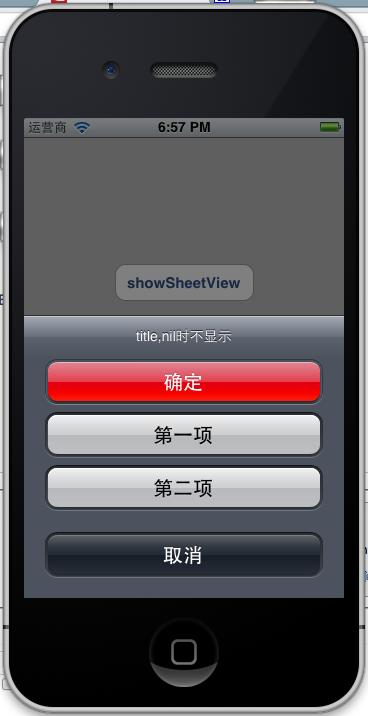
- - (IBAction)showSheet:(id)sender {
- UIActionSheet *actionSheet = [[UIActionSheet alloc]
- initWithTitle:@"title,nil时不显示"
- delegate:self
- cancelButtonTitle:@"取消"
- destructiveButtonTitle:@"确定"
- otherButtonTitles:@"第一项", @"第二项",nil];
- actionSheet.actionSheetStyle = UIActionSheetStyleBlackOpaque;
- [actionSheet showInView:self.view];
- }
actionSheet.actionSheetStyle = UIActionSheetStyleBlackOpaque;//设置样式
参数解释:
cancelButtonTitle destructiveButtonTitle是系统自动的两项。
otherButtonTitles是自己定义的项,注意,最后一个参数要是nil。
[actionSheet showInView:self.view];这行语句的意思是在当前view显示Action sheet。当然还可以用其他方法显示Action sheet。
对应上面的图和代码,一目了然了把
5、接下来我们怎么相应Action Sheet的选项的事件呢?
实现协议里的方法。为了能看出点击Action sheet每一项的效果,我们加入UIAlertView来做信息显示。下面是封装的一个方法,传入对应的信息,在UIAlertView显示对应的信息。
- -(void)showAlert:(NSString *)msg {
- UIAlertView *alert = [[UIAlertView alloc]
- initWithTitle:@"Action Sheet选择项"
- message:msg
- delegate:self
- cancelButtonTitle:@"确定"
- otherButtonTitles: nil];
- [alert show];
- }
那相应被Action Sheet选项执行的代码如下:
- (void)actionSheet:(UIActionSheet *)actionSheet clickedButtonAtIndex:(NSInteger)buttonIndex
- {
- if (buttonIndex == 0) {
- [self showAlert:@"确定"];
- }else if (buttonIndex == 1) {
- [self showAlert:@"第一项"];
- }else if(buttonIndex == 2) {
- [self showAlert:@"第二项"];
- }else if(buttonIndex == 3) {
- [self showAlert:@"取消"];
- }
- }
- - (void)actionSheetCancel:(UIActionSheet *)actionSheet{
- }
- -(void)actionSheet:(UIActionSheet *)actionSheet didDismissWithButtonIndex:(NSInteger)buttonIndex{
- }
- -(void)actionSheet:(UIActionSheet *)actionSheet willDismissWithButtonIndex:(NSInteger)buttonIndex{
- }
可以看到 buttonIndex 是对应的项的索引。
看到那个红色的按钮没?那是ActionSheet支持的一种所谓的销毁按钮,对某户的某个动作起到警示作用,
比如永久性删除一条消息或图像时。如果你指定了一个销毁按钮他就会以红色高亮显示:
actionSheet.destructiveButtonIndex=1;
与导航栏类似,操作表单也支持三种风格 :
UIActionSheetStyleDefault //默认风格:灰色背景上显示白色文字
UIActionSheetStyleBlackTranslucent //透明黑色背景,白色文字
UIActionSheetStyleBlackOpaque //纯黑背景,白色文字
用法:
actionSheet.actionSheetStyle = UIActionSheetStyleBlackOpaque;//设置样式
我选sheet 里的第一项,显示如下:
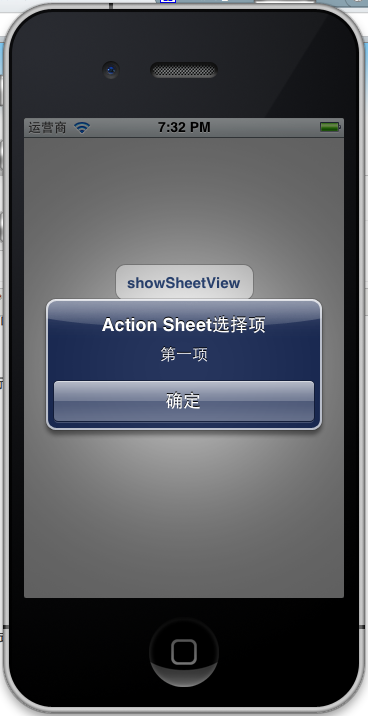
6、注意事项
在开发过程中,发现有时候UIActionSheet的最后一项点击失效,点最后一项的上半区域时有效,这是在特定情况下才会发生,这个场景就是试用了UITabBar的时候才有。解决办法:
在showView时这样使用,[actionSheet showInView:[UIApplication sharedApplication].keyWindow];或者[sheet showInView:[AppDelegate sharedDelegate].tabBarController.view];这样就不会发生遮挡现象了。
UIActionSheet的使用的更多相关文章
- 弹框控件 UIAlertView UIActionSheet
// 创建弹框 从底部弹出,一般用于危险操作 UIActionSheet *sheet = [[UIActionSheet alloc] initWithTitle:@"恭喜通关" ...
- UI第十三节——UIActionSheet
- (void)viewDidLoad { [super viewDidLoad]; UISwitch *swc = [[UISwitch alloc] initWithFrame ...
- 【代码笔记】iOS-清除图片缓存UIActionSheet
一,效果图. 二,代码. RootViewController.m //点击任何处出现sheet -(void)touchesBegan:(NSSet *)touches withEvent:(UIE ...
- UIAlertView 与 UIActionSheet (提示用户)的使用方法
UIAlertView 提示用户 帮助用户选择框 // UIAlertView *alterView = [[UIAlertView alloc] initWithTitle:@"警 ...
- UI里的UIActionSheet按钮
1.效果图:分别为有短信分享 无短信分享 -(void)viewDidLoad{ //添加按钮 UIButton *share ...
- UIAlertView、 UIActionSheet
一.UIAlertView. UIActionSheet都是ios系统自带的弹出式对话框,当UIAlertView或UIActionSheet弹出来时用户无法与应用界面中的其它控件交互,UIAlert ...
- IOS笔记之UIKit_UIAlertView、UIActionSheet
//首先必须继承协议 @interface TRViewController : UIViewController<UIAlertViewDelegate,UIActionSheetDelega ...
- UIActionSheet 修改字体颜色
-(void)willPresentActionSheet:(UIActionSheet *)actionSheet { SEL selector = NSSelectorFromString(@&q ...
- 封装同步的UIActionSheet
封装同步的UIActionSheet 发问题 做 iOS 开发的同学想必都用过 UIActionSheet.UIActionSheet 可以弹出一个选择列表,让用户选择列表中的某一项操作.使用 UIA ...
随机推荐
- ligerui_ligerTree_006_ligerui事件支持
ligerui:ligerTree事件支持: 源码地址:http://download.csdn.net/detail/poiuy1991719/8571255 效果图: 代码:json.txt [ ...
- ES6最具魔力的特性——生成器
ES6生成器(Generators)简介 我们从一个示例开始: function* quips(name) { yield "你好 " + name + "!" ...
- PHP中fopen,file_get_contents,curl函数的区别
PHP中fopen,file_get_contents,curl函数的区别 1.fopen/file_get_contents每次请求都做DNS查询,并不对DNS的信息进行缓存,而curl会对DNS的 ...
- ubuntu 中增加鼠标右键菜单,为Windows 的exe 程序快速增加桌面快捷键
#!/bin/bashmyfile=$NAUTILUS_SCRIPT_SELECTED_FILE_PATHSmyfilename=${myfile##*/}myfilename=${myfilenam ...
- Arcgis Server 默认服务端口号修改方法
本人安装Arcgis Server 10.2之后发布了一个地图服务,该服务默认使用的端口号是6080,本人使用的是教育网,使用教育网均能正常使用该服务,但是使用电信或者移动网络均不能正常访问该网站. ...
- linux初始化配置-----网络配置
一.设置linux网络 1)零时设置ip地址 由于centos7默认没有ifconfig命令所以为了使用方便我们先安装net-tool使我们能使用ifconfig命令查看ip地址 ·挂载系统光盘 [r ...
- html5+css3 微信开发-学习实例
例子1.控制数据只显示两行并且最后使用省略号 样式如下: .ControlDataRows{ overflow : hidden; text-overflow: ellipsis; display: ...
- WEB前端的原理及组成
1:认识WEB前端的组成部分和相关专业术语!具体的总结如下:
- JAVA线程同步辅助类CountDownLatch
一个同步辅助类,在完成一组正在其他线程中执行的操作之前,它允许一个或多个线程一直等待. 用给定的计数 初始化 CountDownLatch.由于调用了 countDown() 方法,所以在当前计数到达 ...
- spark配置
-Dspark.master=local -Xms128m -Xmx512m -XX:MaxPermSize=300m -ea