
(原创)mybatis学习二,spring和mybatis的融合
mybatis学习一夯实基础
上文介绍了mybatis的相关知识,这一节主要来介绍mybaits和spring的融合
一,环境搭建
1,jar包下载,下载路径为jar包
2,将包导入到java工程中
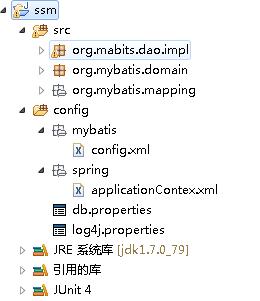
3,新建两个源文件夹,分别为spring和mybatis用来放置各自的xml文件
4,新建一个db.properties文件,用来配置数据库相关信息
最终的效果如下所示:
二,配置文件
1,数据库配置相关信息db.properties
driver=com.mysql.jdbc.Driver

url=jdbc:mysql://localhost:3306/mybatis

name=root

password=123456
2,下面就是mybatis的相关配置了,也就是config.xml配置
单独针对mybatis来说,配置文件主要包括了,配置环境的配置,也就是数据库的配置,mapper的配置还有其他一些setting的配置,对于框架来说,框架是系统的核心,是系统的中枢,所以,数据库配置就要交给框架来配置,这样其他的也可以用这个,综上所述,config.xml文件就用来配置mapper和setting的配置,所以,目前的配置暂且如下:
<?xml version="1.0" encoding="UTF-8" ?>

<!DOCTYPE configuration

  PUBLIC "-//mybatis.org//DTD Config 3.0//EN"

  "http://mybatis.org/dtd/mybatis-3-config.dtd">

<configuration>

    <mappers>

        <mapper resource="org/mybatis/mapping/userMapper.xml" />

    </mappers>

</configuration>
mybatis-config.xml
3,下面就是重头戏,配置spring的配置文件,applicationContext.xml文件,具体步骤如下
a,导入xml的头定义
b,配置数据库,包含两步,读取配置文件位置和内容
<!-- 加载配置文件 -->

    <context:property-placeholder location="classpath:db.properties" />

    <!-- 数据源,使用dbcp -->

    <bean id="dataSource" class="org.apache.commons.dbcp.BasicDataSource"

        destroy-method="close">

        <property name="driverClassName" value="${driver}" />

        <property name="url" value="${url}" />

        <property name="username" value="${name}" />

        <property name="password" value="${password}" />

        <property name="maxActive" value="10" />

        <property name="maxIdle" value="5" />

    </bean>
c,接下来就是要配置能够生成SqlSessionfactory这样的类了,这个类就是org.mybatis.spring.SqlSessionFactoryBean
那么,这个配置文件要有两个作用,读取mybatis的配置文件config.xml和给mybaits指定数据库,为什么呢?上文中我们学习mybatis的过程中,产生Sql
SessionFactory的过程需要读取config.xml文件,所以,spring的融合配置文件肯定需要给SqlSessionFactory指定config.xml文件,但是这个文件在第二步的时候我们并没有给指定数据库,所以,这里我们再给它指定数据库信息,所以,详细的配置信息如下<!-- sqlSessinFactory -->
<bean id="sqlSessionFactory" class="org.mybatis.spring.SqlSessionFactoryBean">
<!-- 加载mybatis的配置文件 -->
<property name="configLocation" value="mybatis/config.xml" />
<!-- 数据源 -->
<property name="dataSource" ref="dataSource" />
</bean>d,上面的信息我们都配置好了,但是还少一步,我们在工程上写的DAO类spring怎样知道这些类?所以,接下来我们要配置这些类
三,上面的配置信息都写好了,下一步是不是可以访问数据库了?
答案是不,上面只是融合了spring和mybatis这两个框架,那么怎么用呢?这个时候我们就要学习一个新类:SqlSessionDaoSupport
这个类是干什么的?这个累就是能够读取spring的配置信息中的sqlSesisonFactory里的配置信息,然后调用mybatis来获取sqlSession的类,所以,我们写的任何DAO层的类,都要继承自这个类,然后获取需要的SqlSession.
继承这个类后,我们可以通过SqlSession ssSession = this.getSqlSession();来获取当前的sqlsession,这个我们已经全部托管给spring框架了,所以,我们使用后就不哟昂在close了。
四,上面的都结束了,是不是就可以用了?
答案是否定的?为什么呢?请听我慢慢道来
1 spring通过配置信息来融合mybaits,也就是可以调用mybatis生成SqlSession,进而进行mybaits框架内的数据操作
2,spring框架内的DAO层,通过继承SqlSessionDaoSupport来获取SqlSession,那么问题来了,这个父类SqlSessionDaoSupport是谁来实例化呢?你肯定会说是spring框架啊,对,没错,是这个,但是这个生成的SqlSession是一个数据库的sqlsession,如果以后这个项目很大了,很明显需要五个或者六个数据库,那么,你这个DAO继承的是那个SqlsessionDaosupport了呢?所以,这里引出了一个新的配置,就是配置DAO,配置其sqlSessionFactory,所以,在applicationConfig.xml最后的配置需要加上这一句:
<!-- 配置DAO接口 -->
<bean id="userDao" class="org.mabits.dao.impl.UserDaoImpl">
<property name="sqlSessionFactory" ref="sqlSessionFactory"></property>
</bean>在学习mybatis的时候,有两种方案,第一种是配置文件,第二种是mapper class。那么针对第二种该怎么弄呢?
针对第二种,需要在applicationContext.xml中配置,具体配置如下
<!-- mapper配置 MapperFactoryBean:根据mapper接口生成mapper对象-->
<bean id="" class="org.mybatis.spring.mapper.MapperFactoryBean">
<property name="mapperInterface" value="org.mybatis.mapping.UserMapper"></property>
<property name="sqlSessionFactory" ref="sqlSessionFactory"></property>
</bean>但是如果一个工程中有很多类,那么这很多类该怎么配置呢?是不是可以通过包名来一块导入呢?对了,你猜对了,就是这个样子
具体的配置如下
<!-- Mapper批量扫描: 从mapper包中扫描mapper接口,并自动创建代理对象,在spring容器中注册 遵循规范:将mapper.java和mapper.xml文件命名一致,并且放在同一个目录里面
自动扫描出来的mapper的bean的id是mapper类名,首字母小写 -->
<bean class="org.mybatis.spring.mapper.MapperScannerConfigurer">
<property name="basePackage" value="org.mybatis.mapping"></property>
<property name="sqlSessionFactoryBeanName" value="sqlSessionFactory"></property>
</bean>
五,总结一下
最后,applicationConfig.xml的配置文件如下
<?xml version="1.0" encoding="UTF-8"?>
<beans xmlns="http://www.springframework.org/schema/beans"
xmlns:context="http://www.springframework.org/schema/context"
xmlns:xsi="http://www.w3.org/2001/XMLSchema-instance" xmlns:aop="http://www.springframework.org/schema/aop"
xmlns:tx="http://www.springframework.org/schema/tx" xmlns:p="http://www.springframework.org/schema/p"
xmlns:util="http://www.springframework.org/schema/util" xmlns:jdbc="http://www.springframework.org/schema/jdbc"
xmlns:cache="http://www.springframework.org/schema/cache"
xsi:schemaLocation="
http://www.springframework.org/schema/context
http://www.springframework.org/schema/context/spring-context.xsd
http://www.springframework.org/schema/beans
http://www.springframework.org/schema/beans/spring-beans.xsd
http://www.springframework.org/schema/tx
http://www.springframework.org/schema/tx/spring-tx.xsd
http://www.springframework.org/schema/jdbc
http://www.springframework.org/schema/jdbc/spring-jdbc-3.1.xsd
http://www.springframework.org/schema/cache
http://www.springframework.org/schema/cache/spring-cache-3.1.xsd
http://www.springframework.org/schema/aop
http://www.springframework.org/schema/aop/spring-aop.xsd
http://www.springframework.org/schema/util
http://www.springframework.org/schema/util/spring-util.xsd">
<!-- 加载配置文件 -->
<context:property-placeholder location="classpath:db.properties" /> <!-- 数据源,使用dbcp -->
<bean id="dataSource" class="org.apache.commons.dbcp.BasicDataSource"
destroy-method="close">
<property name="driverClassName" value="${driver}" />
<property name="url" value="${url}" />
<property name="username" value="${name}" />
<property name="password" value="${password}" />
<property name="maxActive" value="10" />
<property name="maxIdle" value="5" />
</bean>
<!-- sqlSessinFactory -->

    <bean id="sqlSessionFactory" class="org.mybatis.spring.SqlSessionFactoryBean">

        <!-- 加载mybatis的配置文件 -->

        <property name="configLocation" value="mybatis/config.xml" />

        <!-- 数据源 -->

        <property name="dataSource" ref="dataSource" />

    </bean>
<!-- 配置DAO接口 -->

<bean id="userDao" class="org.mabits.dao.impl.UserDaoImpl">

<property name="sqlSessionFactory" ref="sqlSessionFactory"></property>

</bean>
<!-- mapper配置 MapperFactoryBean:根据mapper接口生成mapper对象 -->
<bean class="org.mybatis.spring.mapper.MapperFactoryBean">
<property name="mapperInterface" value="org.mybatis.mapping.UserMapper"></property>
<property name="sqlSessionFactory" ref="sqlSessionFactory"></property>
</bean>
    <!-- Mapper批量扫描: 从mapper包中扫描mapper接口,并自动创建代理对象,在spring容器中注册 遵循规范:将mapper.java和mapper.xml文件命名一致,并且放在同一个目录里面

        自动扫描出来的mapper的bean的id是mapper类名,首字母小写 -->

    <bean class="org.mybatis.spring.mapper.MapperScannerConfigurer">

        <property name="basePackage" value="org.mybatis.mapping"></property>

        <property name="sqlSessionFactoryBeanName" value="sqlSessionFactory"></property>

    </bean>
</beans>applicationContext.xml
上面的就是spring和mybatis融合的相关信息了,接下来开始学习springMVC和mybatis的融合了
mybaits学习三,springMVC和mybatis的融合
(原创)mybatis学习二,spring和mybatis的融合的更多相关文章
- mybatis学习笔记 spring与mybatis整合
转载自http://blog.csdn.net/naruto_Mr/article/details/48239357 1.创建web工程,导入spring依赖包与mybatis依赖包,还需要mybat ...
- MyBatis学习 之 一、MyBatis简介与配置MyBatis+Spring+MySql
目录(?)[-] 一MyBatis简介与配置MyBatisSpringMySql MyBatis简介 MyBatisSpringMySql简单配置 搭建Spring环境 建立MySql数据库 搭建My ...
- Quartz学习——SSMM(Spring+SpringMVC+Mybatis+Mysql)和Quartz集成详解(转)
通过前面的学习,你可能大致了解了Quartz,本篇博文为你打开学习SSMM+Quartz的旅程!欢迎上车,开始美好的旅程! 本篇是在SSM框架基础上进行的. 参考文章: 1.Quartz学习——Qua ...
- (转)SpringMVC学习(四)——Spring、MyBatis和SpringMVC的整合
http://blog.csdn.net/yerenyuan_pku/article/details/72231763 之前我整合了Spring和MyBatis这两个框架,不会的可以看我的文章MyBa ...
- MyBatis学习 之 四、MyBatis配置文件
目录(?)[-] 四MyBatis主配置文件 properties属性 settings设置 typeAliases类型别名 typeHandlers类型句柄 ObjectFactory对象工厂 pl ...
- 【转】MyBatis学习总结(三)——优化MyBatis配置文件中的配置
[转]MyBatis学习总结(三)——优化MyBatis配置文件中的配置 一.连接数据库的配置单独放在一个properties文件中 之前,我们是直接将数据库的连接配置信息写在了MyBatis的con ...
- MyBatis学习(二):与Spring整合(非注解方式配置MyBatis)
搭建SpringMVC的-->传送门<-- 一.环境搭建: 目录结构: 引用的JAR包: 如果是Maven搭建的话,pom.xml的配置如下: <?xml version=" ...
- Quartz学习——SSMM(Spring+SpringMVC+Mybatis+Mysql)和Quartz集成详解(四)
当任何时候觉你得难受了,其实你的大脑是在进化,当任何时候你觉得轻松,其实都在使用以前的坏习惯. 通过前面的学习,你可能大致了解了Quartz,本篇博文为你打开学习SSMM+Quartz的旅程!欢迎上车 ...
- spring学习 六 spring与mybatis整合
在mybatis学习中有两种配置文件 :全局配置文件,映射配置文件.mybatis和spring整合,其实就是把mybatis中的全局配置文件的配置内容都变成一个spring容器的一个bean,让sp ...
随机推荐
- 【iOS】彩色TabBar切换动画实现
无意间看到一个彩色TabBar切换的设计图,感觉很不错,有空就把他实现了. 环境信息 Mac OS X 10.10.4 Xcode 6.4 iOS 8.4 效果图: 效果图 源码下载地址: https ...
- exec
之前一直这样显示 不知道修改了什么,变成了这样. 在终端 找到这个podfile所在的目录 chmod 600 podfile 然后 就变回来了.可能是修改权限的问题.
- Sql server profiler抓出的语句不可信
Sql profiler抓出的语句不可信
- System.Drawing.Image在Save之后Type变了
前段时间发现asp.net MVC 3附带了一个相当方便的图片处理类WebImage,常用的图片处理功能全都包括进去了,用起来是相当的爽. 在项目中刚好有相关的图片处理需求,但由于实际项目是使用asp ...
- C#操作符??和?:
C#操作符??和?: 先看如下代码: string strParam = Request.Params["param"]; if ( strParam== null ) { ...
- Amoeba for MySQL---分布式数据库Proxy解决方案
Amoeba是什么? Amoeba(变形虫)项目,致力于MySQL的分布式数据库前端代理层,它主要在应用层访问MySQL的时候充当SQL路由功能,专注于分布式数据库代理层(Database Proxy ...
- javascript-适配器模式
适配器模式笔记 将一个类(对象)的接口(方法或属性)转化成另一个接口,以满足用户需求,使类(对象)之间接口的不兼容性问题通过适配器方法得以解决 demo实例:1.适配参数对象,使传入的参数完整 2.适 ...
- Javascript之旅——第四站:parseInt中要注意的坑
前些天信用卡站点要接入一个新功能,不过还真比较坑爹,asp站点,大家都知道信用卡的背面是有一个有效期的,在对接银行中这个信息 一定是要传给银行做数据校验,用户在语音输入信用卡有效期后,系统会做一个有效 ...
- Rac grid用户启停监听报错无权限
[grid@max1 ~]$ lsnrctl stop LSNRCTL for Linux: Version 11.2.0.3.0 - Production on 04-NOV-2016 00:20: ...
- cocos2d之json使用实例
前端使用: json管理器中函数解析: 对宠物技能map的定义: 宠物技能表单--数据的基础定义: