
webSocket通信
针对webSocket通信总结:
1.webSocket通信原理图:
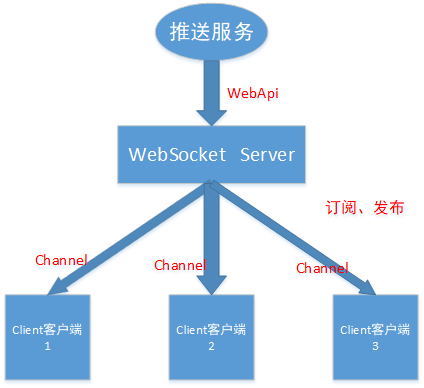
2.webSocket通信实例
参考地址1:https://www.cnblogs.com/cjm123/p/9674506.html
参考地址2:https://www.jb51.net/html5/631711.html
直接上图:

(1)客户端源码:
<!DOCTYPE html>

<html lang="en">

<head>

    <meta charset="UTF-8">

    <meta name="viewport" content="width=device-width, initial-scale=1.0">

    <meta http-equiv="X-UA-Compatible" content="ie=edge">

    <title>WebSocket浏览器端实现</title>

    <script type="text/javascript">

        var start = function () {

            var inc = document.getElementById('incomming');

            var wsImpl = window.WebSocket || window.MozWebSocket;

            var form = document.getElementById('sendForm');

            var input = document.getElementById('sendText');

            inc.innerHTML += "connecting to server ..<br/>";

            // create a new websocket and connect

            window.ws = new wsImpl('ws://localhost:7181/');

            // when data is comming from the server, this metod is called

            ws.onmessage = function (evt) {

                inc.innerHTML += evt.data + '<br/>';

            };

            // when the connection is established, this method is called

            ws.onopen = function () {

                inc.innerHTML += '.. connection open<br/>';

            };

            // when the connection is closed, this method is called

            ws.onclose = function () {

                inc.innerHTML += '.. connection closed<br/>';

            }

            form.addEventListener('submit', function (e) {

                e.preventDefault();

                var val = input.value;

                ws.send(val);

                input.value = "";

            });

        }

        window.onload = start;

    </script>

</head>

<body>

    <form id="sendForm">

        <input id="sendText" placeholder="Text to send" />

    </form>

    <pre id="incomming"></pre>

</body>

</html>
(2)服务端控制台应用程序源码:
using System;

using System.Collections.Generic;

using System.Linq;

using System.Text;

using System.Threading.Tasks;

using Fleck;

namespace WebSocketDemo

{

    /**

     * WebSocket通讯实例

     */

    class Program

    {

        static void Main(string[] args)

        {

            FleckLog.Level = LogLevel.Debug;

            var allSockets = new List<IWebSocketConnection>();

            var server = new WebSocketServer("ws://0.0.0.0:7181");

            server.Start(

                socket =>

                {

                    socket.OnOpen = () =>

                    {

                        Console.WriteLine("连接打开Open!");

                        allSockets.Add(socket);

                    };

                    socket.OnClose = () =>

                    {

                        Console.WriteLine("连接关闭Close!");

                        allSockets.Remove(socket);

                    };

                    socket.OnMessage = message =>

                    {

                        Console.WriteLine(message);

                        allSockets.ToList().ForEach(s=>s.Send("Echo:"+ message));

                    };

                });

            var input = Console.ReadLine();

            while (input!="exit")

            {

                foreach (var socket in allSockets.ToList())

                {

                    socket.Send(input);

                }

                input = Console.ReadLine();

            }

        }

    }

}
附:https://www.cnblogs.com/tinywan/p/5894403.html 这个博文可以参考研究:
webSocket通信的更多相关文章
- C#(SuperWebSocket)与websocket通信
原文:C#(SuperWebSocket)与websocket通信 客户端代码 点击可以查看一些关于websocket的介绍 <!DOCTYPE html> <html> &l ...
- js判断是否安装某个android app,没有安装下载该应用(websocket通信,监听窗口失去焦点事件)
现在经常有写场景需要提示用户下载app, 但是如果用户已经安装,我们希望是直接打开app. 实际上,js是没有判断app是否已经安装的方法的,我们只能曲线救国. 首先,我们需要有call起app的sc ...
- Springboot集成WebSocket通信全部代码,即扣即用。
websocket通信主要来自两个类以及一个测试的html页面. MyHandler 和 WebSocketH5Config,下面全部代码 MyHandler类全部代码: package com.un ...
- 【Java Web开发学习】Spring MVC整合WebSocket通信
Spring MVC整合WebSocket通信 目录 ========================================================================= ...
- websocket通信1009错误,
问题说明: springboot继承 WebSocketConfigurer实现websocket通信服务,服务器端报错,"The decoded text message was too ...
- Python3+WebSockets实现WebSocket通信
一.说明 1.1 背景说明 前段时间同事说云平台通信使用了个websocket的东西,今天抽空来看一下具体是怎么个通信过程. 从形式上看,websocket是一个应用层协议,socket是数据链路层. ...
- 把酒言欢话聊天,基于Vue3.0+Tornado6.1+Redis发布订阅(pubsub)模式打造异步非阻塞(aioredis)实时(websocket)通信聊天系统
原文转载自「刘悦的技术博客」https://v3u.cn/a_id_202 "表达欲"是人类成长史上的强大"源动力",恩格斯早就直截了当地指出,处在蒙昧时代即低 ...
- websocket通信 实现java模拟一个client与webclient通信
发文原由: 熟悉socket通信的同学,对于socket模拟server与client,实现相互通信, 或者使用websocket与java模拟的websocket服务器通信(比如一个聊天室),对于这 ...
- C# 实现WebSocket通信
本实例可通过web网页端进行测试,下面直接上代码. 首先要在NuGet导入“Fleck”包,需 .NET Framework 4.5及以上. using System; using System.Co ...
随机推荐
- nginx redirect ignore port 两层nginx跳转忽略了端口
问题: 两层nginx做代理,第一层:nginx:将9087->代理到80端口,第二层:将80端口->流量打到我们的代码上,结果在代码中拿到的链接不带9087端口,则代码中发生跳转的时候, ...
- LVM使用手册简化命令
创建 hot_add --查看新增的lun pvcreate /dev/sdb --创建物理卷 pvcreate /dev/sdc --创建物理卷 pvcreate /dev/sdd ...
- 时序数据库influxDB存储数据grafana展示数据
一.influxDB简介 InfluxDB是一款用Go语言编写的开源分布式时序.事件和指标数据库,无需外部依赖.该数据库现在主要用于存储涉及大量的时间戳数据,如DevOps监控数据,APP metri ...
- springboot中使用filter
通过注解的方式实现filter过滤器. 创建Filter包,并在该包下创建MyFilter 示例代码: package com.bjpowernode.springboot.filter; impor ...
- 04-spring框架—— Spring 集成 MyBatis
将 MyBatis与 Spring 进行整合,主要解决的问题就是将 SqlSessionFactory 对象交由 Spring来管理.所以,该整合,只需要将 SqlSessionFactory 的对象 ...
- Winform Global exception and task parallel library exception;
static class Program { /// <summary> /// 应用程序的主入口点. /// </summary> [STAThread] static vo ...
- Django学习系列17:在模板中渲染待办事项
前面提到的问题中在表格中显示多个待办事项 是最后一个容易解决的问题.要编写一个新单元测试,检查模板是否也能显示多个待办事项: lists/tests.py def test_displays_all_ ...
- ORACLE纯SQL实现多行合并一行
项目中遇到一个需求,需要将多行合并为一行.表结构如下:NAME Null Type---------------------- ...
- 野生小白纯js仿思否简易移动端
初衷 感谢思否两个多月来的陪伴做这个东西还是多自己两个月多来的学习总结吧,顺带练手.希望能找到一个还可以的工作吧! 为什么没用框架 react过了一边官方文档,对状态提升和组件有点了解一下,懂得还是太 ...
- golang之 Array(数组)
目录 一.Array(数组) 二.数组的定义 1. 基本语法 三.数组的初始化 1. 方式一 2. 方式二 3. 方式三 四.数组的遍历 1. 方式一:for循环遍历 2. 方式二:for range ...