
jmeter beanshell 变量传递
如果写成这样会报错:
${__BeanShell(${__threadNum}*2,ToatlAmount)};
${__BeanShell(${__Random(1,99999,)},DayNum)};
//${__BeanShell(vars.put("BXReason"\,"${__UUID}"))};
${__BeanShell(${__threadNum},BXReason)};
报错信息:
2018-12-20 01:42:30,820 ERROR o.a.j.u.BeanShellInterpreter: Error invoking bsh method: eval Sourced file: inline evaluation of: ``StandardJMeterEngine*2;'' : illegal use of undefined variable, class, or 'void' literal
2018-12-20 01:42:30,820 WARN o.a.j.f.BeanShell: Error running BSH script
org.apache.jorphan.util.JMeterException: Error invoking bsh method: eval Sourced file: inline evaluation of: ``StandardJMeterEngine*2;'' : illegal use of undefined variable, class, or 'void' literal
at org.apache.jmeter.util.BeanShellInterpreter.bshInvoke(BeanShellInterpreter.java:183) ~[ApacheJMeter_core.jar:5.0 r1840935]
at org.apache.jmeter.util.BeanShellInterpreter.eval(BeanShellInterpreter.java:189) ~[ApacheJMeter_core.jar:5.0 r1840935]
at org.apache.jmeter.functions.BeanShell.execute(BeanShell.java:100) [ApacheJMeter_functions.jar:5.0 r1840935]
at org.apache.jmeter.engine.util.CompoundVariable.execute(CompoundVariable.java:136) [ApacheJMeter_core.jar:5.0 r1840935]
at org.apache.jmeter.engine.util.CompoundVariable.execute(CompoundVariable.java:111) [ApacheJMeter_core.jar:5.0 r1840935]
at org.apache.jmeter.testelement.property.FunctionProperty.getStringValue(FunctionProperty.java:92) [ApacheJMeter_core.jar:5.0 r1840935]
at org.apache.jmeter.testbeans.TestBeanHelper.unwrapProperty(TestBeanHelper.java:128) [ApacheJMeter_core.jar:5.0 r1840935]
at org.apache.jmeter.testbeans.TestBeanHelper.prepare(TestBeanHelper.java:83) [ApacheJMeter_core.jar:5.0 r1840935]
at org.apache.jmeter.engine.StandardJMeterEngine.notifyTestListenersOfStart(StandardJMeterEngine.java:212) [ApacheJMeter_core.jar:5.0 r1840935]
at org.apache.jmeter.engine.StandardJMeterEngine.run(StandardJMeterEngine.java:384) [ApacheJMeter_core.jar:5.0 r1840935]
at java.lang.Thread.run(Thread.java:748) [?:1.8.0_172]
Caused by: java.lang.reflect.InvocationTargetException
at sun.reflect.NativeMethodAccessorImpl.invoke0(Native Method) ~[?:1.8.0_172]
at sun.reflect.NativeMethodAccessorImpl.invoke(NativeMethodAccessorImpl.java:62) ~[?:1.8.0_172]
at sun.reflect.DelegatingMethodAccessorImpl.invoke(DelegatingMethodAccessorImpl.java:43) ~[?:1.8.0_172]
at java.lang.reflect.Method.invoke(Method.java:498) ~[?:1.8.0_172]
at org.apache.jmeter.util.BeanShellInterpreter.bshInvoke(BeanShellInterpreter.java:166) ~[ApacheJMeter_core.jar:5.0 r1840935]
... 10 more
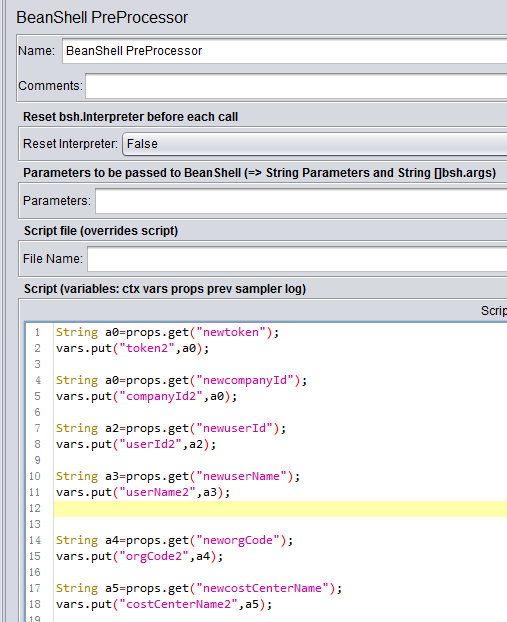
import java.text.DecimalFormat;
String a0=props.get("newtoken");
vars.put("token2",a0);
String a0=props.get("newcompanyId");
vars.put("companyId2",a0);
String a2=props.get("newuserId");
vars.put("userId2",a2);
String a3=props.get("newuserName");
vars.put("userName2",a3);
String a4=props.get("neworgCode");
vars.put("orgCode2",a4);
String a5=props.get("newcostCenterName");
vars.put("costCenterName2",a5);
String a6=props.get("newprofitCenterName");
vars.put("profitCenterName2",a6);
String a7=props.get("newcostCenterID");
vars.put("costCenterID2",a7);
String ToatlAmount="${__BeanShell(${__threadNum}*2,)}";
vars.put("ToatlAmount",ToatlAmount);
String DayNum="${__Random(1,99999,)}";
vars.put("DayNum",DayNum);
String BXReason="${__threadNum}";
vars.put("BXReason",BXReason);
4、Bean Shell常用内置变量
JMeter在它的BeanShell中内置了变量,用户可以通过这些变量与JMeter进行交互,其中主要的变量及其使用方法如下:
log:用来记录日志文件,写入到jmeber.log文件,使用方法:log.info(“This is log info!”);
ctx(JmeterContext)通过它来访问context,使用方法可参考:org.apache.jmeter.threads.JMeterContext。
vars - (JMeterVariables):操作jmeter变量,提供读取/写入访问变量的方法。这个变量实际引用了JMeter线程中的局部变量容器(本质上是Map),它是测试用例与BeanShell交互的桥梁,常用方法:
a) vars.get(String key):从jmeter中获得变量值
b) vars.put(String key,String value):数据存到jmeter变量中
c) vars.putObject("OBJ1",new Object());
更多方法可参考:org.apache.jmeter.threads.JMeterVariables
props - (JMeterProperties - class Java.util.Properties):操作jmeter属性,该变量引用了JMeter的配置信息,可以获取Jmeter的属性,它的使用方法与vars类似,但是只能put进去String类型的值,而不能是一个对象。对应于java.util.Properties。
a) props.get("START.HMS"); 注:START.HMS为属性名,在文件jmeter.properties中定义
b) props.put("PROP1","1234");
prev - (SampleResult):获取前面的sample采样的结果,常用方法:
a) getResponseDataAsString():获取响应信息
b) getResponseCode() :获取响应code
更多方法可参考:org.apache.jmeter.samplers.SampleResult
sampler - (Sampler):gives access to the current sampler 访问当前采样
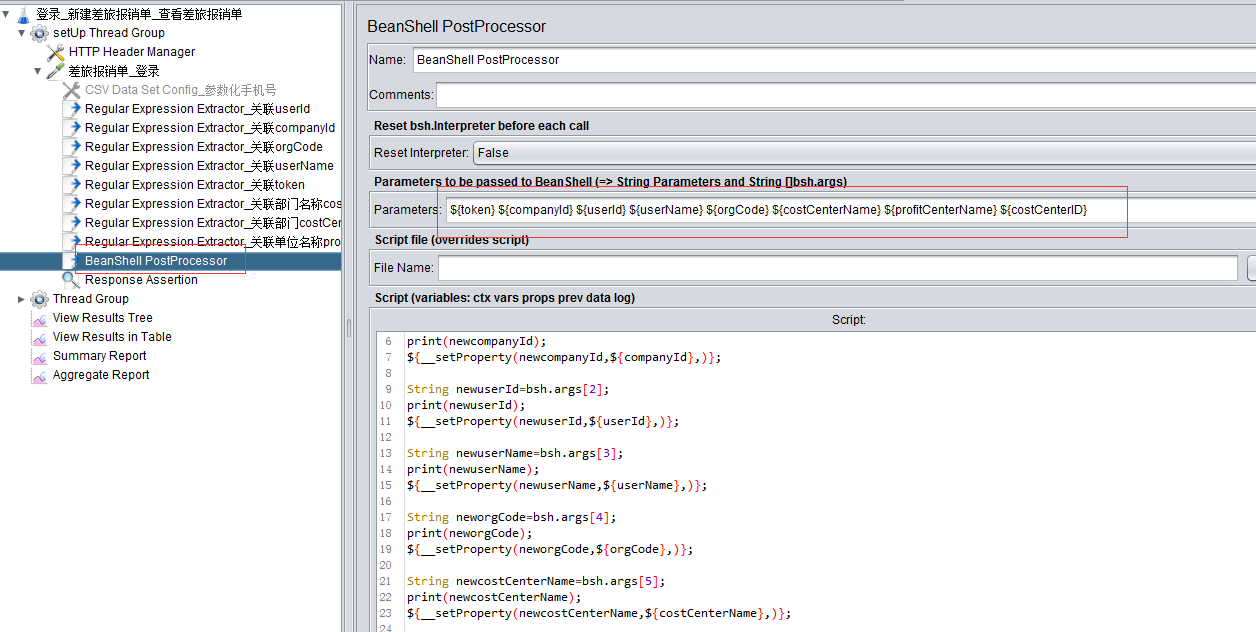
BeanShell PostProcessor脚本:
String newtoken=bsh.args[0];
print(newtoken);
${__setProperty(newtoken,${token},)};
String newcompanyId=bsh.args[1];
print(newcompanyId);
${__setProperty(newcompanyId,${companyId},)};
String newuserId=bsh.args[2];
print(newuserId);
${__setProperty(newuserId,${userId},)};
String newuserName=bsh.args[3];
print(newuserName);
${__setProperty(newuserName,${userName},)};
String neworgCode=bsh.args[4];
print(neworgCode);
${__setProperty(neworgCode,${orgCode},)};
String newcostCenterName=bsh.args[5];
print(newcostCenterName);
${__setProperty(newcostCenterName,${costCenterName},)};
String newprofitCenterName=bsh.args[6];
print(newprofitCenterName);
${__setProperty(newprofitCenterName,${profitCenterName},)};
String newcostCenterID=bsh.args[7];
print(newcostCenterID);
${__setProperty(newcostCenterID,${costCenterID},)};
jmeter beanshell 变量传递的更多相关文章
- jmeter 之变量传递
最近遇到个问题,一个线程组的变量怎么应用到另一个线程组,试了下,通过提取器设置的变量只能用于当前线程组,不能用于其他线程组,只能试试设置property Parameters,应该还有别的办法这只是其 ...
- jmeter BeanShell实例-----两个变量之间的断言对比
jmeter BeanShell实例-----两个变量之间的断言对比 在jmeter的中,断言没法对两个变量的进行对比后判断,只能使用Bean Shell断言来进行,总是有人来问怎么写呢.这里写一个简 ...
- jmeter BeanShell实例-----两个变量之间的断言对比(转)
jmeter BeanShell实例-----两个变量之间的断言对比 在jmeter的中,断言没法对两个变量的进行对比后判断,只能使用Bean Shell断言来进行,总是有人来问怎么写呢.这里写一个简 ...
- Jmeter之BeanShell变量使用讲解
一.在测试过程中经常会遇到一些业务逻辑处理需要,单纯的线程设置不能满足,这时候就要使用BeanShell编写一定的脚本 前置处理器:BeanShell PreProcessor,主要接口请求前做一些参 ...
- jmeter BeanShell断言(一)
原文地址https://blog.csdn.net/lijing742180/article/details/81157947 原文地址https://blog.csdn.net/zailushang ...
- JMeter BeanShell示例
翻译:https://blog.trigent.com/jmeter-blog-series-jmeter-beanshell-example 在这个例子中,我们将演示在Apache JMeter中使 ...
- JMeter博客系列:JMeter BeanShell示例
1.简介 Apache JMeter是一个基于Java的开源工具,使您可以在应用程序上执行功能,负载,性能和回归测试.应用程序可以在Web服务器上运行,也可以是独立的.它支持在包含静态和动态资源的客户 ...
- Jmeter Beanshell 编程简介
简介 Jmeter除了提供丰富的组件以外,还提供脚本支持,可通过编写脚本来丰富Jmeter,实现普通组件无法完成的功能.Beanshell是一种轻量级的Java脚本语言,完全符合Java规范,并且内置 ...
- Jmeter beanshell 生成手机号加密签名
首先自己写一个根据手机号生成加密字符串的函数,并且导出为Jar包,函数具体内容省略,网上有很多 将Jar包放到Jmeter lib\ext目录下面,然后在user.properties里面把路径加进去 ...
随机推荐
- CodeForce-1196D1-RGB Substring (easy version)
原题链接 题目大意: 给出一串由'R', 'G', 'B'组成的长度为n的字符串,在里面选出一个长度为k的子串,要求在改变最少字符的情况下同时也是"RGBRGBRGB…"的子串. ...
- HBaseRegionServer宕机数据恢复
本文由 网易云 发布 作者:范欣欣 本篇文章仅限内部分享,如需转载,请联系网易获取授权. 众所周知,HBase默认适用于写多读少的应用,正是依赖于它相当出色的写入性能:一个100台RS的集群可以轻松地 ...
- 2019牛客国庆集训派对day1(A, B E F K)
链接:https://ac.nowcoder.com/acm/contest/1099#question A:可知符合条件的图中间肯定存在一个由1构成的矩形,找到由1构成矩形的边界,判断出现的1的数量 ...
- 还抱着 Java 8 不放,也是醉了!
作者 | Trisha Gee原文:https://dzone.com/articles/beyond-java-8译者 | 弯月 责编 | 屠敏出品 | CSDN(ID:CSDNnews) 不说 A ...
- Linux Kernel中所應用的數據結構及演算法
Linux Kernel中所應用的數據結構及演算法 Basic Data Structures and Algorithms in the Linux kernel Links are to the ...
- html input标签 要求只能输入纯数字
在input标签添加以下代码即可 oninput = "value=value.replace(/[^\d]/g,'')" <input type="text&qu ...
- java的几种定时器
https://blog.csdn.net/coolwindd/article/details/82804189 1.@Scheduled注解 @Scheduled注解是最简单的方式,只需要启用定时器 ...
- tf.keras 解决plot_model 的配置问题
https://blog.csdn.net/ha010/article/details/103367311
- AtCoder Beginner Contest 130 F Minimum Bounding Box 三分法求极值(WA)
题意:给n个点的起始坐标以及他们的行走方向,每一单位时间每个点往它的方向移动一单位.问最小能包围所有点的矩形. 解法:看到题目求极值,想了想好像可以用三分法求极值,虽然我也不能证明面积是个单峰函数. ...
- vector<类指针>清理
https://www.cnblogs.com/nanke/archive/2011/05/10/2042662.html 1.vector<class> &aa,作为函数参数 2 ...