
activemq热备与消息丢失
1. 解压 tar -zxvf apache-activemq-5.12.0-bin.tar.gz
2. 改名 mv apache-activemq-5.12.0 activemq
3. cd activemq/bin
4. 启动 ./activemq start
5. 访问 ip:8161/admin
/* 楼主本地的虚拟机这么安装没问题,可是远程的服务器安装却启动失败
* 如果启动报错的话,可以通过 ./activemq console查看启动信息
* 我启动失败是应为主机名不合法, 通过 hostname 命令可以查看当前主机名
* hostnamectl set-hostname newname设置新的主机名
* hostnamectl –static set-hostname newname设置静态名字
* 使用 reboot 重启之后, 就是新的名字了 (名字最好是简短的纯英文)
*/
消息丢失:如果在.5机器发送了2条消息,然后用.6机器去消费1条;这个时候对于.5机器来说.6就是一个客户端,它拿走了2条消息消费了一条还剩一条待消费。而此时剩下的一条只能通过.6机器消费,无法通过.5拿到消息。这样就达不到高性能的目的,我们可以通过消息回流来解决。
activemq热备配置(可以是n台,我以2台为例,灰色部分都是默认配置文件):vim activemq/conf/activemq.xml
<!-- START SNIPPET: example -->
<beans
xmlns="http://www.springframework.org/schema/beans"
xmlns:xsi="http://www.w3.org/2001/XMLSchema-instance"
xsi:schemaLocation="http://www.springframework.org/schema/beans http://www.springframework.org/schema/beans/spring-beans.xsd
http://activemq.apache.org/schema/core http://activemq.apache.org/schema/core/activemq-core.xsd">
<!-- Allows us to use system properties as variables in this configuration file -->
<bean class="org.springframework.beans.factory.config.PropertyPlaceholderConfigurer">
<property name="locations">
<value>file:${activemq.conf}/credentials.properties</value>
</property>
</bean>
<!-- Allows accessing the server log -->
<bean id="logQuery" class="io.fabric8.insight.log.log4j.Log4jLogQuery"
lazy-init="false" scope="singleton"
init-method="start" destroy-method="stop">
</bean>
<broker xmlns="http://activemq.apache.org/schema/core" brokerName="localhost" dataDirectory="${activemq.data}">
<destinationPolicy>
<policyMap>
<policyEntries>
<policyEntry topic=">" >
<!-- The constantPendingMessageLimitStrategy is used to prevent
slow topic consumers to block producers and affect other consumers
by limiting the number of messages that are retained
For more information, see:
http://activemq.apache.org/slow-consumer-handling.html
-->
<pendingMessageLimitStrategy>
<constantPendingMessageLimitStrategy limit="1000"/>
</pendingMessageLimitStrategy>
</policyEntry>
<!-- 消息回流:加这段配置就不会出现消息丢失的情况(有中文会启动失败) 这段注释要删掉 -->
<policyEntry queue=">" enableAudit="false">
<networkBridgeFilterFactory>
<conditionalNetworkBridgeFilterFactory replayWhenNoConsumers="true" />
</networkBridgeFilterFactory>
</policyEntry>
</policyEntries>
</policyMap>
</destinationPolicy>
<!--
The managementContext is used to configure how ActiveMQ is exposed in
JMX. By default, ActiveMQ uses the MBean server that is started by
the JVM. For more information, see:
http://activemq.apache.org/jmx.html
-->
<managementContext>
<managementContext createConnector="false"/>
</managementContext>
<!--
Configure message persistence for the broker. The default persistence
mechanism is the KahaDB store (identified by the kahaDB tag).
For more information, see:
http://activemq.apache.org/persistence.html
-->
<persistenceAdapter>
<kahaDB directory="${activemq.data}/kahadb"/>
</persistenceAdapter>
<!-- 热备配置:只需要在这里指定服务器地址就好了(有中文会启动失败) 这段注释要删掉 -->
<networkConnectors>
<networkConnector uri="static://(tcp://192.168.5.5:61616,tcp://192.168.5.6:61616)" />
</networkConnectors>
<!--
The systemUsage controls the maximum amount of space the broker will
use before disabling caching and/or slowing down producers. For more information, see:
http://activemq.apache.org/producer-flow-control.html
-->
<systemUsage>
<systemUsage>
<memoryUsage>
<memoryUsage percentOfJvmHeap="70" />
</memoryUsage>
<storeUsage>
<storeUsage limit="100 gb"/>
</storeUsage>
<tempUsage>
<tempUsage limit="50 gb"/>
</tempUsage>
</systemUsage>
</systemUsage>
<!--
The transport connectors expose ActiveMQ over a given protocol to
clients and other brokers. For more information, see:
http://activemq.apache.org/configuring-transports.html
-->
<transportConnectors>
<!-- DOS protection, limit concurrent connections to 1000 and frame size to 100MB -->
<transportConnector name="openwire" uri="tcp://0.0.0.0:61616?maximumConnections=1000&wireFormat.maxFrameSize=104857600"/>
<transportConnector name="amqp" uri="amqp://0.0.0.0:5672?maximumConnections=1000&wireFormat.maxFrameSize=104857600"/>
<transportConnector name="stomp" uri="stomp://0.0.0.0:61613?maximumConnections=1000&wireFormat.maxFrameSize=104857600"/>
<transportConnector name="mqtt" uri="mqtt://0.0.0.0:1883?maximumConnections=1000&wireFormat.maxFrameSize=104857600"/>
<transportConnector name="ws" uri="ws://0.0.0.0:61614?maximumConnections=1000&wireFormat.maxFrameSize=104857600"/>
</transportConnectors>
<!-- destroy the spring context on shutdown to stop jetty -->
<shutdownHooks>
<bean xmlns="http://www.springframework.org/schema/beans" class="org.apache.activemq.hooks.SpringContextHook" />
</shutdownHooks>
</broker>
<!--
Enable web consoles, REST and Ajax APIs and demos
The web consoles requires by default login, you can disable this in the jetty.xml file
Take a look at ${ACTIVEMQ_HOME}/conf/jetty.xml for more details
-->
<import resource="jetty.xml"/>
</beans>
<!-- END SNIPPET: example -->
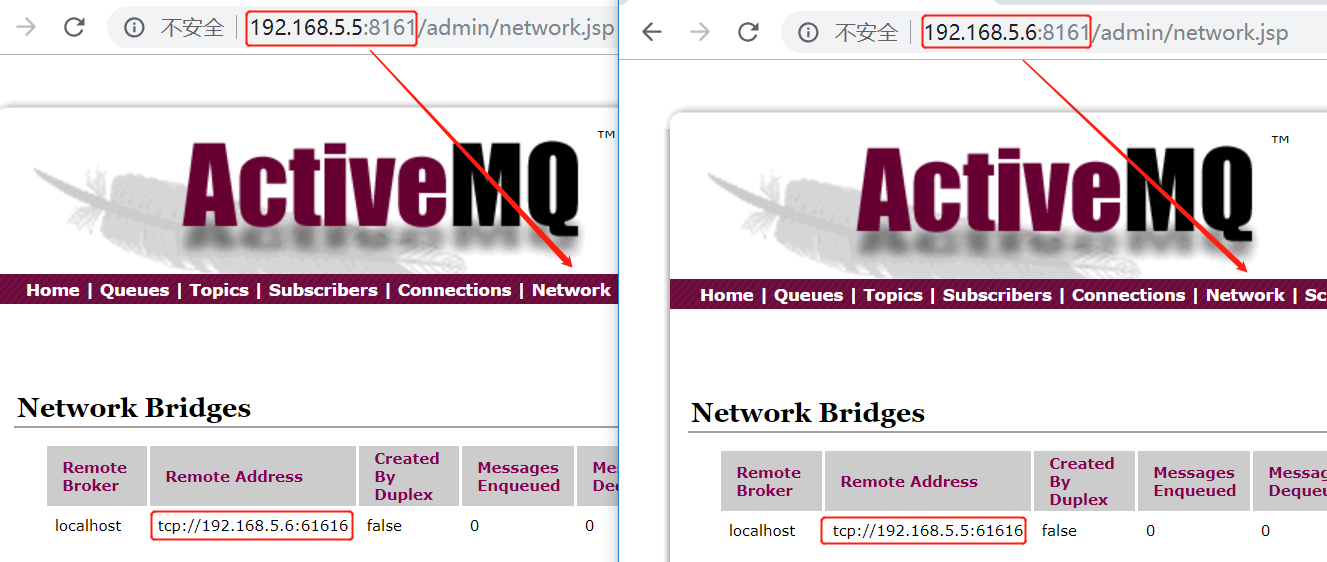
测试:
activemq热备与消息丢失的更多相关文章
- ActiveMQ消息丢失怎么解决?
在消息发送过程中消息丢失的话该怎么解决(包括网络原因): 解决思路: 可以把消息唯一ID,存到表里面,当消息接受端可以获取到这个ID,就给服务端一个回复IF,消息发送出去,没有回复,THEN一直循环发 ...
- windows下使用mysql双机热备功能
一. 准备工作 1. 准备两台服务器(电脑),接入局域网中,使互相ping得通对方 2. 两台服务器都安装mysql-server-5.1,必须保证mysql的版本一致 3. 假设,服务器A:192. ...
- Nginx+keepalived双机热备(主从模式)
负载均衡技术对于一个网站尤其是大型网站的web服务器集群来说是至关重要的!做好负载均衡架构,可以实现故障转移和高可用环境,避免单点故障,保证网站健康持续运行.关于负载均衡介绍,可以参考:linux负载 ...
- ActiveMQ的几种消息持久化机制
为了避免意外宕机以后丢失信息,需要做到重启后可以恢复消息队列,消息系统一般都会采用持久化机制. ActiveMQ的消息持久化机制有JDBC,AMQ,KahaDB和LevelDB,无论使用哪种持久化方式 ...
- RAID与双机热备简单介绍与区别
一. RAID技术详解 RAID是英文Redundant Array of Independent Disks的缩写,翻译成中文意思是“独立磁盘冗余阵列”,有时也简称磁盘阵列(Disk Arra ...
- HA(High available)--Heartbeat高可用性集群(双机热备)菜鸟入门级
HA(High available)--Heartbeat高可用性集群(双机热备) 1.理解:两台服务器A和B ,当A提供服务,B闲置待命,当A服务宕机,会自动切换至B机器继续提供服务.当主机恢复 ...
- activemq安装与简单消息发送接收实例
安装环境:Activemq5.11.1, jdk1.7(activemq5.11.1版本需要jdk升级到1.7),虚拟机: 192.168.147.131 [root@localhost softwa ...
- nginx + keepalived 双机热备
序 双机热备是指两台机器都在运行,但并非两台机器同时在提供服务. 当提供服务的一台出现故障的时候,另外一台会马上自动接管并且提供服务,且切换的时间非常短. keepalived的工作原理是VRRP—— ...
- Redis - Keepalived + redis 主备热备切换
1. 热备方案 硬件:server两台,分别用于master-redis及slave-redis 软件:redis.keepalived 实现目标: 由keepalived对外提供虚拟IP(VIP)进 ...
随机推荐
- ArrayList的contains()和HashSet的contains()效率比较
ArrayList的contains(Object o)方法内部只有一行代码:判断indexOf(0)是否大于等于0.而indexOf(o)内部会从头遍历数组,直到某位置的元素等于o,极端情况下,要把 ...
- Codeforces 950C Zebras ( 贪心 && 模拟 )
题意 : 给出一个 01 串,要求你将其分隔出若干个子序列 ( 每个数字只能属于某一个子序列 ) ,子序列必须满足由 0 开头和结尾,且中间需 01 交替构成.若无法做到,则输出 -1. 分析 : ...
- memset设置最大值
初始化为最大值 memset(mp,0x7f,sizeof(mp));
- 【canvas学习笔记七】混合和裁剪
globalCompositeOperation 如果我们先画了一个图形,然后要在这个图形上面再画一个图形,那么这个图形会怎么样呢?是覆盖在原来的图形上面吗?这时候,就要用到globalComposi ...
- python中加入中文注释报错处理
python中加入中文注释,运行报错如下 解决方法: 在py文件的第一行加入 #coding:utf-8 即可
- 一、Spring MVC起步——IntelliJ IDEA 搭建Spring MVC环境(手把手搭建)
本机环境: JDK 1.7 IntelliJ IDEA 2017.2 1.新建项目 Create New Project 选择Spring MVC 填写项目名和项目存放位置 然后点击Fin ...
- git创建公钥匙
目的: 使用SSH公钥可以让你在你的电脑和码云通讯的时候使用安全连接(git的remote要使用SSH地址) 1.打开终端进入.ssh目录输入当下命令 cd ~/.ssh 如果.ssh文件夹不存在,执 ...
- PTA编程总结二
7-1 币值转换 (20 分) 输入一个整数(位数不超过9位)代表一个人民币值(单位为元),请转换成财务要求的大写中文格式.如23108元,转换后变成“贰万叁仟壹百零捌”元.为了简化输出,用小写英文字 ...
- HyperV - glossary
Root Partition - sometimes called partition. Manages machine-level functions such as device drivers, ...
- c++11多线程---线程入口函数
1.普通函数(线程入口) #include <thread> #include <iostream> void hello(const char *name) { std::c ...