
Android 开发笔记___FrameLayout
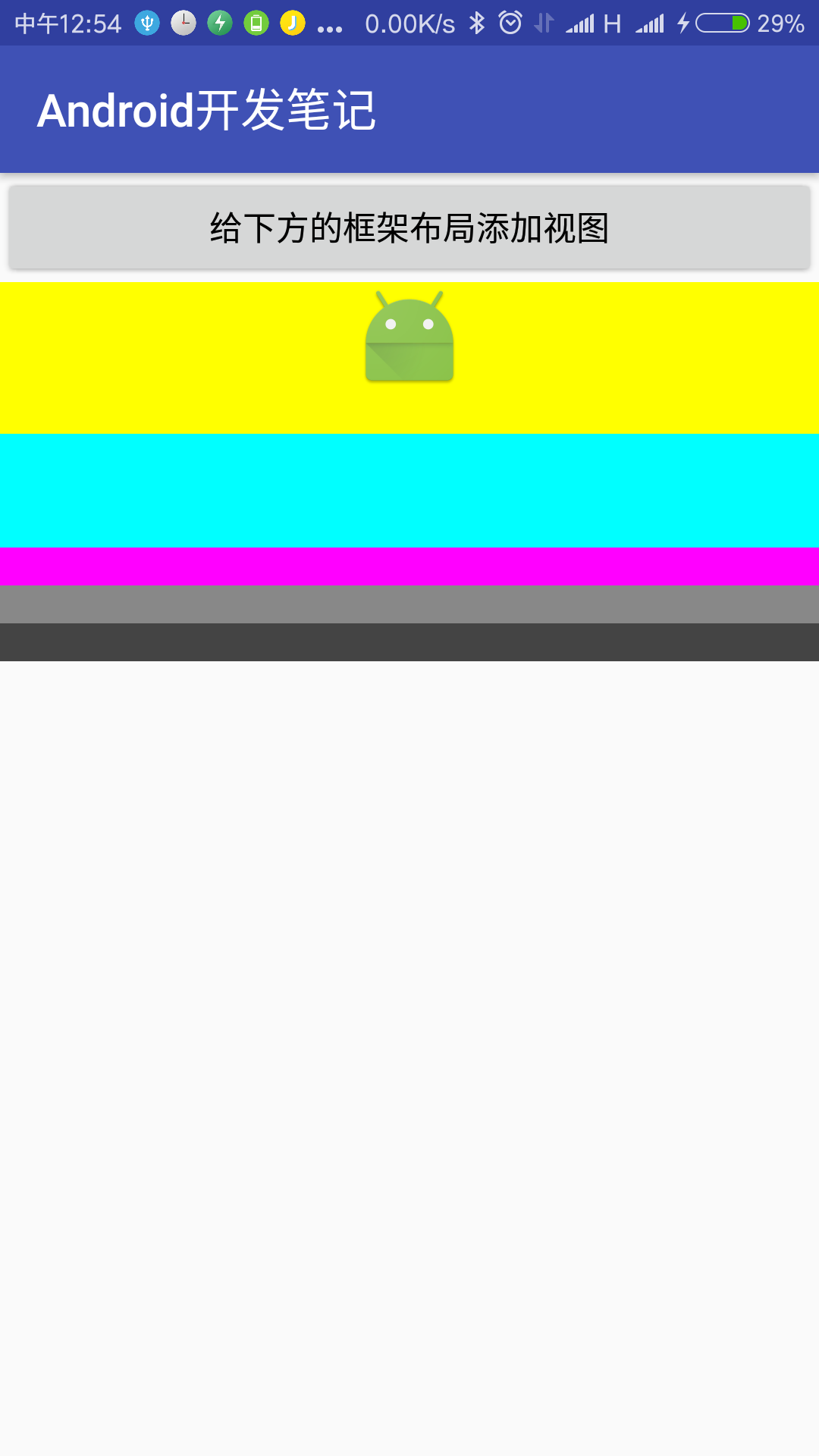
xml
 <LinearLayout xmlns:android="http://schemas.android.com/apk/res/android"

     android:layout_width="match_parent"

     android:layout_height="match_parent"

     android:orientation="vertical" >

     <Button

         android:id="@+id/btn_add_frame"

         android:layout_width="match_parent"

         android:layout_height="wrap_content"

         android:gravity="center"

         android:text="给下方的框架布局添加视图"

         android:textColor="#000000"

         android:textSize="17sp" />

     <FrameLayout

         android:id="@+id/fl_content"

         android:layout_width="match_parent"

         android:layout_height="0dp"

         android:layout_weight="1"

         android:foreground="@mipmap/ic_launcher"

         android:foregroundGravity="top|center_horizontal" >

     </FrameLayout>

 </LinearLayout>
java
 package com.example.alimjan.hello_world;

 import android.content.Context;

 import android.content.Intent;

 import android.graphics.Color;

 import android.os.Bundle;

 import android.support.v7.app.ActionBar;

 import android.support.v7.app.AppCompatActivity;

 import android.view.View;

 import android.widget.FrameLayout;

 import android.widget.LinearLayout;

 /**

  * Created by alimjan on 7/2/2017.

  */

 public class class_3_1_2 extends AppCompatActivity implements View.OnClickListener {

     private FrameLayout fl_content;

     private int[] mColorArray = {

             Color.BLACK, Color.WHITE, Color.RED, Color.YELLOW, Color.GREEN,

             Color.BLUE, Color.CYAN, Color.MAGENTA, Color.GRAY, Color.DKGRAY

     };

     @Override

     protected void onCreate(Bundle savedInstanceState) {

         super.onCreate(savedInstanceState);

         setContentView(R.layout.code_3_1_2);

         fl_content = (FrameLayout) findViewById(R.id.fl_content);

         findViewById(R.id.btn_add_frame).setOnClickListener(this);

     }

     @Override

     public void onClick(View v) {

         if (v.getId() == R.id.btn_add_frame) {

             int random = (int) (Math.random()*10 % 10);

             View vv = new View(this);

             vv.setBackgroundColor(mColorArray[random]);

             LinearLayout.LayoutParams ll_params = new LinearLayout.LayoutParams(

                     ActionBar.LayoutParams.MATCH_PARENT, (random+1)*50);

             vv.setLayoutParams(ll_params);

             vv.setOnLongClickListener(new View.OnLongClickListener() {

                 @Override

                 public boolean onLongClick(View vvv) {

                     fl_content.removeView(vvv);

                     return true;

                 }

             });

             fl_content.addView(vv);

         }

     }

     public static void startHome(Context mContext) {

         Intent intent = new Intent(mContext, class_3_1_2.class);

         mContext.startActivity(intent);

     }

 }
Android 开发笔记___FrameLayout的更多相关文章
- Android开发笔记:打包数据库
对于数据比较多的控制一般会加入SQLite数据库进行数据存储,在打包时这些数据库是不自动打包到apk中的,如何创建数据库呢 方法1:将创建数据库的sql语句在SQLiteHelper继承类中实现,在第 ...
- Android开发笔记--hello world 和目录结构
原文:Android开发笔记--hello world 和目录结构 每接触一个新东西 都有一个hello world的例子. 1.新建项目 2.配置AVD AVD 没有要新建个,如果不能创建 运行SD ...
- 【转】Android开发笔记(序)写在前面的目录
原文:http://blog.csdn.net/aqi00/article/details/50012511 知识点分类 一方面写写自己走过的弯路掉进去的坑,避免以后再犯:另一方面希望通过分享自己的经 ...
- [APP] Android 开发笔记 003-使用Ant Release 打包与keystore加密说明
接上节 [APP] Android 开发笔记 002 5. 使用ant release 打包 1)制作 密钥文件 release.keystore (*.keystore) keytool -genk ...
- [APP] Android 开发笔记 002-命令行创建默认项目结构说明
接上节:[APP] Android 开发笔记 001 4. 默认项目结构说明: 这里我使用Sublime Text 进行加载.
- Android开发笔记——以Volley图片加载、缓存、请求及展示为例理解Volley架构设计
Volley是由Google开源的.用于Android平台上的网络通信库.Volley通过优化Android的网络请求流程,形成了以Request-RequestQueue-Response为主线的网 ...
- Android开发笔记(一百三十四)协调布局CoordinatorLayout
协调布局CoordinatorLayout Android自5.0之后对UI做了较大的提升.一个重大的改进是推出了MaterialDesign库,而该库的基础即为协调布局CoordinatorLayo ...
- 【转】Android开发笔记——圆角和边框们
原文地址:http://blog.xianqu.org/2012/04/android-borders-and-radius-corners/ Android开发笔记——圆角和边框们 在做Androi ...
- 《ArcGIS Runtime SDK for Android开发笔记》
开发笔记之基础教程 ArcGIS Runtime SDK for Android 各版本下载地址 <ArcGIS Runtime SDK for Android开发笔记>——(1).And ...
随机推荐
- 关于C++中char 型变量的地址输出
在刚开始学习C/C++过程中,我们希望输出各个变量的地址来窥探一些我们"百思不得其解"的现象,例如搞清函数堆栈相关的程序内部秘密. 先看下面示例: #include<stdi ...
- NET应用——使用RSA构建相对安全的数据交互
最近又被[现场破解共享单车系统]刷了一脸,不得不开始后怕:如何防止类似的情况发生? 想来想去,始终觉得将程序加密是最简单的做法.但是摩拜.ofo也有加密,为什么仍然被破解?那是因为请求在传输过程中被篡 ...
- 基于C#的BarCode 39实现
一.39条码简介 39码是1974年发展出来的条码系统,是一种可供使用者双向扫瞄的分散式条码,也就是说相临两资料码之间,必须包含一个不具任何意义的空白(或细白,其逻辑值为0),且其具有支援文字的能力, ...
- hdu3729二分匹配
I'm Telling the Truth Time Limit: 2000/1000 MS (Java/Others) Memory Limit: 32768/32768 K (Java/Ot ...
- Jquery跨域读取城市天气预报信息
最新项目中遇到一个问题,页面需要显示一些天气信息,但是部署网站的服务器没连接外网,只有客户端的电脑能连外网,于是想用js去实现这个功能. 刚开始找了一些方法,单独在浏览器中可以使用,但是在项目中运行的 ...
- DataGrid 得到DataGridRow 和DataGridColumn
/* ---------------------------------------------------------- 文件名称:DataGridPlus.cs 作者:秦建辉 MSN:splash ...
- scala中的Type使用
trait Base { val name: String } case class S( name: String, age: Int ) extends Base case class F( na ...
- python模拟登陆 pixiv
##---author:wuhao##在QQ群看到有群友在模拟登陆 pivix.cn 这个网站,闲来无事,我也写了一个测试一下,起初我把它想的复杂了,认为我需要获取服务器返回过来的Set-Cookie ...
- Android的快速开发框架 afinal
afinal 框架学习: http://www.oschina.net/p/afinal
- Java集合源码分析(二)Linkedlist
前言 前面一篇我们分析了ArrayList的源码,这一篇分享的是LinkedList.我们都知道它的底层是由链表实现的,所以我们要明白什么是链表? 一.LinkedList简介 1.1.LinkedL ...