
C# Socket编程笔记(自己看,转载)
看到这个题目,是不是很眼熟?在博客园里搜下,保证会发现关于这个东东的文章实在是太多了~~~真得是没有写得必要,而且我也有点懒得去琢磨字句。(看到这,肯定得来个转折的了,不然就看不到下文了,不是吗)但是,为了自己下一篇要写的文章做参考,还是有必要先补充一下socket基础知识。
注意:如果你已经接触过socket,那就没什么必要耽误时间看下去了。另外,如果发现其中任何错误,欢迎直接指出。
1.按惯例先来介绍下socket
Windows中的很多东西都是从Unix领域借鉴过来的,Socket也是一样。在Unix中,socket代表了一种文件描述符(在Unix中一切都是以文件为单位),而这里这个描述符则是用于描述网络访问的。什么意思呢?就是程序员可以通过socket来发送和接收网络上的数据。你也可以理解成是一个API。有了它,你就不用直接去操作网卡了,而是通过这个接口,这样就省了很多复杂的操作。
在C#中,MS为我们提供了 System.Net.Sockets 命名空间,里面包含了Socket类。
2.有了socket,那就可以用它来访问网络了
不过你不要高兴得太早,要想访问网络,还得有些基本的条件(和编程无关的我就不提了):a. 要确定本机的IP和端口,socket只有与某一IP和端口绑定,才能发挥强大的威力。b. 得有协议吧(否则谁认得你这发送到网络的是什么呀)。想要复杂的,我们可以自己来定协议。但是这个就不在这篇里提了,我这里介绍两种大家最熟悉不过的协议:TCP & UDP。(别说你不知道,不然...不然...我不告诉你)
如果具备了基本的条件,就可以开始用它们访问网络了。来看看步骤吧:
a. 建立一个套接字
b. 绑定本机的IP和端口
c. 如果是TCP,因为是面向连接的,所以要利用ListenO()方法来监听网络上是否有人给自己发东西;如果是UDP,因为是无连接的,所以来者不拒。
d. TCP情况下,如果监听到一个连接,就可以使用accept来接收这个连接,然后就可以利用Send/Receive来执行操作了。而UDP,则不需要accept, 直接使用SendTo/ReceiveFrom来执行操作。(看清楚哦,和TCP的执行方法有区别,因为UDP不需要建立连接,所以在发送前并不知道对方的IP和端口,因此需要指定一个发送的节点才能进行正常的发送和接收)
e. 如果你不想继续发送和接收了,就不要浪费资源了。能close的就close吧。
如果看了上面文字,你还不清楚的话,就来看看图好了:
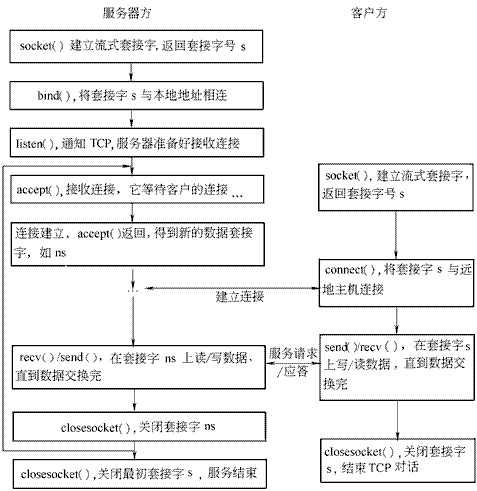
面向连接的套接字系统调用时序
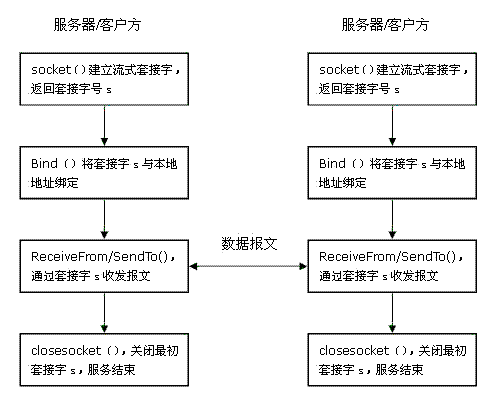
无连接的套接字系统调用时序
3.开始动手敲~~代码(简单的代码)
首先我们来写个面向连接的
TCPServer

 using System;
using System.Net;
using System.Net.Sockets;
using System.Text;
namespace tcpserver
{
/// <summary>
/// Class1 的摘要说明。
/// </summary>
class server
{
/// <summary>
/// 应用程序的主入口点。
/// </summary>
[STAThread]
static void Main(string[] args)
{
//
// TODO: 在此处添加代码以启动应用程序
//
int recv;//用于表示客户端发送的信息长度
byte[] data=new byte[1024];//用于缓存客户端所发送的信息,通过socket传递的信息必须为字节数组
IPEndPoint ipep=new IPEndPoint(IPAddress.Any,9050);//本机预使用的IP和端口
Socket newsock=new Socket(AddressFamily.InterNetwork,SocketType.Stream,ProtocolType.Tcp);
newsock.Bind(ipep);//绑定
newsock.Listen(10);//监听
Console.WriteLine("waiting for a client ");
");
Socket client=newsock.Accept();//当有可用的客户端连接尝试时执行,并返回一个新的socket,用于与客户端之间的通信
IPEndPoint clientip=(IPEndPoint)client.RemoteEndPoint;
Console.WriteLine("connect with client:"+clientip.Address+" at port:"+clientip.Port);
string welcome="welcome here!";
data=Encoding.ASCII.GetBytes(welcome);
client.Send(data,data.Length,SocketFlags.None);//发送信息
while(true)
{//用死循环来不断的从客户端获取信息
data=new byte[1024];
recv=client.Receive(data);
Console.WriteLine("recv="+recv);
if (recv==0)//当信息长度为0,说明客户端连接断开
break;
Console.WriteLine(Encoding.ASCII.GetString(data,0,recv));
client.Send(data,recv,SocketFlags.None);
}
Console.WriteLine("Disconnected from"+clientip.Address);
client.Close();
newsock.Close();
}
}
}TCPServer
using System;
using System.Net;
using System.Net.Sockets;
using System.Text;
namespace tcpserver
{
/// <summary>
/// Class1 的摘要说明。
/// </summary>
class server
{
/// <summary>
/// 应用程序的主入口点。
/// </summary>
[STAThread]
static void Main(string[] args)
{
//
// TODO: 在此处添加代码以启动应用程序
//
int recv;//用于表示客户端发送的信息长度
byte[] data=new byte[1024];//用于缓存客户端所发送的信息,通过socket传递的信息必须为字节数组
IPEndPoint ipep=new IPEndPoint(IPAddress.Any,9050);//本机预使用的IP和端口
Socket newsock=new Socket(AddressFamily.InterNetwork,SocketType.Stream,ProtocolType.Tcp);
newsock.Bind(ipep);//绑定
newsock.Listen(10);//监听
Console.WriteLine("waiting for a client");
Socket client=newsock.Accept();//当有可用的客户端连接尝试时执行,并返回一个新的socket,用于与客户端之间的通信
IPEndPoint clientip=(IPEndPoint)client.RemoteEndPoint;
Console.WriteLine("connect with client:"+clientip.Address+" at port:"+clientip.Port);
string welcome="welcome here!";
data=Encoding.ASCII.GetBytes(welcome);
client.Send(data,data.Length,SocketFlags.None);//发送信息
while(true)
{//用死循环来不断的从客户端获取信息
data=new byte[1024];
recv=client.Receive(data);
Console.WriteLine("recv="+recv);
if (recv==0)//当信息长度为0,说明客户端连接断开
break;
Console.WriteLine(Encoding.ASCII.GetString(data,0,recv));
client.Send(data,recv,SocketFlags.None);
}
Console.WriteLine("Disconnected from"+clientip.Address);
client.Close();
newsock.Close();
}
}
}
TCPClient
using System;using System.Net;
using System.Net.Sockets;
using System.Text;
namespace tcpclient
{
/// <summary>
/// Class1 的摘要说明。
/// </summary>
class client
{
/// <summary>
/// 应用程序的主入口点。
/// </summary>
[STAThread]
static void Main(string[] args)
{
//
// TODO: 在此处添加代码以启动应用程序
//
byte[] data=new byte[1024];
Socket newclient=new Socket(AddressFamily.InterNetwork,SocketType.Stream,ProtocolType.Tcp);
Console.Write("please input the server ip:");
string ipadd=Console.ReadLine();
Console.WriteLine();
Console.Write("please input the server port:");
int port=Convert.ToInt32(Console.ReadLine());
IPEndPoint ie=new IPEndPoint(IPAddress.Parse(ipadd),port);//服务器的IP和端口
try
{
//因为客户端只是用来向特定的服务器发送信息,所以不需要绑定本机的IP和端口。不需要监听。
newclient.Connect(ie);
}
catch(SocketException e)
{
Console.WriteLine("unable to connect to server");
Console.WriteLine(e.ToString());
return;
}
int recv = newclient.Receive(data);
string stringdata=Encoding.ASCII.GetString(data,0,recv);
Console.WriteLine(stringdata);
while(true)
{
string input=Console.ReadLine();
if(input=="exit")
break;
newclient.Send(Encoding.ASCII.GetBytes(input));
data=new byte[1024];
recv=newclient.Receive(data);
stringdata=Encoding.ASCII.GetString(data,0,recv);
Console.WriteLine(stringdata);
}
Console.WriteLine("disconnect from sercer");
newclient.Shutdown(SocketShutdown.Both);
newclient.Close();
}
}
}TCPClient
using System;
using System.Net;
using System.Net.Sockets;
using System.Text;
namespace tcpclient
{
/// <summary>
/// Class1 的摘要说明。
/// </summary>
class client
{
/// <summary>
/// 应用程序的主入口点。
/// </summary>
[STAThread]
static void Main(string[] args)
{
//
// TODO: 在此处添加代码以启动应用程序
//
byte[] data=new byte[1024];
Socket newclient=new Socket(AddressFamily.InterNetwork,SocketType.Stream,ProtocolType.Tcp);
Console.Write("please input the server ip:");
string ipadd=Console.ReadLine();
Console.WriteLine();
Console.Write("please input the server port:");
int port=Convert.ToInt32(Console.ReadLine());
IPEndPoint ie=new IPEndPoint(IPAddress.Parse(ipadd),port);//服务器的IP和端口
try
{
//因为客户端只是用来向特定的服务器发送信息,所以不需要绑定本机的IP和端口。不需要监听。
newclient.Connect(ie);
}
catch(SocketException e)
{
Console.WriteLine("unable to connect to server");
Console.WriteLine(e.ToString());
return;
}
int recv = newclient.Receive(data);
string stringdata=Encoding.ASCII.GetString(data,0,recv);
Console.WriteLine(stringdata);
while(true)
{
string input=Console.ReadLine();
if(input=="exit")
break;
newclient.Send(Encoding.ASCII.GetBytes(input));
data=new byte[1024];
recv=newclient.Receive(data);
stringdata=Encoding.ASCII.GetString(data,0,recv);
Console.WriteLine(stringdata);
}
Console.WriteLine("disconnect from sercer");
newclient.Shutdown(SocketShutdown.Both);
newclient.Close();
}
}
}
下面在给出无连接的(实在是太懒了,下面这个是直接复制别人的)
UDPServer
using System;using System.Collections.Generic;
using System.Text;
using System.Net;
using System.Net.Sockets;
namespace SimpleUdpSrvr
{
class Program
{
static void Main(string[] args)
{
int recv;
byte[] data = new byte[1024];
IPEndPoint ipep = new IPEndPoint(IPAddress.Any, 9050);//定义一网络端点
Socket newsock = new Socket(AddressFamily.InterNetwork, SocketType.Dgram, ProtocolType.Udp);//定义一个Socket
newsock.Bind(ipep);//Socket与本地的一个终结点相关联
Console.WriteLine("Waiting for a client
..");
IPEndPoint sender = new IPEndPoint(IPAddress.Any, 0);//定义要发送的计算机的地址
EndPoint Remote = (EndPoint)(sender);//
recv = newsock.ReceiveFrom(data, ref Remote);//接受数据
Console.WriteLine("Message received from{0}:", Remote.ToString());
Console.WriteLine(Encoding.ASCII.GetBytes(data,0,recv));
string welcome = "Welcome to my test server!";
data = Encoding.ASCII.GetBytes(welcome);
newsock.SendTo(data, data.Length, SocketFlags.None, Remote);
while (true)
{
data = new byte[1024];
recv = newsock.ReceiveFrom(data, ref Remote);
Console.WriteLine(Encoding.ASCII.GetString(data, 0, recv));
newsock.SendTo(data, recv, SocketFlags.None, Remote);
}
}
}
}UDPServer
using System;
using System.Collections.Generic;
using System.Text;
using System.Net;
using System.Net.Sockets;
namespace SimpleUdpSrvr
{
class Program
{
static void Main(string[] args)
{
int recv;
byte[] data = new byte[1024];
IPEndPoint ipep = new IPEndPoint(IPAddress.Any, 9050);//定义一网络端点
Socket newsock = new Socket(AddressFamily.InterNetwork, SocketType.Dgram, ProtocolType.Udp);//定义一个Socket
newsock.Bind(ipep);//Socket与本地的一个终结点相关联
Console.WriteLine("Waiting for a client..");
IPEndPoint sender = new IPEndPoint(IPAddress.Any, 0);//定义要发送的计算机的地址
EndPoint Remote = (EndPoint)(sender);//
recv = newsock.ReceiveFrom(data, ref Remote);//接受数据
Console.WriteLine("Message received from{0}:", Remote.ToString());
Console.WriteLine(Encoding.ASCII.GetBytes(data,0,recv));
string welcome = "Welcome to my test server!";
data = Encoding.ASCII.GetBytes(welcome);
newsock.SendTo(data, data.Length, SocketFlags.None, Remote);
while (true)
{
data = new byte[1024];
recv = newsock.ReceiveFrom(data, ref Remote);
Console.WriteLine(Encoding.ASCII.GetString(data, 0, recv));
newsock.SendTo(data, recv, SocketFlags.None, Remote);
}
}
}
}
UDPClient
using System;using System.Collections.Generic;
using System.Text;
using System.Net;
using System.Net.Sockets;
namespace SimpleUdpClient
{
class Program
{
static void Main(string[] args)
{
byte[] data = new byte[1024];//定义一个数组用来做数据的缓冲区
string input, stringData;
IPEndPoint ipep = new IPEndPoint(IPAddress.Parse("127.0.0.1"), 9050);
Socket server = new Socket(AddressFamily.InterNetwork, SocketType.Dgram, ProtocolType.Udp);
string welcome = "Hello,are you there?";
data = Encoding.ASCII.GetBytes(welcome);
server.SendTo(data, data.Length, SocketFlags.None, ipep);//将数据发送到指定的终结点
IPEndPoint sender = new IPEndPoint(IPAddress.Any, 0);
EndPoint Remote = (EndPoint)sender;
data = new byte[1024];
int recv = server.ReceiveFrom(data, ref Remote);//接受来自服务器的数据
Console.WriteLine("Message received from{0}:", Remote.ToString());
Console.WriteLine(Encoding.ASCII.GetString(data, 0, recv));
while (true)//读取数据
{
input = Console.ReadLine();//从键盘读取数据
if (input == "text")//结束标记
{
break;
}
server.SendTo(Encoding.ASCII.GetBytes(input), Remote);//将数据发送到指定的终结点Remote
data = new byte[1024];
recv = server.ReceiveFrom(data, ref Remote);//从Remote接受数据
stringData = Encoding.ASCII.GetString(data, 0, recv);
Console.WriteLine(stringData);
}
Console.WriteLine("Stopping client");
server.Close();
}
}
} UDPClient
using System;
using System.Collections.Generic;
using System.Text;
using System.Net;
using System.Net.Sockets;
namespace SimpleUdpClient
{
class Program
{
static void Main(string[] args)
{
byte[] data = new byte[1024];//定义一个数组用来做数据的缓冲区
string input, stringData;
IPEndPoint ipep = new IPEndPoint(IPAddress.Parse("127.0.0.1"), 9050);
Socket server = new Socket(AddressFamily.InterNetwork, SocketType.Dgram, ProtocolType.Udp);
string welcome = "Hello,are you there?";
data = Encoding.ASCII.GetBytes(welcome);
server.SendTo(data, data.Length, SocketFlags.None, ipep);//将数据发送到指定的终结点
IPEndPoint sender = new IPEndPoint(IPAddress.Any, 0);
EndPoint Remote = (EndPoint)sender;
data = new byte[1024];
int recv = server.ReceiveFrom(data, ref Remote);//接受来自服务器的数据
Console.WriteLine("Message received from{0}:", Remote.ToString());
Console.WriteLine(Encoding.ASCII.GetString(data, 0, recv));
while (true)//读取数据
{
input = Console.ReadLine();//从键盘读取数据
if (input == "text")//结束标记
{
break;
}
server.SendTo(Encoding.ASCII.GetBytes(input), Remote);//将数据发送到指定的终结点Remote
data = new byte[1024];
recv = server.ReceiveFrom(data, ref Remote);//从Remote接受数据
stringData = Encoding.ASCII.GetString(data, 0, recv);
Console.WriteLine(stringData);
}
Console.WriteLine("Stopping client");
server.Close();
}
}
}
上面的示例只是简单的应用了socket来实现通信,你也可以实现异步socket、IP组播 等等。
MS还为我们提供了几个助手类:TcpClient类、TcpListener类、UDPClient类。这几个类简化了一些操作,所以你也可以利用这几类来写上面的代码,但我个人还是比较习惯直接用socket来写。
既然快写完了,那我就再多啰嗦几句。在需要即时响应的软件中,我个人更倾向使用UDP来实现通信,因为相比TCP来说,UDP占用更少的资源,且响应速度快,延时低。至于UDP的可靠性,则可以通过在应用层加以控制来满足。当然如果可靠性要求高的环境下,还是建议使用TCP。
C# Socket编程笔记(自己看,转载)的更多相关文章
- C# Socket编程笔记(转)
C# Socket编程笔记 http://www.cnblogs.com/stg609/archive/2008/11/15/1333889.html TCP Socket:Server 端连接步骤: ...
- python socket编程笔记
用python实现一个简单的socket网络聊天通讯 (Linux --py2.7平台与windows--py3.6平台) 人生苦短之我用Python篇(socket编程) python之路 sock ...
- Java套接字socket编程笔记
相对于C和C++来说,Java中的socket编程是比较简单的,比较多的细节都已经被封装好了,每次创建socket连接只需要知道地址和端口即可. 在了解socket编程之前,我们先来了解一下读写数据的 ...
- Linux 应用开发----socket编程笔记
Linux socket编程 套接字定义描述 套接字的域 AF_INET ====>IPv4 AF_INET6 ====>IPv6 AF_UNIX ====>unix 域 AF_UP ...
- C# Socket编程笔记
1.按惯例先来介绍下socket Windows中的很多东西都是从Unix领域借鉴过来的,Socket也是一样.在Unix中,socket代表了一种文件描述符(在Unix中一切都是以文件为单 ...
- [转]C# Socket编程笔记
本文转自:http://www.cnblogs.com/stg609/archive/2008/11/15/1333889.html 原文如下: 看到这个题目,是不是很眼熟?在博客园里搜下,保证会发现 ...
- C# Socket编程 笔记,Socket 详解,入门简单
目录 一,网络基础 二,Socket 对象 三,Bind() 绑定与 Connect() 连接 四,Listen() 监听请求连接 和 Accept() 接收连接请求 五,Receive() 与 Se ...
- 转 网络编程学习笔记一:Socket编程
题外话 前几天和朋友聊天,朋友问我怎么最近不写博客了,一个是因为最近在忙着公司使用的一些控件的开发,浏览器兼容性搞死人:但主要是因为这段时间一直在看html5的东西,看到web socket时觉得很有 ...
- 网络编程学习笔记一:Socket编程
“一切皆Socket!” 话虽些许夸张,但是事实也是,现在的网络编程几乎都是用的socket. ——有感于实际编程和开源项目研究. 我们深谙信息交流的价值,那网络中进程之间如何通信,如我们每天打开浏览 ...
随机推荐
- aws上redhat安装redis服务记
1.准备 官网下载
- java 线程方法join的简单总结
虽然关于讨论线程join方法的博客已经很多了,不过个人感觉挺多都讨论得不够全面,所以我觉得有必要对其进行一个全面的总结. 一.作用 Thread类中的join方法的主要作用就是同步,它可以使得线程之间 ...
- python中的JSON(1)
很多程序都要求用户输入某种信息, 例如: 让用户存储游戏首选项或提供要可视化的数据,程序把用户的信息存储在列表和字典等数据结构中, 用户关闭程序时,我们几乎总要保存他们提供的信息: 如何保存-- ...
- linux 命令(alias , unalias , install ,ar , arch ,uname )
https://linux.die.net/man/ http://man.linuxde.net/ user commands 1.alias [ˈālēəs]:别名 alias --help al ...
- PF2.1版本总结,在设计过程中遇到的问题以及技术分享
在距离上一次的版本发布已经过去4个月的时间,因为个人的能力以及时间有限,所以这次的版本会推迟这么久.可是无论怎样,PF2.1带着自身的完善总算不负所望推出.在这次的版本调整中让我深有体会到了程序设计中 ...
- 打开Eclipse弹出“No java virtual machine was found..."的解决方法
今天准备用Eclipse抓取Android应用崩溃log,打开Eclipse时发现运行不了有以下弹框 A Java Runtime Environment(JRE) or Java Developme ...
- 同步中的四种锁synchronized、ReentrantLock、ReadWriteLock、StampedLock
目录 1.synchronized同步锁 2.ReentrantLock重入锁 3.ReadWriteLock读写锁 4.StampedLock戳锁(目前没找到合适的名字,先这么叫吧...) 5.总结 ...
- 一、Openstack_Ocata环境部署准备
OpenStack Ocata环境搭建准备 1.workstation下配置3个虚拟交换机 点击编辑-->虚拟网络编辑器 名称 IP地址 作用 VMnet1 10.1.1.0 Openstack ...
- Java IO流之缓冲流
一.缓冲流简介 二.BufferedInputStream 三.其他三种缓冲流
- javascript痛点之三闭包
先来看看第一节的例子 'use strict'; function num(){ //用var声明一个变量num1 var num1 = 15; } alert(num1);//num1 is not ...