
springboot整合mybatis使用阿里(阿里连接池)和xml方式
源码地址:https://github.com/wuhongpu/springboot-mybatis.git
1、在pom文件中引入相关依赖包
<?xml version="1.0"?>

<project xsi:schemaLocation="http://maven.apache.org/POM/4.0.0 http://maven.apache.org/xsd/maven-4.0.0.xsd" xmlns="http://maven.apache.org/POM/4.0.0"

         xmlns:xsi="http://www.w3.org/2001/XMLSchema-instance">

  <modelVersion>4.0.</modelVersion>

  <groupId>zytl.zytrade.cloud</groupId>

  <artifactId>zytrade-sevice-mobile</artifactId>

  <version>0.0.-SNAPSHOT</version>

  <name>zytrade-sevice-mobile</name>

  <url>http://maven.apache.org</url>
   <!--引入Springboot依赖包-->
 <parent>

        <groupId>org.springframework.boot</groupId>

        <artifactId>spring-boot-starter-parent</artifactId>

        <version>1.5.6.RELEASE</version>

        <relativePath/> <!-- lookup parent from repository -->

    </parent>
  <properties>

    <project.build.sourceEncoding>UTF-</project.build.sourceEncoding>

  </properties>

  <dependencies>

    <dependency>

      <groupId>junit</groupId>

      <artifactId>junit</artifactId>

      <version>3.8.</version>

      <scope>test</scope>

    </dependency>

    <!--eureka依赖-->

    <dependency>

      <groupId>org.springframework.cloud</groupId>

      <artifactId>spring-cloud-starter-eureka</artifactId>

    </dependency>

    <!-- 监控生产环境模块 -->

    <dependency>

      <groupId>org.springframework.boot</groupId>

      <artifactId>spring-boot-starter-actuator</artifactId>

    </dependency>

     <!--支持Spring依赖包-->

    <dependency>

      <groupId>org.springframework.boot</groupId>

      <artifactId>spring-boot-starter</artifactId>

    </dependency>

    <!--支持springmvc包-->

    <dependency>

      <groupId>org.springframework.boot</groupId>

      <artifactId>spring-boot-starter-web</artifactId>

    </dependency>

    <!--mybatis依赖包-->

    <dependency>

      <groupId>org.mybatis.spring.boot</groupId>

      <artifactId>mybatis-spring-boot-starter</artifactId>

      <version>1.3.</version>

    </dependency>

    <!-- oracle驱动 -->

    <dependency>

      <groupId>org.oracle</groupId>

      <artifactId>oracle</artifactId>

      <version>11.2</version>

    </dependency>

    <!-- 阿里连接池-->

    <dependency>

      <groupId>com.alibaba</groupId>

      <artifactId>druid</artifactId>

      <version>1.0.</version>

    </dependency>

    <!-- log4j2 riz日志包-->

     <dependency>

       <groupId>org.springframework.boot</groupId>

       <artifactId>spring-boot-starter-log4j2</artifactId>

     </dependency>

    <!-- gson驱动包-->

    <dependency>

      <groupId>com.alibaba</groupId>

      <artifactId>fastjson</artifactId>

      <version>1.2.</version>

    </dependency>

  </dependencies>

</project>
2、配置文件application.yml
mysql和阿里druid配置

spring:

  application:

    name: zytrade-sevice-mobile    #指定应用的名称建议使用小写

  datasource:

    type: com.alibaba.druid.pool.DruidDataSource

    url: jdbc:oracle:thin:@192.168.1.98::orcl

    #url: jdbc:mysql://localhost/test?useSSL=false&serverTimezone=UTC

    username: proOne

    password: proOne123

    #username: root

   #password:

    #driver-class-name: com.mysql.jdbc.Driver

    driver-class-name: oracle.jdbc.driver.OracleDriver

    # 下面为连接池的补充设置,应用到上面所有数据源中

    # 初始化大小,最小,最大

    initialSize:

    minIdle:

    maxActive:

    # 配置获取连接等待超时的时间

    maxWait:

    # 配置间隔多久才进行一次检测,检测需要关闭的空闲连接,单位是毫秒

    timeBetweenEvictionRunsMillis:

    # 配置一个连接在池中最小生存的时间,单位是毫秒

    minEvictableIdleTimeMillis:

    #validationQuery: select 'x'

    testWhileIdle: false

    testOnBorrow: false

    testOnReturn: false

    # 打开PSCache,并且指定每个连接上PSCache的大小

    poolPreparedStatements: true

    maxPoolPreparedStatementPerConnectionSize:

    # 配置监控统计拦截的filters,去掉后监控界面sql无法统计,'wall'用于防火墙

    filters: stat,wall,slf4j

    # 通过connectProperties属性来打开mergeSql功能;慢SQL记录

    connectionProperties: druid.stat.mergeSql=true;druid.stat.slowSqlMillis=

    # 合并多个DruidDataSource的监控数据

    useGlobalDataSourceStat: true

# mybatis配置

mybatis:

  mapper-locations: classpath*:/zytrade.service.mobile/*.xml
3、启动类
/**

 * @Author: wu

 * @Description:

 * @Date: Create in 11:19 2017/11/8

 * @Modified By:

 */

@SpringBootApplication

@EnableAutoConfiguration

//@EnableDiscoveryClient

@MapperScan("zytrade.service.mobile.dao")//接口扫描,如果此处不加@MapperScan注解必须在接口类上添加@Mapper注解表明这是一个接口扫描器
public class MposApplication { public static void main(String[] args) { SpringApplication.run(MposApplication.class, args); } }
4、阿里数据池配置类
package zytrade.service.mobile.config;
import com.alibaba.druid.pool.DruidDataSource;
import org.springframework.boot.context.properties.ConfigurationProperties;
import org.springframework.context.annotation.Bean;
import org.springframework.context.annotation.Configuration;

import javax.sql.DataSource;
@Configuration

public class DruidDataSourceConfiguration {

    @Bean

    @ConfigurationProperties(prefix = "spring.datasource")

    public DataSource druidDataSource() {

        DruidDataSource druidDataSource = new DruidDataSource();

        return druidDataSource;

    }

//    @Bean

//    public HttpMessageConverters fastJsonHttpMessageConverters(){

//        FastJsonHttpMessageConverter fastConverter=new FastJsonHttpMessageConverter();

//        FastJsonConfig fastJsonConfig=new FastJsonConfig();

//        fastJsonConfig.setSerializerFeatures(SerializerFeature.PrettyFormat);

//        fastConverter.setFastJsonConfig(fastJsonConfig);

//        HttpMessageConverter<?> converter = fastConverter;

//        return new HttpMessageConverters(converter);

//    }

}
2、
package zytrade.service.mobile.config;
import com.alibaba.druid.support.http.WebStatFilter;
import javax.servlet.annotation.WebFilter;
import javax.servlet.annotation.WebInitParam;
@WebFilter(filterName="druidWebStatFilter",urlPatterns="/*",

initParams={

         @WebInitParam(name="exclusions",value="*.js,*.gif,*.jpg,*.bmp,*.png,*.css,*.ico,/druid/*")// 忽略资源

 }

)

public class DruidStatFilter extends WebStatFilter {

}
3
package zytrade.service.mobile.config;

import com.alibaba.druid.support.http.StatViewServlet;

import javax.servlet.annotation.WebServlet;

import javax.servlet.annotation.WebInitParam;

@WebServlet(urlPatterns = "/druid/*",

    initParams={

            @WebInitParam(name="allow",value="192.168.16.110,127.0.0.1"),// IP白名单 (没有配置或者为空,则允许所有访问)

            @WebInitParam(name="deny",value="192.168.16.111"),// IP黑名单 (存在共同时,deny优先于allow)

            @WebInitParam(name="loginUsername",value="admin"),// 用户名

            @WebInitParam(name="loginPassword",value=""),// 密码

            @WebInitParam(name="resetEnable",value="false")// 禁用HTML页面上的“Reset All”功能

    })

public class DruidStatViewServlet extends StatViewServlet {

    private static final long serialVersionUID = 1L;

}
5、项目视图
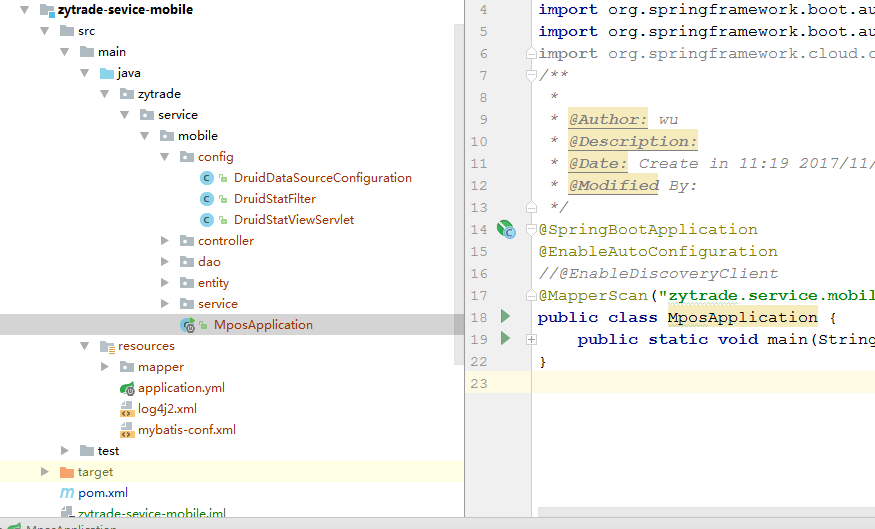
补充log4j2.xml与 mybatis-conf.xml(mybatis全局配置文件)
1、log4j2.xml
<?xml version="1.0" encoding="utf-8"?>

<configuration>

    <properties>

        <!-- 文件输出格式 -->

        <property name="PATTERN">%d{yyyy-MM-dd HH:mm:ss.SSS} |-%-5level [%thread] %c [%L] -| %msg%n</property>

    </properties>

    <appenders>

        <Console name="Console" target="system_out">

            <PatternLayout pattern="${PATTERN}" />

        </Console>

    </appenders>

    <!--配置mybatis日志 -->

    <loggers>

        <logger name="log4j.logger.org.mybatis" level="debug"

            additivity="false">

            <appender-ref ref="Console" />

        </logger>

        <logger name="log4j.logger.java.sql" level="debug" additivity="false">

            <appender-ref ref="Console" />

        </logger>

        <logger name="com.demo.mapper" level="debug" />

        <root level="info">

            <appenderref ref="Console" />

        </root>

    </loggers>

</configuration>
2、 mybatis-conf.xml
<?xml version="1.0" encoding="utf-8"?>

<!-- Copyright - the original author or authors. Licensed under the

    Apache License, Version 2.0 (the "License"); you may not use this file except

    in compliance with the License. You may obtain a copy of the License at http://www.apache.org/licenses/LICENSE-2.0

    Unless required by applicable law or agreed to in writing, software distributed

    under the License is distributed on an "AS IS" BASIS, WITHOUT WARRANTIES

    OR CONDITIONS OF ANY KIND, either express or implied. See the License for

    the specific language governing permissions and limitations under the License. -->

<!DOCTYPE configuration

        PUBLIC "-//mybatis.org//DTD Config 3.0//EN"

        "http://mybatis.org/dtd/mybatis-3-config.dtd">

<configuration>

    <!--设置mybatis日志类型 -->

    <settings>

        <setting name="logImpl" value="LOG4J2" />

        <!--配置的缓存的全局开关。 -->

        <setting name="cacheEnabled" value="true" />

        <!--延迟加载的全局开关。当开启时,所有关联对象都会延迟加载。 特定关联关系中可通过设置fetchType属性来覆盖该项的开关状态。 -->

        <setting name="lazyLoadingEnabled" value="true" />

        <!--当没有为参数提供特定的 JDBC 类型时,为空值指定 JDBC 类型。 某些驱动需要指定列的 JDBC 类型,多数情况直接用一般类型即可,比如

            NULL、VARCHAR 或 OTHER。 -->

        <setting name="jdbcTypeForNull" value="NULL" />

    </settings>

</configuration>
springboot整合mybatis使用阿里(阿里连接池)和xml方式的更多相关文章
- SpringBoot学习:整合MyBatis,使用Druid连接池
项目下载地址:http://download.csdn.NET/detail/aqsunkai/9805821 (一)添加pom依赖: <!-- https://mvnrepository.co ...
- SpringBoot整合MyBatis,HiKari、Druid连接池的使用
SpringBoot整合MyBatis 1.创建项目时勾选mybatis.数据库驱动. mysql驱动默认是8.x的版本,如果要使用5.x的版本,创建后到pom.xml中改. 也可以手动添加依赖 ...
- 阿里druid连接池
1.加入jar包, 下载地址:druid-1.1.0.zip 2.ApplicationContext.xml <!-- druid阿里云连接池 --> <bean name=&qu ...
- 注意:阿里Druid连接池监控的两个坑
阿里的Druid大家都知道是最好的连接池,其强大的监控功能是我们追求的重要特性.但在实际情况中也有不少坑,说下最近遇到的一个坑吧! 问题1:不断打印error级别的错误日志 session ip ch ...
- springboot整合mybatis连接mysql数据库出现SQLException异常
在springboot整合mybatis连接数据库的时候,项目中遇到一个SQLException,我检查了properties配置文件,看数据源有没有配错,检查有没有打错字,在数据库中把sql语句查询 ...
- SpringBoot整合Mybatis之项目结构、数据源
已经有好些日子没有总结了,不是变懒了,而是我一直在奋力学习springboot的路上,现在也算是完成了第一阶段的学习,今天给各位总结总结. 之前在网上找过不少关于springboot的教程,都是一些比 ...
- SpringBoot系列七:SpringBoot 整合 MyBatis(配置 druid 数据源、配置 MyBatis、事务控制、druid 监控)
1.概念:SpringBoot 整合 MyBatis 2.背景 SpringBoot 得到最终效果是一个简化到极致的 WEB 开发,但是只要牵扯到 WEB 开发,就绝对不可能缺少数据层操作,所有的开发 ...
- 【SpringBoot系列1】SpringBoot整合MyBatis
前言: 一直看网上说SpringBoot是解锁你的配置烦恼,一种超级快速开发的框架.一直挺想学的,正好最近也有时间,就学了下 这个是SpringBoot整合MyBatis的一个教程,用了阿里的drui ...
- SpringBoot整合Mybatis之进门篇
已经有好些日子没有总结了,不是变懒了,而是我一直在奋力学习springboot的路上,现在也算是完成了第一阶段的学习,今天给各位总结总结. 之前在网上找过不少关于springboot的教程,都是一些比 ...
- springboot整合Mybatis(一)——入门
一.概述 1.先导 mybatis入门随笔:http://www.cnblogs.com/jiangbei/p/6884641.html 2.引入依赖 <dependency> <g ...
随机推荐
- 设计模式的征途—7.适配器(Adapter)模式
在现实生活中,我们的笔记本电脑的工作电压大多数都是20V,而我国的家庭用电是220V,如何让20V的笔记本电脑能够工作在220V的电压下工作?答案:引入一个电源适配器,俗称变压器,有了这个电源适配器, ...
- MySQL Flush Data
http://dimitrik.free.fr/db_STRESS_MySQL_540_Purge_Lag_and_Ahead_Flushing_Jun2009.html http://dimitri ...
- 转载:一位资深程序员大牛给予Java初学者的学习路线建议
一位资深程序员大牛给予Java初学者的学习路线建议 java学习这一部分其实也算是今天的重点,这一部分用来回答很多群里的朋友所问过的问题,那就是我你是如何学习Java的,能不能给点建议?今天我是打 ...
- 使用Javascript获取当前目录的绝对路径
转自http://heeroluo.net/Article/Detail/101 一谈到路径相关的问题,大家都会往window.location上想,确实这个对象提供了相当多的路径信息,其中常用的就包 ...
- [树莓派(raspberry pi)] 01、在linux环境下给树莓派安装系统及入门各种资料
1.预准备 进入帮助页面https://www.raspberrypi.org/help/,可以直接看到GET START WITH PASPBERRY PI,点击进入: 接下来会引导你检查配件是否齐 ...
- x86平台上的Windows页表映射机制
首先,在x86架构的处理器上,一个正常页面大小为4KB,非PAE模式下,CR3持有页目录页面的物理地址,PDE和PTE格式相同大小为4字节.此时每个页表页面包含1024个PTE,可以映射1024个页面 ...
- python/numpy/tensorflow中,对矩阵行列操作,下标是怎么回事儿?
Python中的list/tuple,numpy中的ndarrray与tensorflow中的tensor. 用python中list/tuple理解,仅仅是从内存角度理解一个序列数据,而非数学中标量 ...
- td-agent 收集日志到kafka的配置
<source> @type tail path /data1/td-agent/wechat-tag*.log tag wechat-tag read_from_head true fo ...
- GIT常用命令(图片版)
Git 是一个很强大的分布式版本控制系统.它不但适用于管理大型开源软件的源代码,管理私人的文档和源代码也有很多优势. 本来想着只把最有用.最常用的 Git 命令记下来,但是总觉得这个也挺有用.那个也用 ...
- 实践作业2:黑盒测试实践——小组任务分工 Day 1
今日教学实验任务分配后,课下小组例会完成任务分工,具体分工如下: (1)系统需求分析--刘思佳 (2)设计测试用例--王俊杰 (3)编写.运行测试脚本--郜昌磊 (4)记录测试过程--吴慧杰 (5)记 ...