
推荐一个比FiddlerCore好用的HTTP(S)代理服务器
为什么不用FiddlerCore?
说到FiddlerCore大家可能会比较陌生,那么它哥Fiddler就比较熟悉了;抓包、模拟低带宽、修改请求我平时比较常用。Fiddler的本质就是一个HTTP代理服务器。
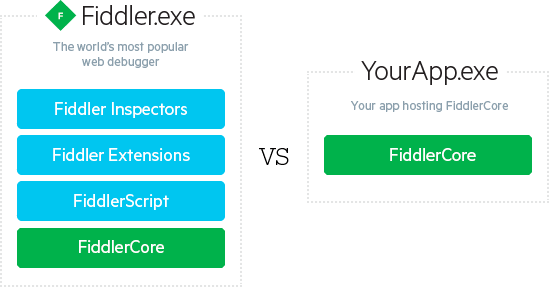
FiddlerCore是Fiddler去除了UI的核心组件,可以用于二次开发。如下图所示:
Fiddler主要有以下几点感觉很别扭:
- API命名不规范、属性/字段混用。
.NET中普遍采用Pascal命名规范,而Fiddler的命名就像个大杂烩。例如:public成员用字段,CONFIG类名,oSession参数名 - 不支持异步。所有的回调都是同步。
- 框架设计不合理,不支持多实例,大量使用了静态方法。所有方法都堆到了Session类中不易于扩展,起码Request/Response也得分开啊。
单就以上几点我感觉这框架完全没有设计可言,如果没有别的选择FiddlerCore我或许就将就用了,好在Github上已经有人先一步重新实现了FiddlerCore
Titanium-Web-Proxy介绍
一个跨平台、轻量级、低内存、高性能的HTTP(S)代理服务器,开发语言为C#
https://github.com/justcoding121/Titanium-Web-Proxy
功能特性
- 支持HTTP(S)与HTTP 1.1的大部分功能
- 支持redirect/block/update 请求
- 支持更新Response
- 支持HTTP承载的WebSocket
- Support mutual SSL authentication
- 完全异步的代理
- 支持代理授权与自动代理检测
- Kerberos/NTLM authentication over HTTP protocols for windows domain
使用
安装NuGet包
Install-Package Titanium.Web.Proxy
支持
- .Net Standard 1.6或更高
- .Net Framework 4.5或更高
设置HTTP代理
var proxyServer = new ProxyServer();

//locally trust root certificate used by this proxy

proxyServer.TrustRootCertificate = true;

//optionally set the Certificate Engine

//Under Mono only BouncyCastle will be supported

//proxyServer.CertificateEngine = Network.CertificateEngine.BouncyCastle;

proxyServer.BeforeRequest += OnRequest;

proxyServer.BeforeResponse += OnResponse;

proxyServer.ServerCertificateValidationCallback += OnCertificateValidation;

proxyServer.ClientCertificateSelectionCallback += OnCertificateSelection;

var explicitEndPoint = new ExplicitProxyEndPoint(IPAddress.Any, 8000, true)

{

//Exclude HTTPS addresses you don't want to proxy

//Useful for clients that use certificate pinning

//for example dropbox.com

// ExcludedHttpsHostNameRegex = new List<string>() { "google.com", "dropbox.com" }

//Use self-issued generic certificate on all HTTPS requests

//Optimizes performance by not creating a certificate for each HTTPS-enabled domain

//Useful when certificate trust is not required by proxy clients

// GenericCertificate = new X509Certificate2(Path.Combine(System.IO.Path.GetDirectoryName(System.Reflection.Assembly.GetExecutingAssembly().Location), "genericcert.pfx"), "password")

};

//An explicit endpoint is where the client knows about the existence of a proxy

//So client sends request in a proxy friendly manner

proxyServer.AddEndPoint(explicitEndPoint);

proxyServer.Start();

//Transparent endpoint is useful for reverse proxy (client is not aware of the existence of proxy)

//A transparent endpoint usually requires a network router port forwarding HTTP(S) packets or DNS

//to send data to this endPoint

var transparentEndPoint = new TransparentProxyEndPoint(IPAddress.Any, 8001, true)

{

	//Generic Certificate hostname to use

	//when SNI is disabled by client

	GenericCertificateName = "google.com"

};

proxyServer.AddEndPoint(transparentEndPoint);

//proxyServer.UpStreamHttpProxy = new ExternalProxy() { HostName = "localhost", Port = 8888 };

//proxyServer.UpStreamHttpsProxy = new ExternalProxy() { HostName = "localhost", Port = 8888 };

foreach (var endPoint in proxyServer.ProxyEndPoints)

Console.WriteLine("Listening on '{0}' endpoint at Ip {1} and port: {2} ",

    endPoint.GetType().Name, endPoint.IpAddress, endPoint.Port);

//Only explicit proxies can be set as system proxy!

proxyServer.SetAsSystemHttpProxy(explicitEndPoint);

proxyServer.SetAsSystemHttpsProxy(explicitEndPoint);

//wait here (You can use something else as a wait function, I am using this as a demo)

Console.Read();

//Unsubscribe & Quit

proxyServer.BeforeRequest -= OnRequest;

proxyServer.BeforeResponse -= OnResponse;

proxyServer.ServerCertificateValidationCallback -= OnCertificateValidation;

proxyServer.ClientCertificateSelectionCallback -= OnCertificateSelection;

proxyServer.Stop();
简单的请求与响应处理
//To access requestBody from OnResponse handler

private IDictionary<Guid, string> requestBodyHistory

        = new ConcurrentDictionary<Guid, string>();

public async Task OnRequest(object sender, SessionEventArgs e)

{

    Console.WriteLine(e.WebSession.Request.Url);

    ////read request headers

    var requestHeaders = e.WebSession.Request.RequestHeaders;

    var method = e.WebSession.Request.Method.ToUpper();

    if ((method == "POST" || method == "PUT" || method == "PATCH"))

    {

	//Get/Set request body bytes

	byte[] bodyBytes = await e.GetRequestBody();

	await e.SetRequestBody(bodyBytes);

	//Get/Set request body as string

	string bodyString = await e.GetRequestBodyAsString();

	await e.SetRequestBodyString(bodyString);

	//store request Body/request headers etc with request Id as key

	//so that you can find it from response handler using request Id

  	requestBodyHistory[e.Id] = bodyString;

    }

    //To cancel a request with a custom HTML content

    //Filter URL

    if (e.WebSession.Request.RequestUri.AbsoluteUri.Contains("google.com"))

    {

	await e.Ok("<!DOCTYPE html>" +

	      "<html><body><h1>" +

	      "Website Blocked" +

	      "</h1>" +

	      "<p>Blocked by titanium web proxy.</p>" +

	      "</body>" +

	      "</html>");

    }

    //Redirect example

    if (e.WebSession.Request.RequestUri.AbsoluteUri.Contains("wikipedia.org"))

    {

	await e.Redirect("https://www.paypal.com");

    }

}

//Modify response

public async Task OnResponse(object sender, SessionEventArgs e)

{

    //read response headers

    var responseHeaders = e.WebSession.Response.ResponseHeaders;

    //if (!e.ProxySession.Request.Host.Equals("medeczane.sgk.gov.tr")) return;

    if (e.WebSession.Request.Method == "GET" || e.WebSession.Request.Method == "POST")

    {

	if (e.WebSession.Response.ResponseStatusCode == "200")

	{

	    if (e.WebSession.Response.ContentType!=null && e.WebSession.Response.ContentType.Trim().ToLower().Contains("text/html"))

	    {

		byte[] bodyBytes = await e.GetResponseBody();

		await e.SetResponseBody(bodyBytes);

		string body = await e.GetResponseBodyAsString();

		await e.SetResponseBodyString(body);

	    }

	}

    }

    //access request body/request headers etc by looking up using requestId

    if(requestBodyHistory.ContainsKey(e.Id))

    {

	var requestBody = requestBodyHistory[e.Id];

    }

}

/// Allows overriding default certificate validation logic

public Task OnCertificateValidation(object sender, CertificateValidationEventArgs e)

{

    //set IsValid to true/false based on Certificate Errors

    if (e.SslPolicyErrors == System.Net.Security.SslPolicyErrors.None)

	e.IsValid = true;

    return Task.FromResult(0);

}

/// Allows overriding default client certificate selection logic during mutual authentication

public Task OnCertificateSelection(object sender, CertificateSelectionEventArgs e)

{

    //set e.clientCertificate to override

    return Task.FromResult(0);

}
未来路线图
- 支持HTTP 2.0
- 支持Socks协议
推荐一个比FiddlerCore好用的HTTP(S)代理服务器的更多相关文章
- 推荐一个简单、轻量、功能非常强大的C#/ASP.NET定时任务执行管理器组件–FluentScheduler定时器
在C#WINFORM或者是ASP.NET的WEB应用程序中,根据各种定时任务的需求,比如:每天的数据统计,每小时刷新系统缓存等等,这个时候我们得应用到定时器这个东东. .NET Framework有自 ...
- 推荐一个实用的css工具
后台程序员整天在和数据打交道,天天的活就是抱着mysql抠数据,如果让他去写网站的样式,就让人感觉力不从心,所以推荐一个twitter的团队开发的东西,几乎囊括了网站所需的样式,http://www. ...
- 前端设计师也有必要学习seo,推荐一个seo博客
做前端设计师有一段时间了,现在越来越觉得作为一个前端设计师,必须要懂一些seo的知识. 因为公司的seo们,总是在网站做好以后,提出各种各样的网站修改的需求. 如果前端设计师,能够了解一些基本的seo ...
- 。求推荐一个usb集线器的购买网址
笔记本蓝屏了,虽然后来让笔记本自己呆了好久,它冷静下来后我重新启动它,它又恢复了正常,但是我至今也没搞懂蓝屏的原因,深切地领悟到没文化不可怕,像我这样一知半解的最可怕... ------LYQ --- ...
- 推荐一个 angular 图像加载插件
推荐一个简单的 Angular 图片加载插件:vgSrc,插件根据图片资源的不同加载状态,显示不同图片,亲测兼容IE-8. 使用 推荐使用 bower 加载: bash bower install v ...
- 推荐一个linux下的web压力测试工具神器webbench
推荐一个linux下的web压力测试工具神器webbench2014-04-30 09:35:29 来源: 评论:0 点击:880 用多了apache的ab工具之后你就会发现ab存在很多问题, ...
- 推荐一个sqlce,sqllite等数据库管理工具
推荐一个sqlce,sqllite等数据库管理工具 下载地址: http://fishcodelib.com/files/DatabaseNet4.zip 支持sqlserver,sqlce, sql ...
- 推荐一个百度网盘搜索工具www.sososo.me
推荐一个百度网盘搜索工具 http://www.sososo.me
- 推荐一个可以直接在Visual Studio中看到complexity的插件CodeMaid
博客搬到了fresky.github.io - Dawei XU,请各位看官挪步.最新的一篇是:推荐一个可以直接在Visual Studio中看到complexity的插件CodeMaid.
随机推荐
- 【Centos7】hostnamectl 设置主机名
Centos7中提供了设置主机名的工具 hostnamectl hostname有三种状态 static(永久) transient(瞬态) pretty (灵活) 查看主机名状态 [oracle@h ...
- 50行Python代码构建小型区块链
本文介绍了如何使用python构建一个小型的区块链技术,使用Python2实现,代码不到50行. Although some think blockchain is a solution waitin ...
- “最美天气”版本II
抓取实时天气前需要首先获得所有地区的cityCode,因为在最后queryWeather的时候需要传递这个参数. 最美天气获取全部cityCode及cityName的方法: 1.获取34个省及直辖市的 ...
- jQuery表单事件
1.focus() 获得焦点,适用于所有元素2.blur() 失去焦点,适用于所有元素3.change() 当内容改变时触发 只适用于 input textarea select4.select() ...
- Struts2流程分析与工具配置
1. 运行流程 请求 -- StrutsPrepareAndExecuteFilter 核心控制器 -– Interceptors 拦截器(实现代码功能 ) -– Action 的execuute - ...
- redis 安装及启动关闭
1.redis下载 方式1:直接去官网下载 https://redis.io/download 方式2:通过命令下载 wget http://download.redis.io/releases/re ...
- 迈向angularjs2系列(7):表单
目录 一:校验表单的使用 1.搭建脚手架 2.校验表单的使用 3.select下拉列表的用法 一: 校验表单的使用 对于CRUD型的应用,表单是必备组件. 1.搭建脚手架 git clone http ...
- Java内存溢出分析方法(Eclipse Memory Analyzer 使用简单入门)
转载至:http://outofmemory.cn/java/jvm/OutOfMemoryError-analysis 工具 安装Memory Analyse Tools(MAT) 工具, 可以直接 ...
- NHibernate教程(14)--使用视图
本节内容 引入 1.持久化类 2.映射文件 3.测试 结语 引入 在数据库操作中,我们除了对表操作,还有视图.存储过程等操作,这一篇和下篇来学习这些内容.这篇我们来学习如何在NHibernate中使用 ...
- MySQL (三)-- 字段属性、索引、关系、范式、逆规范化
1 字段属性 主键.唯一键和自增长. 1.1 主键 主键:primary key,一张表中只能有一个字段可以使用对应的键,用来唯一的约束该字段里面的数据,不能重复. 一张表只能有最多一个主键. 1.1 ...