
spring boot:多个filter/多个interceptor/多个aop时设置调用的先后顺序(spring boot 2.3.1)
一,filter/interceptor/aop生效的先后顺序?
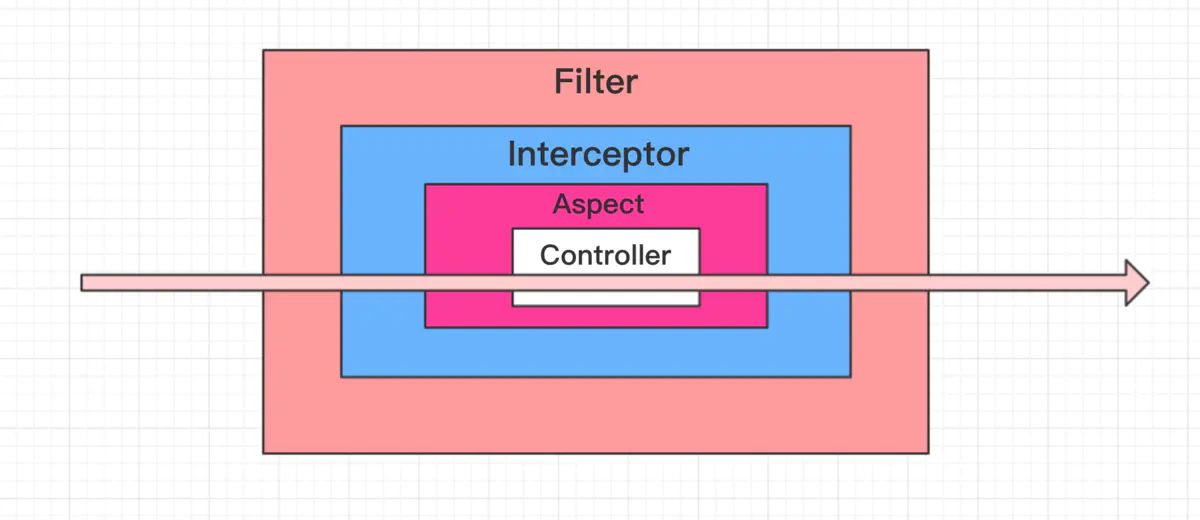
1,filter即过滤器,基于servlet容器,处于最外层,
所以它会最先起作用,最后才停止
说明:filter对所有访问到servlet容器的url都有效,包括静态资源
2,interceptor即拦截器,基于web框架,它会在filter之后起作用
说明:spring boot 1.x中,静态资源已被interceptor排除,
spring boot 2.x中,需要自己手动排除到静态资源的访问
filter和interceptor都是作用于请求
3,aop即切面,基于Spring的IOC容器,对spring管理的bean有效,
它会在interceptor之后才生效
aop可以作用于类和方法
如图:
说明:刘宏缔的架构森林是一个专注架构的博客,地址:https://www.cnblogs.com/architectforest
对应的源码可以访问这里获取: https://github.com/liuhongdi/
说明:作者:刘宏缔 邮箱: 371125307@qq.com
二,演示项目的相关信息
1,项目地址:
https://github.com/liuhongdi/costtime
2,项目的原理:
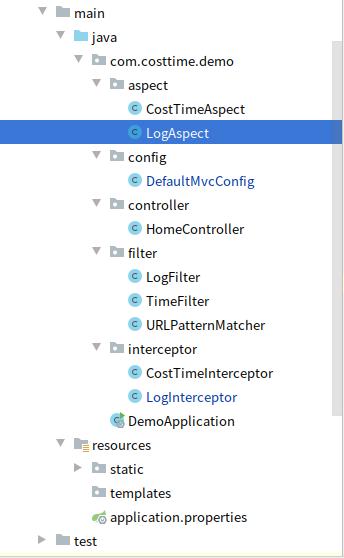
项目中使用了两个filter,两个interceptor,两个aspect,
功能分别都是:计算请求或方法执行的时间, 打印请求的参数
然后观察它们被执行到的顺序
3,项目结构:如图:
三,配置文件说明 :
pom.xml
        <!--aop begin-->

        <dependency>

            <groupId>org.springframework.boot</groupId>

            <artifactId>spring-boot-starter-aop</artifactId>

        </dependency>
用来引入aop
四,java代码说明
1,DefaultMvcConfig.java
@Configuration

@ConditionalOnWebApplication(type = ConditionalOnWebApplication.Type.SERVLET)

public class DefaultMvcConfig implements WebMvcConfigurer {

    @Resource

    private LogInterceptor logInterceptor;

    @Resource

    private CostTimeInterceptor costTimeInterceptor;

    @Override

    public void addViewControllers(ViewControllerRegistry registry) {

        registry.addViewController("/").setViewName("/home/home");

    }

    //添加Interceptor

    @Override

    public void addInterceptors(InterceptorRegistry registry) {

        //1.加入的顺序就是拦截器执行的顺序,

        //2.按顺序执行所有拦截器的preHandle

        //3.所有的preHandle 执行完再执行全部postHandle 最后是postHandle

        registry.addInterceptor(costTimeInterceptor)

                .addPathPatterns("/home/home**")

                .excludePathPatterns("/html/*","/js/*");

        registry.addInterceptor(logInterceptor)

                .addPathPatterns("/**")

.excludePathPatterns("/html/*","/static/**","/images/**");

    }

    //add filter

    @Bean

    public FilterRegistrationBean addTimeFilterBean() {

        FilterRegistrationBean registration = new FilterRegistrationBean();

        registration.setFilter(new TimeFilter());

        registration.setName("timeFilter");

        registration.setOrder(2);  //请求中过滤器执行的先后顺序,值越小越先执行

        registration.addUrlPatterns("/home/*","/abc/*");

        return registration;

    }

    @Bean

    public FilterRegistrationBean addLogFilterBean() {

        FilterRegistrationBean registration = new FilterRegistrationBean();

        registration.setFilter(new LogFilter());

        registration.setName("logFilter");

        registration.setOrder(1);  //请求中过滤器执行的先后顺序,值越小越先执行

        registration.addUrlPatterns("/*");

        registration.addInitParameter("exclusions","/js/*,/images/*,*.js,*.gif,*.jpg,*.png,*.css,*.ico,/druid2/*");

        return registration;

    }

}
说明:拦截器是按加入到registry的顺序执行
filter是按setOrder中指定的顺序执行
另外:filter也可以用Order注解来指定顺序
2,CostTimeAspect.java
@Component

@Aspect

@Order(3)

public class CostTimeAspect {

    ThreadLocal<Long> startTime = new ThreadLocal<>();

    @Pointcut("execution(public * com.costtime.demo.controller.*.*(..))")

    private void pointcut() {}

   //用around得到方法使用的时间

    @Around(value = "pointcut()")

    public Object doAround(ProceedingJoinPoint joinPoint) throws Throwable {

        System.out.println("------costtime aop around begin");

        long begin = System.nanoTime();

        Object obj=joinPoint.proceed();

        long end =System.nanoTime();

        long timeMicro = (end-begin)/1000;

        System.out.println("costtime aop 方法around:微秒数:"+timeMicro);

        System.out.println("------costtime aop around end");

        return obj;

    }

    @Before("pointcut()")

    public void doBefore(JoinPoint joinPoint) throws Throwable{

        System.out.println("------costtime aop doBefore begin");

        startTime.set(System.currentTimeMillis());

    }

    //和doBefore搭配,得到使用的时间

    @AfterReturning(returning = "ret" , pointcut = "pointcut()")

    public void doAfterReturning(Object ret){

        System.out.println("------costtime aop doAfterReturning begin");

        System.out.println("costtime aop 方法doafterreturning:毫秒数:"+ (System.currentTimeMillis() - startTime.get()));

    }

}
3,LogAspect.java
@Component

@Aspect

@Order(1)

public class LogAspect {

    @Pointcut("execution(public * com.costtime.demo.controller.*.*(..))")

    private void pointcut() {}

    @Around(value = "pointcut()")

    public Object doAround(ProceedingJoinPoint joinPoint) throws Throwable {

        System.out.println("------log aop around begin");

        Object obj=joinPoint.proceed();

        System.out.println("------log aop around end");

        return obj;

    }

    //把请求参数打印出来

    @Before("pointcut()")

    public void doBefore(JoinPoint joinPoint) throws Throwable{

        System.out.println("------log aop doBefore begin");

        ServletRequestAttributes attributes = (ServletRequestAttributes) RequestContextHolder.getRequestAttributes();

        HttpServletRequest request = attributes.getRequest();

        //得到方法的参数名和参数值

        Signature signature = joinPoint.getSignature();

        MethodSignature methodSignature = (MethodSignature)signature;

        String[] paramNames = methodSignature.getParameterNames();

        Object[] args = joinPoint.getArgs();

        String paramValue = "";

        Map<String, Object> nameAndArgs = new HashMap<String, Object>();

        for (int i = 0; i < paramNames.length; i++) {

            paramValue+="parameter:"+paramNames[i]+";value:"+args[i];

        }

        // 记录下请求内容

        System.out.println("log aop URL : " + request.getRequestURL().toString());

        System.out.println("log aop PARAM : " +  request.getQueryString());

        System.out.println("log aop HTTP_METHOD : " + request.getMethod());

        System.out.println("log aop IP : " + request.getRemoteAddr());

        System.out.println("log aop METHOD CLASS : " + joinPoint.getSignature().getDeclaringTypeName() );

        System.out.println("log aop METHOD NAME: " + joinPoint.getSignature().getName());

        System.out.println("log aop METHOD ARGS : " + paramValue);

    }

    @AfterReturning(returning = "ret" , pointcut = "pointcut()")

    public void doAfterReturning(Object ret){

        System.out.println("------log aop doAfterReturning begin");

    }

}
说明:这两个aspect用Order注解来指定执行的先后顺序,
值越小执行顺序越靠前
4,过滤器和拦截器的代码因为功能基本一致,为节省篇幅,不再贴出,
大家可以从github上访问:
https://github.com/liuhongdi/costtime
五,测试启动顺序的效果
1,访问url:
http://127.0.0.1:8080/home/home?v=1
查看控制台的输出:
----------------log filter doFilter begin

===执行过滤器功能

log filter URL : http://127.0.0.1:8080/home/home

log filter PARAM : v=1

log filter HTTP_METHOD : GET

log filter IP : 127.0.0.1

----------------time filter doFilter begin---------------time interceptor preHandle

[interceptor] request parameters: name:v;value:1

---------------log interceptor preHandle

[interceptor] request parameters: name:v;value:1------log aop around begin

------log aop doBefore begin

log aop URL : http://127.0.0.1:8080/home/home

log aop PARAM : v=1

log aop HTTP_METHOD : GET

log aop IP : 127.0.0.1

log aop METHOD CLASS : com.costtime.demo.controller.HomeController

log aop METHOD NAME: homeMethod

log aop METHOD ARGS : parameter:version;value:1

------costtime aop around begin

------costtime aop doBefore begin

------costtime aop doAfterReturning begin

costtime aop 方法doafterreturning:毫秒数:1027

costtime aop 方法around:微秒数:1027548

------costtime aop around end

------log aop doAfterReturning begin

------log aop around end

---------------log interceptor postHandle

---------------time interceptor postHandle

time interceptor 方法 postHandle:毫秒数:1108

---------------log interceptor afterCompletion

---------------time interceptor afterCompletion

timefilter: /home/home costtime: 1128ms

----------------time filter doFilter end

----------------log filter doFilter end
2,可以看到:
大类的启动顺序是:
filter
interceptor
aop
3,可以看到
filter的启动顺序,是按我们在config中设定的order顺序
interceptor的启动顺序,是addInterceptor到registry的顺序
同一个interceptor内部:执行顺序是: preHandle,postHandle,afterCompletion
aop的启动顺序:是我们在Order注解中指定的顺序
同一个aop内部:around比dobefore启动更早
六,查看spring boot的版本
  .   ____          _            __ _ _

 /\\ / ___'_ __ _ _(_)_ __  __ _ \ \ \ \

( ( )\___ | '_ | '_| | '_ \/ _` | \ \ \ \

 \\/  ___)| |_)| | | | | || (_| |  ) ) ) )

  '  |____| .__|_| |_|_| |_\__, | / / / /

 =========|_|==============|___/=/_/_/_/

 :: Spring Boot ::        (v2.3.1.RELEASE)
spring boot:多个filter/多个interceptor/多个aop时设置调用的先后顺序(spring boot 2.3.1)的更多相关文章
- 非spring组件servlet、filter、interceptor中注入spring bean
问题:在filter和interceptor中经常需要调用Spring的bean,filter也是配置在web.xml中的,请问一下这样调用的话,filter中调用Spring的某个bean,这个be ...
- [转] Spring Boot实战之Filter实现使用JWT进行接口认证
[From] http://blog.csdn.net/sun_t89/article/details/51923017 Spring Boot实战之Filter实现使用JWT进行接口认证 jwt(j ...
- 曹工说Spring Boot源码(16)-- Spring从xml文件里到底得到了什么(aop:config完整解析【上】)
写在前面的话 相关背景及资源: 曹工说Spring Boot源码(1)-- Bean Definition到底是什么,附spring思维导图分享 曹工说Spring Boot源码(2)-- Bean ...
- spring cloud gateway之filter篇
转载请标明出处: https://www.fangzhipeng.com 本文出自方志朋的博客 在上一篇文章详细的介绍了Gateway的Predict,Predict决定了请求由哪一个路由处理,在路由 ...
- Spring MVC中各个filter的用法
转载:http://blog.csdn.net/qyp1314/article/details/42023725 Spring MVC中各个filter的用法 2014-12-19 09:08 105 ...
- Spring Cloud Zuul网关 Filter、熔断、重试、高可用的使用方式。
时间过的很快,写springcloud(十):服务网关zuul初级篇还在半年前,现在已经是2018年了,我们继续探讨Zuul更高级的使用方式. 上篇文章主要介绍了Zuul网关使用模式,以及自动转发机制 ...
- spring boot继承web和mybatis时,调用接口删除记录出现的空指针以及解决办法
前两天在学spring boot的时候,出现了一个很奇怪的错误,因为是第一次使用spring boot,所以没想到会遇到这种莫名其妙的bug,即调用接口删除数据库中一条记录的时候,数据库中记录事实上以 ...
- JAVA Spring MVC中各个filter的用法
spring mvc的org.springframework.web.filter包下的Java文件如下: 类的结构如下: AbstractRequestLoggingFilter及其子类 Abstr ...
- Filter(过滤器)与Interceptor(拦截器)的区别
Filter能够对请求和响应资源进行拦截: Interceptor只针对请求进行拦截 在 Struts2中: (1)拦截器是基于java反射机制的,而过滤器是基于函数回调的. (2)过滤器依赖与ser ...
随机推荐
- 【小程序】---- 封装Echarts公共组件,遍历图表实现多个饼图
一.问题描述: 在小程序的项目中,封装公共的饼图组件,并在需要的页面引入使用.要求一个页面中有多个饼图,动态渲染不同的数据. 二.效果实现: 1. 查看——小程序使用Echarts的方式 2. 封装饼 ...
- 几个概念讲解Xaas
saas:software as a service SaaS平台是运营saas软件的平台.SaaS提供商为企业搭建信息化所需要的所有网络基础设施及软件.硬件运作平台,并负责所有前期的实施.后期的维 ...
- spring boot之AOP
首先,aop是面向对象切面,嗯,就是说不面向静态方法,我做测试demo的时候controller方法有个加了static,尴尬的是就用了那个方法测,检查了几遍配置... 参看这篇文章https://m ...
- 永远不要在代码中使用“User”这个单词
当你意识到你在项目开始时做的轻量.简单的设想竟然完全错了时,你已经用了六个月的时间投入到这个项目上.现在你需要解决这些问题,才能让这个系统继续运行下去,你发现你用在这个项目上的精力远远超出了你的预 ...
- jquery学习:
1.什么是jQuery jquery 全称 javaScript Query.是js的一个框架.本质上仍然是js. 2.jQuery的特点 支持各种主流的浏览器. 使用特别简单 拥有便捷的插件扩展机制 ...
- OSI和TCP/IP参考模型
分层思想: 分层模型是一种开发网络协议的设计方法. 把节点之间的通讯这个复杂的问题,分成了若干个简单的小问题逐一解决. 把网络相邻节点之间通过接口进行通信,下层为上层提供服务.当网络发生故障,很容易确 ...
- 一文了解.Net Core 3.1 Web API基础知识
一.前言 随着近几年前后端分离.微服务等模式的兴起,.Net Core也似有如火如荼之势 ,自16年发布第一个版本到19年底的3.1 LTS版本,以及将发布的.NET 5,.NET Core一路更迭, ...
- 再玩树莓派(二)Jexus&.NetCore
接上一篇,操作系统弄好之后,轮到开发运行环境的搭建. 先说说目标,也就是我到底想搞什么飞机.先说说小目标吧. 现有一个手机App客户端,以答题小游戏作为其内容(例如:口算题,24点,科学百科等) 树莓 ...
- 这么美的“vector容器”,你确定你不看吗?
内容思维导图: 一.vector基本概念: 1.功能: vector数据结构和数组非常相似,也称为单端数组. 2.vector和普通数组的区别: 不同之处在于数组是静态空间,而vector是可以动态扩 ...
- 联赛模拟测试8 Dash Speed 线段树分治
题目描述 分析 对于测试点\(1\).\(2\),直接搜索即可 对于测试点\(3 \sim 6\),树退化成一条链,我们可以将其看成序列上的染色问题,用线段树维护颜色相同的最长序列 对于测试点\(7\ ...