
JS获取时间(当前-过去-未来)
/**

         * 获取时间格式为:1970-01-01 00:00

         * @param  {参数} params

         * 属性         类型      默认值        必填    说明

         * date         Date    new Date()      否     Date对象

         * ms            int         0          否     获取距当前ms毫秒时间

         * dateFormat   String      /           否      日期分隔符

         * timeFormat   string      :           否      时间分隔符

         *

         */

        const formatTime = (params) => {

            const ms = (!params.ms ? 0 : params.ms);

            const date = !params.data ? new Date(new Date().getTime() + ms) : new Date(params.date.getTime() + ms);

            const year = date.getFullYear();

            const month = date.getMonth() + 1;

            const day = date.getDate();

            const hour = date.getHours();

            const minute = date.getMinutes();

            const second = date.getSeconds();

            const dateFormat = (!params.dateFormat) ? "/" : params.dateFormat;

            const timeFormat = (!params.timeFormat) ? ":" : params.timeFormat;

            return [year, month, day].map(formatNumber).join(dateFormat) + ' ' + [hour, minute, second].map(formatNumber).join(timeFormat);

        }

        const formatNumber = n => {

            n = n.toString();

            return n[1] ? n : '0' + n;

        }
测试案例:
<!DOCTYPE html>

<html>

<head>

    <meta charset="utf-8" name="viewport" content="width=device-width;initscale=1.0" />

    <title>js获取当前/未来时间</title>

</head>

<body>

    <h1>5分钟前时间:<span id="beforeFiveMinuteTime"></span></h1>

    <h1>当前时间:<span id="nowTime"></span></h1>

    <h1>5分钟后时间:<span id="afterFiveMinuteTime"></span></h1>

    <script type="text/javascript">

        /**

         * 获取时间格式为:1970-01-01 00:00

         * @param  {参数} params

         * 属性         类型      默认值        必填    说明

         * date         Date    new Date()      否     Date对象

         * ms            int         0          否     获取距当前ms毫秒时间

         * dateFormat   String      /           否      日期分隔符

         * timeFormat   string      :           否      时间分隔符

         *

         */

        const formatTime = (params) => {

            const ms = (!params.ms ? 0 : params.ms);

            const date = !params.data ? new Date(new Date().getTime() + ms) : new Date(params.date.getTime() + ms);

            const year = date.getFullYear();

            const month = date.getMonth() + 1;

            const day = date.getDate();

            const hour = date.getHours();

            const minute = date.getMinutes();

            const second = date.getSeconds();

            const dateFormat = (!params.dateFormat) ? "/" : params.dateFormat;

            const timeFormat = (!params.timeFormat) ? ":" : params.timeFormat;

            return [year, month, day].map(formatNumber).join(dateFormat) + ' ' + [hour, minute, second].map(formatNumber).join(timeFormat);

        }

        const formatNumber = n => {

            n = n.toString();

            return n[1] ? n : '0' + n;

        }

        window.onload = () => {

            document.getElementById("beforeFiveMinuteTime").innerHTML = formatTime({

                date: new Date(),

                ms: -5 * 60 * 1000,

                dateFormat: "-"

            });

            document.getElementById("nowTime").innerHTML = formatTime({

                date: new Date(),

                timeFormat: "/"

            });

            document.getElementById("afterFiveMinuteTime").innerHTML = formatTime({

                date: new Date(),

                ms: 5 * 60 * 1000

            });

        }

    </script>

</body>

</html>
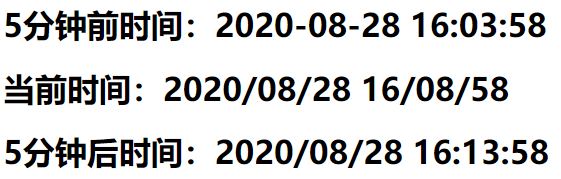
结果:
JS获取时间(当前-过去-未来)的更多相关文章
- js获取时间相关函数
js获取时间函数 var myDate = new Date; var year = myDate.getFullYear();//获取当前年 var yue = myDate.getMonth()+ ...
- js 获取时间 new Date()详细介绍
javaScript系列:js中获取时间new Date()详细介绍 (2012-03-31 09:54:25) 转载▼ 标签: js时间 new date() 字符类型 转换 分类: study-j ...
- js 获取时间对象代码
/** * 获取时间对象 */function getDateObj(addDayCount) { var dd = new Date(); dd.setDate(dd.getDate()+addDa ...
- js获取时间加多山天和时间戳转换成日期
function huoqu(){ var data = $("#data").val();//获取的时间 var day = $('#day').val();//往后 ...
- js获取时间,循环执行任务,延迟执行任务
一.获取时间 核心方法创建一个时间对象:new Date() 时间对象相关操作 时间对象.函数名 函数名 功能 getYear() 获取四位数的年份 getMonth() 获取2位数的月数, 这个是从 ...
- js获取时间及转化
有关Javascript的本地时间获取,下面我直接用代码来进行举例吧 let time = new Date(); let month = time.getMonth()+1; //获取的月份0~11 ...
- js 获取时间比较全,留备用(zhuan)
var myDate = new Date(); myDate.getYear(); //获取当前年份(2位) myDate.getFullYear(); //获取完整的年份(4位 ...
- 【巩固】JS获取时间的一些基础知识
就是一个new Date()对象,要注意的有以下几点; 直接给oDate对象设置年月日时分秒的时候要分成两步,oDate.setFullYear()接受三个参数分别是年月日,注意月份是从0开始计一月的 ...
- js获取时间天数
date2必须大于date1 function getDays(date1,date2){ /*获取之间的天数*/ /*date1,date2都是date格式*/ var getd=(date2.ge ...
随机推荐
- Rsync服务详解
Rsync简介 什么是rsync? Rsync是一款开源的.快速的.多功能的.可实现全量及增量的本地或远程数据同步备份的优秀工具.Rstync软件适用于unix/linux/windows等多种操作系 ...
- PHP 怎么安装
您需要做什么? 为了开始使用 PHP,您可以: 找一个支持 PHP 和 MySQL 的 Web 主机 在您自己的 PC 机上安装 Web 服务器,然后安装 PHP 和 MySQL 使用支持 PHP 的 ...
- RectTransform的localPosition与anchoredPosition(3D)的区别
RectTransform继承自Transform,用于描述矩形的坐标(Position),尺寸(Size),锚点(anchor)和中心点(pivot)等信息,每个2D布局下的元素都会自动生成该组件. ...
- 教你在 Linux 下时光穿梭
时光穿梭?电影里的桥段吧?良许你又在唬人? 非也非也,良许在这里要给大家介绍 touch 命令,有了它你就可以改变时间戳,达到时光穿梭的目的. touch 命令在我们的工作中使用也相当频繁,我们就由浅 ...
- Dynmaics 365 scale group
关于scale Groups的概念,在看Dynamics crm online的时候,一直不理解缩放组scale group的概念,后来查到GP也在用这个概念,想想不就是动态扩展嘛,马上顿悟了,原来如 ...
- 灰帽黑客 基本的Linux漏洞攻击
有两个重要的寄存器负责处理堆栈:基址指针(EBP)和栈指针(ESP),EBP指向当前进程的当前栈帧的底部,ESP则总是指向栈顶 当调用函数的时候,会导致程序流跳转.在汇编代码调用函数时,将发生以下三件 ...
- 利用这10个工具,你可以写出更好的Python代码
我每天都使用这些实用程序来使我的Python代码可显示. 它们是免费且易于使用的. 编写漂亮的Python比看起来难. 作为发布工作流程的一部分,我使用以下工具使代码可显示并消除可避免的错误. 很多人 ...
- 解决使用rollup构建ECharts过程中遇到的问题
1.ECharts官方文档 参考:自定义构建 ECharts - ECharts Documentation 2.解决问题 改动一: // line.js // 引入 echarts 主模块. // ...
- Exception processing template "success": Exception parsing document: template="success",
代码很简单 package com.kele.controller; import org.springframework.stereotype.Controller;import org.sprin ...
- cvsnt 和wincvs 的安装配置既简单操作 2007-07-28 11:33
CVSNT 配置 版本:CVSNT 2.5.03(Scorpio)Build 2382 安装过程:简单一路next即可. 配置: (一)我们先准备好两个目录,分别是KHRoot,和KHTemp.KHR ...