
C# 操作redis
下载 redis windows 版本 官网目前没有windows安装下载,下载地址为
https://github.com/MicrosoftArchive/redis/releases
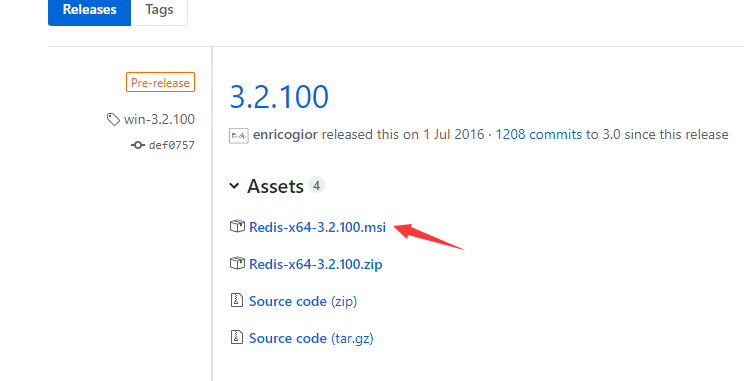
直接点击安装 一直下一步
我的安装路径 D:\Program Files\Redis
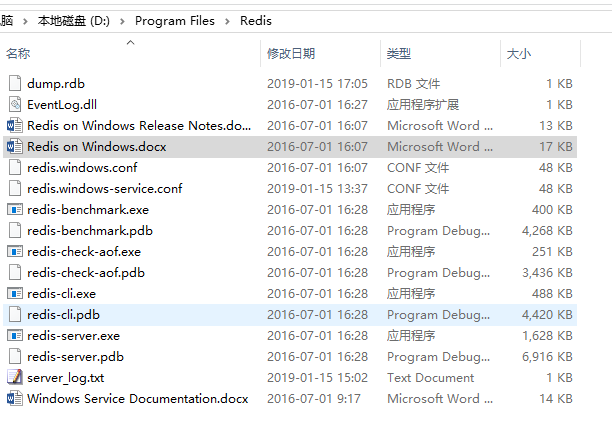
启动命令行工具 测试redis

C# 连接redis 在项目类库引用上右键启动NuGet 搜索redis 安装以下二个框架

redis工具类
public class RedisCacheHelper

    {

        private static readonly PooledRedisClientManager pool = null;

        private static readonly string[] redisHosts = null;

        public static int RedisMaxReadPool = ;

        public static int RedisMaxWritePool = ;

        static RedisCacheHelper()

        {

            var redisHostStr = "127.0.0.1:6379";

            if (!string.IsNullOrEmpty(redisHostStr))

            {

                redisHosts = redisHostStr.Split(',');

                if (redisHosts.Length > )

                {

                    pool = new PooledRedisClientManager(redisHosts, redisHosts,

                        new RedisClientManagerConfig()

                        {

                            MaxWritePoolSize = RedisMaxWritePool,

                            MaxReadPoolSize = RedisMaxReadPool,

                            AutoStart = true

                        });

                }

            }

        }

        #region Add

        public static void Add<T>(string key, T value, DateTime expiry)

        {

            if (value == null)

            {

                return;

            }

            if (expiry <= DateTime.Now)

            {

                Remove(key);

                return;

            }

            try

            {

                if (pool != null)

                {

                    using (var r = pool.GetClient())

                    {

                        if (r != null)

                        {

                            r.SendTimeout = ;

                            r.Set(key, value, expiry - DateTime.Now);

                        }

                    }

                }

            }

            catch (Exception ex)

            {

                string msg = string.Format("{0}:{1}发生异常!{2}", "cache", "存储", key);

            }

        }

        public static void Add<T>(string key, T value, TimeSpan slidingExpiration)

        {

            if (value == null)

            {

                return;

            }

            if (slidingExpiration.TotalSeconds <= )

            {

                Remove(key);

                return;

            }

            try

            {

                if (pool != null)

                {

                    using (var r = pool.GetClient())

                    {

                        if (r != null)

                        {

                            r.SendTimeout = ;

                            r.Set(key, value, slidingExpiration);

                        }

                    }

                }

            }

            catch (Exception ex)

            {

                string msg = string.Format("{0}:{1}发生异常!{2}", "cache", "存储", key);

            }

        }

        public static T Get<T>(string key)

        {

            if (string.IsNullOrEmpty(key))

            {

                return default(T);

            }

            T obj = default(T);

            try

            {

                if (pool != null)

                {

                    using (var r = pool.GetClient())

                    {

                        if (r != null)

                        {

                            r.SendTimeout = ;

                            obj = r.Get<T>(key);

                        }

                    }

                }

            }

            catch (Exception ex)

            {

                string msg = string.Format("{0}:{1}发生异常!{2}", "cache", "获取", key);

            }

            return obj;

        }

        #endregion

        public static void Remove(string key)

        {

            try

            {

                if (pool != null)

                {

                    using (var r = pool.GetClient())

                    {

                        if (r != null)

                        {

                            r.SendTimeout = ;

                            r.Remove(key);

                        }

                    }

                }

            }

            catch (Exception ex)

            {

                string msg = string.Format("{0}:{1}发生异常!{2}", "cache", "删除", key);

            }

        }

        public static bool Exists(string key)

        {

            try

            {

                if (pool != null)

                {

                    using (var r = pool.GetClient())

                    {

                        if (r != null)

                        {

                            r.SendTimeout = ;

                            return r.ContainsKey(key);

                        }

                    }

                }

            }

            catch (Exception ex)

            {

                string msg = string.Format("{0}:{1}发生异常!{2}", "cache", "是否存在", key);

            }

            return false;

        }

    }
测试操作
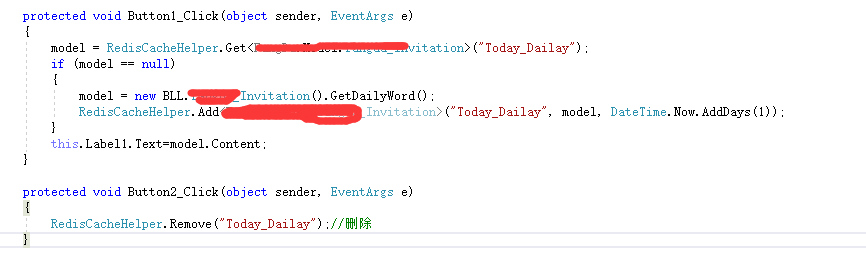
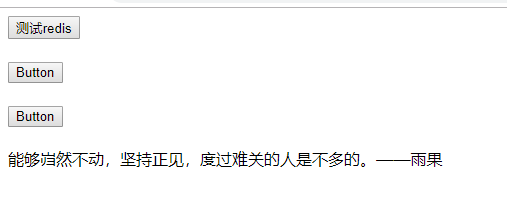
测试
C# 操作redis的更多相关文章
- Java Spring mvc 操作 Redis 及 Redis 集群
本文原创,转载请注明:http://www.cnblogs.com/fengzheng/p/5941953.html 关于 Redis 集群搭建可以参考我的另一篇文章 Redis集群搭建与简单使用 R ...
- Java中使用Jedis操作Redis(转载)
整理 1.字符串 添加:set keyname value 查询:get keyname 拼接:append keyname value 删除:del keyname 添加多个: mset keyna ...
- (转)Java中使用Jedis操作Redis
转自http://www.cnblogs.com/liuling/p/2014-4-19-04.html 使用Java操作Redis需要jedis-2.1.0.jar,下载地址:http://file ...
- Python—操作redis
Python操作redis 连接方式:点击 1.String 操作 redis中的String在在内存中按照一个name对应一个value来存储 set() #在Redis中设置值,默认不存在则创建, ...
- php操作redis简单例子
<?php //在PHP里操作Redis //Redis就是php的一个功能类 //创建Redis对象 $redis = new Redis(); //链接redis服务器 $redis -&g ...
- python——操作Redis
在使用django的websocket的时候,发现web请求和其他当前的django进程的内存是不共享的,猜测django的机制可能是每来一个web请求,就开启一个进程去与web进行交互,一次来达到利 ...
- 使用jedis操作redis
一 连通性 1. 简单代码测试连通性 Jedis jedis = new Jedis(".......", 6379); String keys = "name" ...
- Java中使用Jedis操作Redis
使用Java操作Redis需要jedis-2.1.0.jar,下载地址:http://files.cnblogs.com/liuling/jedis-2.1.0.jar.zip 如果需要使用Redis ...
- Python操作Redis、Memcache、RabbitMQ、SQLAlchemy
Python操作 Redis.Memcache.RabbitMQ.SQLAlchemy redis介绍:redis是一个开源的,先进的KEY-VALUE存储,它通常被称为数据结构服务器,因为键可以包含 ...
- 通过PHP扩展phpredis操作redis
我们使用phpredis,这个扩展能让你用PHP操作redis. 源码下载: phpize ./configure ); var_dump($result); echo $redis->get( ...
随机推荐
- 易语言Dns缓存
一些与DNS解析有关的命令: ipconfig/displaydns -查看被缓存的域名解析 ipconfig/flushdns -清空DNS缓存 .版本 .DLL命令 DnsFlushR ...
- Python 多进程和多线程的效率对比
import time from threading import Thread from multiprocessing import Process def f1(): # time.sleep( ...
- 4--Postman--Request&Response
//var josndata=JSON.parse(responseBody);//获取body中返回的所有参数//tests["code"]=josndata.code===20 ...
- 【Spring】文件上传
一:引入所需jar包 // https://mvnrepository.com/artifact/commons-fileupload/commons-fileuploadcompile group: ...
- 使用ueditor配置后台接口
因为后台是java,所以针对的是jsp版本的ueditor. 工程中需要导入jsp目录lib下的jar包.如果是maven管理的工程,可以导入jar包. 上传图片的功能的话,需要后台配置正确.如果需要 ...
- python学习6---字典合并
1.针对python3版本 d1={'gao':1,'luo':2} d2={'liu':3,'jia':4} dictMerged1=dict(d1,**d2) print(dictMerged1) ...
- Array.sort()
sort() : 是对数组的元素进行排序,并返回一个数组.默认排序方式是根据字符串的Unicode码表的码点. 由于取决于具体实现,所以无法保证它的时间和空间复杂度. arr.sort(compare ...
- tp3.2小结(1)
入口文件:index.php目录结构:核心,Thinkphp 公共资源,public jq 上传的图片等 应用目录,application 房模块 common:基于模块的公共目录,公共函数命名:类: ...
- getRealPath()和getContextPath()的区别
转载自:http://sucre.iteye.com/blog/319178 在程序中常常要获取文件的路径,有的时候需要用到相对路径而有的时候就要用到绝对路径,一提到绝对路径大家一定想到了getRea ...
- 兄弟连学python---网络简介
网络简介 1.什么是网络 网络是辅助双方能够连接在一起的工具 使用网络的目的 为了联通多方然后进行通讯,能够让软件在不同的电脑上运行,相互传输数据 网络的发展 网络协议 什么是协议 约定俗成的,没有理 ...